
Breaking Editor
締切、執筆、写真、メール納品が一つのアプリで
Conçue pour iPhone, iPad, Mac
Gratuit · Achats intégrés
- Classification d’âge4+
- CatégorieProductivité
- DéveloppeurTSUTSUMU ISHIKAWA
- LanguesJaponais+ 1 de plus
- Taille1,7 Mo
Renvoie vers la page App Store officielle
Download.org n’héberge aucun fichier de Breaking Editor. Le bouton ouvre la page de l’application sur App Store, où TSUTSUMU ISHIKAWA la publie. Fiche vérifiée pour la dernière fois le 12/11/2026.
Captures d’écran
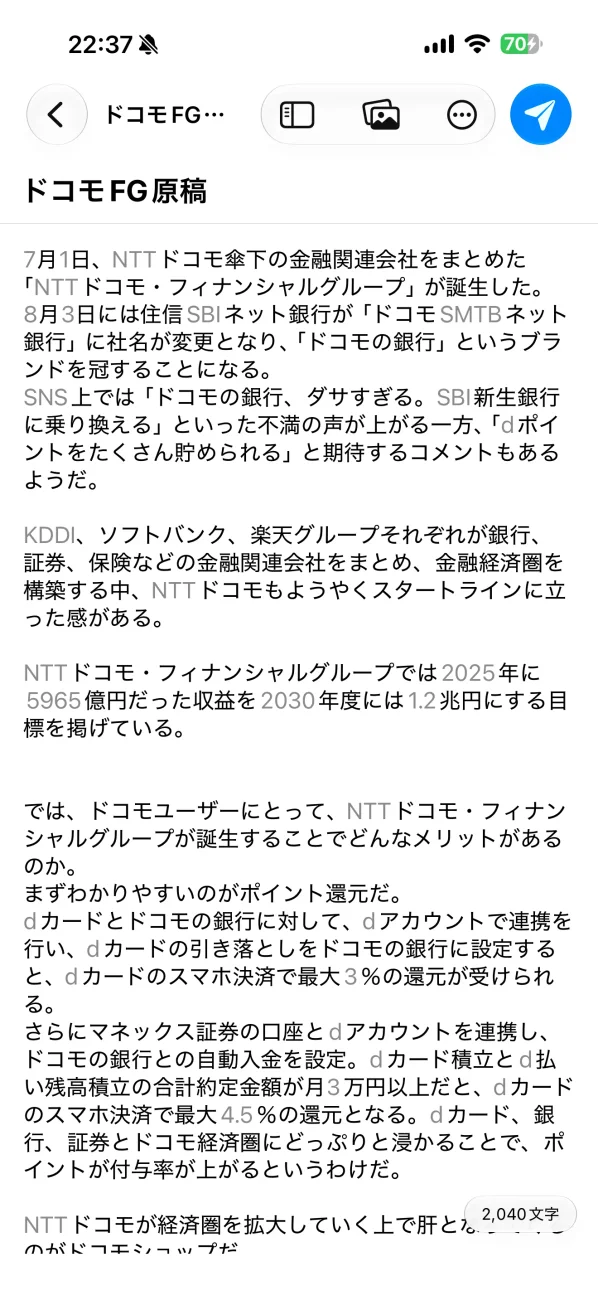
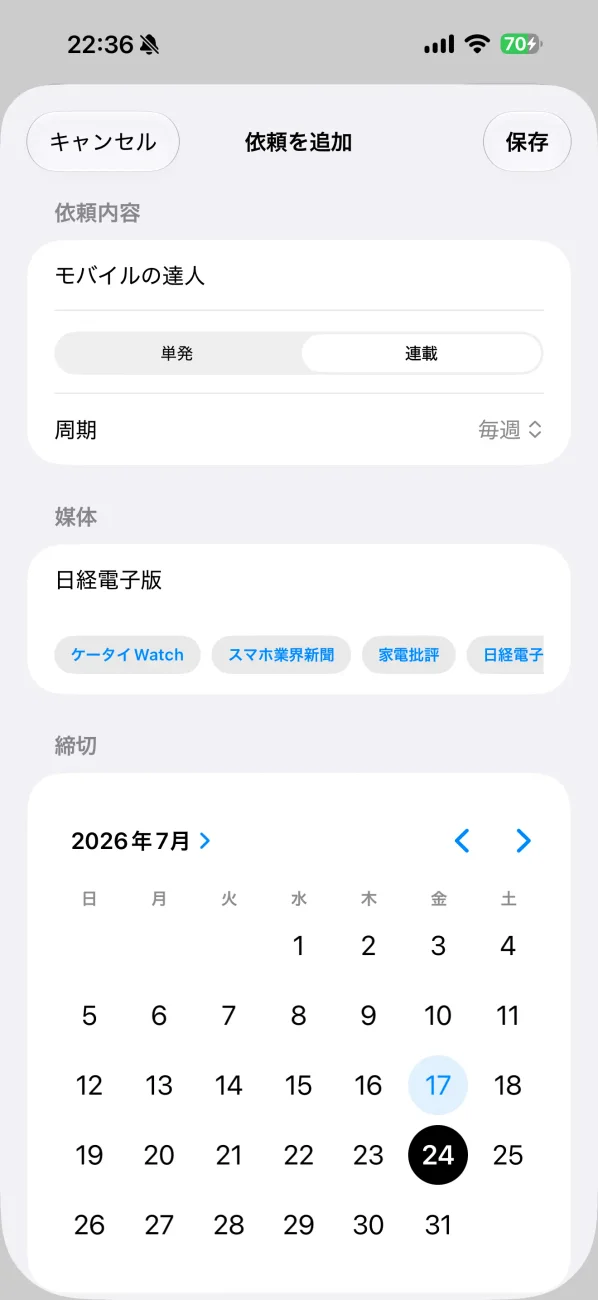

À propos
Le développeur n’a pas fourni ce texte dans votre langue.
Breaking Editor is a writing app built for people who write for a living — writers, journalists, reporters, editors, and bloggers. From interview notes to drafting, deadline management, email delivery, and WordPress posting, everything happens in one app.
■ An editor built for focused writing
A distraction-free text editor with line numbers, Markdown support, and a rock-steady typewriter display that never jumps while you type. Your work is saved automatically as you write.
■ Interview notes with a voice recorder
A dedicated note format for interviews: the date is recorded automatically, your location can be captured via GPS, and you can organize notes by interviewee (organization and name) and topic. Snap photos of documents with the camera, and record audio with a live level meter so you always know the recording is running. Recordings can be shared to transcription apps and other tools. Tap "Write" on any note to instantly create a draft from its content — the note itself stays untouched.
■ Deadlines, managed for you
Track both recurring series and one-off assignments. When you deliver an installment of a series, the next deadline is created automatically. Tag assignments by publication, filter your list, and jump straight from a deadline into the editor.
■ Line count conversion
Set a characters-per-line width for each publication (for example, 11 characters per line) and the footer shows exactly how many lines your draft will occupy — the way print media counts manuscripts.
■ Deliver by email
Compose delivery emails with the recipient's name and your greeting filled in automatically. The greeting template is fully editable, attachments can be sent as plain text (.txt / .md) or Word (.docx), and photos are attached with captions listed in the email body.
■ Post to WordPress (Pro)
Publish drafts straight from the editor to your own WordPress site — as a draft or published immediately. Photos are optimized for the web, uploaded to your media library, and inserted with captions. Powered by WordPress application passwords; your credentials are stored securely in the device keychain.
■ Your work on iPad, iPhone, and Mac (Pro)
Breaking Editor is free to download, and every on-device feature is free to use. A single one-time purchase unlocks Pro: iCloud sync for your drafts, interview notes (including photos and recordings), deadlines, contacts, and settings across all your devices, plus WordPress posting. No subscription. Your data is stored only on your devices and in your own iCloud — never on external servers.
■ Made for
- Writers and journalists juggling multiple deadlines
- Reporters who want interview notes, recordings, and photos in one place
- Editors organizing incoming and outgoing manuscripts
- Bloggers who want to publish to their own site the moment a piece is done
- Anyone who writes across iPad, iPhone, and Mac
From deadline pressure to the joy of writing — Breaking Editor.
Nouveautés
Version 2.3 · 22/10/2026
Now optimized for iPhone Duo.
- Fills the screen on both the outer and inner displays
- On the inner display, the sidebar, draft list, and editor sit side by side — browse your drafts while you write
- Fold or unfold mid-sentence and your draft stays right where you left it
- On wide screens, lines are kept to a comfortable reading width (toggle it in the More menu)
- All controls remain available when toolbars move to the side on the outer display
- Fixed the appearance of the Send and Cancel buttons on Mac
Confidentialité de l’application
Ce que TSUTSUMU ISHIKAWA déclare sur l’App Store au sujet du traitement des données par cette application.
-
Données non collectées
Le développeur ne collecte aucune donnée à partir de cette application.
Les pratiques en matière de confidentialité peuvent varier, notamment en fonction des fonctionnalités que vous utilisez ou de votre âge.
Informations
- Vendeur
- TSUTSUMU ISHIKAWA
- Catégorie
- Productivité
- Version
- 2.3
- Mis à jour
- 22/10/2026
- Publié
- 23/07/2026
- Taille
- 1,7 Mo
- Nécessite
- iOS 26.0 ou version ultérieure
- Classification d’âge
- 4+
- Prix
- Gratuit
- Achats intégrés
- Oui
- Langues
- Japonais, Anglais
- Copyright
- © 株式会社ラップアップ
Vous aimerez peut-être aussi
-
 Tsuranari: Continuous CalendarProductivité
-
 Jiraiya - Markdown Book EditorProductivité
-
 e-Conte ConverterProductivité
-
 Tsuzuku : habitudes & tâchesSéries, routines et widgets
-
 Check - Simple To-DoProductivité
-
 Markdown Reader - ReamProductivité
-
 Unagasukun: Habit ReminderProductivité
-
 KakochouProductivité
-
 レコログ|タイムスケジュールと行動記録のライフログアプリProductivité
-
 コピペ&メモ帳 - メモ + 簡単コピー + ウェブ検索 -Productivité