
- Classification d’âge4+
- CatégorieProductivité
- DéveloppeurJohn Karamatsoukas
- LanguesAnglais
- Taille12,8 Mo
Cliqer Remote n’est peut-être pas disponible sur App Store pour le moment
La fiche de la boutique était inaccessible lors de notre dernière vérification. Le lien mène toujours à la page App Store officielle.
Captures d’écran


À propos
Le développeur n’a pas fourni ce texte dans votre langue.
Cliqer Remote puts the whole presentation in your hand. Join a room by code or QR, move the slides with one tap, read your notes, draw on the slide and, when you host, run the show on your computer from your iPhone, iPad or Apple Watch.
Built natively for iPhone, iPad and Apple Watch. Under 11 MB to download and quick to open.
INSTANT CLICKS
Big next and back buttons fill the screen. Every press answers with a flash, and the slide number follows the real slide on the screen.
YOUR NOTES WITH THE SLIDE
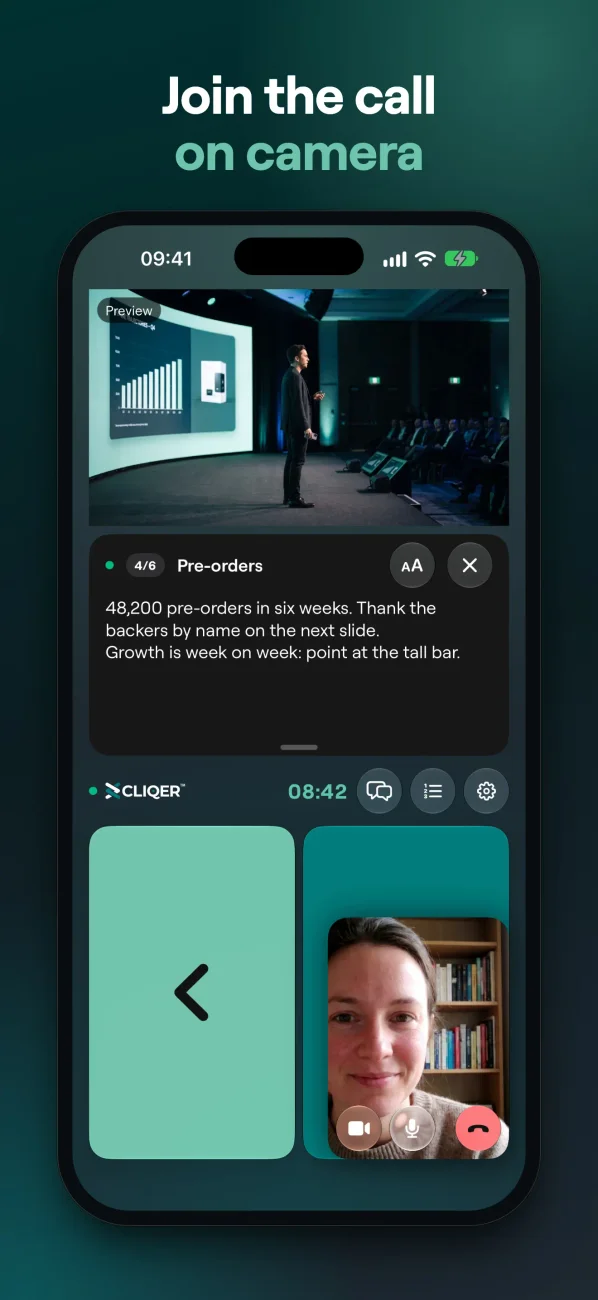
Follow the live slide and read your presenter notes under it, or beside it in landscape. Make the text bigger with one tap and drag the divider to give the notes more room.
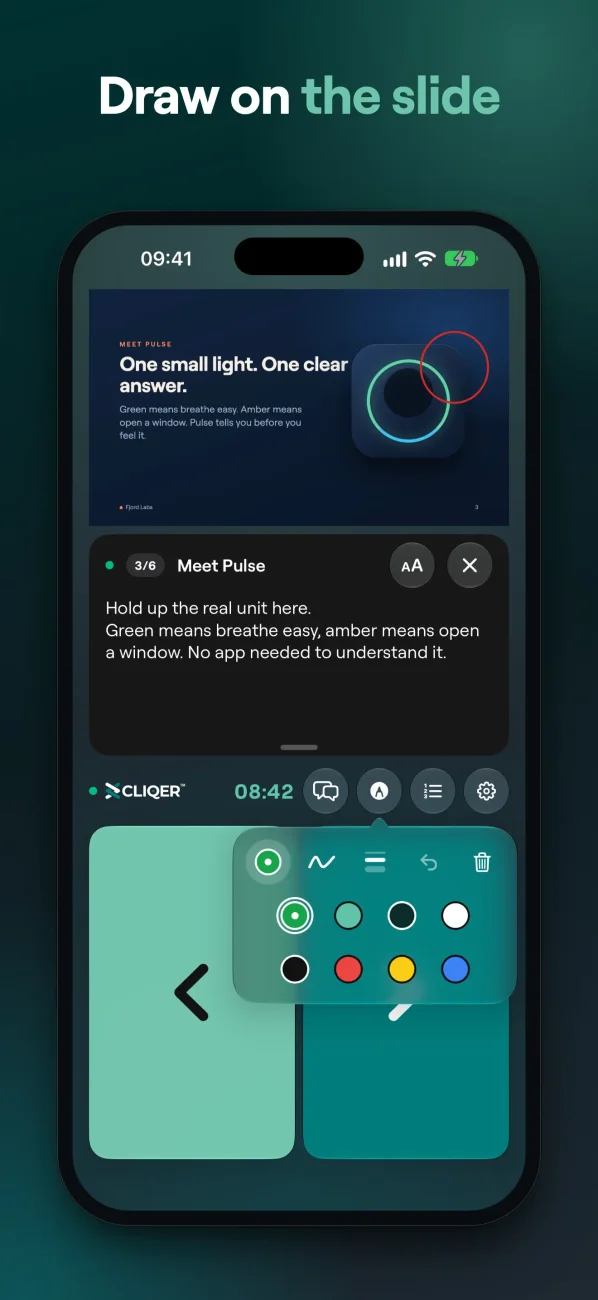
DRAW ON THE SLIDE
Touch the slide to point with a laser. Turn on the pen to draw: pick a colour, a pen, highlighter, marker or fading pen, and thin, medium or thick. Hold at the end of a stroke to straighten it into a line, arrow, rectangle or ellipse. Undo a stroke, or turn the pen off to clear your drawing.
PRESENTER OR HOST, ONE TAP
Pair with Cliqer on your Mac or Windows PC by scanning the QR code on its screen. Then switch between Presenter and Host with one tap, without leaving the room.
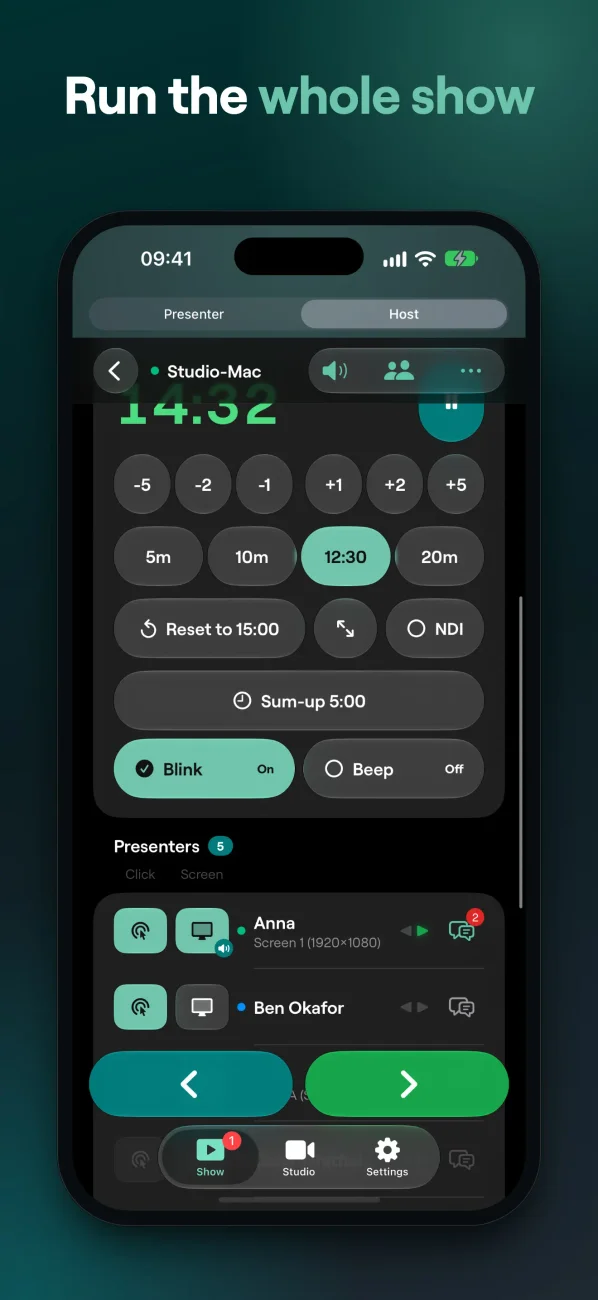
RUN THE WHOLE SHOW
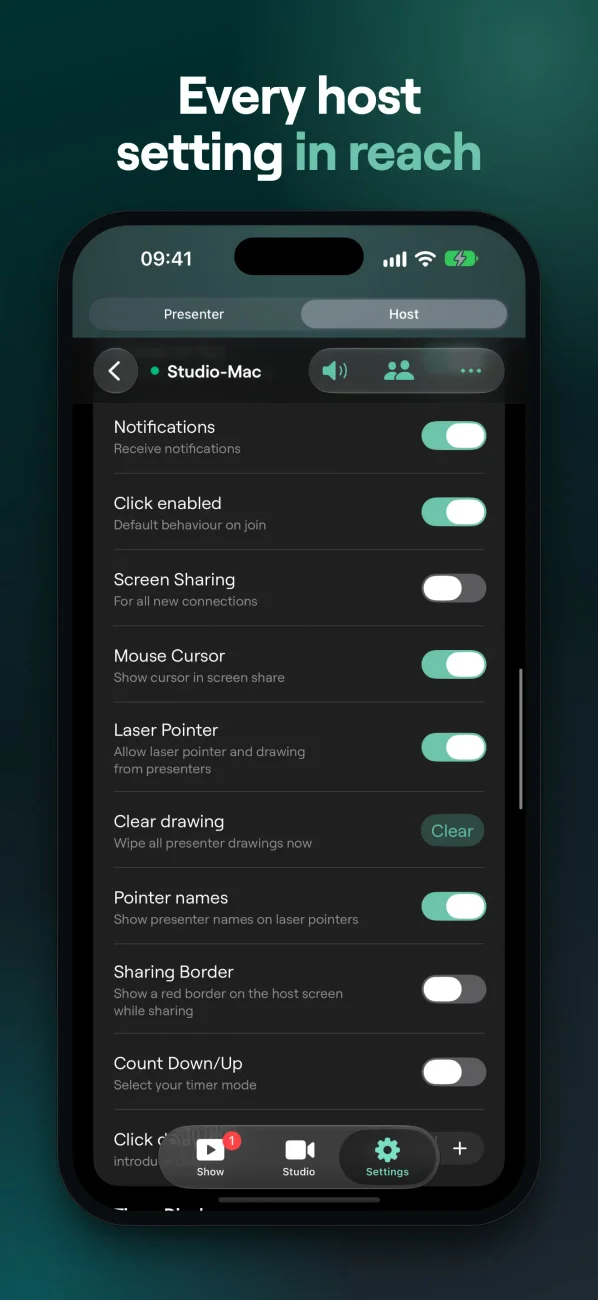
Show: slides, timer and every presenter's controls. Studio: cut between your inputs. Settings: every host setting in reach, including Clear drawing to wipe all the ink on the screen. Your device asks for Face ID, Touch ID or your passcode when it connects. You can unpair it any time.
JOIN THE CALL
For hybrid events the host can invite you on camera and microphone. Both stay off until you choose to join the call.
CHAT WITH THE HOST
Send messages from the room. Report or block any message.
APPLE WATCH
Move the slides from your wrist. The watch app works with your iPhone, or on its own over Wi-Fi or cellular: enter the room code and click.
Free, no ads, and no account needed to join a room or pair a device.
Cliqer Remote works with Cliqer on your computer, which hosts the room. Get Cliqer at cliqer.io.
Confidentialité de l’application
Ce que John Karamatsoukas déclare sur l’App Store au sujet du traitement des données par cette application.
-
Données établissant un lien avec vous
Peuvent être collectées et liées à votre identité.
- Emplacement
- Coordonnées
- Contenu utilisateur
- Identifiants
- Données d’utilisation
Les pratiques en matière de confidentialité peuvent varier, notamment en fonction des fonctionnalités que vous utilisez ou de votre âge.
Informations
- Vendeur
- CLIQER LTD
- Catégorie
- Productivité
- Version
- 1.1.0
- Mis à jour
- 10/11/2026
- Publié
- 09/11/2026
- Taille
- 12,8 Mo
- Nécessite
- iOS 18.0 ou version ultérieure
- Classification d’âge
- 4+
- Langues
- Anglais
- Copyright
- © 2026 CLIQER LTD
Vous aimerez peut-être aussi
-
 LayerMapper NDIProductivité
-
 2Do : Liste de tâches & TodoGestionnaire, agenda, rappels
-
 DOQIT - Life Admin, OrganisedProductivité
-
 Orbit : Scanner 3D LiDARScannez autant que vous voulez
-
 Titan RemoteProductivité
-
 Hear2Text : audio en texteTranscription et sous-titres
-
 Habit: Habitudes, Buts, SériesRoutine quotidienne & rappels
-
 GRNMA InfoNetProductivité
-
 SafeGuardianProductivité
-
 Signer des documents PDF .Modifier et archiver le pdf