CueAir
Digital mixer control for iPad
Conçue pour iPad
Gratuit · Achats intégrés
- Classification d’âge4+
- CatégorieMusique
- DéveloppeurSI (KR)
- LanguesAnglais+ 2 de plus
- Taille63,1 Mo
Renvoie vers la page App Store officielle
Download.org n’héberge aucun fichier de CueAir. Le bouton ouvre la page de l’application sur App Store, où SI (KR) la publie. Fiche vérifiée pour la dernière fois le 23/11/2026.
Captures d’écran







À propos
Le développeur n’a pas fourni ce texte dans votre langue.
CueAir controls your digital mixer from an iPad. Join the same local network and adjust the mixes you need from the stage or the audience.
Supported mixers
• Behringer · Midas X AIR (XR18 · XR16 · XR12 · MR18), X32 · M32
• Behringer WING, Yamaha TF, Allen & Heath CQ, Soundcraft Ui
WING, TF, CQ and Ui support is built to match the messages each maker's own app exchanges with the console. Please check it in rehearsal before a show. The first value change asks for confirmation, and choosing View only keeps that connection read-only.
Features
• Check and adjust channel input, Gate, EQ and Compressor
• Monitor mixes with bus sends and output EQ
• FX Rack and parameter editing for each model
• DCA, mute groups and scenes stored on the mixer
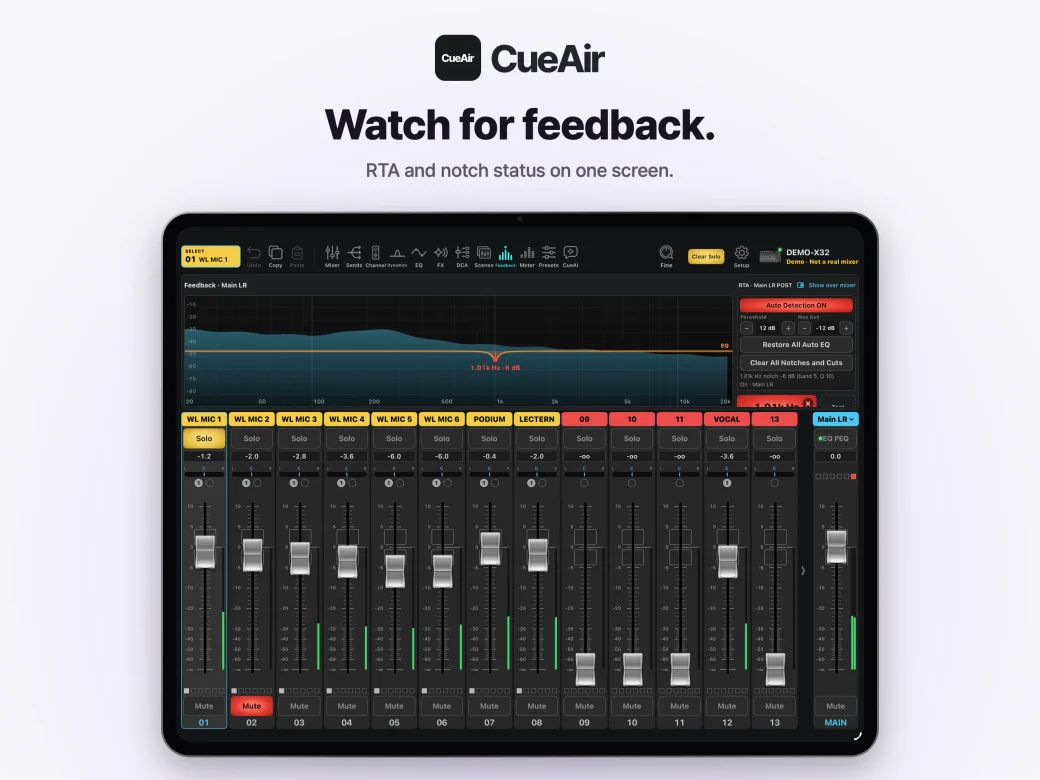
• RTA, feedback watch and automatic notch control
• Meter tab for every channel, with a full screen meter view
• Built-in demos to explore without a mixer (XR18 · X32 · WING · TF5 · CQ-20B · Ui24R)
CueAi
Tell CueAi about the venue, the lineup and the sound you want. It looks at the current mixer settings and suggests changes. A suggestion is applied to the mixer only after you review it. CueAi needs a Cuetone account and CueAi credits. Joining mixing AI improvement is optional and can be changed in Setup at any time.
Cuetone account (optional)
Sign in to a Cuetone account with Apple or Google to save presets to your account and keep them in sync. Signing in is optional.
Free use and purchases
Connecting to and controlling a real mixer is free. A banner ad may appear on the connection screen. The mixer control screens have no ads. Remove Ads is an optional one-time in-app purchase, not a subscription, and can be restored on the same Apple account. Earlier buyers of real mixer connection also use the app without ads. CueAi credits can be topped up with in-app purchases.
Getting started
Connect the iPad and a compatible mixer to the same local network and allow local network access. For X AIR, X32 and M32 enter the IP address. For WING, TF, CQ and Ui enter IP:port (WING 2222, TF 50368, CQ 51326, Ui 80). Available features and screens depend on the mixer and its firmware. The built-in demo works without hardware, and mixer connection, control and the demo need no sign up.
This app controls the mixer remotely and does not stream mixer audio to the iPad. The RTA source is shared with other control apps on the mixer, so check what it is set to at the venue. CueAir is not an official app of Behringer · Midas · Music Tribe, Yamaha, Allen & Heath or Soundcraft · HARMAN. All trademarks belong to their owners.
Nouveautés
Version 1.48 · 22/11/2026
• The RTA on the EQ and Feedback graphs now shows as clear bars, like EQ MODE: low levels in blue, healthy levels in green and loud levels in yellow. Choose bars or a filled area under Settings › RTA style or with the BAR and FILL keys in EQ MODE.
• When the channel shown in the RTA clips, the tips of the strongest bars turn red and a red band with CLIP appears briefly at the top of the graph.
• Full-screen meters have a new Core view with bold bars for the key channels; switch between Core and All. Compressor gain reduction shows in orange (now on X AIR too), clip indicators are larger and channel names use the mixer's colors.
• On X AIR and X32, mutes and the selected channel's EQ now catch up even if a change notification from the console is missed. X32 channel links copy fader and mute to the partner only after the link setting is confirmed.
• Fixed: on WING consoles, effect parameter values could appear in the wrong control or stay blank.
• Soundcraft Ui: Mute now releases channels muted by a mute group. CueAi also reads the RTA when asked from the mixer screen.
• Improved stability across mixers, including editing staying locked after returning from an offline document, CQ faders jumping while dragging and stale Feedback suggestions after changing outputs.
Confidentialité de l’application
Ce que SI (KR) déclare sur l’App Store au sujet du traitement des données par cette application.
-
Données établissant un lien avec vous
Peuvent être collectées et liées à votre identité.
- Achats
- Emplacement
- Coordonnées
- Contenu utilisateur
- Identifiants
- Données d’utilisation
-
Données n’établissant aucun lien avec vous
Peuvent être collectées, mais ne sont pas liées à votre identité.
- Diagnostic
Les pratiques en matière de confidentialité peuvent varier, notamment en fonction des fonctionnalités que vous utilisez ou de votre âge.
Informations
- Vendeur
- SI (KR)
- Catégorie
- Musique
- Version
- 1.48
- Mis à jour
- 22/11/2026
- Publié
- 06/11/2026
- Taille
- 63,1 Mo
- Nécessite
- iOS 17.0 ou version ultérieure
- Classification d’âge
- 4+
- Prix
- Gratuit
- Achats intégrés
- Oui
- Langues
- Anglais, Coréen, Thaï
- Copyright
- © 2026 CueTone