Deadline Editor
Shoot. Deliver. Repeat.
Conçue pour iPhone, iPad, Mac
Gratuit · Achats intégrés
- Classification d’âge4+
- CatégoriePhoto et vidéo
- DéveloppeurRonin Group Inc.
- LanguesAnglais
- Taille88,5 Mo
Renvoie vers la page App Store officielle
Download.org n’héberge aucun fichier de Deadline Editor. Le bouton ouvre la page de l’application sur App Store, où Ronin Group Inc. la publie. Fiche vérifiée pour la dernière fois le 25/11/2026.
Captures d’écran




À propos
Le développeur n’a pas fourni ce texte dans votre langue.
Deadline Editor is a professional photo management and editing app for photographers working under pressure — in sports, events, and editorial photography.
Browse & Organize
Browse thousands of images in a fast, GPU-accelerated thumbnail grid. Filter by star rating, color code, or favorite status. Pair RAW+JPEG automatically and view them together or separately.
Edit JPEG/RAW Files Non-Destructively
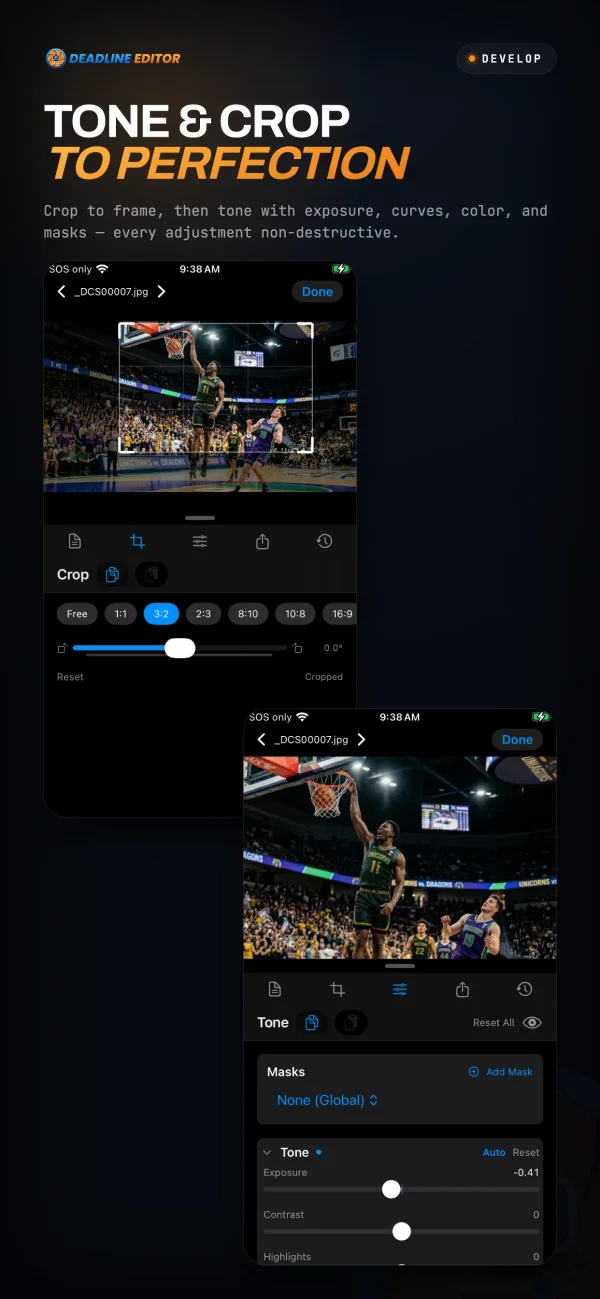
Process 15+ RAW formats with a full suite of professional adjustments — exposure, contrast, highlights, shadows, white balance, clarity, texture, dehaze, sharpening, noise reduction, vignette, and film grain. All edits are stored as XMP metadata, so your original files are never modified.
Shoot Track
Record where you have been working. Your route appears on a map with a pin for every photograph, and each frame is written with the position it was taken at — RAW included, through its XMP sidecar. Frames imported from a card later are placed by their own capture time. Export a session as a GPX file for Lightroom or Photo Mechanic, or share a picture of the map. Tracks stay on your iPad, are never uploaded, and are deleted on a schedule you set.
Voice Tags & Transcription
Attach voice memos and have them transcribed on device. Transcriptions flow into your chosen metadata field — field notes, player IDs, or scene descriptions without typing.
Sports Photography Workflows
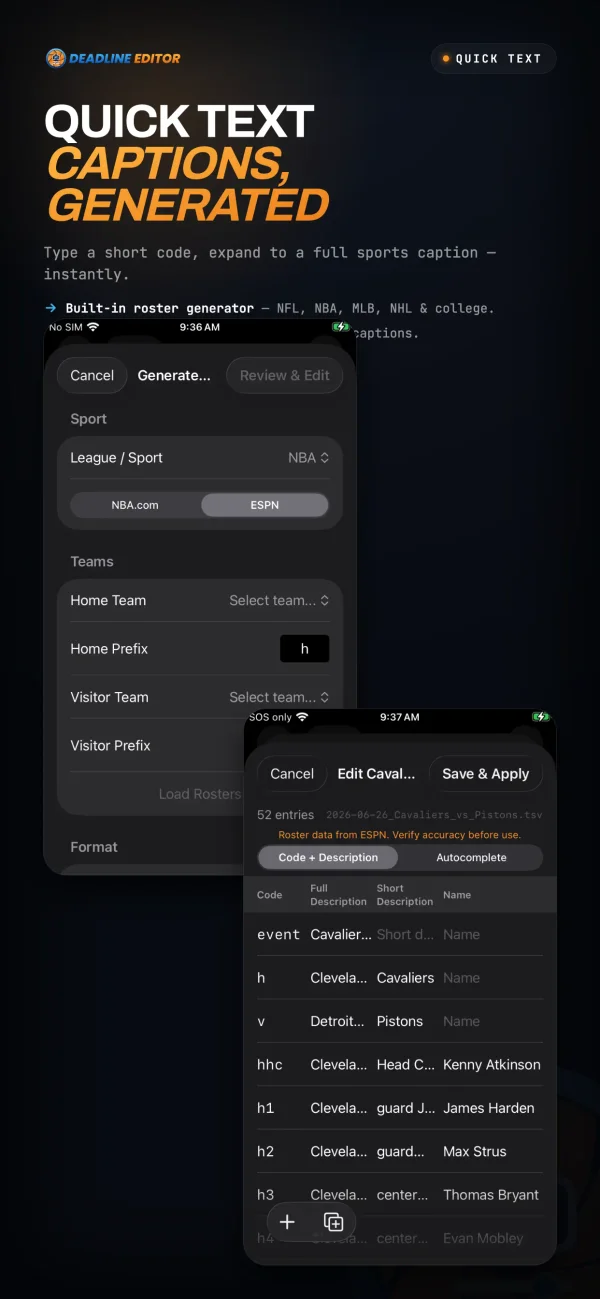
Build game rosters by fetching live data for 20+ professional and college leagues, or paste roster data from any source. In Batch Mode, type a jersey number and the app expands it to the player's full name and position using Quick Text. Auto-advance moves you to the next image after each tag.
Quick Text Automation
Load TSV/CSV files with shorthand-to-caption mappings. Type a trigger key and it expands to full text. Combine sources and see live match previews as you type.
Import From Anywhere
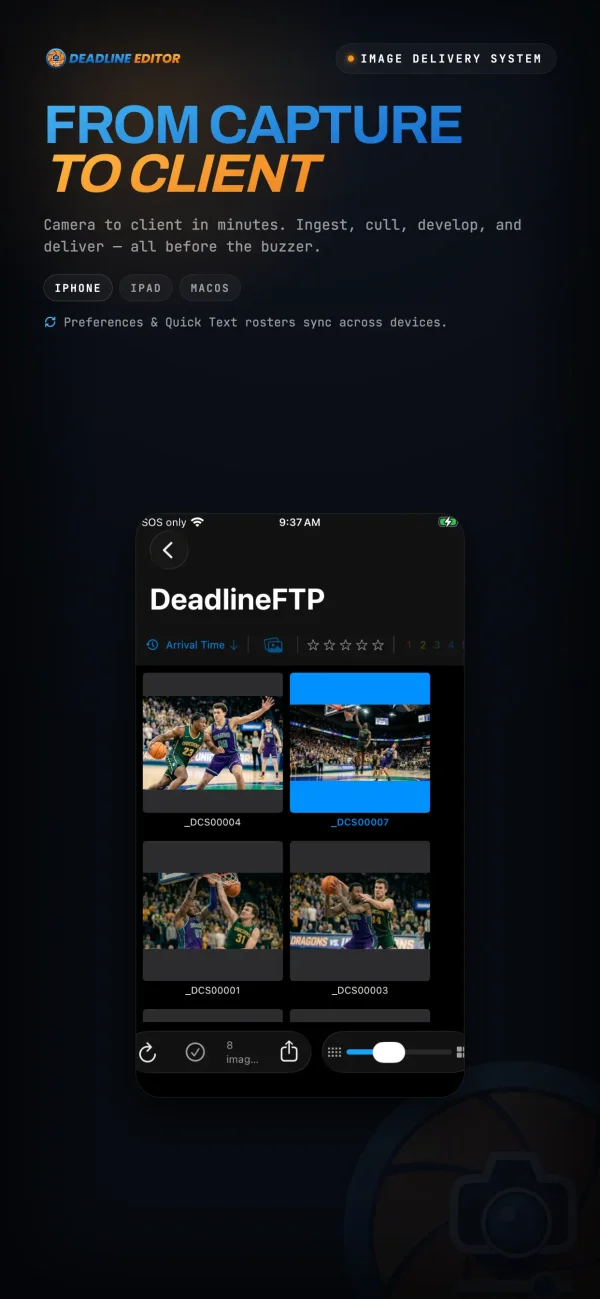
Tether to a Wi-Fi camera over FTP and receive frames as you shoot. Import from card readers with verified checksums and automatic rollback on failure. Sync from FTP servers on a schedule. Connect to
DeadlineFTP.com
for real-time file delivery. Apply XMP metadata templates during any import.
Comprehensive Metadata Editing
Edit 66+ XMP and IPTC fields organized into categories — description, creator, content, people, location, rights, workflow, and camera info. Choose which fields are visible, pin your most-used, and reorder everything. Edit across multiple images at once.
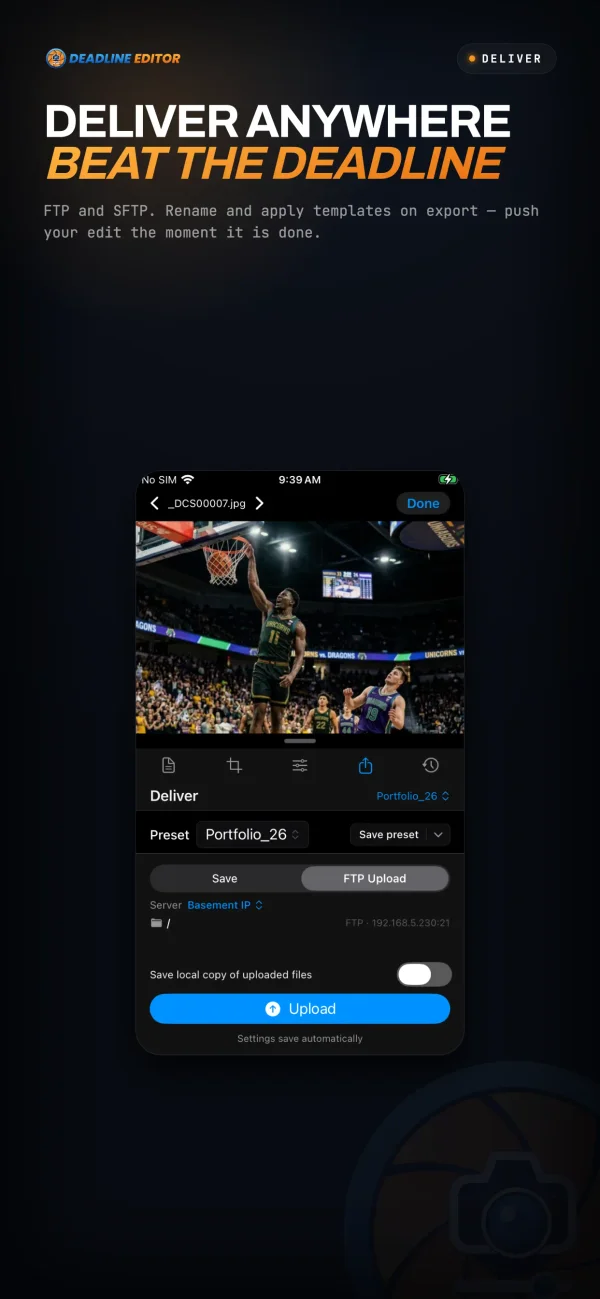
Deliver Fast
Export to JPEG, PNG, TIFF, or HEIC with quality control, optional resizing, and metadata handling. Upload directly to FTP, FTPS or SFTP with batch support and progress tracking. Save delivery presets for one-click repeat workflows. Rename on export using pattern-based naming with EXIF date, metadata fields, and sequence variables.
Built for Professionals
Extensive hardware keyboard shortcuts let you rate, color-code, protect, navigate, filter, and tag without touching the screen. A dedicated photographer database stores contact information for embedding in image metadata. Use the iPad as a read-only client display for a photographer working on a Mac — no subscription needed.
Supports JPEG, PNG, TIFF, HEIC, WebP, and RAW formats from Canon, Nikon, Sony, Fujifilm, Olympus, Panasonic, Pentax, and Samsung. Requires iPadOS 17.0 or later.
Subscription
7-day free trial, then Deadline Editor Monthly at $9.99/month or Deadline Editor Annual at $79.99/year. Payment is charged to your Apple Account at confirmation of purchase. Subscriptions renew automatically unless cancelled at least 24 hours before the end of the period. Manage or cancel in Settings > your Apple Account > Subscriptions. Works with an existing Deadline subscription — sign in to activate.
Privacy Policy:
https://deadlineftp.com/privacy.html
Terms of Use (EULA):
https://deadlineftp.com/terms.html
Nouveautés
Version 1.0.115 · 25/11/2026
Shoot tethered over a USB-C cable
• Sony: plug a Sony camera into the iPad (PC Remote mode) and frames arrive as you shoot, with live view, a shutter button and the exposure strip.
• Canon and Nikon: choose USB in the tether walkthrough, press Start and plug the camera in. It connects on its own, and a camera that is switched off or unplugged shows as dropped.
Camera Control screen (Sony Only)
• A new Live View & Controls screen in the sidebar while a camera is connected, by cable or network: live view, shutter with a thumbnail of the shot you just took, exposure, white balance with a color temperature slider, and focus area.
• Sync Date & Time sets the clock on every connected camera in one tap.
• A camera's own FTP settings, including its FTP slots, are editable from the iPad.
Deadline FTP
• Start Syncing: connect to see the files waiting on the server, then tap Start Syncing to download them. New files download as they arrive. Tap Stop Syncing to pause without signing out.
• After a screen lock or network change you get a Reconnect card instead of the sign-in form.
• Manage your Deadline FTP logins on the Deadline FTP screen: add, rename, turn off and set passwords, and see exactly what to type into a camera.
Quick Text
• Add i after a side letter to keep the jersey number and still name the side (h34li).
• Add a to name the opponent (h34a reads "…in action against Boston").
• Add p to insert a caption without filling in person shown/personality (h34p).
• Rename a Quick Text source from its editor.
Photos and files
• Copying a tone and pasting it onto a selection changes every selected photo, including RAW+JPEG pairs.
• Edited tiles and the inspector preview follow a file when it is renamed.
• Color codes keep their number when you save and reopen a photo.
• Tapping a caption places the cursor where you tapped.
• Photos with no capture date are foldered by their modification date.
• Insert Test Image stamps a capture date.
Confidentialité de l’application
Ce que Ronin Group Inc. déclare sur l’App Store au sujet du traitement des données par cette application.
-
Données établissant un lien avec vous
Peuvent être collectées et liées à votre identité.
- Achats
- Coordonnées
- Contenu utilisateur
- Identifiants
- Diagnostic
-
Données n’établissant aucun lien avec vous
Peuvent être collectées, mais ne sont pas liées à votre identité.
- Emplacement
- Contenu utilisateur
Les pratiques en matière de confidentialité peuvent varier, notamment en fonction des fonctionnalités que vous utilisez ou de votre âge.
Informations
- Vendeur
- Ronin Group Inc.
- Catégorie
- Photo et vidéo
- Version
- 1.0.115
- Mis à jour
- 25/11/2026
- Publié
- 01/07/2026
- Taille
- 88,5 Mo
- Nécessite
- iOS 17.0 ou version ultérieure
- Classification d’âge
- 4+
- Prix
- Gratuit
- Achats intégrés
- Oui
- Langues
- Anglais
- Copyright
- © 2026 Ronin Group Inc.
Vous aimerez peut-être aussi
-
 IPTCPhotoSenderPhoto et vidéo
-
 Sideline LocalPhoto et vidéo
-
 Fast Sports Photo EditorPhoto et vidéo
-
 SportfoliosPhoto et vidéo
-
 Photographer's Pocket KnifePhoto et vidéo
-
 PressKit - Caption & SendPhoto et vidéo
-
 ExifBossPhoto et vidéo
-
 PicDeploy - IPTC EditorPhoto et vidéo
-
 TheEditor photo editorPhoto et vidéo
-
 CataImageOrganizza foto e metadati IPTC