- Classification d’âge12+
- CatégorieÉducation
- DéveloppeurKEVIN CHRISTOPHER FLANAGAN
- LanguesAnglais
- Taille17,1 Mo
Renvoie vers la page App Store officielle
Download.org n’héberge aucun fichier de Go Remote Viewing. Le bouton ouvre la page de l’application sur App Store, où KEVIN CHRISTOPHER FLANAGAN la publie. Fiche vérifiée pour la dernière fois le 23/11/2026.
Captures d’écran


À propos
Le développeur n’a pas fourni ce texte dans votre langue.
Learn a blind practice protocol, keep an honest record, and compare what you noticed.
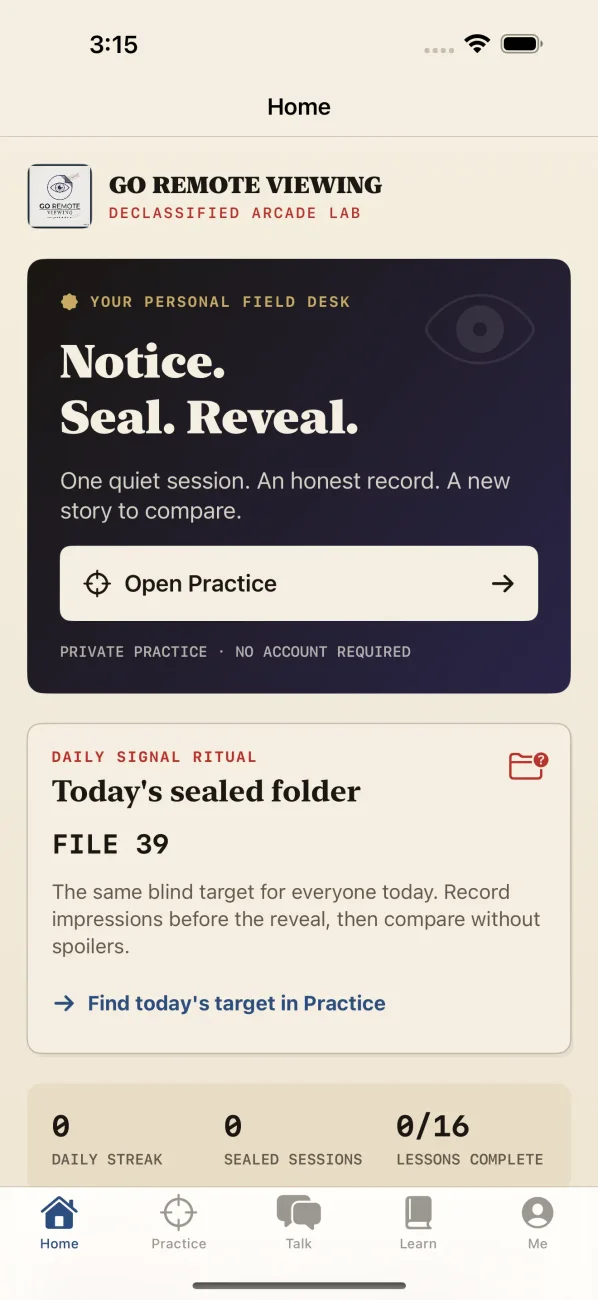
Go Remote Viewing brings daily practice, a private field journal and 16 native lessons into a warm paper, ink and red field desk. Home helps you start or resume a session, continue learning, and review your local streak. Practice, Talk, Learn and Me keep the next step easy to find.
AN HONEST EXPERIMENT
Remote viewing is scientifically disputed. GRV makes no claim of paranormal ability. Record impressions while a target is hidden, seal your original record, then compare it with feedback without moving the goalposts.
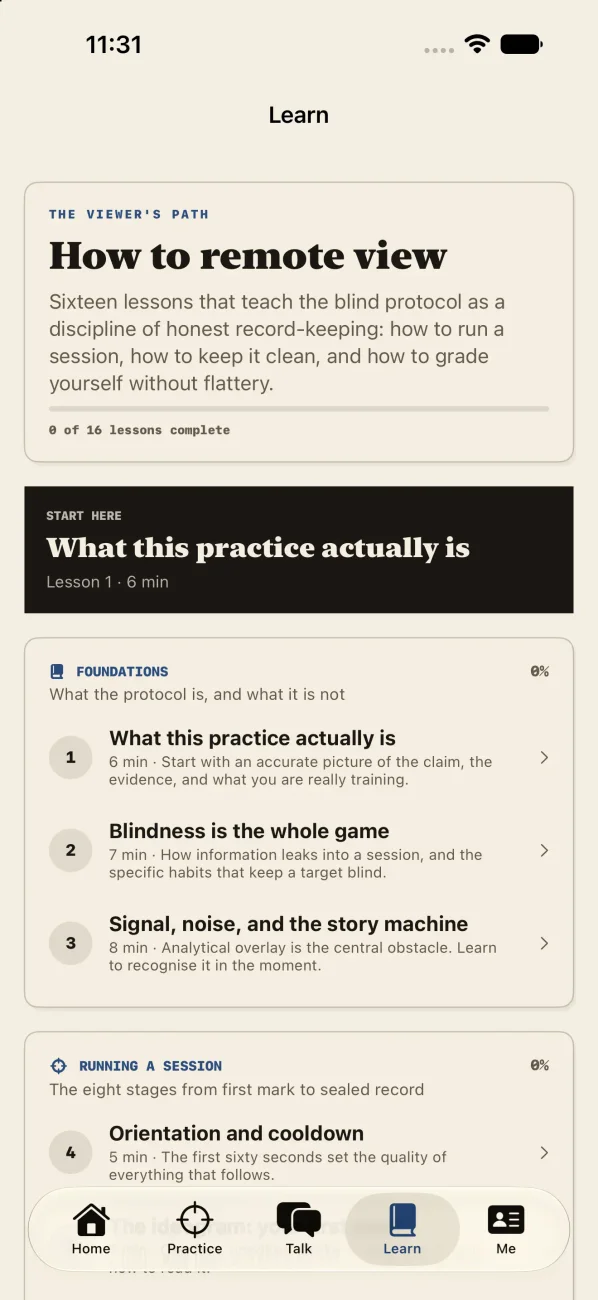
16 LESSONS — BUILT IN
Learn foundations, session technique, analytical overlay, honest judging and fair practice design. Lessons and checkpoints work offline with no account.
NATIVE BLIND PRACTICE
• Accept a random, non-descriptive coordinate.
• Draw an ideogram with Apple Pencil or your finger.
• Capture raw gestalt and sensory impressions.
• Keep named guesses separate as analytical overlay.
• Seal your record before revealing the target.
• Compare coverage and precision against structured target descriptors.
Choose illustrated procedural scenes or four curated AI-created images bundled in the app. Local practice needs no prompt, account, connection or external AI service. The image and its identity stay hidden until sealing. Calibration compares descriptors; it does not prove psychic ability.
PRACTICE WITH A PARTNER
A partner privately views a random target, sets a four-digit PIN and hands over a covered device. The viewer receives only the coordinate. After sealing, feedback, scoring and sharing stay locked until the proctor enters the correct PIN. A salted verifier is stored inside the encrypted session; the PIN itself is never saved.
YOUR PRIVATE FIELD JOURNAL
Resume interrupted practice with the same hidden target, notes and sketch. Practice and Academy keep separate encrypted drafts. Search completed sessions, revisit original ideograms and add private reflections after feedback. Sealed impressions and the first calibration stay unchanged, including misses.
Practice records use a device-only Keychain key and are excluded from backups. Local practice stays on your device unless you deliberately choose to share. Guest users can erase local sessions in the app.
ONE DAILY TARGET — NO SPOILERS
Every device derives the same procedural Daily Target for the calendar day. Seal it, build a streak and share a spoiler-free result grid. Home Screen and Lock Screen widgets show only the blind coordinate, completion and streak. App Shortcuts open daily practice or report your streak. Optional reminders are scheduled on device.
OPTIONAL COMMUNITY
Choose when to publish a session story. The generated result-facts draft excludes your transcript, notes, ideogram, sensory tags and analytical overlay. Guests see a local read-only preview; sign in to edit and publish. Browse public discussions as a guest. Sign in to post, join synced challenges, or use private labs. Community includes reporting, blocking, moderation and in-app account deletion.
PRIVATE HELP
Signed-in viewers can submit problems, questions and feature ideas, read staff replies and follow up in the app. Only the ticket owner and GRV support admins can access a request. Guests can use the web form or email support@goremoteviewing.com.
No subscriptions, payments, advertising or cross-app tracking.
For education, experimental practice and entertainment only. Never use sessions for medical, legal, financial or safety decisions; claims about named people; or missing-person and criminal investigations.
Nouveautés
Version 1.8.0 · 21/11/2026
A first-session guide on Home walks you through choosing a blind target, recording your impressions, and judging your result. It remembers your progress between visits. VoiceOver reads the instructions for each active step.
Open Talk to browse public community discussions before creating an account. You decide whether to share a question or session story. Private practice and lessons are available offline.
Confidentialité de l’application
Ce que KEVIN CHRISTOPHER FLANAGAN déclare sur l’App Store au sujet du traitement des données par cette application.
-
Données établissant un lien avec vous
Peuvent être collectées et liées à votre identité.
- Coordonnées
- Contenu utilisateur
- Identifiants
- Données d’utilisation
- Autres données
Les pratiques en matière de confidentialité peuvent varier, notamment en fonction des fonctionnalités que vous utilisez ou de votre âge.
Informations
- Vendeur
- KEVIN CHRISTOPHER FLANAGAN
- Catégorie
- Éducation
- Version
- 1.8.0
- Mis à jour
- 21/11/2026
- Publié
- 14/09/2026
- Taille
- 17,1 Mo
- Nécessite
- iOS 17.0 ou version ultérieure
- Classification d’âge
- 12+
- Prix
- Gratuit
- Langues
- Anglais
- Copyright
- © 2026 Kevin Christopher Flanagan
Vous aimerez peut-être aussi
-
 Squatch AphantasiaÉducation
-
 Aperture: Remote ViewingÉducation
-
 Parle Gallois - NowFluencyParlez, imitez & apprenez
-
 Kandili: Daily Bible ReadingsRéférences
-
 Les enfants à dormir | MonCanVous dormirez plus et mieux
-
 VEREVIO - ESP & Remote ViewingÉducation
-
 Catholic Spiritual WarfareRéférences
-
 Esthetician Exam PracticeÉducation
-
 Cosmic Ray Detector SORAMAMEÉducation
-
 Extra Sense - intuition gamesÉducation