
InstantPrint Layout
Print Mini Photos at Home
Conçue pour iPhone, iPad, iPod touch
Gratuit · Achats intégrés
- Classification d’âge4+
- CatégoriePhoto et vidéo
- Développeur超 王
- LanguesAnglais+ 1 de plus
- Taille45,8 Mo
Renvoie vers la page App Store officielle
Download.org n’héberge aucun fichier de InstantPrint Layout. Le bouton ouvre la page de l’application sur App Store, où 超 王 la publie. Fiche vérifiée pour la dernière fois le 18/11/2026.
Captures d’écran

À propos
Le développeur n’a pas fourni ce texte dans votre langue.
Turn your standard photo printer into an instant photo factory.
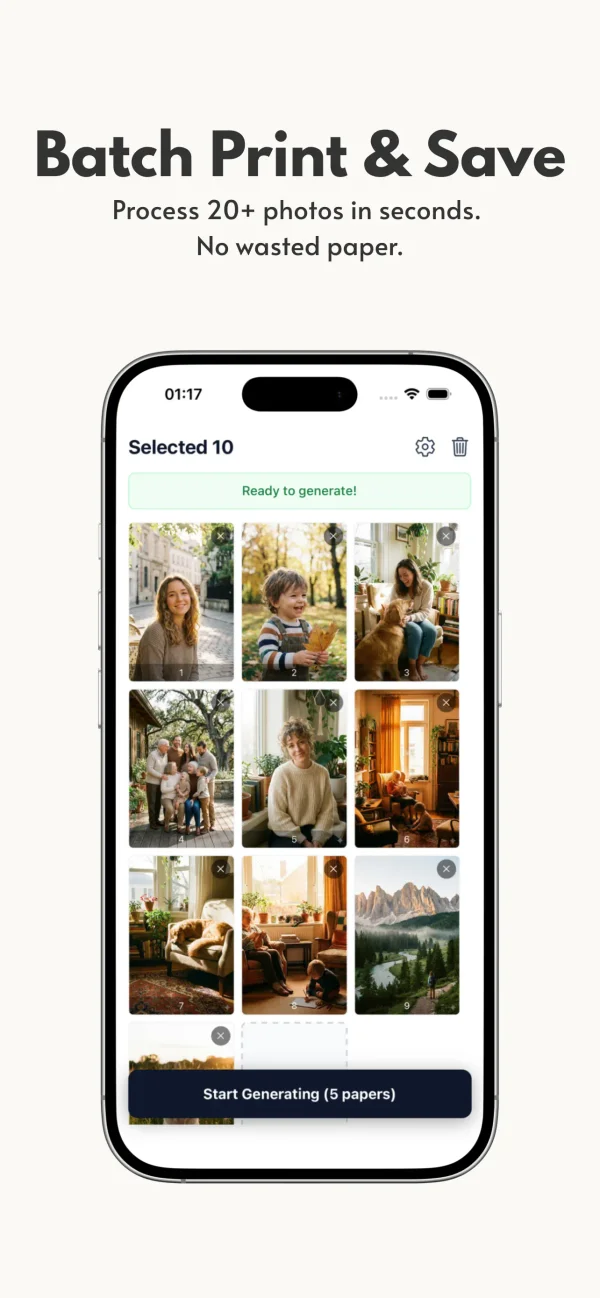
InstantPrint helps you print mini-style photos using standard 6-inch (4x6) photo paper. Whether you have a compact photo printer or a standard inkjet, this app is your best companion.
WHY YOU'LL LOVE IT:
Save 50% on Paper Don't waste a whole sheet for one small photo. Our smart layout automatically arranges two photos on a single sheet of paper. Cut it in half, and you get two prints for the price of one!
Trendy Mini Look Get that classic, white-bordered instant film aesthetic without buying expensive specialized film.
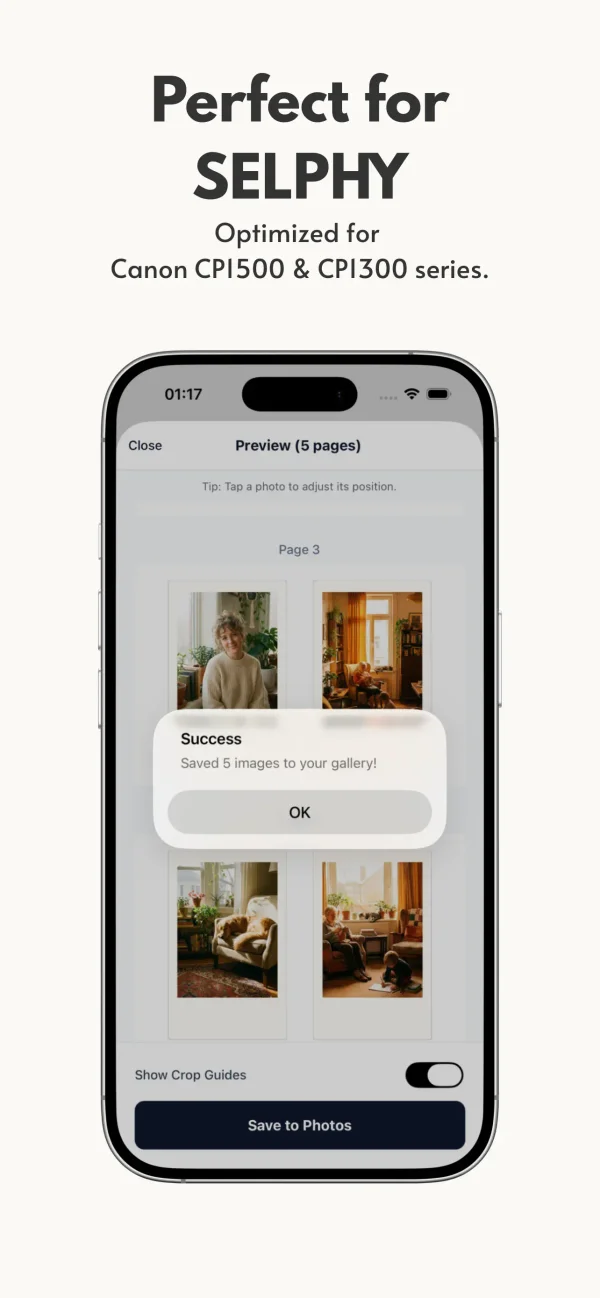
Smart Cut Guides The app generates light gray dashed lines to guide your scissors. Cutting perfect white borders has never been easier.
Privacy First We don't upload your photos. All processing happens 100% locally on your device. Your memories are safe with you.
KEY FEATURES:
Batch Mode: Select up to 20 photos at once (Pro).
High Quality: Exports at 300 DPI for crystal clear prints.
Universal Support: Works with any printer using standard 100x148mm (4x6 inch) paper.
No Ads: Enjoy a clean, distraction-free interface.
Stop paying for expensive film. Start printing smarter today!
Nouveautés
Version 1.0.2 · 12/03/2026
Collage Templates Major Update:
New 12-Photo Layouts: Showcase even more of your favorite moments in a single frame.
New 24-Photo Layouts: Massive capacity to capture your entire story at once.
Perfect for 6-Inch Prints: All new templates are optimized for standard 6-inch photo paper for seamless printing.
Stay tuned—more creative templates are coming soon!
Confidentialité de l’application
Ce que 超 王 déclare sur l’App Store au sujet du traitement des données par cette application.
-
Données n’établissant aucun lien avec vous
Peuvent être collectées, mais ne sont pas liées à votre identité.
- Achats
Les pratiques en matière de confidentialité peuvent varier, notamment en fonction des fonctionnalités que vous utilisez ou de votre âge.
Informations
- Vendeur
- 超 王
- Catégorie
- Photo et vidéo
- Version
- 1.0.2
- Mis à jour
- 12/03/2026
- Publié
- 29/01/2026
- Taille
- 45,8 Mo
- Nécessite
- iOS 15.1 ou version ultérieure
- Classification d’âge
- 4+
- Prix
- Gratuit
- Achats intégrés
- Oui
- Langues
- Anglais, Chinois simplifié
- Copyright
- © 2026 Chao Wang
Vous aimerez peut-être aussi
-
 Photo Print EditorPhoto et vidéo
-
 Imprimer Photo: Taille RéelleAirPrint 10x15, 13x18cm, PDF
-
 Film SaucerPhoto et vidéo
-
 PolacardPhoto et vidéo
-
 PaperCam - Retro Film Camera -Photo et vidéo
-
 PPP - Passport Photo PrinterPhoto et vidéo
-
 Print Photos Exact SizePhoto et vidéo
-
 Imagine: AI Image ToolsPhoto et vidéo
-
 Photo Print Size: Auto LayoutPhoto et vidéo
-
 ChronoTracePhoto et vidéo