Karaoke Builder
MP3+Your Lyrics = Lot's of Fun
Conçue pour iPad, Mac
5,99 € · Achats intégrés
- Classification d’âge4+
- CatégorieMusique
- DéveloppeurEnvyGames
- LanguesAnglais
- Taille18,4 Mo
Renvoie vers la page App Store officielle
Download.org n’héberge aucun fichier de Karaoke Builder. Le bouton ouvre la page de l’application sur App Store, où EnvyGames la publie. Fiche vérifiée pour la dernière fois le 12/11/2026.
Captures d’écran

À propos
Le développeur n’a pas fourni ce texte dans votre langue.
Karaoke Builder — Create Professional Karaoke Videos on Your Mac
Transform any song into a polished karaoke video with perfectly synced lyrics. Whether you're a karaoke host, music teacher, content creator, or just love singing along to your favorite tracks, Karaoke Builder gives you everything you need to create stunning videos that look like they came from a professional studio.
VISUAL TIMELINE EDITING
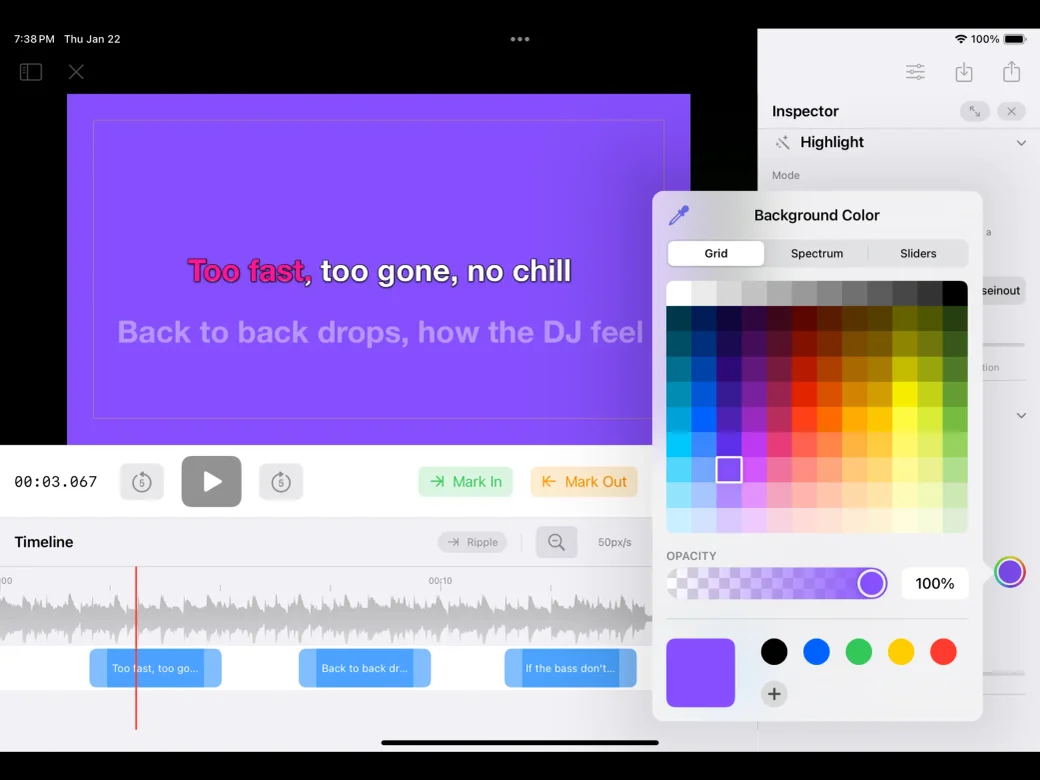
See your entire song at a glance with our waveform-based timeline. Drag and drop lyric blocks directly onto the audio waveform to sync timing with frame-perfect precision. Resize segments by dragging their edges, or use ripple editing to move multiple lyrics together while maintaining their relative timing.
REAL-TIME PREVIEW
Watch your karaoke video come to life as you work. The live preview shows exactly how your final video will look, updating instantly as you adjust timing, styling, and animations. No more guessing — what you see is what you export.
THREE HIGHLIGHT ANIMATION STYLES
- Mask Reveal: The classic karaoke look with a sharp left-to-right wipe revealing highlighted text
- Opacity Wipe: A softer, gradient-style fade with adjustable feathering for a modern feel
- Color Change: Smooth color transitions that progressively shift from base to highlight color
Fine-tune animations with easing options (linear, ease-in, ease-out, ease-in-out) and customizable feather widths for the perfect look.
COMPLETE STYLE CUSTOMIZATION
Make every video uniquely yours:
- Choose from any system font with full size control
- Set custom base and highlight colors with hex precision
- Add text strokes with adjustable width and color
- Apply drop shadows with control over blur, opacity, offset, and color
- Position lyrics anywhere on screen with anchor points and fine-tuned offsets
FLEXIBLE LAYOUT OPTIONS
Position your lyrics exactly where you want them:
- Vertical anchoring: top, center, or bottom of screen
- Horizontal alignment: left, center, or right
- Adjustable safe margins for broadcast-ready output
- Custom background colors or import your own background images
- Line spacing control for multi-line readability
EFFICIENT WORKFLOW
- Paste entire lyrics and automatically create individual line segments
- Mark timing points with keyboard shortcuts while audio plays
- Nudge timing forward or backward with precision controls
- Split, merge, and reorder lyric segments easily
- Full keyboard shortcut support for power users
PROFESSIONAL EXPORT
Export your finished videos in stunning quality:
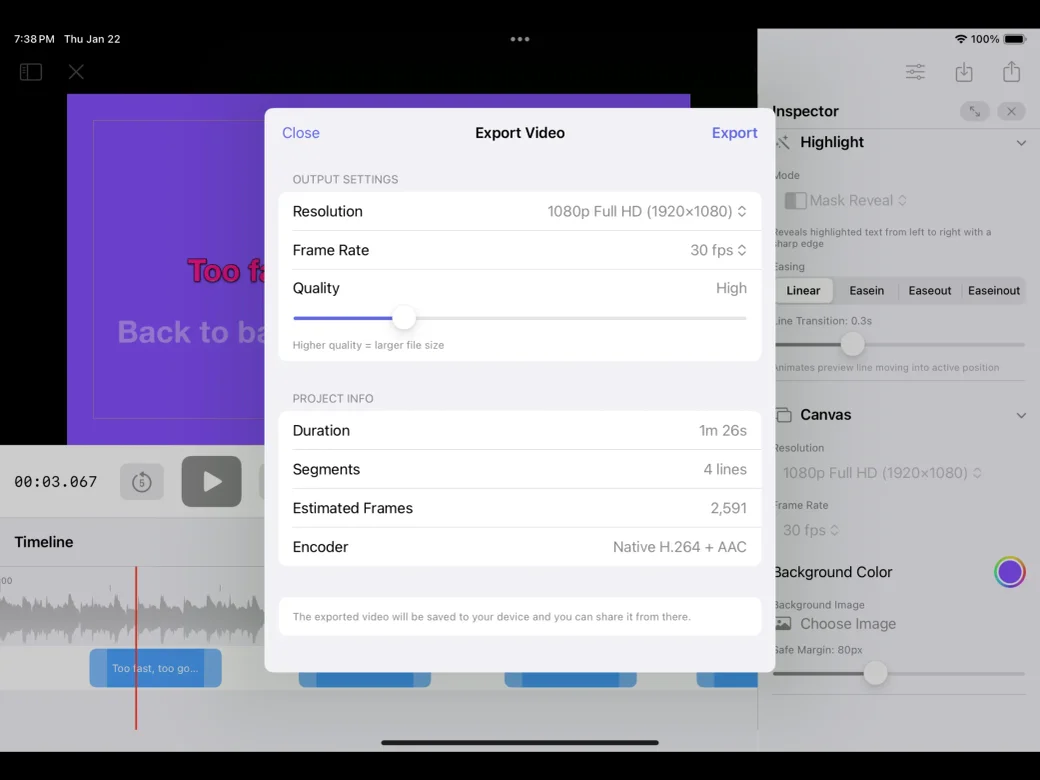
- Resolution options: 720p HD, 1080p Full HD, or 4K UHD
- Frame rates: 24, 25, 30, or 60 fps
- H.264 video with AAC audio for universal compatibility
- Adjustable quality settings for the perfect file size balance
AUDIO SUPPORT
Import your music in popular formats including MP3, WAV, and M4A. The intelligent waveform generator creates a detailed visual representation of your audio for precise timing alignment.
PROJECT MANAGEMENT
- Save projects to continue editing later
- All audio and image assets are stored within the project bundle
- Recent projects list for quick access
- Template presets (Classic, Neon, Minimal) to jumpstart new projects
REQUIREMENTS
- macOS 13.0 (Ventura) or later
- FFmpeg required for video export (free, easy installation via Homebrew)
Whether you're creating karaoke tracks for a party, building educational music content, producing lyric videos for YouTube, or making sing-along videos for any purpose, Karaoke Builder provides the professional tools you need with an intuitive interface that anyone can master.
Download Karaoke Builder today and start creating karaoke videos that look amazing and keep everyone singing along!
Terms of Use: https://www.apple.com/legal/internet-services/itunes/dev/stdeula/
Nouveautés
Version 2.0 · 18/06/2026
- Four new highlight modes: Neon Glow (pulsing halo sweep), Wave (per-character ripple), Word Pop (active word scales up), and Bouncing Ball (the classic, hopping word to word)
- Animated backgrounds: Gradient Flow, Floating Notes, Spotlight beams, and a twinkling Starfield
- Text effects: configurable glow and two-color gradient fill
- Intro & outro: song title card, animated 3-2-1 countdown ring into the first line, and end fade-out
- Tap Sync to play the song and tap Return at each line; times a whole song in one pass
- Undo/redo (⌘Z/⇧⌘Z) with slider-drag coalescing
- LRC import/export with multi-timestamp and metadata support
- Project thumbnails rendered on save and shown in Recents, plus timeline snapping
- Added practice speed to slow down the playback
- Added audio mode - instrumental only, vocals only, and music support modes
Confidentialité de l’application
Ce que EnvyGames déclare sur l’App Store au sujet du traitement des données par cette application.
-
Données non collectées
Le développeur ne collecte aucune donnée à partir de cette application.
Les pratiques en matière de confidentialité peuvent varier, notamment en fonction des fonctionnalités que vous utilisez ou de votre âge.
Informations
- Vendeur
- Tendi LLC
- Catégorie
- Musique
- Version
- 2.0
- Mis à jour
- 18/06/2026
- Publié
- 21/01/2026
- Taille
- 18,4 Mo
- Nécessite
- iOS 26.0 ou version ultérieure
- Classification d’âge
- 4+
- Prix
- 5,99 €
- Achats intégrés
- Oui
- Langues
- Anglais
- Copyright
- © 2025-2026 Tendi LLC