
Lets Countdown
Countdowns & Date Widgets
Conçue pour iPhone, iPad, Mac
Gratuit · Achats intégrés
- Classification d’âge4+
- CatégorieUtilitaires
- DéveloppeurFionn McGinley
- LanguesAnglais
- Taille15,0 Mo
Renvoie vers la page App Store officielle
Download.org n’héberge aucun fichier de Lets Countdown. Le bouton ouvre la page de l’application sur App Store, où Fionn McGinley la publie. Fiche vérifiée pour la dernière fois le 23/11/2026.
Captures d’écran



À propos
Le développeur n’a pas fourni ce texte dans votre langue.
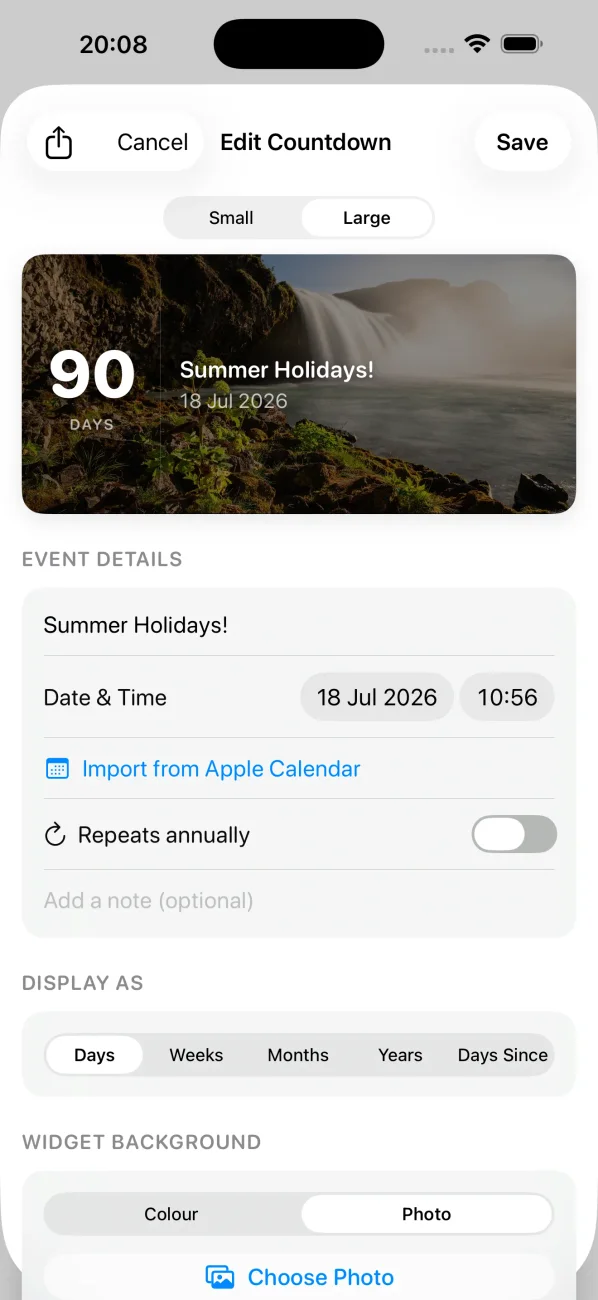
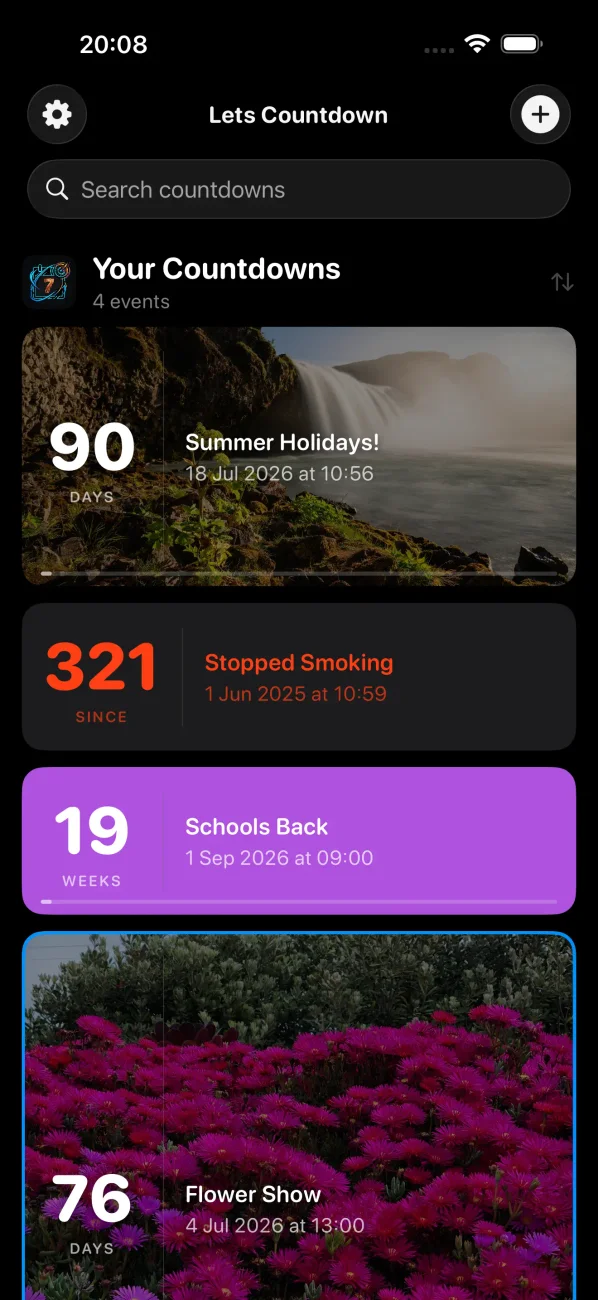
Lets Countdown is the simplest, most beautiful way to count down to the moments that matter – birthdays, holidays, trips, weddings, exams and everything in between.
Add an event, make it yours with a photo or colour, and put it on your Home Screen. Your countdowns stay up to date to the minute, on your iPhone, iPad and Mac.
COUNT DOWN YOUR WAY
• Show days, weeks, months or years – or count up with "Days Since"
• Hours and minutes take over on the final day, then a celebration when it arrives
• Repeat every year for birthdays and anniversaries
• Add notes, like a booking reference or a reminder of what to pack
MAKE IT PERSONAL
• Use your own photos or pick from a palette of colours
• Six font styles and automatic or custom text colour
• Photo darkness slider so text always stays readable
• Live preview as you edit
WIDGETS THAT DO MORE
• Small, medium and large Home Screen widgets with a progress bar
• "Up Next" widget: your soonest countdowns in one list
• Lock Screen widgets, including a progress ring
• Browse with arrows, pin a favourite, or always follow what's next
• Tap a widget to jump straight to that countdown
LIVE ACTIVITY
• In the final hours, a live timer on your Lock Screen and in the Dynamic Island
NEVER MISS IT
• Reminders on the day, 1, 3, 7 or 30 days before, or right at the moment it happens
• Choose the time your reminders arrive
BUILT AROUND YOUR CALENDAR
• Import events from Apple Calendar – upcoming or past
• Linked countdowns follow the event if it moves, including repeating events
STAY ORGANISED
• Search, filter by Upcoming, Past and Since, sort or drag to reorder
• Duplicate a countdown in one tap
• Add countdowns with Siri and Shortcuts, and find them in Spotlight
SHARE THE EXCITEMENT
• Send a link anyone with the app can add in one tap
• Share a countdown as an image, or with its photo over AirDrop
ON EVERY SCREEN
• iCloud sync across iPhone, iPad and Mac
• iPad and iPhone Duo: list and details side by side
• Mac: a menu bar countdown, keyboard shortcuts and widgets
• Alternate app icons
PRIVATE BY DESIGN
• No accounts, no ads, no tracking, no analytics
• Your countdowns stay on your devices and in your own iCloud
PRICING
Lets Countdown is free for up to 3 countdowns, with every feature included. A single small one-time purchase unlocks unlimited countdowns – no subscription. If you had Lets Countdown before this version, unlimited countdowns stay free for you.
Nouveautés
Version 1.16 · 17/11/2026
Already have Lets Countdown? Nothing changes for you – unlimited countdowns stay free, forever.
PRICING
• New users can create up to 3 countdowns for free, with every feature included
• Unlimited countdowns is a single small one-time purchase – no subscription, no ads
WHAT'S NEW
• "Up Next" widget – your soonest countdowns in one list
• Live timer on your Lock Screen and in the Dynamic Island in the final hours
• Choose when reminders arrive, plus a new "at the time of the event" reminder
• Quick dates: Tomorrow, In a week, Christmas and more in one tap
• Duplicate any countdown
• Filter your list by Upcoming, Past and Since
• A fresh new app icon
BETTER WIDGETS
• Progress bars on every widget, and a progress ring on the Lock Screen
• Hours and minutes stay accurate right up to the moment
• Tap a widget to jump straight to that countdown
• Choose to always follow your next countdown
SMARTER CALENDAR
• Countdowns linked to repeating events stay on the right date
• When an event moves, its reminders move too
• Browse past events, filter by calendar, and see what you've already added
ALSO
• Countdowns switch to hours and minutes on the day itself
• Mac: ⌘N for a new countdown, sorting in the View menu, and a richer menu bar
• Lots of fixes and polish
Confidentialité de l’application
Ce que Fionn McGinley déclare sur l’App Store au sujet du traitement des données par cette application.
-
Données établissant un lien avec vous
Peuvent être collectées et liées à votre identité.
- Identifiants
Les pratiques en matière de confidentialité peuvent varier, notamment en fonction des fonctionnalités que vous utilisez ou de votre âge.
Informations
- Vendeur
- Fionn McGinley
- Catégorie
- Utilitaires
- Version
- 1.16
- Mis à jour
- 17/11/2026
- Publié
- 21/04/2026
- Taille
- 15,0 Mo
- Nécessite
- iOS 17.0 ou version ultérieure
- Classification d’âge
- 4+
- Prix
- Gratuit
- Achats intégrés
- Oui
- Langues
- Anglais
- Copyright
- © 2026 Fionn McGinley
Vous aimerez peut-être aussi
-
 Countzy - Countdown Timer AppUtilitaires
-
 Faraway Days: CountdownsUtilitaires
-
 Countdowner AppUtilitaires
-
 Anniversaires : Rappel & ListeCompte à rebours, calendrier
-
 HOLD : Compte à reboursMinuteur sur écran verrouillé
-
 Countdown Calendar TimersMinuteur, rappel et calendrier
-
 NextGen ChargeUtilitaires
-
 Compte à Rebours Widget PhotoJours restants, anniversaires
-
 Tickr: Compte à ReboursSuivi d'Événements et Rappels
-
 First Light: Alarm ClockUtilitaires