MapInk: Map Notes
Draw & plan routes
Conçue pour iPhone, iPad
Gratuit · Achats intégrés
- Classification d’âge4+
- CatégorieNavigation
- DéveloppeurMC Software Ltd
- LanguesAnglais+ 26 de plus
- Taille22,7 Mo
Renvoie vers la page App Store officielle
Download.org n’héberge aucun fichier de MapInk: Map Notes. Le bouton ouvre la page de l’application sur App Store, où MC Software Ltd la publie. Fiche vérifiée pour la dernière fois le 17/11/2026.
Captures d’écran

À propos
Le développeur n’a pas fourni ce texte dans votre langue.
MapInk turns your iPhone and iPad into a map canvas for planning trips, marking places, and capturing handwritten notes exactly where they belong.
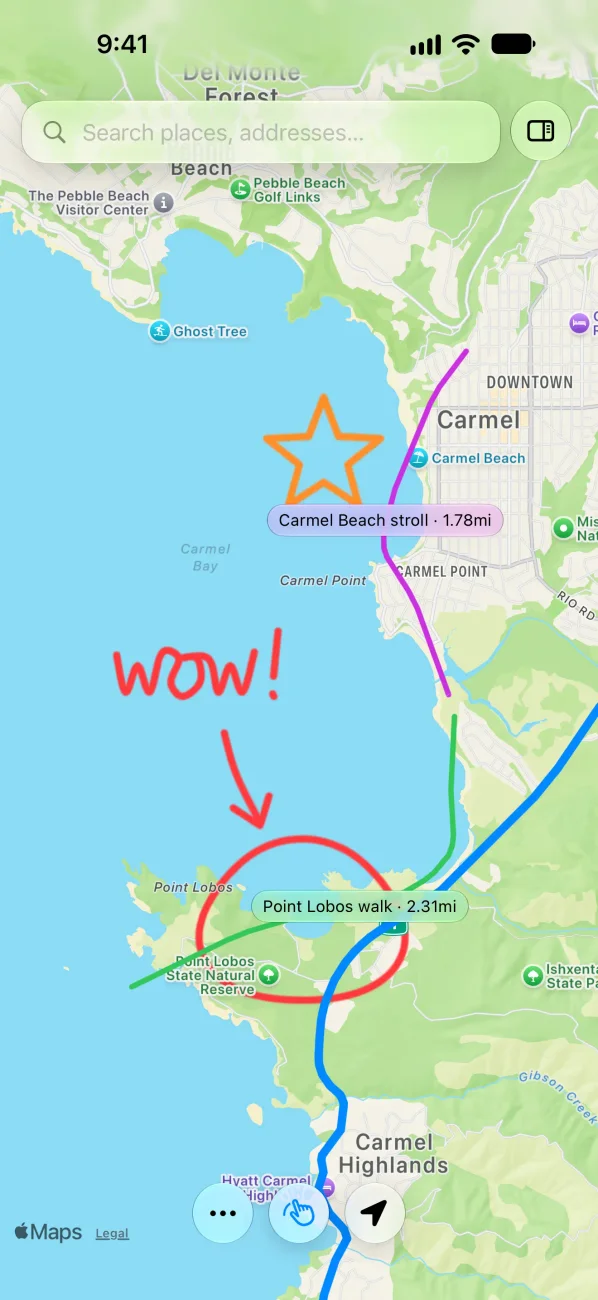
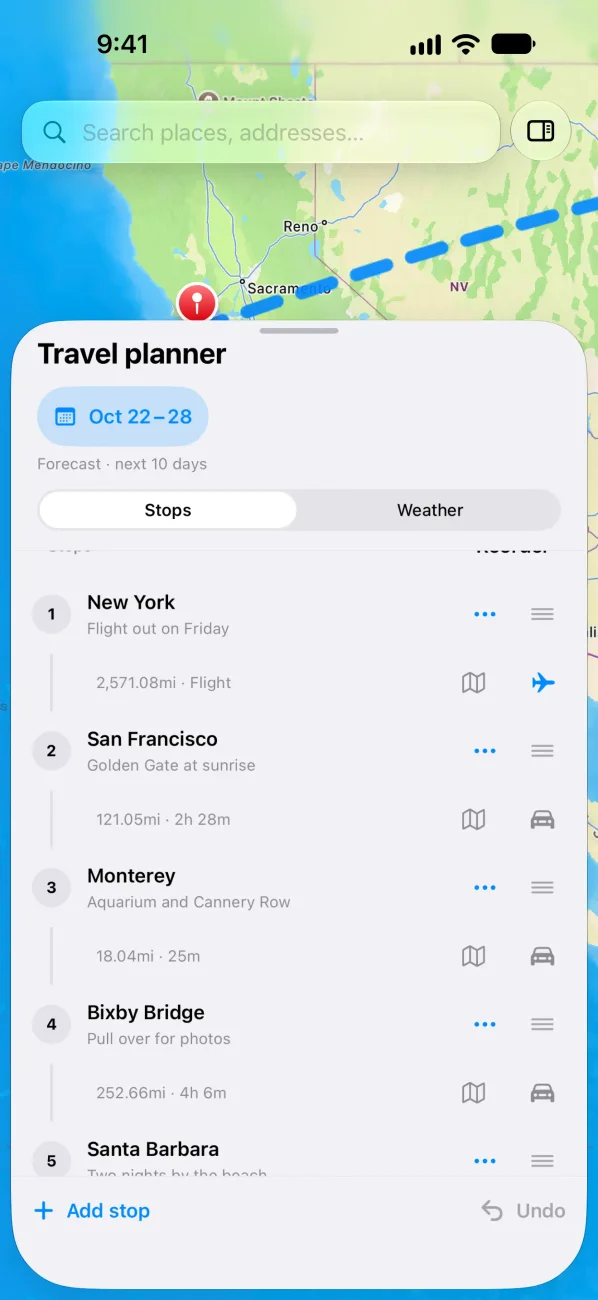
Search for a place or address, drop pins, and sketch routes with Apple Pencil or your finger. Connect your pins into a Journey to drive, walk or fly between stops, and check the weather for every stop along the way. When you want to explain or remember a place, write directly on the map and share a snapshot.
Plan a Journey
- Connect your pins into a Journey and reorder stops anytime
- Choose Drive, Walk or Fly for each leg; flights are drawn as arcs across the map
- See the distance and travel time of every leg
Weather for your trip
- Add your travel dates to see the forecast at each stop
- Choose Flexible dates to compare typical weather month by month
- See rain, daylight and a typical-day temperature curve for any month
- Turn weather off in Preferences if you don't need it
Draw on the map
- Sketch freehand lines and see their distances
- Drive and Walk lines follow the roads through the corners you draw
- Rest your pencil on the end of a line to keep drawing it
- Erase whole lines or just part of one
- Name your routes, group them, and give each Project its own colors
Notes and projects
- Drop titled pins with notes for stops, landmarks, ideas and meeting points
- Write handwritten notes on the map with Apple Pencil or your finger
- Save projects with lines, pins and notes together, and reopen them later
- Switch between standard, hybrid and satellite map styles
- Share annotated map images, with your Journey included
Try MapInk free with up to five items on the map, then unlock unlimited items forever with a one-time purchase.
MapInk is built for visual thinkers, travelers, field note takers, students, and anyone who plans better by drawing over real places.
Nouveautés
Version 1.1.0 · 22/10/2026
MapInk 1.1 is our biggest update yet.
• MapInk on iPhone: plan and sketch on your iPhone as well as your iPad.
• Weather for your Journey: add dates to see the forecast at each stop, or choose Flexible dates to compare typical weather by month, with rain, daylight and a typical-day temperature curve. Turn weather off in Preferences if you don't need it.
• Fly between stops: choose Drive, Walk or Fly for each leg. Flights are drawn as arcs, even across the Pacific.
• Smarter drawn routes: Drive and Walk lines follow the corners you draw. Rest your pencil on the end of a line to keep drawing it.
• Partial eraser: erase just part of a line, or switch back to erasing whole items.
• Project colors: give each Project its own named colors.
• Pan and zoom with your fingers while you draw.
• Shared images now include your Journey, flights too.
• Smoother drawing, erasing and map rendering, plus many fixes.
Confidentialité de l’application
Ce que MC Software Ltd déclare sur l’App Store au sujet du traitement des données par cette application.
-
Données non collectées
Le développeur ne collecte aucune donnée à partir de cette application.
Les pratiques en matière de confidentialité peuvent varier, notamment en fonction des fonctionnalités que vous utilisez ou de votre âge.
Informations
- Vendeur
- MC Software Ltd
- Catégorie
- Navigation
- Version
- 1.1.0
- Mis à jour
- 22/10/2026
- Publié
- 06/08/2026
- Taille
- 22,7 Mo
- Nécessite
- iOS 27.0 ou version ultérieure
- Classification d’âge
- 4+
- Prix
- Gratuit
- Achats intégrés
- Oui
- Langues
- Anglais, Arabe, Tchèque, Danois, Néerlandais, Finnois, Français, Allemand, Grec, Hébreu, Indonésien, Italien + 15 de plus
- Copyright
- © 2026 MC Software ltd