Mapshift
Tuning box maps from CarPlay
Conçue pour iPhone
Gratuit · Achats intégrés
- Classification d’âge4+
- CatégorieUtilitaires
- DéveloppeurRIGWIG LLC
- LanguesAnglais
- Taille1,7 Mo
Renvoie vers la page App Store officielle
Download.org n’héberge aucun fichier de Mapshift. Le bouton ouvre la page de l’application sur App Store, où RIGWIG LLC la publie. Fiche vérifiée pour la dernière fois le 12/11/2026.
Captures d’écran


À propos
Le développeur n’a pas fourni ce texte dans votre langue.
Mapshift puts your plug-in tuning module's maps where you actually drive: on the CarPlay screen, in Siri, on the Home Screen and Lock Screen, and in Control Center.
It works with RaceChip Gen3 based tuning modules, including the Neuspeed Power Module and the RaceChip GTS, GTS Black and RS, over Bluetooth. Pair once with the module's serial number and you are set.
FREE
• Pair your module and confirm it works with your car before paying anything
• Eco, Sport and Race presets, each assigned to any of the module's maps (1 to 7, or 1 to 6 on RS, as in the vendor app)
• A map slider for direct selection, with a settle delay and lockout so changes are applied one at a time and confirmed by the module
• Tuning on and off
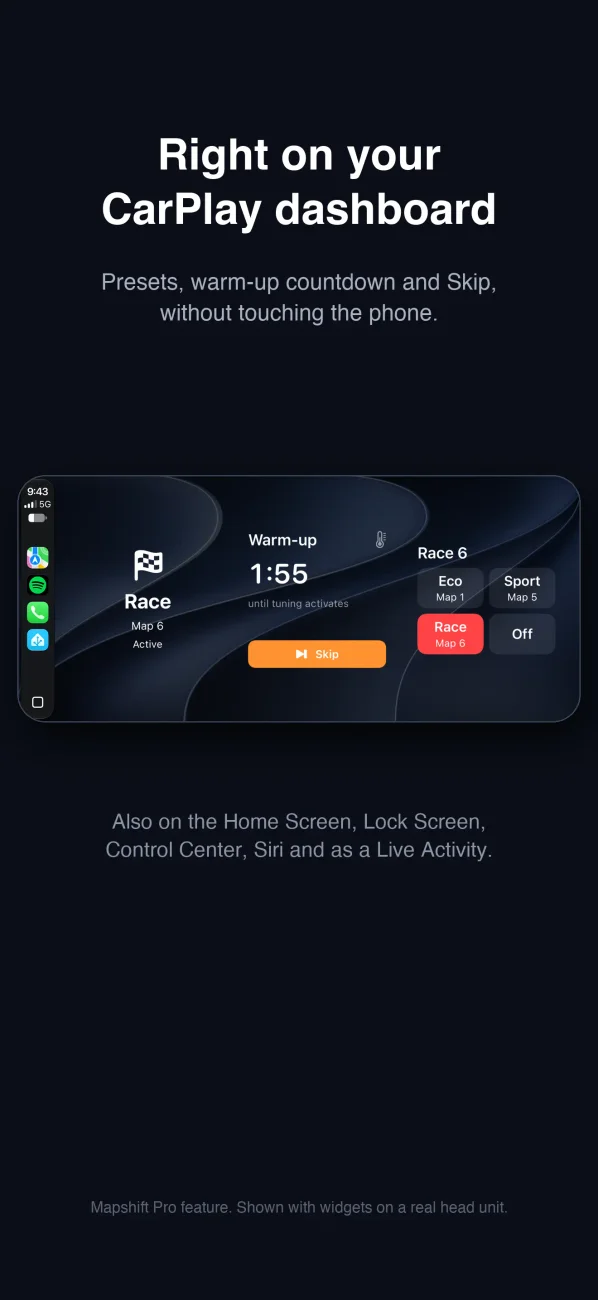
• Warm-up timer: set the delay the module waits after each engine start, see the countdown, skip it
• Demo mode to explore everything without a module
MAPSHIFT PRO (one-time purchase, Family Sharing)
• CarPlay app: Off, Eco, Sport and Race on the car's screen, every map one tap away, and the warm-up countdown with Skip and the timer setting
• CarPlay dashboard widgets: a preset grid and large one-tap buttons
• Home Screen widgets, Lock Screen and StandBy widgets
• Control Center button, also usable from the Action button
• Siri and Shortcuts: "Set Mapshift to Sport", automations when CarPlay connects
• Warm-up Live Activity with a Skip button on the Lock Screen and in the Dynamic Island
• The app reconnects when the module powers up, so the countdown and current map appear without a tap
HOW IT WORKS
Mapshift sends the module the same map, on/off and warm-up commands the vendor's app sends. The maps themselves live on the module. Every change is read back and confirmed before the controls unlock again.
GOOD TO KNOW
• Supports generation 3 modules. Generation 2 modules and XLR/RX throttle controllers are not supported.
• The module needs the ignition on to be reachable.
• Mapshift collects no data and makes no network connections.
• Built-in diagnostics let you email a log if something does not work with your module.
Mapshift is an independent app. It is not made by, affiliated with or endorsed by RaceChip, Smart Vehicle Engineering or Neuspeed. Names are used only to describe compatibility. Using a tuning module may affect your vehicle warranty, insurance and emissions compliance; check the laws where you drive.
Confidentialité de l’application
Ce que RIGWIG LLC déclare sur l’App Store au sujet du traitement des données par cette application.
-
Données non collectées
Le développeur ne collecte aucune donnée à partir de cette application.
Les pratiques en matière de confidentialité peuvent varier, notamment en fonction des fonctionnalités que vous utilisez ou de votre âge.
Informations
- Vendeur
- RIGWIG LLC
- Catégorie
- Utilitaires
- Version
- 1.0
- Mis à jour
- 05/11/2026
- Publié
- 05/11/2026
- Taille
- 1,7 Mo
- Nécessite
- iOS 18.0 ou version ultérieure
- Classification d’âge
- 4+
- Prix
- Gratuit
- Achats intégrés
- Oui
- Langues
- Anglais
- Copyright
- © 2026 RIGWIG LLC