
- Classification d’âge4+
- CatégorieProductivité
- DéveloppeurZachary Alan Sturman
- LanguesAnglais
- Taille7,4 Mo
Renvoie vers la page App Store officielle
Download.org n’héberge aucun fichier de MediLedger. Le bouton ouvre la page de l’application sur App Store, où Zachary Alan Sturman la publie. Fiche vérifiée pour la dernière fois le 12/11/2026.
Captures d’écran

À propos
Le développeur n’a pas fourni ce texte dans votre langue.
MediLedger: Widget-First Medication Management
Never miss a dose or run out of medication again. MediLedger is designed with widgets at its core, bringing your medication management directly to your Home Screen for instant access and peace of mind.
Widget-First Design
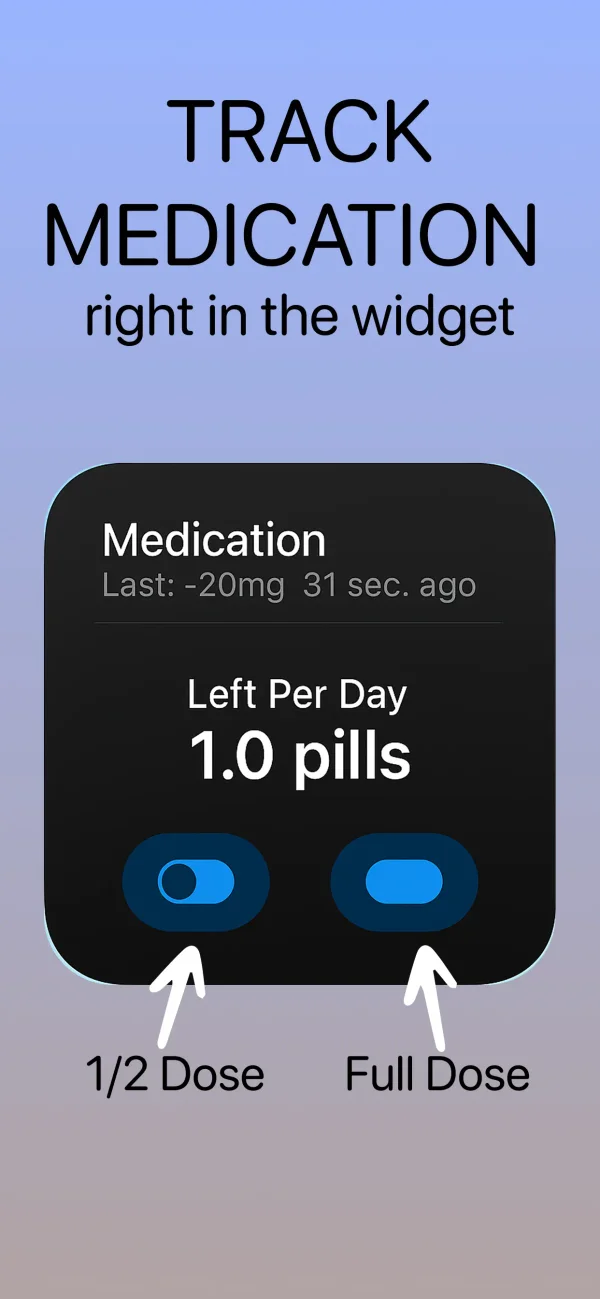
• Add interactive medication widgets to your Home Screen
• Take half or full doses with one tap directly from the widget
• View critical information like days until refill and remaining doses
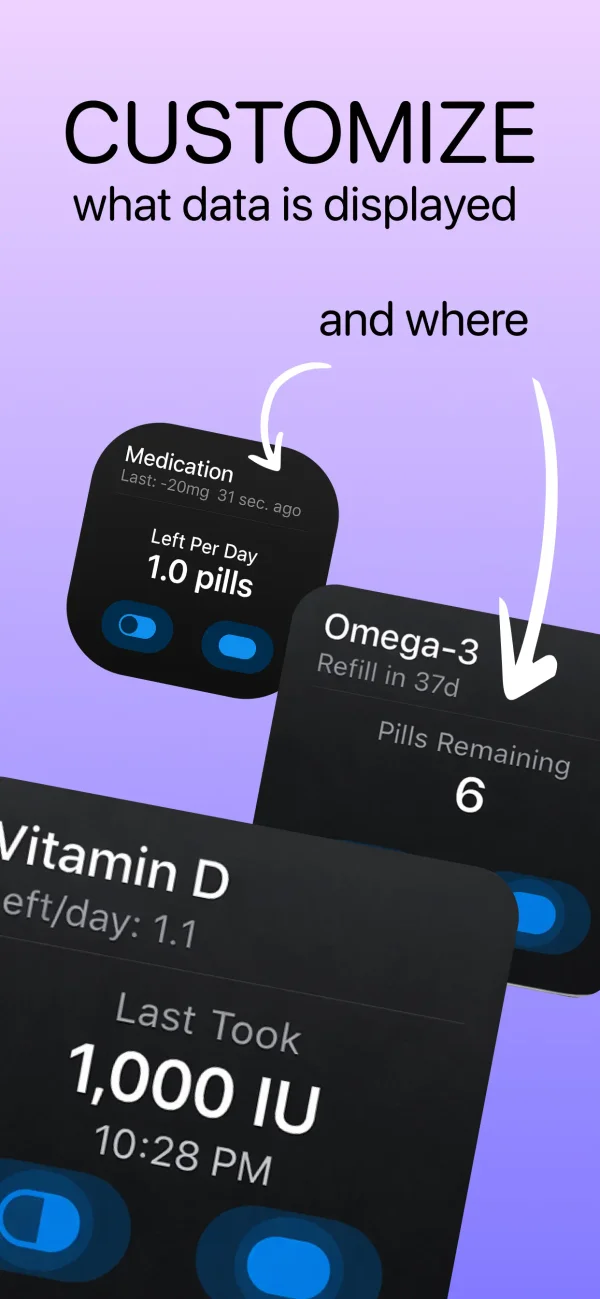
• Configure multiple widgets for different medications
• Customize what information each widget displays
Complete Medication Tracking
• Add prescription and non-prescription medications
• Track pill strength, daily dosage, and supply duration
• Monitor remaining medication with automatic calculations
• Set custom refill schedules or let the app calculate automatically
• Detailed medication history with intake logging
Seamless Multi-Device Experience
• Powered by SwiftData for instant sync across iPhone, iPad, and Mac
• Access your medication data anywhere, anytime
• Changes sync automatically between all your devices
• Works offline with sync when connection returns
Smart Dosage Management
• Flexible dosing: full dose, half dose, or custom amounts
• Automatic remaining medication calculations
• Pills-per-day tracking based on supply and refill dates
• Refill reminders and date tracking
• Comprehensive intake history and analytics
Key Features
• Interactive Home Screen widgets with dose buttons
• Support for both mg and pill-based dosing
• Medication detail views with editing capabilities
• Swipe actions for quick dose logging
• Visual medication cards with key information
• Export and backup capabilities through iCloud sync
Perfect for:
• Managing multiple daily medications
• Tracking prescription refill schedules
• Monitoring supplement intake
• Caregivers managing medications for others
• Anyone requiring precise medication adherence
Transform your medication routine with widgets that work as hard as you do. Download MediLedger today and experience medication management that fits your lifestyle.
Privacy First: All your medication data stays on your devices and syncs securely through your personal iCloud account.
Nouveautés
Version 1.2.1 · 11/12/2025
What’s New in This Version
• Updated App Store screenshots and subtitle to better showcase widget-based medication tracking
• Refined widget UI for clearer dose buttons and improved readability
• Enhanced customization screens for a smoother setup experience
• General performance improvements
• Fixed several bugs affecting dose logging and daily pill count updates
Confidentialité de l’application
Ce que Zachary Alan Sturman déclare sur l’App Store au sujet du traitement des données par cette application.
-
Données non collectées
Le développeur ne collecte aucune donnée à partir de cette application.
Les pratiques en matière de confidentialité peuvent varier, notamment en fonction des fonctionnalités que vous utilisez ou de votre âge.
Informations
- Vendeur
- Zachary Alan Sturman
- Catégorie
- Productivité
- Version
- 1.2.1
- Mis à jour
- 11/12/2025
- Publié
- 02/11/2025
- Taille
- 7,4 Mo
- Nécessite
- iOS 18.4 ou version ultérieure
- Classification d’âge
- 4+
- Prix
- Gratuit
- Langues
- Anglais
- Copyright
- © 2025 Zachary Sturman
Vous aimerez peut-être aussi
-
 AI Career CVProductivité
-
 FocusFlip Focus TimerProductivité
-
 Yucki: Mental DumpProductivité
-
 Memo : Transcription localeDictaphone et audio en texte
-
 Loata: AI Notes & File SearchProductivité
-
 Quantu - AI AgentsProductivité
-
 Focus it : Minuteur PomodoroTâches, widgets et Live
-
 Ishi: ADHD Unstuck, Brain DumpProductivité
-
 AI Reminder: Voice To Do ListProductivité
-
 TONT: Liste de tâches & chronoChrono sur l'écran verrouillé