
NotchBud
Daily briefs, meetings & todos
Conçue pour iPhone, Mac
Gratuit · Achats intégrés
- Classification d’âge4+
- CatégorieProductivité
- DéveloppeurBob Van den Audenaerde
- LanguesAnglais
- Taille2,3 Mo
Renvoie vers la page App Store officielle
Download.org n’héberge aucun fichier de NotchBud. Le bouton ouvre la page de l’application sur App Store, où Bob Van den Audenaerde la publie. Fiche vérifiée pour la dernière fois le 15/11/2026.
Captures d’écran

À propos
Le développeur n’a pas fourni ce texte dans votre langue.
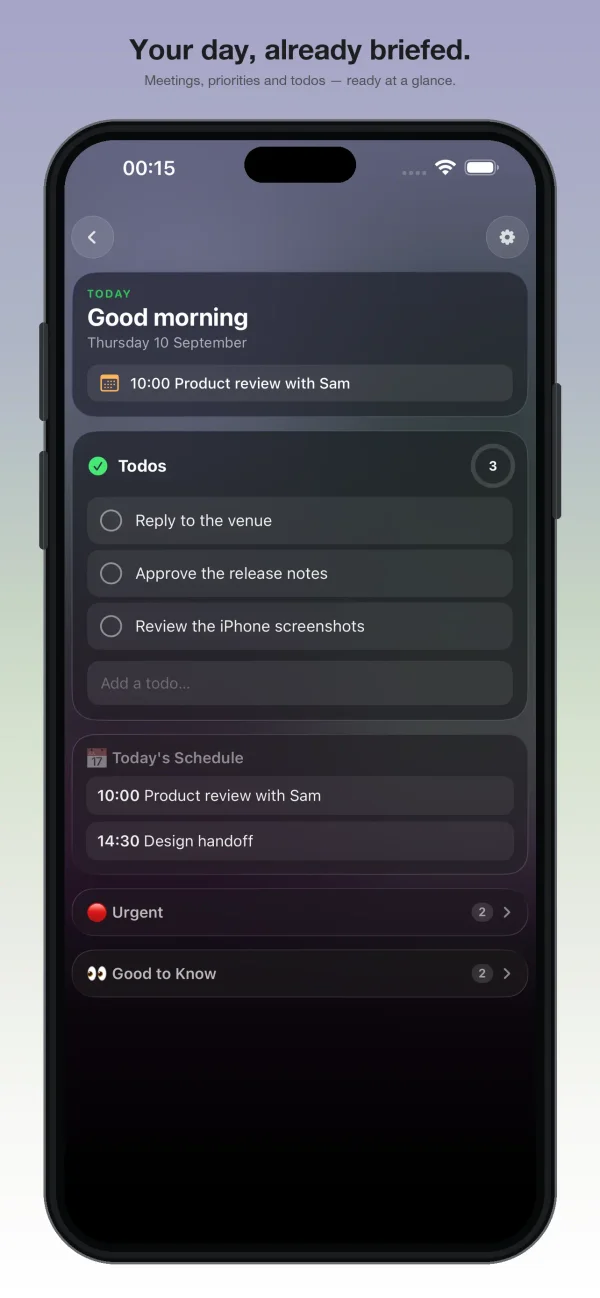
NotchBud brings your daily briefing, meetings, and todos together on Mac and iPhone.
BRIEFINGS FROM YOUR AI
Use the setup prompts with an AI assistant that can write files to your selected folder. NotchBud renders daily Markdown briefings as readable cards. Prioritize or clear items, and let your assistant read that feedback when preparing the next brief. AI services and their connections are set up separately.
TODOS IN CONTEXT
Add tasks, mark priorities, and check off completed work. Completed items stay visible for the day, so you can see your progress.
MEETINGS CLOSE AT HAND
Connect your calendar to see upcoming meetings and open available video meeting links. Meeting reminders and supported Live Activities help you keep track of what comes next.
AT A GLANCE ON IPHONE
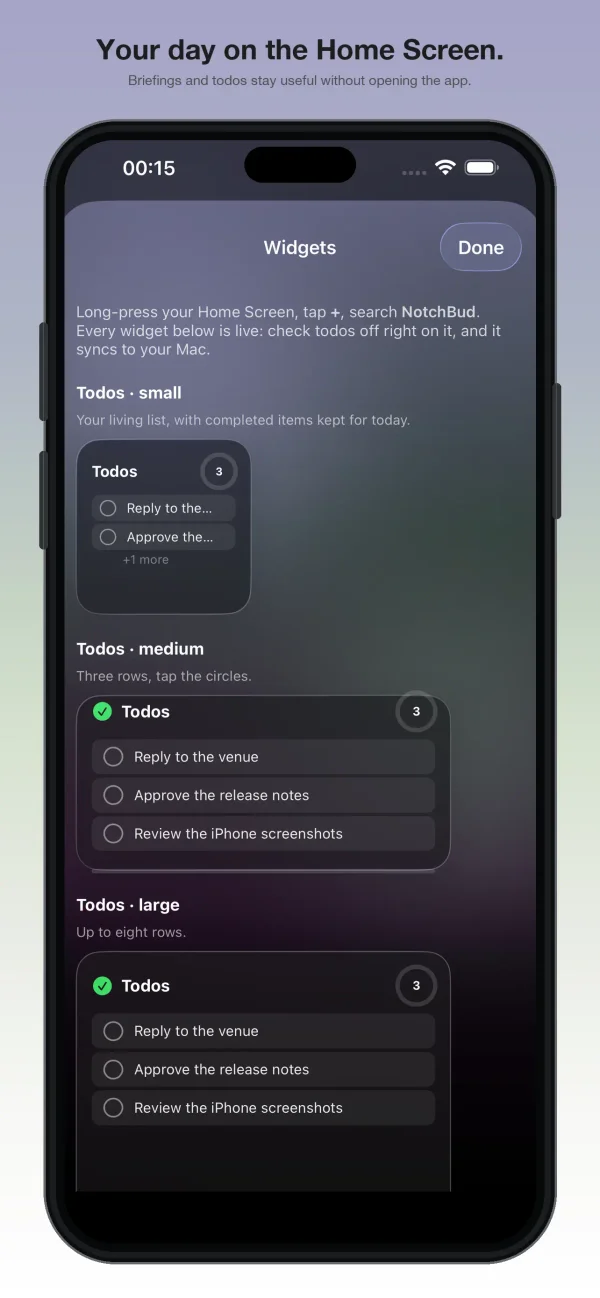
Read briefings and manage todos with briefing, todo, and combined widgets. Move between recent briefs and capture tasks on the go.
YOUR DAY UNDER THE NOTCH
On Mac, hover the MacBook notch to see your briefing, next meeting, and todo list. Capture a thought with Control-Space and keep working.
YOUR OWN FILES
Choose the NotchBud iCloud folder to sync your briefs and app data across your devices. NotchBud works with daily Markdown files. No NotchBud account is required.
Free download with a one-time Lifetime Unlock for Mac and iPhone.
Nouveautés
Version 1.0.2 · 21/10/2026
• Easier start: a short welcome shows what NotchBud does on iPhone and connects your calendar in one tap.
• Meeting alerts now work: connect your calendar for a heads-up 15 minutes ahead on the Lock Screen and in the Dynamic Island.
• Safer sync with your Mac: todos and swipes are never overwritten while iCloud is still syncing, and changes from both devices are merged.
• Clearer screens: a calm syncing state, honest calendar text, and a Widgets button that opens the widget gallery.
• Works hand in hand with NotchBud 1.0.2 for Mac.
Confidentialité de l’application
Ce que Bob Van den Audenaerde déclare sur l’App Store au sujet du traitement des données par cette application.
-
Données non collectées
Le développeur ne collecte aucune donnée à partir de cette application.
Les pratiques en matière de confidentialité peuvent varier, notamment en fonction des fonctionnalités que vous utilisez ou de votre âge.
Informations
- Vendeur
- Bob Van den Audenaerde
- Catégorie
- Productivité
- Version
- 1.0.2
- Mis à jour
- 21/10/2026
- Publié
- 15/09/2026
- Taille
- 2,3 Mo
- Nécessite
- iOS 18.0 ou version ultérieure
- Classification d’âge
- 4+
- Prix
- Gratuit
- Achats intégrés
- Oui
- Langues
- Anglais
- Copyright
- © 2026 Mutant BV
Vous aimerez peut-être aussi
-
 Island Hub : actions en directTimers, listes, pins en direct
-
 Pique: Keep thoughts afloatProductivité
-
 Machka: Dynamic Notch IslandProductivité
-
 Vellure - Lock Screen NotesProductivité
-
 Focused: Control Screen TimeProductivité
-
 Ahead Islandカレンダー連動で予定までの時刻をカウントダウンにて表示
-
 Teak: Save InspirationsProductivité
-
 Note1: Lock Screen NoteUne note sur l'écran de veille
-
 Dynamic Notes AppProductivité
-
 ADHD NotesProductivité