
Photo Proof
GPS Photo Verification
Conçue pour iPhone, iPad, iPod touch
Gratuit
- Classification d’âge4+
- CatégoriePhoto et vidéo
- DéveloppeurCogniter Technologies Pvt Ltd
- LanguesAnglais
- Taille45,3 Mo
Renvoie vers la page App Store officielle
Download.org n’héberge aucun fichier de Photo Proof. Le bouton ouvre la page de l’application sur App Store, où Cogniter Technologies Pvt Ltd la publie. Fiche vérifiée pour la dernière fois le 14/11/2026.
Captures d’écran






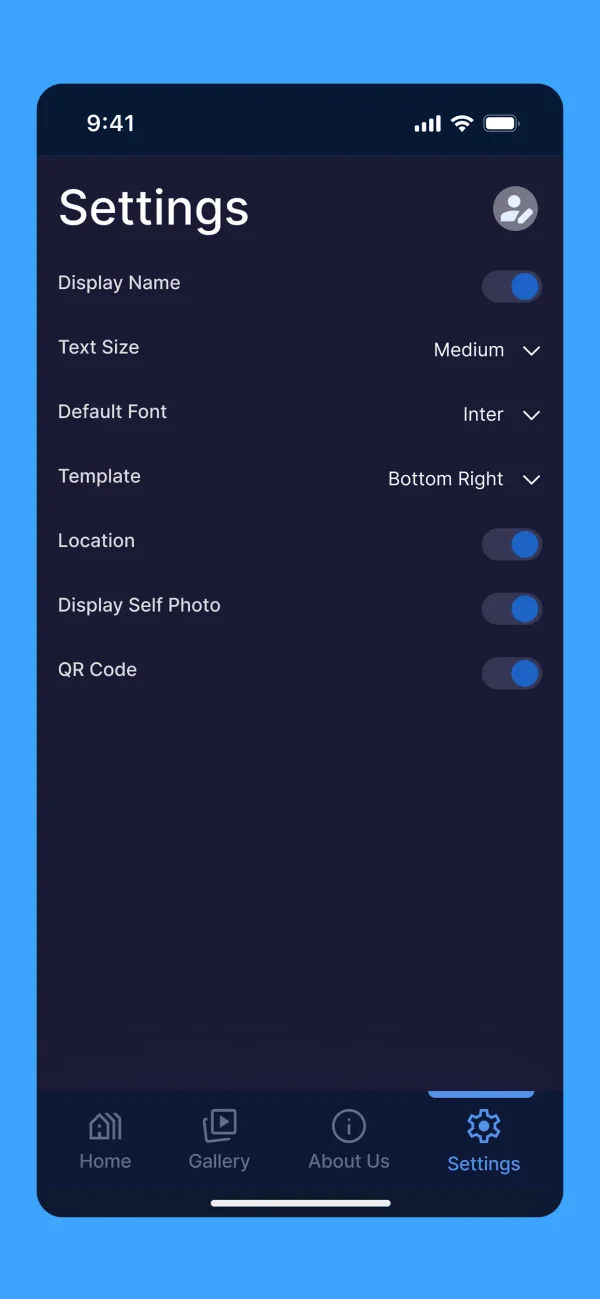

À propos
Le développeur n’a pas fourni ce texte dans votre langue.
PhotoProof is a free, secure app designed for anyone that requires tamper proof, verifiable photo documentation. Every image receives a unique verification ID, live GPS coordinates, date, time, and timezone, enabling instant online authenticity validation via QR code or shared link. All data is synced from our servers so even if user spoofs the time on his/her device our app will not get affected.
One can even use it for taking a photo of your collectable item which you have put on sale on Facebook, Instagram or online store, that photo will have the "Verified by Photo Proof" Stamp and QR code to verify it online.
In today’s digital world, photos alone aren’t proof. They can be edited, reused, or locations faked. Photo Proof makes it 100% authentic and verifiable.
PhotoProof only works when:
• The user has an active internet connection for online syncing of date and time data
• GPS/location services are turned ON
This ensures metadata is captured in real time and cannot be manipulated offline. Users cannot upload edited images or reuse old photos.
No internet. No GPS. No capture.
That’s how we protect authenticity.
Key Features
• Secure In-App Capture
• Photos must be taken directly within PhotoProof— preventing gallery uploads or edited images.
• Live GPS Metadata
• Exact location is captured photography.
• Accurate Time & Timezone Stamp
• Date, time, and timezone are automatically embedded.
• Unique Verification ID
• Each image receives a system-generated ID that can be shared to verify the photo.
• Professional Metadata Templates
• Choose from a library of professional templates to display metadata on the image.
• Customizable Display Controls
• Users can show or hide:
• User name
• User photo
• Location
• Date & Time
• Timezone
• Verification ID
Full control over presentation — without compromising integrity.
Simple Verification Process
- Anyone with the verification ID can validate the authenticity of the image, once our online verfication is active.
How PhotoProof Stops Common Photo Fraud
- Before PhotoProof, people could:
• Reuse old site photos and claim they were taken today
• Take photos at one location and report them from another
• Disable GPS and manually type false location details
• Edit timestamps before submitting reports
• Capture images offline and manipulate metadata later
This dramatically reduces disputes, false reporting, and compliance risks.
PhotoProof is ideal for Industries where visual evidence must be trusted:
- Construction & Infrastructure
- Real Estate & Property Management
- Logistics & Supply Chain
- Banking & Financial Services
- Insurance
- Manufacturing & Quality Control
- Healthcare & Field Services
- Government & Public Sector
How it works:
- Open the App
o Launch PhotoProof on your device. Make sure your internet connection is active and GPS is turned ON.
- Tap “CAPTURE NEW PHOTO”
o Click the CAPTURE NEW PHOTO button to begin secure photo capture.
- Capture the Image
o Take the photo you need. The app instantly records:
§ Live GPS location
§ Date
§ Time
§ Timezone
§ Unique Verification ID
o All metadata is captured in real time.
- Change Template
o Select from the pre-built template library to display metadata in a professional format.
You can switch templates anytime before saving or sharing.
- Save the Photo
o Save the verified image directly to your device.
- Share with Anyone
o Send the photo to clients, managers, auditors, or stakeholders.
- Settings – Full Display Control
o Inside Settings, you decide what appears on your photo:
§ Show/Hide Name
§ Show/Hide User’s photo
§ Show/Hide Location
§ Show/Hide Date & Time
§ Show/Hide Timezone
o You control the presentation — while PhotoProof ensures the integrity.
Don’t Just Take Photos. Capture Proof.
With PhotoProof, every image becomes verified documentation backed by live metadata and secure validation.
Download PhotoProof today and ensure your visual records are trusted, traceable, and tamper-resistant.
Nouveautés
Version 1.0.10 · 11/11/2026
We've improved PhotoProof to make capturing and verifying photo evidence easier and more reliable. Enjoy a smoother experience, improved performance, and enhanced stability.
Confidentialité de l’application
Ce que Cogniter Technologies Pvt Ltd déclare sur l’App Store au sujet du traitement des données par cette application.
-
Données n’établissant aucun lien avec vous
Peuvent être collectées, mais ne sont pas liées à votre identité.
- Emplacement
- Coordonnées
Les pratiques en matière de confidentialité peuvent varier, notamment en fonction des fonctionnalités que vous utilisez ou de votre âge.
Informations
- Vendeur
- Cogniter Technologies Pvt Ltd
- Catégorie
- Photo et vidéo
- Version
- 1.0.10
- Mis à jour
- 11/11/2026
- Publié
- 19/02/2026
- Taille
- 45,3 Mo
- Nécessite
- iOS 13.0 ou version ultérieure
- Classification d’âge
- 4+
- Prix
- Gratuit
- Langues
- Anglais
- Copyright
- Copyright © 2024 - Cogniter Technologies. All Rights Reserved.
Vous aimerez peut-être aussi
-
 ParcelProof : vidéo déballagePreuve de colis et litiges
-
 Photo de preuveBadges photo vérifiés
-
 Rama CapturePhoto et vidéo
-
 Timestamp Camera GPSPhoto et vidéo
-
 Timestamp Camera: Site GPS MapPhoto et vidéo
-
 GPS Map Camera・Timestamp PhotoPhoto et vidéo
-
 GPS Map Camera - GeoLens Cam!Photo et vidéo
-
 Shutternote : Cadre EXIFPhotos encadrées avec EXIF
-
 Caméra GPS Carte: ProofCamHeure, date, adresse & GPS
-
 Photo Vault: Secret LockerPhoto et vidéo