
- Classification d’âge12+
- CatégorieOutils de développement
- DéveloppeurZerui Zhou
- LanguesAnglais
- Taille2,2 Mo
Pi Relay n’est peut-être pas disponible sur App Store pour le moment
La fiche de la boutique était inaccessible lors de notre dernière vérification. Le lien mène toujours à la page App Store officielle.
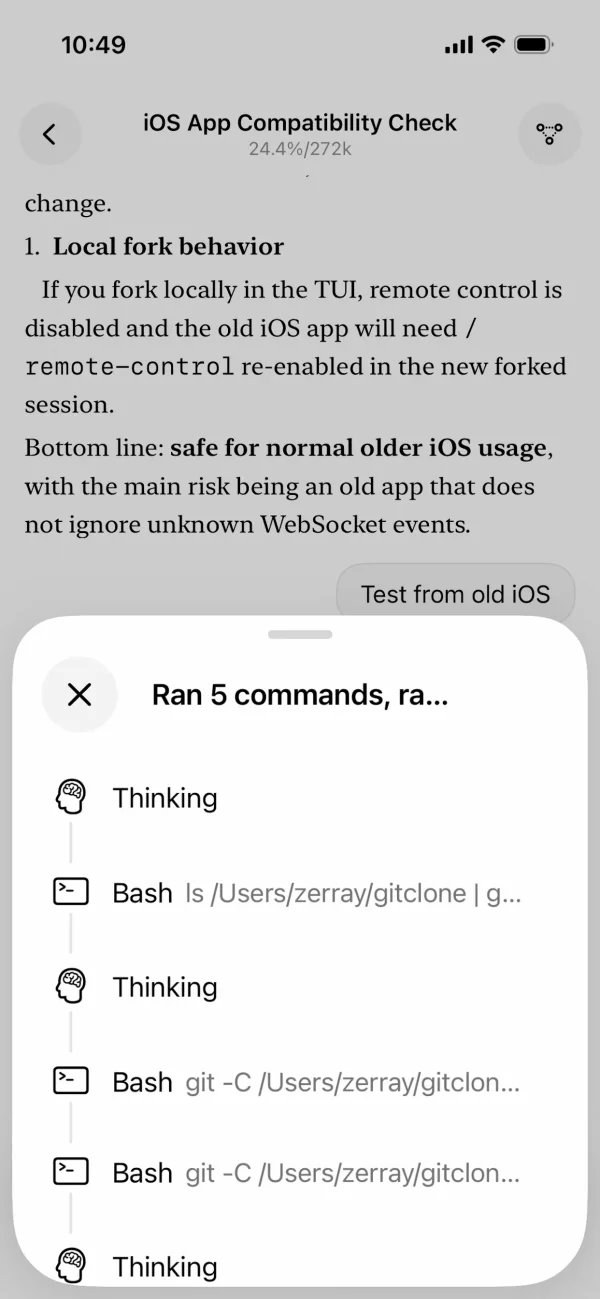
Captures d’écran


À propos
Le développeur n’a pas fourni ce texte dans votre langue.
Pi Relay is a companion iPhone app for the Pi coding agent. It lets you connect securely to your own Pi remote-control server, browse active projects and sessions, and continue conversations from your phone.
Pairing is simple: install the Pi remote-control extension on the machine running Pi, open the pairing QR code, and scan it with Pi Relay. Once paired, you can switch between remotes, view project sessions, read conversation history, send new prompts, abort running work, and request context compaction with /compact.
Pi Relay is designed for users who already run Pi on their own computer or development environment and want a lightweight mobile companion for monitoring and continuing work away from the desktop.
Key features:
- QR-code pairing with your Pi remote-control server
- Remote list with quick switching and unpairing
- Project and session browsing
- Conversation view with selectable and copyable messages
- Runtime status and context usage display
- Prompt sending, abort support, and /compact support
- Live session updates while the app is active
Pi Relay requires a running Pi remote-control extension/server. The extension is available at:
https://github.com/zerray/pi-remote-control
Nouveautés
Version 1.0.5 · 05/11/2026
Answer extension prompts from your phone
When an extension in your Pi session asks a question — such as a permission check before running a command, a yes/no confirmation, a choice from a list, or a short text answer — it now appears as a card on the session screen. Answer it right from your iPhone and the session continues, with no need to walk back to your computer.
• Pick an option, confirm or decline, or type a reply
• Whichever answers first, your phone or the terminal, is used
• Stopping a run also dismisses any open prompts
Requires pi-remote-control 1.0.9 or later on your computer.
Confidentialité de l’application
Ce que Zerui Zhou déclare sur l’App Store au sujet du traitement des données par cette application.
-
Données non collectées
Le développeur ne collecte aucune donnée à partir de cette application.
Les pratiques en matière de confidentialité peuvent varier, notamment en fonction des fonctionnalités que vous utilisez ou de votre âge.
Informations
- Vendeur
- Zerui Zhou
- Catégorie
- Outils de développement
- Version
- 1.0.5
- Mis à jour
- 05/11/2026
- Publié
- 16/05/2026
- Taille
- 2,2 Mo
- Nécessite
- iOS 17.0 ou version ultérieure
- Classification d’âge
- 12+
- Langues
- Anglais
- Copyright
- © Zhou Zerui
Vous aimerez peut-être aussi
-
 Pi in Pocket - Agent ViewerOutils de développement
-
 Remote Pi - Coding AgentOutils de développement
-
 MuxAgent: Remote CodingOutils de développement
-
 Sesori: Remote AI Coding AgentOutils de développement
-
 Pi Dev MobileOutils de développement
-
 githtml - GitHub Doc ReaderDocs GitHub hors ligne
-
 ReqlyOutils de développement
-
 PushwordOutils de développement
-
 Assets for XcodeOutils de développement
-
 SymbolKitOutils de développement