
Shared Wallet
Easy expense tracking for two
Conçue pour iPhone, iPad, iPod touch
Gratuit
- Classification d’âge4+
- CatégorieFinance
- DéveloppeurKeita Ide
- LanguesAnglais
- Taille28,8 Mo
Renvoie vers la page App Store officielle
Download.org n’héberge aucun fichier de Shared Wallet. Le bouton ouvre la page de l’application sur App Store, où Keita Ide la publie. Fiche vérifiée pour la dernière fois le 15/11/2026.
Captures d’écran



À propos
Le développeur n’a pas fourni ce texte dans votre langue.
▼ Title
Shared Budget for Two – Simplify Splitting Expenses
▼ Description
Make splitting money between two people simple and stress-free.
“Did I pay more on my credit card this month?”
“So how much should I transfer in the end?”
“How much do we need to put into our shared account?”
You don’t need to spend time on these conversations anymore.
Shared Budget for Two is a simple app that automates monthly expense settlement for couples. Just enter your expenses, and the app automatically calculates who should pay how much and where to transfer it. No complicated math. No spreadsheets. Let the app handle everything—and spend your time on what really matters.
▼ Recommended For
Couples who spend too much time settling monthly expenses
Those who use separate credit cards and find calculations complicated
People who cover shared costs like rent or utilities in advance
Couples who split expenses unevenly (not 50:50)
Those with a shared account who want to know exact deposit amounts
Anyone tired of using spreadsheets or calculators
People looking for a simple app with no account registration required
▼ Key Features
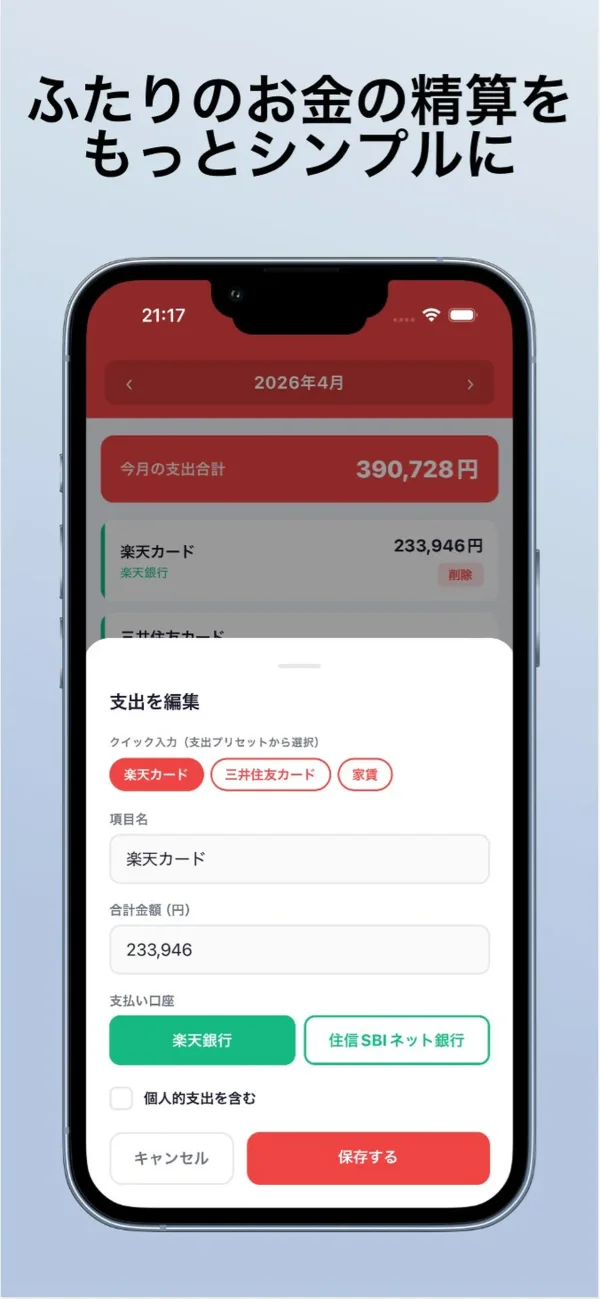
Quick Expense Entry
Categorize expenses into three types: Person 1, Person 2, or Shared Account.
Even within credit card payments, you can separate personal purchases and shared expenses—ensuring fair calculations even when they’re mixed.
You can also save frequently used payments as presets, such as monthly rent or credit card bills. With presets, recurring entries can be added with just one tap.
Flexible Split Ratios
Not every couple splits expenses equally. Set a custom ratio from 0% to 100% for Person 1 based on your income or lifestyle. Once set, all calculations are automatically adjusted.
Automatic Settlement Calculation
Simply enter expenses and open the “Results” tab to see everything calculated instantly.
Personal Payment Balancing
The app calculates how much each person has paid versus how much they should have paid based on the ratio. Instantly see who has overpaid and by how much.
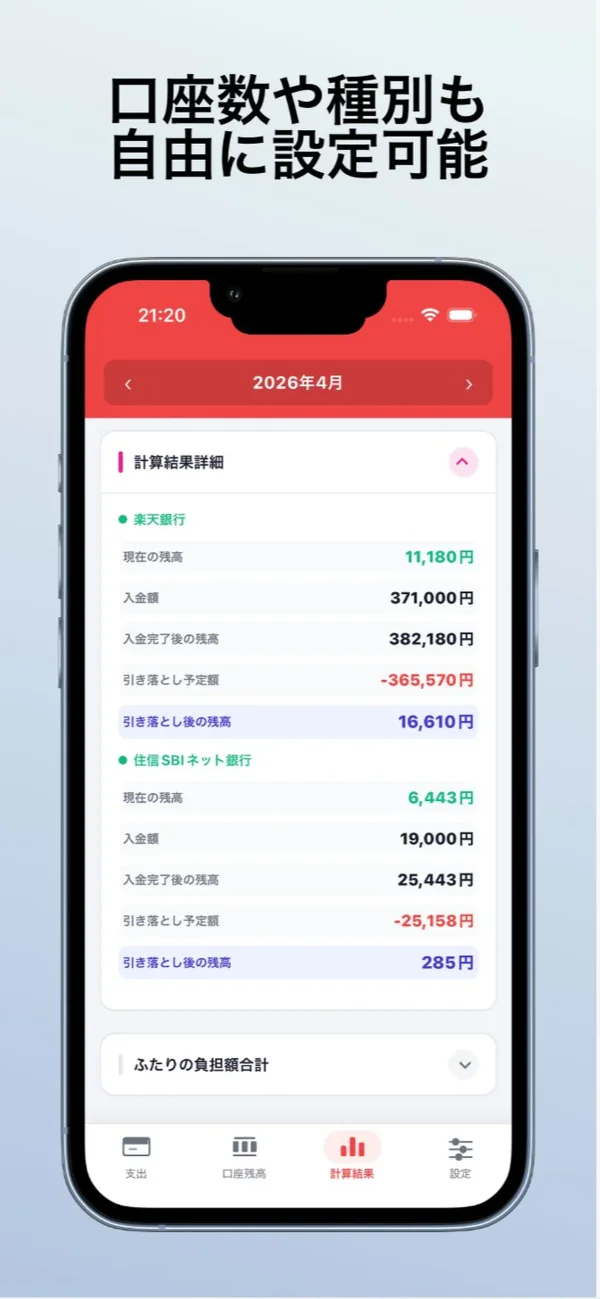
Per-Account Deposit Calculation
For each account, the app calculates how much each person needs to deposit, considering total expenses, current balance, and buffer amount.
If the balance is sufficient, no deposit is required. You can also round amounts (e.g., to the nearest 100 or 1000).
Expense Breakdown Visualization
View your monthly expenses in a donut chart. Easily understand the balance between personal and shared spending.
Monthly History
Navigate past months and review previous settlements. You can also edit or delete past entries anytime.
Theme Customization
Change the app’s main color to suit your preference.
Automatic Data Saving
All data is stored locally on your device. Even if you close or restart the app, your data remains محفوظ.
▼ How It Works
STEP 1 Initial Setup (one-time)
Set names and expense ratio. Optionally register accounts and presets for faster input later.
STEP 2 Add Monthly Expenses
Enter expenses once your credit card statements are finalized. With presets, it takes just one tap.
STEP 3 Check Results and Transfer
Open the “Results” tab and enter current account balances. The app instantly shows who needs to pay how much. Just transfer, and you’re done.
▼ Privacy First
All data is stored only on your device. No data is sent to external servers.
No account registration required. Works even offline.
Your financial data stays private and secure.
Make managing money as a couple simpler and fairer.
Start a stress-free financial life together today.
Terms of Use (EULA): https://www.apple.com/legal/internet-services/itunes/dev/stdeula/
Privacy Policy: https://aquapeakstudio.com/privacy-policy
Nouveautés
Version 1.0.6 · 23/09/2026
▼ Title
Shared Budget for Two – Simplify Splitting Expenses
▼ Description
Make splitting money between two people simple and stress-free.
“Did I pay more on my credit card this month?”
“So how much should I transfer in the end?”
“How much do we need to put into our shared account?”
You don’t need to spend time on these conversations anymore.
Shared Budget for Two is a simple app that automates monthly expense settlement for couples. Just enter your expenses, and the app automatically calculates who should pay how much and where to transfer it. No complicated math. No spreadsheets. Let the app handle everything—and spend your time on what really matters.
▼ Recommended For
Couples who spend too much time settling monthly expenses
Those who use separate credit cards and find calculations complicated
People who cover shared costs like rent or utilities in advance
Couples who split expenses unevenly (not 50:50)
Those with a shared account who want to know exact deposit amounts
Anyone tired of using spreadsheets or calculators
People looking for a simple app with no account registration required
▼ Key Features
Quick Expense Entry
Categorize expenses into three types: Person 1, Person 2, or Shared Account.
Even within credit card payments, you can separate personal purchases and shared expenses—ensuring fair calculations even when they’re mixed.
You can also save frequently used payments as presets, such as monthly rent or credit card bills. With presets, recurring entries can be added with just one tap.
Flexible Split Ratios
Not every couple splits expenses equally. Set a custom ratio from 0% to 100% for Person 1 based on your income or lifestyle. Once set, all calculations are automatically adjusted.
Automatic Settlement Calculation
Simply enter expenses and open the “Results” tab to see everything calculated instantly.
Personal Payment Balancing
The app calculates how much each person has paid versus how much they should have paid based on the ratio. Instantly see who has overpaid and by how much.
Per-Account Deposit Calculation
For each account, the app calculates how much each person needs to deposit, considering total expenses, current balance, and buffer amount.
If the balance is sufficient, no deposit is required. You can also round amounts (e.g., to the nearest 100 or 1000).
Expense Breakdown Visualization
View your monthly expenses in a donut chart. Easily understand the balance between personal and shared spending.
Monthly History
Navigate past months and review previous settlements. You can also edit or delete past entries anytime.
Theme Customization
Change the app’s main color to suit your preference.
Automatic Data Saving
All data is stored locally on your device. Even if you close or restart the app, your data remains محفوظ.
▼ How It Works
STEP 1 Initial Setup (one-time)
Set names and expense ratio. Optionally register accounts and presets for faster input later.
STEP 2 Add Monthly Expenses
Enter expenses once your credit card statements are finalized. With presets, it takes just one tap.
STEP 3 Check Results and Transfer
Open the “Results” tab and enter current account balances. The app instantly shows who needs to pay how much. Just transfer, and you’re done.
▼ Privacy First
All data is stored only on your device. No data is sent to external servers.
No account registration required. Works even offline.
Your financial data stays private and secure.
Make managing money as a couple simpler and fairer.
Start a stress-free financial life together today.
Confidentialité de l’application
Ce que Keita Ide déclare sur l’App Store au sujet du traitement des données par cette application.
-
Données non collectées
Le développeur ne collecte aucune donnée à partir de cette application.
Les pratiques en matière de confidentialité peuvent varier, notamment en fonction des fonctionnalités que vous utilisez ou de votre âge.
Informations
- Vendeur
- Keita Ide
- Catégorie
- Finance
- Version
- 1.0.6
- Mis à jour
- 23/09/2026
- Publié
- 20/03/2026
- Taille
- 28,8 Mo
- Nécessite
- iOS 15.1 ou version ultérieure
- Classification d’âge
- 4+
- Prix
- Gratuit
- Langues
- Anglais
- Copyright
- © 2026 AquaPeak
Vous aimerez peut-être aussi
-
 SplyncDépenses pour couples et amis
-
 OurBudget: TogetherFinance
-
 なかまる - 夫婦・カップルの家計簿Finance
-
 SpendojoFinance
-
 PairTab: Dépenses de coupleFrais partagés, argent perso
-
 FiftyFifty: Shared ExpensesFinance
-
 Family Ledger - Shared WalletFinance
-
 Our Wallet: Couple ExpensesFinance
-
 Two Cents : BudgetDépenses partagées à deux
-
 Kuramate: Budget en coupleReçus IA, seul ou à deux