- Classification d’âge4+
- CatégorieProductivité
- DéveloppeurMoscoso Pacheco, Gonzalo Juvenal
- LanguesAnglais+ 3 de plus
- Taille2,1 Mo
Renvoie vers la page App Store officielle
Download.org n’héberge aucun fichier de SoloWrite. Le bouton ouvre la page de l’application sur App Store, où Moscoso Pacheco, Gonzalo Juvenal la publie. Fiche vérifiée pour la dernière fois le 18/11/2026.
Captures d’écran


À propos
Le développeur n’a pas fourni ce texte dans votre langue.
SoloWrite is the digital version of a blank page. It is not a project manager and not a social network - it is the calm space where your ideas land before the noise makes them disappear.
Open the app. Write. That's it.
JUST WRITE
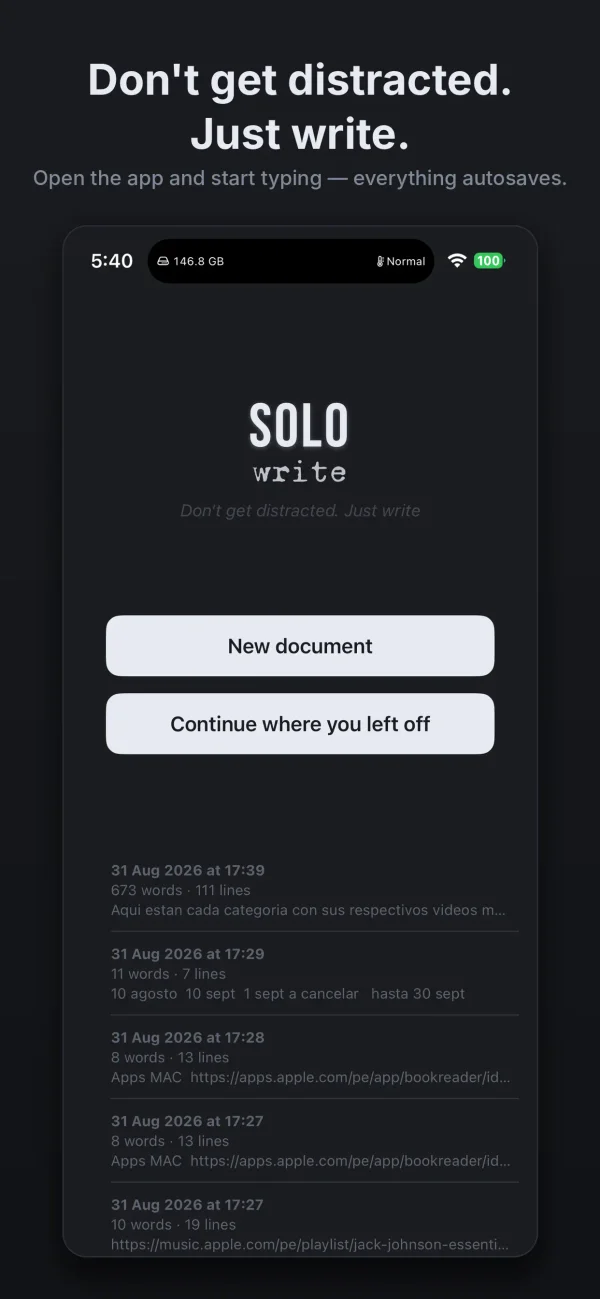
- A start screen with two choices: New document, or continue exactly where you left off
- Your recent notes one tap away - rename or delete them with a swipe
- The editor fills the whole screen; every gram of cognitive friction has been removed
- A live status bar with word, character and line counts and the autosave time
12 EDITING MODES
- Write Markdown, or switch the editor to Swift, Python, JavaScript, TypeScript, JSON, HTML, CSS, YAML, XML, plain text or todo lists
- Real syntax highlighting for each language, rendered live as you type
LIVE MARKDOWN
- Headings, bold, italics, quotes, lists, links, highlights and code blocks are styled as you type - while your text stays 100% plain Markdown
- Line numbers, GitHub style - double-tap a number to select the whole line
- A tiny code toolbar inserts Markdown snippets so you never have to remember the syntax
MAKE IT YOURS
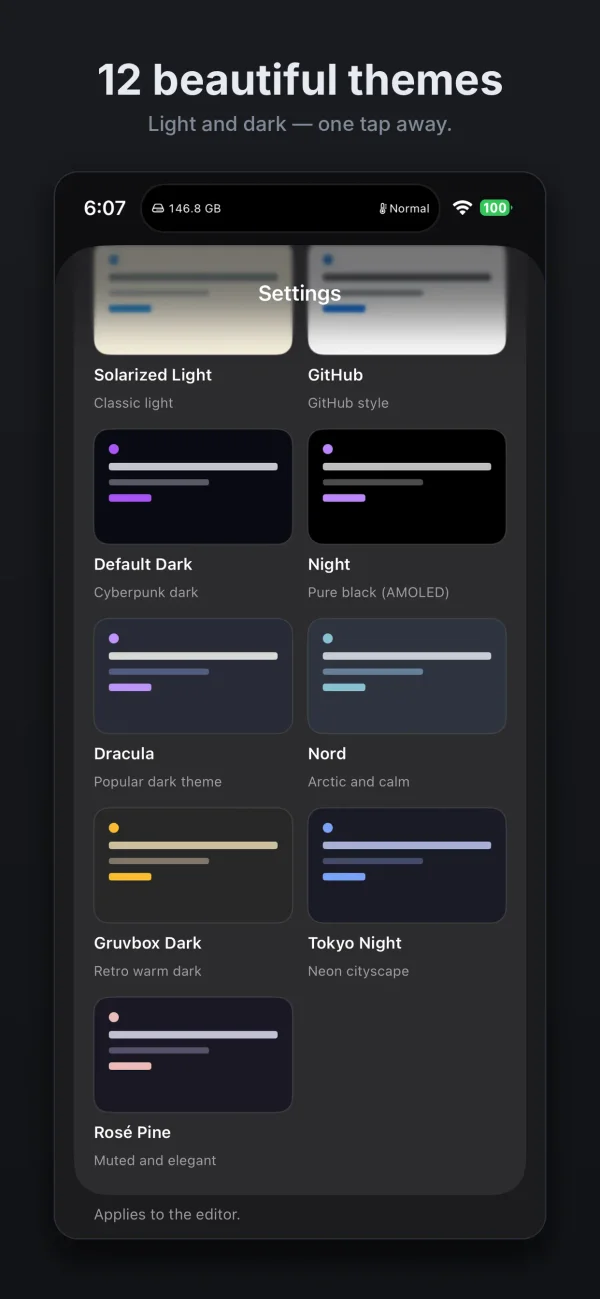
- 12 hand-tuned themes: the dark developer theme Pushword, Paper, Sepia, Solarized, GitHub, Dracula, Nord, Gruvbox, Tokyo Night, Rose Pine, pure-black Night and more
- The theme dresses the whole app, not just the editor
- Monospaced fonts and adjustable sizes
- English and Spanish, switchable in-app
YOUR WORDS BELONG TO YOU
- Standard .md files stored in YOUR iCloud Drive - browse them any time in the Files app
- No proprietary database. Works natively with Obsidian, iA Writer and any text editor
- Automatic sync: your draft is preserved as you type, and the Save button is one tap away
- Start on iPhone, continue on the Mac companion app exactly where you left off
PRIVATE BY DESIGN
- No account. No login. No analytics. No servers.
- Your text never leaves your devices and your iCloud
ONE-TIME PURCHASE
- Pay once, keep it forever. No subscriptions, no ads.
SoloWrite. Don't get distracted. Just write.
Nouveautés
Version 3.2 · 07/10/2026
SoloWrite's biggest update yet: a complete redesign and a rebuilt saving system.
NEW LOOK
- New dark developer theme "Pushword": carbon background, blue accent, and a carefully tuned multicolor syntax palette
- New status bar with live line, word and character counts and the autosave time
- The open note appears as a chip with a close button
- Recent notes now show the file name first, so everything is easy to find
12 EDITING MODES
- New Language selector in Settings: Markdown, Swift, Python, JavaScript, TypeScript, JSON, HTML, CSS, YAML, XML, plain text and todo lists, each with its own live syntax highlighting
A REBUILT SAVING SYSTEM
- Closing the app now saves your work automatically, like Pages or Word
- Every note keeps a single identity: editing an existing note always updates that same file, never a duplicate
- Deleting a note moves it to the "Recently Deleted" folder, recoverable for 30 days
AND MORE
- New Save button: save your note and return to the start screen in one tap
- Links are shown clean: accent color, no underline
- Double-tap a line number to select the whole line
- Fixes and performance improvements throughout
Confidentialité de l’application
Ce que Moscoso Pacheco, Gonzalo Juvenal déclare sur l’App Store au sujet du traitement des données par cette application.
-
Données non collectées
Le développeur ne collecte aucune donnée à partir de cette application.
Les pratiques en matière de confidentialité peuvent varier, notamment en fonction des fonctionnalités que vous utilisez ou de votre âge.
Informations
- Vendeur
- Moscoso Pacheco, Gonzalo Juvenal
- Catégorie
- Productivité
- Version
- 3.2
- Mis à jour
- 07/10/2026
- Publié
- 19/12/2025
- Taille
- 2,1 Mo
- Nécessite
- iOS 17.6 ou version ultérieure
- Classification d’âge
- 4+
- Prix
- 3,99 €
- Langues
- Anglais, Allemand, Japonais, Espagnol
- Copyright
- © 2025 MyIOSapps
Vous aimerez peut-être aussi
-
 WorkIntent - Time TrackerProductivité
-
 LeapingCard - Anki,flashcardProductivité
-
 TexmuProductivité
-
 Hours tracker - TimoProductivité
-
 SheetCollector-xlsx ods...pdfTableaux en PDF
-
 PDF Splitter 2025Productivité
-
 PDF Reader 2025Productivité
-
 Takt - Suivi du tempsGérez votre temps - minuteur
-
 Copia: Clipboard ManagerProductivité
-
 iLinkboxProductivité