- Classification d’âge4+
- CatégorieMusique
- DéveloppeurSteffen Muly
- Taille2,1 Mo
Renvoie vers la page App Store officielle
Download.org n’héberge aucun fichier de SpectraView Studio. Le bouton ouvre la page de l’application sur App Store, où Steffen Muly la publie. Fiche vérifiée pour la dernière fois le 12/11/2026.
Captures d’écran


À propos
Le développeur n’a pas fourni ce texte dans votre langue.
See your sound. SpectraView Studio turns your iPad or Mac into a professional audio analysis lab. The measurements engineers trust, always within reach. Free, no account, no subscription.
Whether you mix music, master tracks, edit podcasts, or broadcast audio, SpectraView shows you exactly what's in your file and whether it's ready to deliver.
FOUR ANALYZERS IN ONE APP
▸ Waveform: Amplitude, dynamics, and transients at a glance, with separate left/right channels for stereo files.
▸ Frequency Analyzer: Real-time FFT spectrum with smoothing, peak hold, and slope correction. Follows playback live, or freezes on any point when paused.
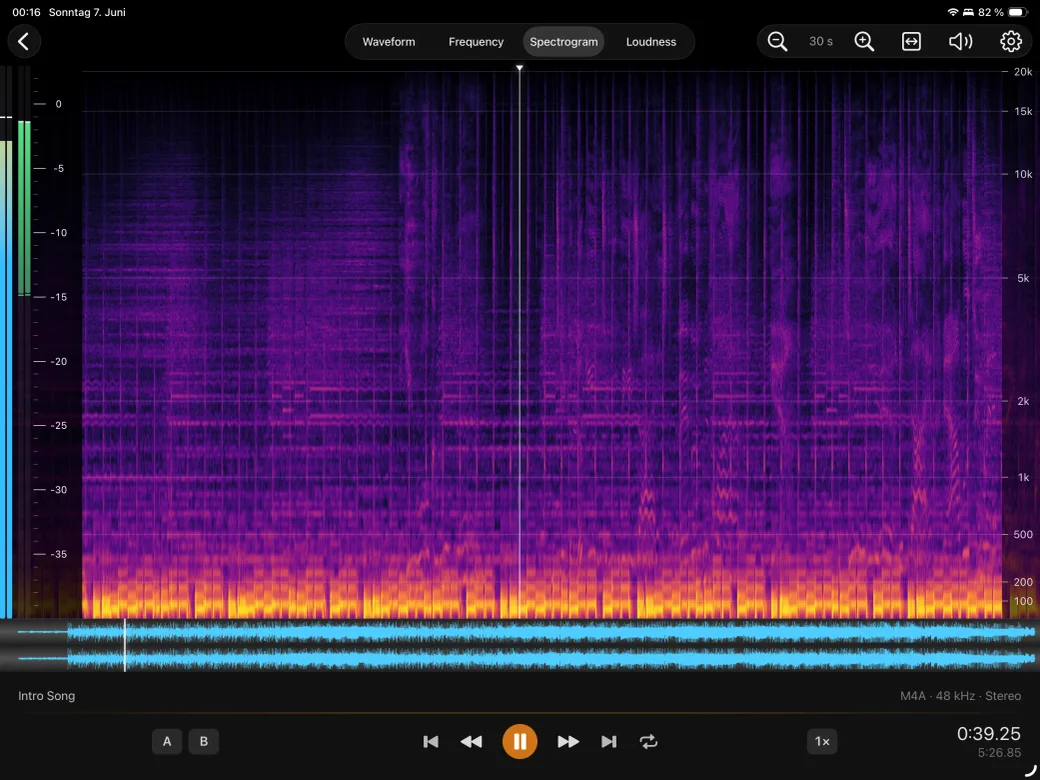
▸ Spectrogram: A colour-coded map of frequency over time. Spot noise, hum, codec artefacts, resonances, and tonal imbalance instantly. Magma, Inferno, or Grayscale palettes.
▸ Loudness: EBU R128 / ITU-R BS.1770 metering with Integrated, Short-Term, and Momentary LUFS, True Peak, RMS, Crest Factor, Loudness Range (LRA), and a Dynamic Range score. Reference lines for -14, -16, and -23 LUFS cover the most common streaming and broadcast targets.
KNOW BEFORE YOU DELIVER
One look at the file summary (Integrated LUFS, Max True Peak, LRA, DR) tells you whether a mix is ready for Spotify, Apple Music, YouTube, or broadcast.
BUILT FOR REAL SESSIONS
▸ Tile-based rendering opens and plays a 10-hour recording as smoothly as a 3-minute track.
▸ A/B loop markers isolate any section for critical listening; playback from 0.25× to 2×.
▸ Full keyboard control on Magic Keyboard and Apple Silicon Mac: play, seek, zoom, and set loop points.
▸ Fast Forward / Rewind to scan long files, with a latency-compensated playhead so the cursor lands where you actually hear it.
▸ Record straight from the microphone and analyse instantly.
SUPPORTED FORMATS
WAV · M4A / AAC · MP3 · AIFF · FLAC · CAF
YOUR AUDIO STAYS YOURS
No account. No subscription. No cloud. Every measurement runs on your device. Your files are never uploaded anywhere.
SpectraView Studio. See what you're hearing.
Nouveautés
Version 1.0.2 · 07/06/2026
- Fast Forward and Fast Rewind buttons in the transport bar: smoothly scroll the timeline through the viewport at a zoom-adapted speed to locate a moment in long recordings. Audio is muted during fast seek.
- Full keyboard shortcuts when using a Magic Keyboard or running on an Apple Silicon Mac: Space, arrow keys (with Shift / Cmd / Option modifiers), Home / End, ↑ and ↓ to zoom, A / B / L for markers and loop, comma for Settings. See the User Guide for the complete table.
- Folder browser now shows subfolders. Tap to descend, to any depth.
- Right-click (or two-finger-click) on the file list brings up Remove / Delete / Share. Works on Mac and on iPad (long-press also surfaces the menu).
- Spectrogram is smoother in the lows. The frequency axis switched to a mel scale (the perceptual scaling professional spectral tools use), and the colour gradient between FFT bins is interpolated more softly. The per-bin "plateau" pattern at low frequencies is gone.
- File-mode Loudness layout reorganised. Readout cards moved to the left of the plot, target chips to the right, inline target labels removed: cleaner plot, more space for the loudness curve.
- Playback playhead now syncs precisely with the speaker output. On AirPods or any Bluetooth output the visual cursor sits where the transient is actually heard instead of leading by ~150 ms.
- Scrolling the main timeline during playback now seeks the audio to the position you left it at. No more snap-back to where the audio was playing.
- Spacebar play/pause is now reliably in sync with the playhead. In some situations the keyboard shortcut could resume playback from a much earlier position than the visual cursor showed.
- Custom-target editor in the Loudness tab no longer clips the Set button against the bottom of the screen on iPad mini; the dialog now opens upward from the chip.
Confidentialité de l’application
Ce que Steffen Muly déclare sur l’App Store au sujet du traitement des données par cette application.
-
Données non collectées
Le développeur ne collecte aucune donnée à partir de cette application.
Les pratiques en matière de confidentialité peuvent varier, notamment en fonction des fonctionnalités que vous utilisez ou de votre âge.
Informations
- Vendeur
- Steffen Muly
- Catégorie
- Musique
- Version
- 1.0.2
- Mis à jour
- 07/06/2026
- Publié
- 28/05/2026
- Taille
- 2,1 Mo
- Nécessite
- iOS 26.5 ou version ultérieure
- Classification d’âge
- 4+
- Prix
- Gratuit
- Copyright
- © 2026 Jeemedia