- Classification d’âge4+
- CatégorieMétéo
- DéveloppeurKelly Ford
- LanguesAnglais
- Taille9,7 Mo
Renvoie vers la page App Store officielle
Download.org n’héberge aucun fichier de Weather Fast. Le bouton ouvre la page de l’application sur App Store, où Kelly Ford la publie. Fiche vérifiée pour la dernière fois le 16/11/2026.
Captures d’écran

À propos
Le développeur n’a pas fourni ce texte dans votre langue.
Fast Weather - Clean, Accessible Weather Forecasts
Get the weather information you need, fast. No clutter, no tracking, no subscriptions—just accurate forecasts delivered in a beautifully simple interface designed for everyone.
WHY FAST WEATHER?
• Lightning Fast: Current conditions at a glance, detailed forecasts when you need them
• Built from the ground up with VoiceOver users in mind
• Your Privacy Matters: No tracking, no analytics, no ads. Your city list stays on your device
• No API Key Required: Powered by Open-Meteo's free weather service
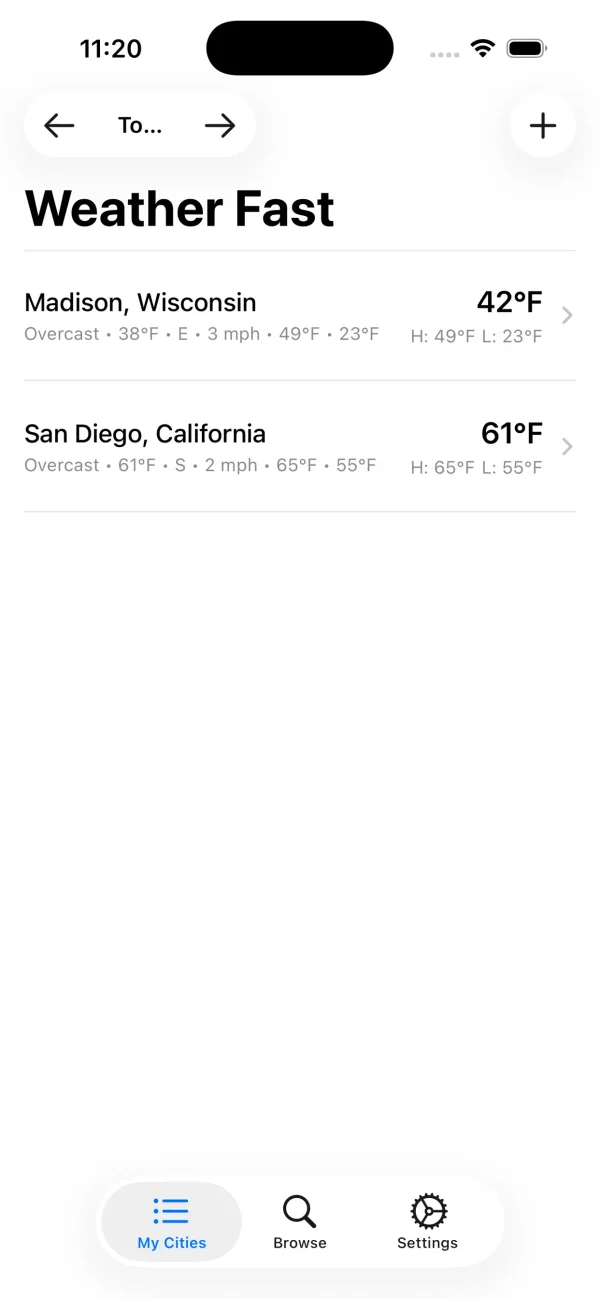
• Two View Modes: Choose how you view your weather—Flat or List view
COMPREHENSIVE WEATHER DATA
Current Conditions:
• Temperature and "feels like" with humidity
• Wind speed, direction, and gusts
• UV Index with color-coded risk levels
• Dew point, pressure, visibility, cloud cover
• Precipitation tracking (rain, showers, snow)
Hourly Forecast:
• 24-hour outlook with detailed conditions
• Rain probability and precipitation amounts
• UV Index, wind, humidity, and more
• Perfect for planning your day
Daily Forecast:
• 16-day extended outlook
• High and low temperatures
• Sunrise, sunset, and daylight duration
• Rain probability and UV Index
Weather Around Me:
• Regional weather in all 8 directions (N, S, E, W, NE, NW, SE, SW)
• Adjustable distance radius to see the bigger picture
• Compare conditions in surrounding areas
• Explore nearby cities and their weather
Historical Weather:
• View past weather for any date going back years
• Compare the same date across multiple years
• Browse consecutive days of historical data
• Perfect for trip planning and trend analysis
PERSONALIZE YOUR EXPERIENCE
Two View Modes:
• Flat View: Beautiful cards with full weather details
• List View: Minimalist single-line efficiency
Choose Your Units:
• Temperature: Fahrenheit or Celsius
• Wind Speed: mph or km/h
• Precipitation: inches or millimeters
• Pressure: inHg or hPa
• Visibility: miles or kilometers
Customize Fields:
• Show or hide specific weather data
• Configure what appears in city list view
• Set your preferred default view mode
• Tailor the app to your needs
SMART CITY MANAGEMENT
• Browse cities by US state or international country
• Add multiple cities with one-tap or VoiceOver Action
ABOUT THE DATA
Weather data provided by Open-Meteo.com (Creative Commons BY 4.0). Geocoding powered by OpenStreetMap. Both services are respected, reliable, and privacy-friendly.
Whether you're checking if you need an umbrella or planning a week-long trip, Fast Weather gives you the information you need without the hassle. Download today and experience weather forecasts the way they should be—fast, clear, and accessible to everyone.
Nouveautés
Version 1.6.0.6 · 29/10/2026
***New***
Open at Launch: You can now choose a city for WeatherFast to open to instead of your city list. The app starts on that city's full weather, and Back takes you to your list. Choose Open at Launch from a city's Actions menu in Flat view, from the menu when you touch and hold a city in List view (also available as a VoiceOver action), or from the Actions menu on the city's own screen. My Location can be your choice too. Settings > Display Options > Open at Launch shows your current choice and lets you switch back to opening on the city list. The setting is kept separately on each device, so your iPhone and iPad can open to different cities, even with iCloud sync on.
Radar Preview (off by default): WeatherFast now includes an early, experimental animated radar for the United States and Canada. It is turned off while it's being refined. To try it, go to Settings, choose Developer Settings at the bottom, and turn on Radar Loop, then open any city's Actions menu and choose Radar. You can choose National Weather Service, U.S. composite or Environment Canada radar, and browse radar stations from the Browse tab. Each frame is a real image, so VoiceOver's Intelligent Image Description in iOS 27 can describe it.
Confidentialité de l’application
Ce que Kelly Ford déclare sur l’App Store au sujet du traitement des données par cette application.
-
Données non collectées
Le développeur ne collecte aucune donnée à partir de cette application.
Les pratiques en matière de confidentialité peuvent varier, notamment en fonction des fonctionnalités que vous utilisez ou de votre âge.
Informations
- Vendeur
- Kelly Ford
- Catégorie
- Météo
- Version
- 1.6.0.6
- Mis à jour
- 29/10/2026
- Publié
- 10/03/2026
- Taille
- 9,7 Mo
- Nécessite
- iOS 17.0 ou version ultérieure
- Classification d’âge
- 4+
- Prix
- Gratuit
- Langues
- Anglais
- Copyright
- © Kelly Ford