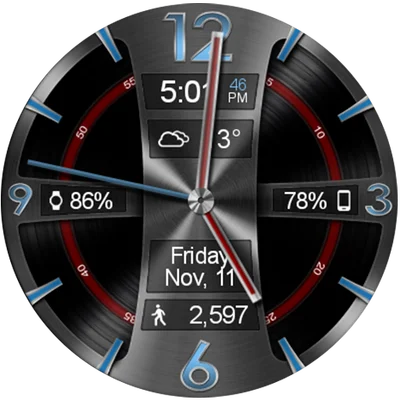
Avionic Depth HD Watch Face
DeNitE AppzBerisi iklan · Pembelian dalam aplikasi
- Rating 3+Batasan usia
- PersonalisasiKategori
- 25/6/2022Diperbarui
- GratisHarga
Tertaut ke halaman resmi com.denite.watchface.avionicdepth di Google Play. Terakhir diperiksa pada 21/11/2026.
Tentang aplikasi ini
Terjemahan otomatis oleh Google. Bahasa asli: Inggris (Amerika Serikat).
Widget Wajah Jam Animasi & Baterai Wallpaper Hidup, Tanggal, Cuaca, Penghitung Langkah
Tampilan Jam, Widget Jam & Wallpaper Animasi HD Wear OS interaktif yang sepenuhnya dapat disesuaikan ini menghadirkan keanggunan klasik pada pergelangan tangan dan Peluncur Anda. Fitur termasuk komplikasi khusus, level baterai, kondisi cuaca, penghitung langkah, pemilih warna & informasi tanggal. Aplikasi pengaturan juga akan diinstal pada perangkat seluler Anda untuk mengonfigurasi tampilan jam untuk tampilan apa pun yang Anda inginkan. Pilih warna apa saja dan buat tampilan yang sepenuhnya disesuaikan untuk Anda sendiri! Tidak punya jam tangan Wear OS? Tidak masalah! Anda dapat menggunakan widget jam atau Wallpaper Animasi di peluncur Anda!
⭐ Kompatibel dengan semua jam tangan Wear OS termasuk Samsung Galaxy Watch 4 & 5 Series baru! ⭐
❗ PENTING ❗ - Tidak kompatibel dengan Jam Tangan Samsung yang menggunakan Tizen atau jam tangan pintar lainnya dengan sistem operasi selain Wear OS.
★Fitur Dasar★
✔ Widget Jam Peluncur (Tidak ada bekas karena konsumsi baterai) (Hanya Seluler)
✔ Jam digital & atau analog yang dapat disesuaikan
✔ Pemilihan zona waktu
✔ Pemilih format tanggal khusus
✔ Barang bekas mulus
✔ 24 Jam
✔ Perlindungan Burn-In
✔ Kompatibel dengan persegi
★Fitur Premium★
✔ Animasi (Hanya tampilan jam - BUKAN Widget)
✔ Bingkai Widget
✔ Gambar Animasi (Animasi)
✔ Komplikasi Kustom
✔ Mode Layar (Normal, Selalu Sekitar, Selalu Aktif)
✔ Layar pada pemilihan Waktu
✔ Tindakan Interaktif (Saat ini tidak tersedia di Samsung Watch 4/5)
✔ Pemilih mode sekitar
✔ Layar pemilih tepat waktu
✔ Pemilih warna untuk memilih warna apa pun yang Anda suka untuk latar belakang, jarum jam, teks, & angka
✔ Simpan tema warna pribadi (tekan lama untuk menghapus tema)
✔ Nomor jam beralih
✔ Perhatikan status baterai
✔ Status baterai ponsel (Saat terhubung ke Ponsel Android)
✔ Tanggal sekarang
✔ Penghitung Langkah
✔ Kondisi cuaca (Saat terhubung ke Ponsel Android)
★Terjemahan★
✔ bahasa Inggris
✔ Cina
✔ Ceko
✔ Belanda
✔ Prancis
✔ Jerman
✔ Italia
✔ Jepang
✔ Korea
✔ Rusia
✔ Spanyol
★Cara memasang★
Tampilan Jam - Setelah menginstal dari Play store, Anda mungkin diminta untuk memberikan izin ke aplikasi di ponsel Anda - pastikan untuk menyetujui semua izin. Setelah aplikasi terinstal di ponsel Anda, mungkin diperlukan waktu 5-10 menit untuk mentransfer ke jam tangan Anda dan aplikasi Wear OS. Harap bersabar. Setelah dipasang, cukup tekan lama pada tampilan jam untuk menampilkan menu pilihan, atau pilih tampilan jam ini dari aplikasi Wear OS. Gunakan aplikasi pengaturan yang menyertainya untuk mengonfigurasi pengaturan dan opsi
Widget - Bergantung pada peluncur yang Anda gunakan, Anda dapat menekan lama peluncur untuk meletakkan widget, atau memilih widget ini dari Laci Aplikasi -> daftar Widget. Sesuaikan dan ubah pengaturan widget dengan Aplikasi yang menyertainya.
Wallpaper Animasi - Bergantung pada peluncur yang Anda gunakan, Anda dapat menekan lama peluncur untuk memilih Wallpaper, atau Anda dapat memilih Wallpaper Animasi dari Aplikasi Setelan
Jika Anda memiliki masalah, kirimkan email kepada saya sebelum meninggalkan ulasan negatif - saya akan melakukan yang terbaik untuk memperbaiki masalah ini secepat mungkin.< /b>
★Pemecahan Masalah★
http://deniteappz.com/watchface/troubleshooting.html
Nantikan tampilan jam lainnya yang akan datang!
Tampilkan teks asli
This completely customizable interactive HD Wear OS Watch Face, Clock Widget & Live Wallpaper brings a classic elegance to your wrist and Launcher. Features include custom complications, battery levels, weather conditions, step counter, color picker & date information. A settings app will also be installed on your mobile device to configure the watch face for any look you desire. Select any color and create a completely custom look for yourself! Don't have a Wear OS watch? No Problem! You can use the clock widget or Live Wallpaper on your launcher!
⭐ Compatible with all Wear OS watches including the new Samsung Galaxy Watch 4 & 5 Series! ⭐
❗ IMPORTANT ❗ - Not compatible with Samsung Watches that use Tizen or other smartwatches with other operating systems than Wear OS.
★Basic Features★
✔ Launcher Clock Widget (No second hand due to battery consumption) (Mobile Only)
✔ Customizable digital & or analog clock
✔ Time zone selection
✔ Custom date format picker
✔ Smooth second hand
✔ 24-Hour
✔ Burn-In protection
✔ Square compatible
★Premium Features★
✔ Animated (Only watch face - NOT Widget)
✔ Widget Frames
✔ Live Wallpaper (Animated)
✔ Custom Complications
✔ Screen Modes (Normal, Always Ambient, Always On)
✔ Screen on Time selection
✔ Interactive Actions (Currently unavailable on Samsung Watch 4/5)
✔ Ambient modes selector
✔ Screen on-time selector
✔ Color picker to select any color you like for the background, clock hands, text, & numbers
✔ Save personal color themes (long press to delete theme)
✔ Clock numbers toggle
✔ Watch battery status
✔ Phone battery status (When connected to an Android Phone)
✔ Current date
✔ Step Counter
✔ Weather conditions (When connected to an Android Phone)
★Translations★
✔ English
✔ Chinese
✔ Czech
✔ Dutch
✔ French
✔ German
✔ Italian
✔ Japanese
✔ Korean
✔ Russian
✔ Spanish
★How to install★
Watch Face - Once you have installed from the Play store, you may be asked to grant permissions to the app on your phone - be sure to approve all permissions. Once the app has installed on your phone, it may take 5-10 minutes to transfer over to you watch and the Wear OS app. Please be patient. Once installed, simply long press on your watch face to bring up the selection menu, or select this watch face from the Wear OS app. Use the accompanying settings app to configure the settings and options
Widget - Depending on what launcher you are using, you can either long press on your launcher to place a widget, or select this widget from the App Drawer -> Widgets list. Customize and change the widget settings with the accompanying App.
Live Wallpaper - Depending on what launcher you are using, you can either long press on your launcher to select your Wallpaper, or you can select the Live Wallpaper from the Settings App
If you have any problems at all, please send me an email before leaving a negative review - I will do my best to fix the issue as soon as possible.
★Trouble Shooting★
http://deniteappz.com/watchface/troubleshooting.html
Stay tuned for more watch faces to come!
Keamanan data
Yang dinyatakan DeNitE Appz di Google Play tentang data yang dikumpulkan dan dibagikan aplikasi ini.
- Tidak ada data yang dibagikan kepada pihak ketigaPelajari lebih lanjut cara developer menyatakan pembagian data
- Aplikasi ini dapat mengumpulkan jenis data berikutLokasi, Info pribadi, dan Info dan performa aplikasi
- Data tidak dienkripsi
- Anda dapat meminta agar data dihapus
Yang baru
Versi 6.1.3 · 25/6/2022
★6.1.3★
✔ Install on watch (Navigation Menu)
✔ Bug fixes
Kontak pengembang
- Situs webdeniteappz.com
- Emaildeniteappz@gmail.com
- Kebijakan Privasideniteappz.com
- Alamat21 Carlton St. #1303 Toronto, ON M5B 1L3 Canada
Informasi
- Ditawarkan oleh
- DeNitE Appz
- Kategori
- Personalisasi
- Versi
- 6.1.3
- Diperbarui
- 25/6/2022
- Dirilis
- 12/11/2016
- Memerlukan
- Android 6.0 atau yang lebih baru
- Batasan usia
- Rating 3+
- Harga
- Gratis
- Pembelian dalam aplikasi
- Rp 11.000 - Rp 209.000 per item
- Nama paket
- com.denite.watchface.avionicdepth