AWD Cloud Candy watchface
AIwatch- Rating 3+Batasan usia
- PersonalisasiKategori
- 4/8/2026Diperbarui
- Rp 19.000Harga
Tertaut ke halaman resmi com.watchfacestudio.awd_cloud_candy di Google Play. Terakhir diperiksa pada 13/11/2026.
Tentang aplikasi ini
Terjemahan otomatis oleh Google. Bahasa asli: Inggris (Amerika Serikat).
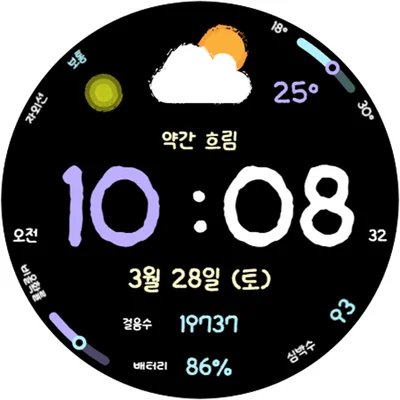
Tampilan jam digital yang jernih dengan ikon cuaca yang intuitif.
Keterbacaan: Jam digital besar dengan font unik dan ramah.
Cuaca sekilas: Ikon yang mudah dipahami untuk kondisi cuaca saat ini.
Statistik Harian: Melacak langkah Anda, detak jantung, dan level baterai.
Kesederhanaan: Tata letak minimalis yang berfokus pada informasi penting.
Fitur
• Ikon kondisi cuaca
• Bar kemajuan suhu, suhu terendah & tertinggi
• Indikator UV
• Jumlah langkah
• Persentase baterai
• Detak jantung
• 12/24 jam
• Bar kemajuan perubahan curah hujan
• Hari / Tanggal
Kustomisasi
Kustomisasi
• 16 perubahan gaya warna
• Blingking ON/OFF
• 3 pintasan aplikasi
- Mendukung Wear OS
- Mode jam tangan layar persegi tidak didukung.
***Panduan Instalasi***
Aplikasi seluler memandu Anda melalui proses instalasi tampilan jam.
Anda dapat menghapus aplikasi seluler setelah instalasi tampilan jam selesai.
1. Jam tangan dan ponsel Anda harus terhubung melalui Bluetooth.
2. Ketuk tombol "Instal" di aplikasi panduan seluler.
3. Ikuti petunjuk untuk menginstal tampilan jam. Ini hanya akan memakan waktu beberapa menit.
Anda juga dapat mencari dan menginstal tampilan jam langsung dari aplikasi Google di jam tangan Anda.
Anda juga dapat mencari dan menginstal tampilan jam dari peramban web seluler.
Kirim umpan balik: aiwatchdesign@gmail.com
Tampilkan teks asli
Readability: Large digital clock with a unique, friendly font.
Weather at a glance: Easy-to-understand icons for current conditions.
Daily Stats: Tracks your steps, heart rate, and battery level.
Simplicity: A minimalist layout that focuses on essential information.
Features
• Weather condition icon
• Temp , Low & High temperature progress bar
• UV indicator
• Step count
• Battery %
• Heart rate
• 12/24H
• Change of precipitation progress bar
• Day / Date
Customizing
Customization
• 16 Color style change
• Blingking ON/OFF
• 3 App shortcut
- Support wear OS
- Square screen watch mode is not supported.
***Installation Guide***
The mobile app guides you through the watch face installation process.
You can delete the mobile app once the watch face installation is complete.
1. Your watch and phone must be connected via Bluetooth.
2. Tap the "Install" button in the mobile guide app.
3. Follow the instructions to install the watch face. It will take only a few minutes.
You can also search for and install watch faces directly from the Google app on your watch.
You can also search for and install watch faces from a mobile web browser.
Send feedback : aiwatchdesign@gmail.com
Keamanan data
Yang dinyatakan AIwatch di Google Play tentang data yang dikumpulkan dan dibagikan aplikasi ini.
- Tidak ada data yang dibagikan kepada pihak ketigaPelajari lebih lanjut cara developer menyatakan pembagian data
- Tidak ada data yang dikumpulkanPelajari lebih lanjut cara developer menyatakan pengumpulan data
Kontak pengembang
- Situs webinstagram.com
- Emailaiwatchdesign@gmail.com
- Kebijakan Privasisites.google.com
- Alamat완정로65번안길 17 (마전동, 금호어울림아파트) 101동204호 검단구, 인천광역시 23469 South Korea
Informasi
- Ditawarkan oleh
- AIwatch
- Kategori
- Personalisasi
- Diperbarui
- 4/8/2026
- Dirilis
- 29/3/2026
- Batasan usia
- Rating 3+
- Harga
- Rp 19.000
- Nama paket
- com.watchfacestudio.awd_cloud_candy