CNRwatch020
CNRwatch- Rating 3+Batasan usia
- PersonalisasiKategori
- 18/8/2024Diperbarui
- Rp 14.000Harga
Tertaut ke halaman resmi com.watchfacestudio.cnrwatch020 di Google Play. Terakhir diperiksa pada 21/11/2026.
Tentang aplikasi ini
Terjemahan otomatis oleh Google. Bahasa asli: Inggris (Amerika Serikat).
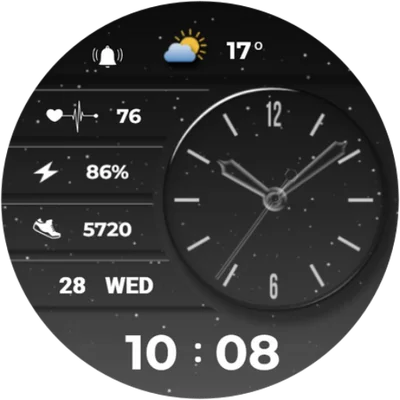
Tampilan jam untuk Wear OS
Digital - Jam Analog
1 Komplikasi
Tanggal - Jam Alarm
Langkah Pintasan
Pintasan Jantung
Pintasan Baterai
6 Pilihan Warna
CATATAN INSTALASI:
1 - Aplikasi Pendamping;
Pastikan jam tangan terhubung dengan benar ke ponsel, buka aplikasi di ponsel, ketuk gambar, lalu ikuti petunjuk di jam tangan.
ATAU
2- Aplikasi Play Store;
Pilih waktu upload Anda dari menu drop-down di sebelah kanan tombol upload.
Setelah beberapa menit, putaran jam akan disetel. Anda dapat memilih tampilan jam dari opsi Tambahkan tampilan jam.
Catatan: Jangan khawatir jika Anda terjebak dalam siklus pembayaran, hanya satu pembayaran yang akan dilakukan, meskipun Anda diminta membayar untuk kedua kalinya. Tunggu 5 menit atau mulai ulang jam tangan Anda dan coba lagi.
Mungkin ada masalah sinkronisasi antara perangkat Anda dan server Google.
Harap dicatat bahwa masalah di sisi ini TIDAK bergantung pada pengembang. Pengembang tidak memiliki kendali atas Play Store dari sisi ini.
Harap aktifkan sensor dan izin pengambilan data komplikasi secara manual untuk fungsionalitas penuh!
Terima kasih!
Tampilkan teks asli
Digital - Analog Clock
1 Complication
Date - Alarm Clock
Steps Shortcut
Heart Shortcut
Battery Shortcut
6 Color Option
INSTALLATION NOTES:
1 - Companion App;
Make sure the watch is properly connected to the phone, open the app on the phone, tap the image and then follow the instructions on the watch.
OR
2- Play Store Application;
Select your upload time from the drop-down menu to the right of the upload button.
After a few minutes, the clock dial will be set. You can select the clock view from the Add clock view option.
Note: Don't worry if you get stuck in the payment cycle, only a single payment will be made, even if you are asked to pay a second time. Wait 5 minutes or restart your watch and try again.
There may be a synchronisation issue between your device and Google servers.
Please note that problems on this side do NOT depend on the developer. The developer has no control over the Play Store from this side.
Please enable sensors and complication data retrieval permissions manually for full functionality!
Thank you!
Keamanan data
Yang dinyatakan CNRwatch di Google Play tentang data yang dikumpulkan dan dibagikan aplikasi ini.
- Tidak ada data yang dibagikan kepada pihak ketigaPelajari lebih lanjut cara developer menyatakan pembagian data
- Tidak ada data yang dikumpulkanPelajari lebih lanjut cara developer menyatakan pengumpulan data
Yang baru
Versi 1.0.0 · 18/8/2024
CNR WATCH FACES WearOS
Kontak pengembang
- Emailhircingokhan@gmail.com
- Kebijakan Privasifreeprivacypolicy.com
- AlamatGoncalar Mh. 6029 sokak No : 22 35650 Izmir Türkiye
Informasi
- Ditawarkan oleh
- CNRwatch
- Kategori
- Personalisasi
- Versi
- 1.0.0
- Diperbarui
- 18/8/2024
- Dirilis
- 4/3/2024
- Memerlukan
- Android 11 atau yang lebih baru
- Batasan usia
- Rating 3+
- Harga
- Rp 14.000
- Nama paket
- com.watchfacestudio.cnrwatch020