Daisy Bloom 3
Bloomfield Watchfaces- Rating 3+Batasan usia
- PersonalisasiKategori
- 10/2/2022Diperbarui
- Rp 15.000Harga
Tertaut ke halaman resmi com.bloomfield.daisybloom3 di Google Play. Terakhir diperiksa pada 20/11/2026.
Tentang aplikasi ini
Terjemahan otomatis oleh Google. Bahasa asli: Inggris (Amerika Serikat).
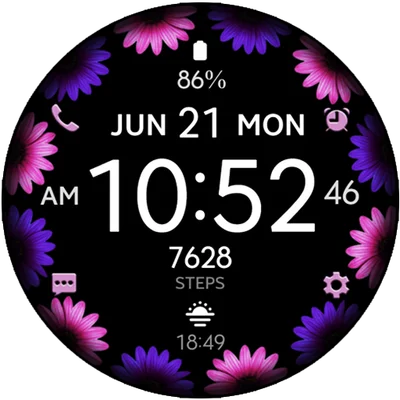
Tampilan Jam Digital Bergaya untuk Wear OS
Wajah Jam Bertema Bunga (oleh Bloomfield Watchfaces)
PENTING!
*Bloomfield Watchfaces (salin tautan tempel di bawah pada browser web untuk melihat koleksi lengkap)
https://play.google.com/store/apps/developer?id=Bloomfield+Watchfaces
* Pastikan arloji terhubung dengan benar ke telepon. Setelah beberapa menit, periksa tampilan jam yang dipasang oleh aplikasi Wearable di ponsel.
* Jika Anda mengalami masalah sinkronisasi antara ponsel Anda dan Play Store, instal aplikasi langsung dari jam tangan: cari "Daisy Bloom 3" dari Play Store di jam tangan dan tekan tombol instal.
* Jika Anda melihat pemberitahuan "Aplikasi ini tidak tersedia untuk perangkat Anda", gunakan Play Store di WEB BROWSER dari Ponsel, PC atau Laptop daripada menggunakan aplikasi play store di ponsel untuk memasang tampilan jam.
* Aktifkan semua izin dari pengaturan -> aplikasi -> izin.
* Tampilan jam ini dikembangkan dengan alat "Watch Face Studio" Samsung untuk perangkat berbasis sistem operasi Wear OS Google / One UI Samsung yang baru seperti Samsung Galaxy Watch 4.
Fitur:
-12/24 jam waktu digital (sinkronisasi otomatis, berdasarkan pengaturan telepon)
-Tanggal (Multi-bahasa)
-Penghitung langkah
-Status baterai
-Selalu-Aktif
-Pintasan Aplikasi Preset (Pengaturan, Alarm, Pesan, Telepon & Kalender)
-Warna LCD yang dapat diubah
2 Komplikasi yang Dapat Diedit :
-Menonton Baterai
-Matahari terbit Matahari terbenam
*beberapa fitur mungkin tidak tersedia di beberapa jam tangan.
Hubungi kami di: bloomfieldwatchfaces@gmail.com
Halaman Facebook: https://www.facebook.com/bloomfieldwatchfaces
Toko Galaxy: https://galaxy.store/ALwatches
Tampilkan teks asli
Flower Themed Watch Face (by Bloomfield Watchfaces)
IMPORTANT!
*Bloomfield Watchfaces (copy paste link below on a web browser to see full collection)
https://play.google.com/store/apps/developer?id=Bloomfield+Watchfaces
* Make sure the watch is properly connected to the phone. After a few minutes, check the watch faces installed by the Wearable app on the phone.
* If you are having synchronization problems between your phone and Play Store, install the app directly from watch: search "Daisy Bloom 3" from Play Store on watch and hit on install button.
* If you see a notice "This app is not available for your device", use Play Store on a WEB BROWSER from Phone, PC or Laptop instead of using the play store app on phone to install watch face.
* Enable all permissions from settings -> applications -> permissions.
* This watch face was developed with Samsung's "Watch Face Studio" tool for devices based on the new Wear OS Google / One UI Samsung operating system like Samsung Galaxy Watch 4.
Features:
-12/24hr digital time (auto-sync, based on phone settings)
-Date (Multi-language)
-Step counter
-Battery status
-Always-On
-Preset App Shortcuts (Settings, Alarm, Messages, Phone & Calendar)
-Changeable LCD colors
2 Editable Complications :
-Watch Battery
-Sunrise Sunset
*some features may not be available on some watches.
Contact us at: bloomfieldwatchfaces@gmail.com
Facebook Page: https://www.facebook.com/bloomfieldwatchfaces
Galaxy Store: https://galaxy.store/ALwatches
Keamanan data
Yang dinyatakan Bloomfield Watchfaces di Google Play tentang data yang dikumpulkan dan dibagikan aplikasi ini.
- Tidak ada data yang dibagikan kepada pihak ketigaPelajari lebih lanjut cara developer menyatakan pembagian data
- Tidak ada data yang dikumpulkanPelajari lebih lanjut cara developer menyatakan pengumpulan data
Kontak pengembang
- Situs webfacebook.com
- Emailbloomfieldwatchfaces@gmail.com
- Kebijakan Privasisites.google.com
- Alamat0015 BLOCK 5 BLK Beverly Homes Hugo Perez, Trece Martirez City 4109 Philippines
Informasi
- Ditawarkan oleh
- Bloomfield Watchfaces
- Kategori
- Personalisasi
- Versi
- 1.0
- Diperbarui
- 10/2/2022
- Dirilis
- 10/2/2022
- Memerlukan
- Android 9 atau yang lebih baru
- Batasan usia
- Rating 3+
- Harga
- Rp 15.000
- Nama paket
- com.bloomfield.daisybloom3