GRBL Weather 2
Grubel- Rating 3+Batasan usia
- PersonalisasiKategori
- 8/10/2026Diperbarui
- Rp 13.000Harga
Tertaut ke halaman resmi com.grbl.weather2 di Google Play. Terakhir diperiksa pada 22/11/2026.
Tentang aplikasi ini
Terjemahan otomatis oleh Google. Bahasa asli: Inggris (Amerika Serikat).
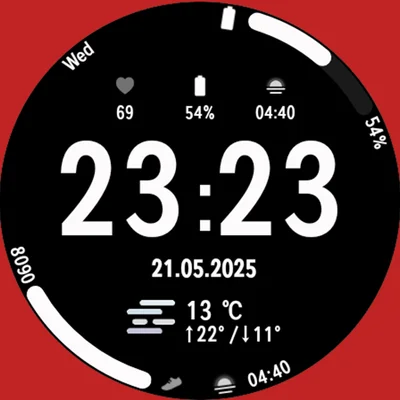
Tampilan jam modern dengan ikon cuaca khusus Dirancang untuk Wear OS
📢 KETIKA ANDA TIDAK DAPAT MELIHAT KOMPLIKASI CUACA SETELAH MEMASANG TAMPILAN JAM:
- HARAP PERBARUI CUACA SECARA MANUAL DI JAM
JIKA ITU TIDAK BERHASIL:
- HARAP GANTI KE TAMPILAN JAM LAIN LALU GANTI KEMBALI KE YANG INI
Didesain untuk Wear OS
FITUR:
✅ Mendukung AM/PM, 12H/24H, C° & F°
✅ 7 komplikasi kustom (termasuk 2 bilah)
✅ Ikon cuaca kustom (untuk siang dan malam)
✅ Tanggal (format berubah berdasarkan lokasi pengguna)
✅ AOD dengan warna yang sesuai dengan tema
✅13 tema
Jika Anda menghadapi masalah, silakan hubungi kami di grubel.watchfaces@gmail.com. Kami akan dengan senang hati memberikan tangkapan layar dan petunjuk langkah demi langkah untuk membantu Anda memasang tampilan jam.
📢Tampilan jam tidak berubah secara otomatis setelah pemasangan. Untuk mengaturnya, kembali ke tampilan awal, ketuk dan tahan, geser ke ujung, dan ketuk ‘+’ untuk menambahkan tampilan jam. Gunakan bezel untuk menemukannya.
Pengembang Samsung menawarkan video bermanfaat yang menunjukkan berbagai cara untuk memasang tampilan jam Wear OS:
🎬 https://youtu.be/vMM4Q2-rqoM
📢APLIKASI PENDAMPING TIDAK MENGINSTAL TAMPILAN JAM DI JAM ANDA. APLIKASI INI HANYA MEMBUKA DAFTAR PLAY STORE DI JAM ANDA, YANG DAPAT ANDA INSTAL SENDIRI.
HARAP BACA PETUNJUK DI BAWAH.
Ada dua cara untuk memasang tampilan jam ini ke perangkat WearOS Anda:
Dari APLIKASI PLAY STORE:
1. Gunakan menu tarik-turun dan pilih perangkat target pada APLIKASI PLAY STORE:
setelah beberapa menit tampilan jam akan ditransfer ke jam.
2- AKTIFKAN TAMPILAN JAM:
Setelah terpasang, Anda perlu mengaktifkan tampilan jam.
Tekan lama layar, geser ke kiri dan ketuk "TAMBAHKAN TAMPILAN JAM" untuk mengaktifkannya.
Dari SITUS WEB PLAY STORE:
1 - Buka tautan tampilan jam melalui Peramban Web di PC/Mac seperti Chrome, Safari (dll.). Anda dapat mencari nama tampilan jam di Play Store.
Klik "Instal di lebih banyak perangkat" dan pilih perangkat target:
setelah beberapa menit tampilan jam akan ditransfer ke jam.
2- AKTIFKAN TAMPILAN JAM:
Setelah terpasang, Anda perlu mengaktifkan tampilan jam. Tekan layar lama, geser ke kiri dan ketuk "TAMBAHKAN WATCH
FACE" untuk mengaktifkannya.
untuk API 34+
📢 Ingat, jika Anda ingin jam tangan Anda menampilkan status baterai ponsel, Anda harus memasang aplikasi Phone Battery Complication
DISCLAIMER
📢 Setiap perangkat menawarkan komplikasi kustom yang berbeda, dan pilihannya bervariasi menurut aplikasi pihak ketiga. Komplikasi kustom yang ditampilkan di tangkapan layar toko berasal dari aplikasi pihak ketiga - Phone Battery Complication
Penulis ikon: Rasmus Nielsen (https://www.iconfinder.com/rasmusnielsendk)
Tampilkan teks asli
📢 WHEN YOU CAN'T SEE THE WEATHER COMPLICATION AFTER INSTALLING THE WATCH FACE:
- PLEASE UPDATE THE WEATHER MANUALLY ON THE WATCH
IF THAT DOESNT WORK:
- PLEASE SWITCH TO OTHER WATCH FACE THEN SWITCH BACK TO THIS ONE
Designed for Wear OS
FEATURES:
✅ Supports AM/PM, 12H/24H, C° & F°
✅ 7 custom complications (including 2 bars)
✅ Custom weather icons (for day and night)
✅ Date (format change based on user's locale)
✅ AOD with theme-matching colors
✅13 themes
If you face any problem, please reach out to us at grubel.watchfaces@gmail.com. We’ll gladly provide screenshots and step-by-step instructions to help you install the watch face.
📢Watch faces do not change automatically after installation. To set it up, return to the home display, tap and hold, swipe to the end, and tap ‘+’ to add the watch face. Use the bezel to find it.
Samsung Developers offer a helpful video showing multiple ways to install a Wear OS watch face:
🎬 https://youtu.be/vMM4Q2-rqoM
📢THE COMPANION APP DOES NOT INSTALL THE WATCH FACE ON YOUR WATCH. IT ONLY OPENS THE PLAY STORE LISTING ON YOUR WATCH, WHERE YOU CAN INSTALL IT YOURSELF.
PLEASE READ INSTRUCTIONS BELOW.
There are two ways to install this watchaface to your WearOS device:
From PLAY STORE APP:
1. Use the drop-down menu and select the target
device on the PLAY STORE APP:
after a few minutes the watch face will transferred on
watch.
2- ACTIVATE WATCH FACE:
Once installed, you need to activate the watch face.
Long press screen, swipe left and tap "ADD WATCH
FACE" to activate it.
From PLAY STORE WEBSITE:
1 - Go to the watch face link through a Web Browser on
PC / Mac such as Chrome, Safari (etc.). You can search
the watch face name on Play Store.
Click on "Install on more devices" and select the target
device:
after a few minutes the watch face will transferred on
watch.
2- ACTIVATE WATCH FACE:
Once installed, you need to activate the watch face.
Long press screen, swipe left and tap "ADD WATCH
FACE" to activate it.
for API 34+
📢 Remember , if you want your watch to show phone's battery status, you should install Phone Battery Complication app
DISCLAIMER
📢 Each device offers different custom complications, and selection varies by third-party apps. Custom complications shown in store screenshots come from third-party app - Phone Battery Complication
Icons author: Rasmus Nielsen (https://www.iconfinder.com/rasmusnielsendk)
Keamanan data
Yang dinyatakan Grubel di Google Play tentang data yang dikumpulkan dan dibagikan aplikasi ini.
- Tidak ada data yang dibagikan kepada pihak ketigaPelajari lebih lanjut cara developer menyatakan pembagian data
- Tidak ada data yang dikumpulkanPelajari lebih lanjut cara developer menyatakan pengumpulan data
Kontak pengembang
- Situs webgrubelwatchfaces.com
- Emailgrubel.watchfaces@gmail.com
- Kebijakan Privasisites.google.com
- AlamatJuliana Tuwima 20/8a 90-002 Łódź Poland
Informasi
- Ditawarkan oleh
- Grubel
- Kategori
- Personalisasi
- Diperbarui
- 8/10/2026
- Dirilis
- 23/5/2025
- Batasan usia
- Rating 3+
- Harga
- Rp 13.000
- Nama paket
- com.grbl.weather2