JND0091
JacoNaudeDesign- Rating 3+Batasan usia
- PersonalisasiKategori
- 23/8/2025Diperbarui
- Rp 21.000Harga
Tertaut ke halaman resmi com.watchfacestudio.jnd0091 di Google Play. Terakhir diperiksa pada 24/11/2026.
Tentang aplikasi ini
Terjemahan otomatis oleh Google. Bahasa asli: Inggris (Inggris Raya).
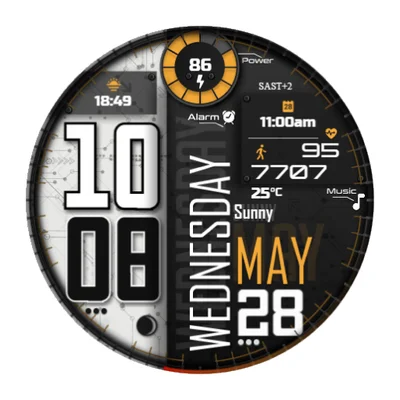
JND0091 adalah tampilan jam digital berkualitas tinggi yang terperinci untuk Wear OS.
Tampilan jam ini kompatibel dengan perangkat Wear OS 5+ dengan API Level 34+, termasuk Samsung Galaxy Watch 5, 6, 7, Ultra, Pixel Watch, dan lainnya.
JND0091 adalah tampilan jam digital berkualitas tinggi dengan banyak opsi penyesuaian dan desain yang mendetail. Fitur-fiturnya meliputi, 6x Opsi Warna, 3x Opsi Warna Belakang, 4x Pintasan, 2x Pintasan yang Dapat Disesuaikan, 2x Komplikasi yang Dapat Disesuaikan, Fase Bulan, Suhu, Cuaca, Baterai, Tanggal, Zona Waktu, Langkah & Detak Jantung.
Tampilan gelap yang selalu aktif memastikan gaya dan masa pakai baterai yang hebat.
Beberapa fitur mungkin tidak tersedia di semua jam tangan dan dial ini tidak cocok untuk jam tangan persegi atau persegi panjang.
FITUR
- Format 12/24 jam: Disinkronkan dengan pengaturan ponsel Anda.
- Celsius dan Fahrenheit Disinkronkan dengan pengaturan lokasi ponsel Anda.
- Tanggal.
- Zona Waktu.
- Fase Bulan.
- Suhu.
- Informasi Cuaca. - Informasi Baterai.
- Pemantauan Langkah dan Denyut Jantung.
- 6x Pilihan Warna Berbeda.
- 3x Pilihan Warna Belakang.
- 2x Pintasan yang Dapat Disesuaikan.
- 2x Komplikasi yang Dapat Disesuaikan.
- Mode Always On Display yang Mirip.
- 4x Pintasan Aplikasi Preset:
Kalender
Info Baterai
Pemutar Musik
Alarm
CATATAN INSTALASI:
1 - Pastikan jam tangan dan ponsel terhubung dengan benar.
2 - Pilih perangkat target dari menu drop down di Play Store dan pilih Jam Tangan dan Ponsel.
3. Di ponsel Anda, Anda dapat membuka Aplikasi Pendamping dan mengikuti petunjuknya.
Setelah beberapa menit, tampilan jam akan ditransfer ke jam tangan: periksa tampilan jam yang diinstal oleh aplikasi Wearable di ponsel.
CATATAN PENTING:
Harap Pastikan Anda telah mengaktifkan semua izin dari pengaturan > aplikasi. Dan juga saat diminta setelah menginstal tampilan dan saat menekan lama untuk menyesuaikan komplikasi.
INFORMASI TENTANG DENYUT JANTUNG:
Saat pertama kali Anda menggunakan tampilan jam atau mengenakannya, denyut jantung akan diukur. Setelah pengukuran pertama, tampilan jam akan secara otomatis mengukur denyut jantung Anda setiap 10 menit.
Untuk bantuan apa pun, silakan hubungi kami di support@jaconaudedesign.com
Hubungi saya di saluran lain untuk mendapatkan ide dan promosi serta rilis baru.
WEB: www.jaconaudedesign.com
INSTAGRAM: https://www.instagram.com/jaconaude2020/
Terima kasih dan selamat menikmati.
Tampilkan teks asli
This watch face is compatible with Wear OS 5+ devices with API Level 34+, including Samsung Galaxy Watch 5, 6, 7, Ultra, Pixel Watch, and others.
The JND0091 is a high quality digital watch face with a lot of customization options and a detailed design. Features include, 6x Color Options, 3x Back Color Options, 4x Shortcuts, 2x Customizable shortcuts, 2x Customizable Complications, Moon Phase, Temperature, Weather, Battery, Date, Time Zone, Steps & Heart rate.
A dark always on display ensures great style and battery life.
Some features may not be available on all watches and this dial is not suitable for square or rectangular watches.
FEATURES
- 12/24hr Format: Syncs with your phone settings.
- Celsius and Fahrenheit Syncs with your phone location settings.
- Date.
- Time Zone.
- Moon Phase.
- Temperature.
- Weather Information.
- Battery Information.
- Steps and Heart Rate Monitoring.
- 6x Different Color Options.
- 3x Back Color Options.
- 2x Customizable Shortcuts.
- 2x Customizable Complications.
- Similar Always On Display Mode.
- 4x Preset App Shortcuts:
Calendar
Battery Info
Music Player
Alarms
INSTALLATION NOTES:
1 - Make sure the watch and phone is properly connected.
2 - Select target device from drop down in Play Store and select both Watch and Phone.
3. On your phone you can open up the Companion App and follow the instructions.
After a few minutes the watch face will transferred on watch : check the watch faces installed by the Wearable app on the phone.
IMPORTANT NOTE:
Please Make sure you have enabled all permissions from settings > applications. And also when prompted after installing face and when long pressing to customize complication.
INFORMATION ON HEART RATE:
The first time you use the face or put on the watch the heart rate is measured. After the first measurement, the watch face will automatically measure your heart rate every 10 minutes.
For any assistance please reach out to us at support@jaconaudedesign.com
Reach out to me on my other channels for ideas and promotions plus new releases.
WEB: www.jaconaudedesign.com
INSTAGRAM: https://www.instagram.com/jaconaude2020/
Thank you and enjoy.
Keamanan data
Yang dinyatakan JacoNaudeDesign di Google Play tentang data yang dikumpulkan dan dibagikan aplikasi ini.
- Tidak ada data yang dibagikan kepada pihak ketigaPelajari lebih lanjut cara developer menyatakan pembagian data
- Tidak ada data yang dikumpulkanPelajari lebih lanjut cara developer menyatakan pengumpulan data
Kontak pengembang
- Situs webjaconaudedesign.com
- Emailjaco1301@gmail.com
- Kebijakan Privasijaconaudedesign.com
- AlamatSerenade Rd, BARVALLEN 7 Villa Heunis PRIMROSE EAST Johannesburg 1401 South Africa
Informasi
- Ditawarkan oleh
- JacoNaudeDesign
- Kategori
- Personalisasi
- Diperbarui
- 23/8/2025
- Dirilis
- 25/5/2025
- Batasan usia
- Rating 3+
- Harga
- Rp 21.000
- Nama paket
- com.watchfacestudio.jnd0091