Lavanda - Flowers
CHESTER WATCH FACES- Rating 3+Batasan usia
- PersonalisasiKategori
- 15/10/2026Diperbarui
- Rp 30.000Harga
Tertaut ke halaman resmi com.watchfacestudio.lavandaflowers di Google Play. Terakhir diperiksa pada 14/11/2026.
Tentang aplikasi ini
Terjemahan otomatis oleh Google. Bahasa asli: Inggris (Amerika Serikat).
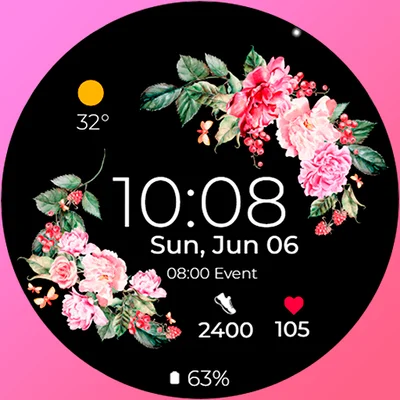
Tampilan jam bermotif bunga dengan detak jantung & langkah. Hanya untuk jam tangan Wear OS 6+ berbentuk bulat.
Tampilan jam Lavanda - Flowers yang stylish!
CARA INSTALASI (3 langkah)
1. Sebelum membeli, pastikan jam tangan Anda menjalankan Wear OS 6+ dan terhubung ke ponsel Anda dengan akun Google yang sama.
2. Di halaman ini, ketuk panah ▼ di sebelah tombol Beli/Instal dan pilih JAM TANGAN Anda sebagai perangkat (bukan hanya ponsel Anda). Cara termudah: beli langsung di Google Play di jam tangan Anda.
3. Di jam tangan Anda, sentuh dan tahan tampilan jam saat ini, geser ke akhir daftar, ketuk "Tambahkan tampilan jam" dan pilih Lavanda - Flowers.
Tidak muncul setelah beberapa menit? Pastikan ponsel dan jam tangan tetap online dan buka Google Play di jam tangan. Panduan lengkap: https://chesterwf.com/installation-instructions/
Jika jam tangan meminta untuk membayar lagi, periksa apakah jam tangan menggunakan akun Google yang sama.
KOMPATIBILITAS: hanya untuk jam tangan pintar Wear OS 6+ bulat (tidak untuk jam tangan persegi panjang). TIDAK berfungsi pada jam tangan pintar atau gelang kebugaran yang tidak menjalankan Wear OS.
Fungsi utama tampilan jam:
- Tanggal, bulan, dan hari dalam seminggu.
- Detak jantung (diukur secara otomatis setiap jam; ketuk bacaan untuk mengukur secara manual).
- Langkah kaki per hari.
- Dua zona untuk memilih aplikasi agar mudah diakses.
- Dua zona komplikasi untuk menampilkan informasi yang dipilih.
- Enam belas warna teks.
- Lima warna lentera.
- Dua mode Always On Display (AOD).
- Multibahasa.
Semoga Anda menikmati tampilan jam ini di jam tangan Anda!
Lihat tampilan jam kami lainnya di Google Play Store:
https://play.google.com/store/apps/dev?id=6421855235785006640
Dukungan:
- Silakan hubungi info@chesterwf.com
Tampilkan teks asli
Stylish Lavanda - Flowers watch face!
HOW TO INSTALL (3 steps)
1. Before buying, make sure your watch runs Wear OS 6+ and is connected to your phone with the same Google account.
2. On this page, tap the ▼ arrow next to the Buy/Install button and select your WATCH as the device (not only your phone). Simplest way: buy it directly in Google Play on your watch.
3. On your watch, touch and hold the current watch face, swipe to the end of the list, tap "Add watch face" and choose Lavanda - Flowers.
Not showing up after a few minutes? Keep both phone and watch online and open Google Play on the watch. Full guide: https://chesterwf.com/installation-instructions/
If the watch asks to pay again, check that it uses the same Google account.
COMPATIBILITY: round Wear OS 6+ smartwatches only (not for rectangular watches). Does NOT work on smartwatches or fitness bands that don't run Wear OS.
The main functions of the watch face:
- Date, month and day of the week.
- Heart rate (measured automatically once an hour; tap the reading to measure manually).
- Steps walked per day.
- Two zones to select apps for quick access.
- Two complication zones to display selected information.
- Sixteen text colors.
- Five colors of lanterns.
- Two AOD modes.
- Multilingual.
I hope you enjoy wearing this watch face on your watch!
Check out our other watch faces on the Google Play Store:
https://play.google.com/store/apps/dev?id=6421855235785006640
Support:
- Please contact info@chesterwf.com
Keamanan data
Yang dinyatakan CHESTER WATCH FACES di Google Play tentang data yang dikumpulkan dan dibagikan aplikasi ini.
- Tidak ada data yang dibagikan kepada pihak ketigaPelajari lebih lanjut cara developer menyatakan pembagian data
- Tidak ada data yang dikumpulkanPelajari lebih lanjut cara developer menyatakan pengumpulan data
Kontak pengembang
- Emailira.ivannikova2002@gmail.com
- Kebijakan Privasisites.google.com
- Alamatул. Ярославская, 8 14 090000 Уральск Kazakhstan
Informasi
- Ditawarkan oleh
- CHESTER WATCH FACES
- Kategori
- Personalisasi
- Diperbarui
- 15/10/2026
- Dirilis
- 10/7/2022
- Batasan usia
- Rating 3+
- Harga
- Rp 30.000
- Nama paket
- com.watchfacestudio.lavandaflowers