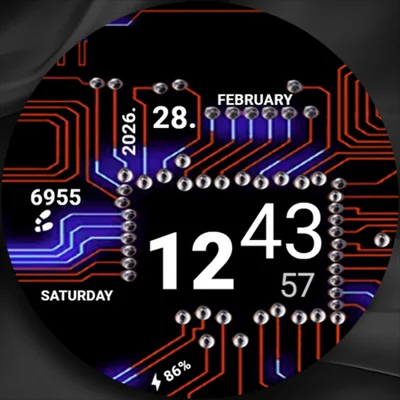
Microchip
Freiberg watches- Rating 3+Batasan usia
- PersonalisasiKategori
- 9/8/2026Diperbarui
- GratisHarga
Tertaut ke halaman resmi com.watchfacestudio.microchip di Google Play. Terakhir diperiksa pada 25/11/2026.
Tentang aplikasi ini
Terjemahan otomatis oleh Google. Bahasa asli: Inggris (Amerika Serikat).
Tampilan Wear OS Watch animasi
Tampilan jam Wear OS.
Aplikasi pendamping layar jam Wear OS untuk Ponsel:
Segera setelah menginstal aplikasi seluler, sebuah pesan akan muncul saat Anda membuka aplikasi.
Anda perlu mengetuk gambar tampilan jam untuk memulai proses pemasangan tampilan jam di jam Anda (Untuk mempercepat koneksi dan pemuatan, buka aplikasi GALAXY WEARABLE atau program manajemen jam lainnya. Pengunduhan ke jam Anda akan segera dimulai.).
Setelah proses instalasi selesai, aplikasi pendamping dapat dihapus.
Setelah instalasi, telusuri pustaka tampilan jam untuk menemukan tampilan layar.
PENTING SETELAH INSTALASI - setelah instalasi, ponsel akan membuka tautan pengembalian dana yang akan terlihat di jam. Untuk menemukan tampilan jam, jangan tekan pengembalian dana dan telusuri pustaka tampilan jam untuk menemukan tampilan jam
Fitur Utama:
- Tampilan Jam Animasi (Tampilan animasi. Animasi dapat dimatikan.)
- Penanda AM/PM (Untuk format waktu 12 jam).
- Tampilan jam digital dapat dialihkan ke 12/24 jam melalui Pengaturan Ponsel.
- Tanggal.
- Langkah (tidak dapat diubah atau dihapus)
- Status level baterai.
- Warna yang dapat diubah (ketuk & tahan untuk menyesuaikan & mengubah warna)
- Akses cepat ke Alarm.
- Akses cepat ke kalender.
- Akses cepat ke baterai.
- Akses cepat ke 3 pintasan khusus (Ketuk & tahan untuk menyesuaikan & mengubah pintasan Tersembunyi ke tindakan yang Anda pilih).
- Selalu ditampilkan.
Catatan:
Email untuk umpan balik dan saran ===> freibergclockfaces@gmail.com
Tampilkan teks asli
Wear OS clock face.
Wear OS watch screen companion app for Phone:
Immediately after installing the mobile application, a message will appear when you open the application.
You need to tap on the watch face image to start the process of installing the watch face on your watch (To speed up connection and loading, open the GALAXY WEARABLE app or other clock management program. Downloading to your watch will begin immediately.).
Once the installation process is complete, the companion app can be deleted.
After installation, browse the watch face library to find the screen face.
IMPORTANT AFTER INSTALLATION - after installation, the phone will open a refund link that will be visible on the watch. To find a watch face don't press refund and browse the watch face library to find a watch face
Main Features:
- Animated Watch face (Animated display. The animation can be turned off. )
- AM/PM marker (For 12-hour time format).
- Digital watch face switchable to 12/24 hour via Phone Settings.
- Date.
- Steps (cannot be changed or removed)
- Battery level status.
- Changeable colors (tap & hold to customize & change colors)
- Quick access to Alarm.
- Quick access to the calendar.
- Quick access to the battery.
- Quick access to 3 custom shortcuts(Tap & hold to customize & change Hidden shortcut to your chosen action).
- Always on display.
Note:
Email for feedback and suggestions ===> freibergclockfaces@gmail.com
Keamanan data
Yang dinyatakan Freiberg watches di Google Play tentang data yang dikumpulkan dan dibagikan aplikasi ini.
- Tidak ada data yang dibagikan kepada pihak ketigaPelajari lebih lanjut cara developer menyatakan pembagian data
- Tidak ada data yang dikumpulkanPelajari lebih lanjut cara developer menyatakan pengumpulan data
- Berkomitmen untuk mematuhi Kebijakan Keluarga Play
Kontak pengembang
- Emailfreibergclockfaces@gmail.com
- Kebijakan Privasisites.google.com
- AlamatKokneses pagasts, Burtnieki Aizkraukles novads, Latvija, LV-5113 Latvia
Informasi
- Ditawarkan oleh
- Freiberg watches
- Kategori
- Personalisasi
- Diperbarui
- 9/8/2026
- Dirilis
- 16/4/2023
- Batasan usia
- Rating 3+
- Harga
- Gratis
- Nama paket
- com.watchfacestudio.microchip
Aplikasi serupa
-
 Gamer RGB Lights LED Rainbow
Personalisasi
-
 Digital watch face D28
Personalisasi
-
 VJ-PCB DİGİTAL WATCH FACE
Personalisasi
-
 Quantum Design Watch Face
Personalisasi
-
 Green Circuit Watch Face
Personalisasi
-
 Hybrid Watch Face CUE176
Personalisasi
-
 Purple Gorgeous For Wear OS
Personalisasi
-
 Watch Face I6
Personalisasi
-
 SH024 Watch Face, WearOS watch
Personalisasi
-
 Pixelated Watch Face GTR3
Personalisasi
-
 Watch
Personalisasi
-
 Watch Face WF101
Personalisasi