SD153S
Speedydesign- Rating 3+Batasan usia
- PersonalisasiKategori
- 11/8/2026Diperbarui
- Rp 24.000Harga
Tertaut ke halaman resmi com.watchfacestudio.sd153S di Google Play. Terakhir diperiksa pada 13/11/2026.
Tentang aplikasi ini
Terjemahan otomatis oleh Google. Bahasa asli: Inggris (Amerika Serikat).
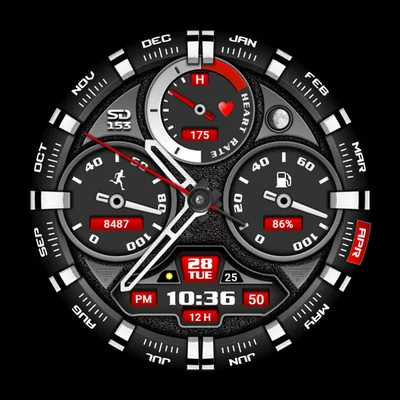
Jam tangan olahraga analog
Tampilan jam analog bergaya kronograf yang sporty dan multifungsi, dilengkapi dengan fitur detak jantung, penghitung langkah, dan banyak fungsi lainnya. Untuk melengkapi pengalaman, Anda juga memiliki dua pintasan. Belum lagi kustomisasi penuh dengan pilihan warna.
CATATAN INSTALASI:
Silakan periksa tautan ini untuk panduan instalasi dan pemecahan masalah: https://speedydesign.it/installazione
Tampilan jam ini mendukung semua perangkat Wear OS.
Deskripsi:
• Waktu analog
• Waktu digital 12/24 jam
• Tanggal & Hari
• Bulan
• Fase bulan
• Level baterai + persentase
• Jumlah langkah + persentase
• Detak jantung + interval
• Kondisi cuaca saat ini + suhu
• Pintasan
• Jarum malam
• AOD
Dapat Dikustomisasi:
x 05 Warna tampilan
x 05 Warna indeks
x 05 Warna bulan
x 05 Warna jarum malam
x 02 Pintasan
Kustomisasi tampilan:
1 - Sentuh dan tahan layar
2 - Ketuk opsi Kustomisasi
Komplikasi Tampilan:
Anda dapat mengkustomisasi tampilan dengan semua data yang Anda inginkan.
Misalnya, Anda dapat memilih cuaca, detak jantung, barometer, dll.
Catatan tentang detak jantung:
Tampilan jam tidak secara otomatis mengukur dan tidak secara otomatis menampilkan hasil detak jantung saat dipasang.
Untuk melihat data detak jantung saat ini pada tampilan jam, Anda perlu melakukan pengukuran manual.
Untuk melakukan ini, ketuk area tampilan detak jantung.
Tunggu beberapa detik. Tampilan jam akan melakukan pengukuran dan menampilkan hasilnya.
Pastikan Anda telah mengaktifkan penggunaan sensor saat memasang tampilan jam, jika tidak, ganti dengan tampilan jam lain lalu kembali ke tampilan jam ini untuk mengaktifkan sensor.
Setelah pengukuran manual pertama, tampilan jam dapat secara otomatis mengukur detak jantung Anda setiap 10 menit. Pengukuran manual juga akan dimungkinkan.
(Beberapa fitur mungkin tidak tersedia pada beberapa jam tangan).
TETAP PANTAU:
newsletter@speedydesign.it
SPEEDYDESIGN:
https://www.speedydesign.it
FACEBOOK:
https://www.facebook.com/Speedy-Design-117708058358665
INSTAGRAM:
https://www.instagram.com/speedydesign.ita/
Terima kasih!
Tampilkan teks asli
Sporty, multifunctional analog chronograph-style dial, heart rate, step counting, and many other functions are all included. To complete the experience, you also have two shortcuts. Not to mention the complete customization with its colors.
INSTALLATION NOTES:
Please check this link for installation and troubleshooting guide: https://speedydesign.it/installazione
This watch face supports all Wear OS devices.
Description:
• Analog time
• Digital time 12/24 hour
• Date & Day
• Month
• Moon phase
• Battery level + percentage
• Steps count + percentage
• Heart rate + interval
• Current weather conditions + temperature
• Shortcut
• Night Hand
• AOD
Customizable:
x 05 Display colors
x 05 Index colors
x 05 Month colors
x 05 Night hand colors
x 02 Shortcut
Dial customization:
1 - Touch and hold the display
2 - Tap on the Customize option
Dial Complications:
you can customize the dial with all the data you want.
For example, you can select weather, heart rate, barometer etc.
Notes on heart rate:
The watch face does not automatically measure and does not automatically display the heart rate result when installed.
To see current heart rate data on the dials, you will need to take a manual measurement.
To do this, tap the heart rate display area.
Wait a few seconds. The dial will take a measurement and display the current result.
Make sure you enabled the use of sensors when you installed the watch face, otherwise swap it with another watch face and then go back to this one to enable the sensors.
After the first manual measurement, the dial can automatically measure your heart rate every 10 minutes. Manual measurement will also be possible.
(Some features may not be available on some watches).
STAY TUNED:
newsletter@speedydesign.it
SPEEDYDESIGN:
https://www.speedydesign.it
FACEBOOK:
https://www.facebook.com/Speedy-Design-117708058358665
INSTAGRAM:
https://www.instagram.com/speedydesign.ita/
Thank you !
Keamanan data
Yang dinyatakan Speedydesign di Google Play tentang data yang dikumpulkan dan dibagikan aplikasi ini.
- Tidak ada data yang dibagikan kepada pihak ketigaPelajari lebih lanjut cara developer menyatakan pembagian data
- Tidak ada data yang dikumpulkanPelajari lebih lanjut cara developer menyatakan pengumpulan data
Yang baru
Versi 1.0.0 · 11/8/2026
- Initial release
Kontak pengembang
- Situs webspeedydesign.it
- Emailsupport@speedydesign.it
- Kebijakan Privasispeedydesign.it
- AlamatVia dell'Alpino, 33 33047 Remanzacco Italy
Informasi
- Ditawarkan oleh
- Speedydesign
- Kategori
- Personalisasi
- Versi
- 1.0.0
- Diperbarui
- 11/8/2026
- Dirilis
- 7/5/2026
- Batasan usia
- Rating 3+
- Harga
- Rp 24.000
- Nama paket
- com.watchfacestudio.sd153S