Silver Classic Watch Face
Pars Watch Faces- Rating 3+Batasan usia
- PersonalisasiKategori
- 5/10/2026Diperbarui
- Rp 12.000Harga
Tertaut ke halaman resmi com.watchfacestudio.silverclassicneu di Google Play. Terakhir diperiksa pada 13/11/2026.
Tentang aplikasi ini
Terjemahan otomatis oleh Google. Bahasa asli: Inggris (Amerika Serikat).
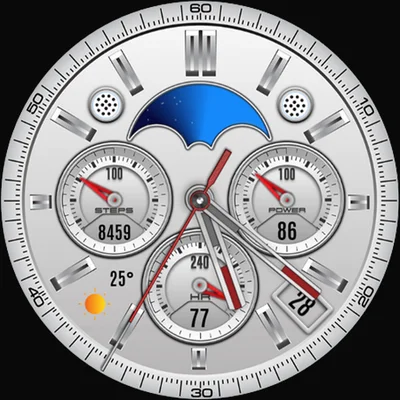
Tampilan Jam Klasik Perak. Kecanggihan Perak, Fungsionalitas Cerdas.
Tingkatkan tampilan jam tangan Anda dengan tampilan jam analog ramping berlatar belakang perak yang elegan dan tata letak yang cerdas dan informatif. Dirancang untuk keanggunan dan efisiensi, tampilan jam ini mencakup fitur-fitur bermanfaat seperti tanggal, langkah, baterai, dan lainnya — semuanya terintegrasi dengan mulus ke dalam desain analog klasik.
Tampilan Jam Silver Classic kompatibel dengan semua jam tangan yang menggunakan Wear OS SDK 34 dan API 34+.
CATATAN PENTING: Aplikasi pendamping yang terpasang di ponsel Anda hanya untuk tujuan informasi. Tampilan jam akan otomatis terpasang di jam tangan Anda. Anda hanya perlu mengaktifkan bagian "Selalu Atur Tampilan Jam" dari menu pengaturan di aplikasi Play Store pada jam tangan Anda. Ini akan secara otomatis menampilkan tampilan jam di layar beranda. Untuk informasi selengkapnya, silakan periksa tautan di bawah ini.
https://www.parswatchfaces.com/set/
PERHATIAN: Pada beberapa merek dan model jam tangan, fungsi khusus untuk jam tangan seri Samsung Galaxy mungkin tidak berfungsi.
* Silakan periksa gambar tampilan jam untuk informasi selengkapnya.
CATATAN:
- Pastikan Anda telah mengizinkan sensor akses. - Target langkah ditetapkan ke 10 ribu.
- Mengaktifkan pedometer dengan mengeklik teks Pedometer mungkin tidak berfungsi pada beberapa model jam tangan selain model jam tangan Samsung.
- Tampilan jam ini kompatibel dengan Samsung Galaxy Watch 4, Watch 5, Watch 6, Watch 7, Pixel Watch, dll. Mendukung semua perangkat Wear OS dengan API Level 30+.
CATATAN PEMASANGAN:
1 - Pastikan jam tangan terhubung dengan benar ke ponsel.
Aplikasi Ponsel hanya berfungsi sebagai pengganti untuk memudahkan pengaturan dan menemukan tampilan jam di jam tangan Wear OS Anda.
NB: Jika Anda mengalami kendala dalam siklus pembayaran, jangan khawatir, hanya satu pembayaran yang akan dilakukan meskipun Anda diminta membayar untuk kedua kalinya. Tunggu 5 menit atau mulai ulang jam tangan Anda dan coba lagi.
Mungkin ada masalah sinkronisasi antara perangkat Anda dan server Google.
atau
2 - Atau, coba pasang tampilan jam dari peramban web di PC Anda.
PS: Saat memasang tampilan jam, pengembang tidak memiliki kendali apa pun atas pemasangan tersebut.
Sebelum menulis komentar negatif atau memberikan peringkat bintang 1, harap baca Panduan Pemasangan dengan saksama pada tautan di bawah ini dan hubungi kami melalui email jika Anda mengalami masalah lain.
https://www.parswatchfaces.com/installation-guide/
CATATAN: Jika Anda mendapatkan pesan "Perangkat Anda tidak kompatibel" alih-alih aplikasi di ponsel, silakan gunakan Play Store di peramban WEB dari PC atau Laptop.
PEMBERITAHUAN PENTING:
Setelah pemasangan, tampilan jam dapat memuat hasil pengukuran detak jantung terakhir, tetapi tidak harus.
Tampilan jam tidak mengukur dan tidak secara otomatis menampilkan hasil detak jantung.
Untuk melihat skor detak jantung Anda saat ini, Anda perlu melakukan pengukuran manual.
Untuk melakukannya, duduk diam, tunggu beberapa menit, lalu klik area tampilan detak jantung.
Tunggu beberapa detik. Tampilan jam akan melakukan pengukuran dan menampilkan hasil saat ini.
Lakukan ini kapan pun Anda ingin melihat detak jantung Anda saat ini.
KATALOG WATCH FACES SAYA
https://play.google.com/store/apps/dev?id=7655501335678734997
IKUTI KAMI:
FACEBOOK
https://www.facebook.com/profile.php?id=100078915463662
INSTAGRAM
https://www.instagram.com/parswf/
TELEGRAM
https://t.me/parswatchfaces
Jika Anda memiliki pertanyaan, silakan hubungi saya: info@parswatchfaces.com
Saya akan sangat berterima kasih atas penilaian dan ulasan Anda di Store.
Terima kasih.
Tampilkan teks asli
Elevate your wrist with a sleek analog watch face featuring a refined silver background and a smart, informative layout. Designed for both elegance and efficiency, it includes useful complications like date, steps, battery, and more — all integrated seamlessly into a classic analog design.
Silver Classic Watch Face is compatible with all watches using Wear OS SDK 34 and Api 34+.
IMPORTANT NOTE: The companion application installed on your phone is for informational purposes only. The watch face will be automatically installed on your watch. All you need to do is activate the Always Set Watch Face section from the settings menu in the Play Store application on your watch. This will automatically bring the watch face to your home screen. For more information, please check the link below.
https://www.parswatchfaces.com/set/
PLEASE NOTE: In some watch brands and models, functions specific to Samsung Galaxy series watches may not work.
* Please check the pictures of the watch face for more information.
NOTES:
- Make sure you have allowed the access sensors.
- Step target set to 10k.
- Turning on the pedometer by clicking on the Pedometer text may not work on some watch models other than Samsung watch models.
- This watch face is compatible with Samsung Galaxy Watch 4,Watch 5, Watch 6, Watch 7, Pixel Watch etc.It supports all Wear OS devices with API Level 30+.
ISTALLING NOTES:
1 - Make sure the watch is properly connected to the phone.
The Phone app just acts as a placeholder to make it easy to set up and find the watch face on your Wear OS watch
PS: If you get stuck in the payment cycle, don't worry, only one payment will be made even if you are asked to pay a second time. Wait 5 minutes or restart your watch and try again.
There may be a synchronization issue between your device and Google servers.
or
2 - Alternatively, try to install the watch face from the web browser on your PC.
PS: While installing the watch face, the developer has no any control about the installation.
Before writing a negative comment or giving 1 star rating please read the Installation Guide carefully in the link below and please contact us via e-mail if you get any other problem.
https://www.parswatchfaces.com/installation-guide/
NOTE :If you get the message "Your devices are not compatible" instead of app on phone, please use Play Store in WEB browser from PC or Laptop.
IMPORTANT NOTICE :
After installation, the watch face can load the last heart rate measurement result, but it doesn't have to.
The watch face does not automatically measure and does not automatically display the heart rate result.
To view your current heart rate score, you'll need to take a manual measurement.
To do this, sit still, wait a few minutes and click on the heart rate display area.
Wait a few seconds. The watch face will take a measurement and display the current result.
Do this whenever you want to see your current heart rate.
MY WATCH FACES CATALOG
https://play.google.com/store/apps/dev?id=7655501335678734997
FOLLOW US :
FACEBOOK
https://www.facebook.com/profile.php?id=100078915463662
INSTAGRAM
https://www.instagram.com/parswf/
TELEGRAM
https://t.me/parswatchfaces
if you have any question, please contact with me: info@parswatchfaces.com
I would be very grateful for the rate and review in the Store.
Thanks.
Keamanan data
Yang dinyatakan Pars Watch Faces di Google Play tentang data yang dikumpulkan dan dibagikan aplikasi ini.
- Tidak ada data yang dibagikan kepada pihak ketigaPelajari lebih lanjut cara developer menyatakan pembagian data
- Tidak ada data yang dikumpulkanPelajari lebih lanjut cara developer menyatakan pengumpulan data
Yang baru
5/10/2026
SDK Update
Kontak pengembang
- Situs webparswatchfaces.com
- Emailparswatchfaces@gmail.com
- Kebijakan Privasiparswatchfaces.com
- AlamatEsentepe Mah.Tuna Caddesi̇.Di̇nlendi̇ Sok. İçsezgi̇ Apt.K:3 D:8, 16120 Nilüfer/Bursa Türkiye
Informasi
- Ditawarkan oleh
- Pars Watch Faces
- Kategori
- Personalisasi
- Diperbarui
- 5/10/2026
- Dirilis
- 13/7/2025
- Batasan usia
- Rating 3+
- Harga
- Rp 12.000
- Nama paket
- com.watchfacestudio.silverclassicneu