SMZ INTEGRITY2
SMZ™- Rating 3+Batasan usia
- PersonalisasiKategori
- 1/11/2025Diperbarui
- Rp 28.000Harga
Tertaut ke halaman resmi com.smzjdh.integrity2 di Google Play. Terakhir diperiksa pada 13/11/2026.
Tentang aplikasi ini
Terjemahan otomatis oleh Google. Bahasa asli: Inggris (Amerika Serikat).
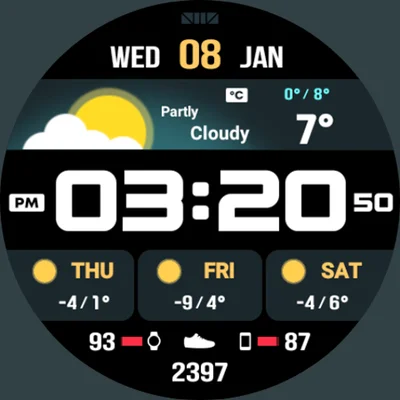
Tampilan Jam Digital SMZ untuk Wear OS
[SESUAIKAN]
Untuk penyesuaian tampilan jam, sentuh dan tahan layar dan sentuh tombol [Sesuaikan].
[Cara menggunakan format 24 jam]
Jika Anda ingin mengubah format waktu, Anda dapat mengaturnya pada jalur di bawah ini pada ponsel yang terhubung ke jam tangan.
*Telepon yang terhubung - Pengaturan - Manajemen umum - Tanggal dan waktu - Gunakan format 24 jam.
Jika dicentang, jam tangan juga akan berformat 24 jam, dan jika tidak dicentang, jam tangan akan berformat 12 jam.
[Kegelapan layar AOD]
Di bagian Kustomisasi, 'AOD Dim' menyesuaikan kegelapan seluruh layar AOD.
[Tingkat Baterai Ponsel]
Aplikasi Komplikasi Baterai Ponsel dari amoledwatchfaces™
Tautan pengembang - https://play.google.com/store/apps/dev?id=5591589606735981545
Untuk menggunakan fungsi ini, aplikasi 'Komplikasi Baterai Ponsel' harus diinstal pada ponsel dan jam tangan Anda.
Jalur pengunduhan:
https://play.google.com/store/apps/details?id=com.weartools.phonebattcomp
*Cara mengatur. - https://cafe.naver.com/smzwatch/22
[Instagram SMZ]
http://www.instagram.com/smz.watch.tech
[Facebook SMZ]
https://www.facebook.com/smz.watchface
[Beranda SMZ]
https://www.smzwatch.com
[Email selalu diterima]
smz.watch.tech@gmail.com
Tampilkan teks asli
[CUSTOMIZE]
For customization of watchface, touch and hold the screen and touch on [Coustomize] button.
[How to use 24-hour format]
If you want to change the time format, you can set it in the path below on the phone connected to the watch.
*The connected phone - Settings - General management - Date and time - Use 24-hour format.
If checked, the watch will also be in 24-hour format, and if unchecked, the watch will be in 12-hour format.
[The DARKNESS of the AOD screen]
In the Customize section, 'AOD Dim' adjusts the darkness of all the AOD screen.
[Phone Battery Level]
Phone Battery Complications app from amoledwatchfaces™
Dev's link - https://play.google.com/store/apps/dev?id=5591589606735981545
To use this function, the 'Phone Battery Complication' app must be installed on your phone and watch.
Download path :
https://play.google.com/store/apps/details?id=com.weartools.phonebattcomp
*How to set. - https://cafe.naver.com/smzwatch/22
[SMZ Instagram]
http://www.instagram.com/smz.watch.tech
[SMZ Facebook]
https://www.facebook.com/smz.watchface
[SMZ Homepage]
https://www.smzwatch.com
[E-mail is always welcome]
smz.watch.tech@gmail.com
Keamanan data
Yang dinyatakan SMZ™ di Google Play tentang data yang dikumpulkan dan dibagikan aplikasi ini.
- Tidak ada data yang dibagikan kepada pihak ketigaPelajari lebih lanjut cara developer menyatakan pembagian data
- Tidak ada data yang dikumpulkanPelajari lebih lanjut cara developer menyatakan pengumpulan data
Kontak pengembang
- Situs webinstagram.com
- Emailsmz.watch.tech@gmail.com
- Kebijakan Privasiblog.naver.com
- Alamat거제대로 275 거제미소지움더퍼스트, 102동 1101호 연제구, 부산광역시 47512 South Korea
Informasi
- Ditawarkan oleh
- SMZ™
- Kategori
- Personalisasi
- Diperbarui
- 1/11/2025
- Dirilis
- 8/1/2025
- Batasan usia
- Rating 3+
- Harga
- Rp 28.000
- Nama paket
- com.smzjdh.integrity2