SMZ INTEGRITY3
SMZ™- Rating 3+Batasan usia
- PersonalisasiKategori
- 1/11/2025Diperbarui
- Rp 28.000Harga
Tertaut ke halaman resmi com.smzjdh.integrity3 di Google Play. Terakhir diperiksa pada 13/11/2026.
Tentang aplikasi ini
Terjemahan otomatis oleh Google. Bahasa asli: Inggris (Amerika Serikat).
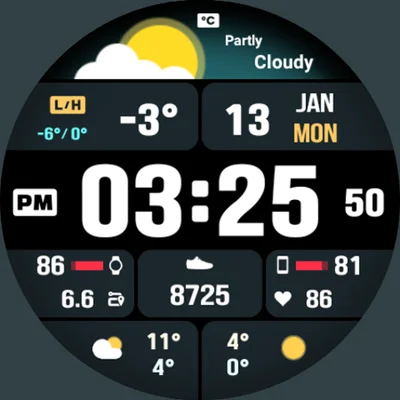
Tampilan Jam Digital SMZ untuk Wear OS
[Konfigurasi Tampilan Jam]
1. Waktu Saat Ini
2. Tanggal, Minggu, Bulan
2. Kondisi Cuaca dan Suhu Saat Ini
3. Suhu Rendah/Tinggi Saat Ini
4. Cuaca Besok dan Cuaca Lusa
5. Langkah dan Jarak Pindah
6. Denyut Jantung
7. Baterai Jam Tangan dan Baterai Ponsel
[Menyesuaikan Opsi]
1. Warna (30 warna)
2. BG (9 jenis latar belakang)
3. Font waktu (3 jenis)
4. Bahasa (Bagian tanggal mendukung semua bahasa)
5. Gaya AOD (6 jenis)
6. AOD Dim (5 tingkat kecerahan)
9. Komplikasi (1 komplikasi yang dapat diedit, 6 zona pintasan yang dapat diedit, 3 pintasan tetap)
[SESUAIKAN]
Untuk penyesuaian tampilan jam, sentuh dan tahan layar dan sentuh tombol [Sesuaikan].
[Kegelapan layar AOD]
Di bagian Kustomisasi, 'AOD Dim' menyesuaikan kegelapan seluruh layar AOD.
[Cara menggunakan format 24 jam]
Jika Anda ingin mengubah format waktu, Anda dapat mengaturnya pada jalur di bawah ini pada ponsel yang terhubung ke jam tangan.
*Telepon yang terhubung - Pengaturan - Manajemen umum - Tanggal dan waktu - Gunakan format 24 jam.
Jika dicentang, jam tangan juga akan berformat 24 jam, dan jika tidak dicentang, jam tangan akan berformat 12 jam.
[Tingkat Baterai Ponsel]
Aplikasi Komplikasi Baterai Ponsel dari amoledwatchfaces™
Tautan pengembang - https://play.google.com/store/apps/dev?id=5591589606735981545
Untuk menggunakan fungsi ini, aplikasi 'Komplikasi Baterai Ponsel' harus diinstal pada ponsel dan jam tangan Anda.
Jalur pengunduhan:
https://play.google.com/store/apps/details?id=com.weartools.phonebattcomp
*Cara mengatur. - https://cafe.naver.com/smzwatch/22
[Instagram SMZ]
http://www.instagram.com/smz.watch.tech
[Facebook SMZ]
https://www.facebook.com/smz.watchface
[Beranda SMZ]
https://www.smzwatch.com
[Email selalu diterima]
smz.watch.tech@gmail.com
Tampilkan teks asli
[Watch Face Configuration]
1. Current Time
2. Date, Week, Month
2. Current Weather Conditions and Temperature
3. Today's Low/High Temperature
4. Tomorrow's Weather and the Day After Tomorrow's Weather
5. Steps and Moved distance
6. Heart Rate
7. Watch Battery and Phone Battery
[Customizing Options]
1. Color (30 colors)
2. BG (9 types of backgrounds)
3. Time font (3 types)
4. Language (The date part supports all languages)
5. AOD Style (6 types)
6. AOD Dim (5 levels of brightness)
9. Complication (1 editable complication, 6 editable shortcut zones, 3 fixed shortcuts)
[CUSTOMIZE]
For customization of watchface, touch and hold the screen and touch on [Coustomize] button.
[The DARKNESS of the AOD screen]
In the Customize section, 'AOD Dim' adjusts the darkness of all the AOD screen.
[How to use 24-hour format]
If you want to change the time format, you can set it in the path below on the phone connected to the watch.
*The connected phone - Settings - General management - Date and time - Use 24-hour format.
If checked, the watch will also be in 24-hour format, and if unchecked, the watch will be in 12-hour format.
[Phone Battery Level]
Phone Battery Complications app from amoledwatchfaces™
Dev's link - https://play.google.com/store/apps/dev?id=5591589606735981545
To use this function, the 'Phone Battery Complication' app must be installed on your phone and watch.
Download path :
https://play.google.com/store/apps/details?id=com.weartools.phonebattcomp
*How to set. - https://cafe.naver.com/smzwatch/22
[SMZ Instagram]
http://www.instagram.com/smz.watch.tech
[SMZ Facebook]
https://www.facebook.com/smz.watchface
[SMZ Homepage]
https://www.smzwatch.com
[E-mail is always welcome]
smz.watch.tech@gmail.com
Keamanan data
Yang dinyatakan SMZ™ di Google Play tentang data yang dikumpulkan dan dibagikan aplikasi ini.
- Tidak ada data yang dibagikan kepada pihak ketigaPelajari lebih lanjut cara developer menyatakan pembagian data
- Tidak ada data yang dikumpulkanPelajari lebih lanjut cara developer menyatakan pengumpulan data
Kontak pengembang
- Situs webinstagram.com
- Emailsmz.watch.tech@gmail.com
- Kebijakan Privasiblog.naver.com
- Alamat거제대로 275 거제미소지움더퍼스트, 102동 1101호 연제구, 부산광역시 47512 South Korea
Informasi
- Ditawarkan oleh
- SMZ™
- Kategori
- Personalisasi
- Diperbarui
- 1/11/2025
- Dirilis
- 27/1/2025
- Batasan usia
- Rating 3+
- Harga
- Rp 28.000
- Nama paket
- com.smzjdh.integrity3