
AutoSilent
Dirancang untuk iPhone, iPad, iPod touch
Gratis · Pembelian dalam aplikasi
- Batasan usia4+
- KategoriKegunaan
- PengembangNiv Gutherz
- BahasaInggris
- Ukuran24,5 MB
Tertaut ke halaman resmi App Store
Download.org tidak menyimpan file AutoSilent apa pun. Tombol ini membuka halaman aplikasi di App Store, tempat Niv Gutherz menerbitkannya. Halaman terakhir diperiksa pada 15/11/2026.
Tangkapan layar


Tentang
Pengembang belum menyediakan teks ini dalam bahasa Anda.
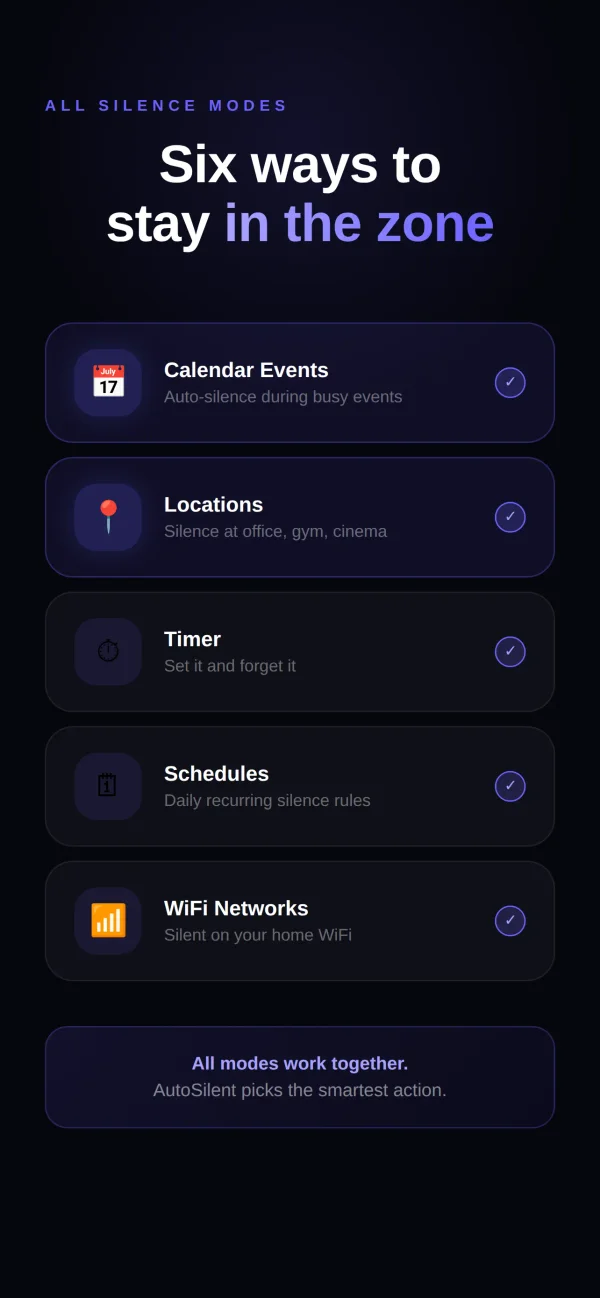
AutoSilent automatically mutes your iDevice (iPhone, iPad) during meetings, scheduled times or at selected locations.
Comes with 7 days free trial period. After this you may purchase an auto-renewing subscription through an In-App Purchase. If you do not maintain a subscription you will not be able to have premium features, like: Schedule events, Location Events snd Calendar events.
• Auto-renewable subscription
• 1 month ($1.99)
• Your subscription will be charged to your iTunes account at confirmation of purchase and will automatically renew (at the duration selected) unless auto-renew is turned off at least 24 hours before the end of the current period.
• Current subscription may not be cancelled during the active subscription period; however, you can manage your subscription and/or turn off auto-renewal by visiting your iTunes Account Settings after purchase.
Note:
------
In case of a problem to identify an already purchased subscription, please try first to quit and re-open the app. In case it does not work please click on "Restore Purchases".
EULA
------
https://www.apple.com/legal/internet-services/itunes/dev/stdeula/
Privacy Policy
--------------
http://www.gutherz.org/autosilent/privacy_policy_autosilent.html
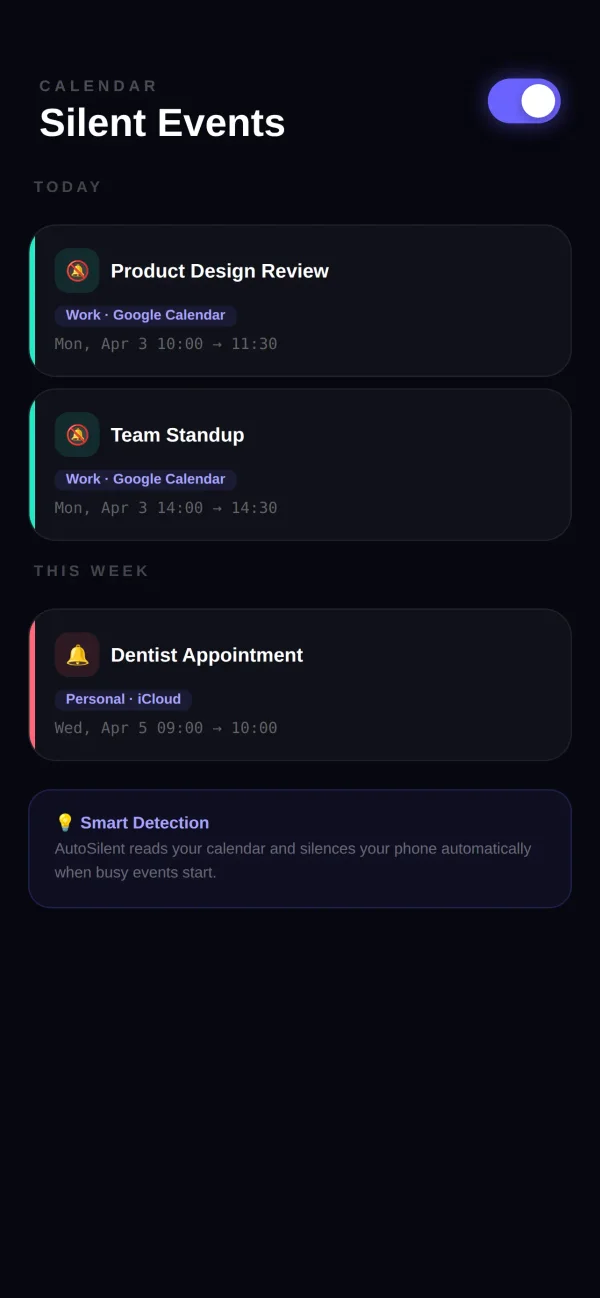
In the first tab the next silent event that it finds in your iPhone calendars. This tab is not intended to be used to add or modify events. To add new event just open your Calendar application and add/modify your event. AutoSilent will automatically synchronize with your calendars.
On first run, make sure to allow AutoSilent to get your current location and allow it to get notifications.
AutoSilent synchronizes with your calendars and automatically silents your iDevice during meetings. AutoSilent automatically re-sets your iDevice back to Regular/Ring mode at the end of the meeting.
AutoSilent is a location based application. It can detect your current location and mute your iDevice automatically when you are at School or at the University.
AutoSilent will set your iDevice back to Regular/Ring mode when you leave those places.
Don’t miss an important call because you forget to un mute your phone.
Don’t be embarrassed by alerts that go on while you are in a meeting. Let AutoSilent do the job for you.
Calendar event is considered silent when:
1. Availability is busy
2. Not a whole day event
3. Event notes do not contain !ring
4. Event notes contain !silent
Calendar Tab – This tab shows you the next meeting that AutoSilent will automatically mute your iDevice
Locations Tab – Lists locations where AutoSilent automatically mutes your iDevice. You can click on any of the location rows and make modifications.
Settings Tab -
Calendar Silent: enables or disables mute for calendar events.
Location silent: enables or disables mute for Location events.
Ring/Silent Notification: Enables or disables notification alerts whenever iDevice changes its mode from mute to un mute and vice versa.
Next Silent Event: Specifies the number of days to look forward for the next Silent event in your calendar(s). (Defaults to 30 days)
Location Radius: Specifies the radius where AutoSilent checks for location events. (Defaults to 500 meters)
Calendar: Selects the calendar to check for calendar events. (Defaults to ALL calendars)
Silent Out Of Office: Silence the phone during "Out Of Office" events.
Keep Mute Status: When selected AutoSilent will not change your iDevice to ring mode if it was silent before event was started.
Only !silent events: AutoSilent will only look for !silent events in your selected calendars.
Mute on WiFi network: put _all for all WiFi networks or the WiFi name that will be used by AutoSilent to mute your device once you are connected to that network. AutoSilent will unmute your device once you are disconnected from that network.
Battery Disclaimer:
Continued use of GPS running in the background can dramatically decrease battery life.
Yang baru
Versi 8.3 · 25/4/2026
• New dark and light appearance modes — choose your preferred look in Settings
• Dashboard shows active silent events and WiFi ring conflicts
• Bug fixes and performance improvements
Privasi aplikasi
Yang dinyatakan Niv Gutherz di App Store tentang cara aplikasi ini menangani data.
-
Data tidak dikumpulkan
Pengembang tidak mengumpulkan data apa pun dari aplikasi ini.
Praktik privasi dapat bervariasi, misalnya berdasarkan fitur yang Anda gunakan atau usia Anda.
Informasi
- Penjual
- Ron Gutherz
- Kategori
- Kegunaan
- Versi
- 8.3
- Diperbarui
- 25/4/2026
- Dirilis
- 9/11/2011
- Ukuran
- 24,5 MB
- Memerlukan
- iOS 12.0 atau yang lebih baru
- Batasan usia
- 4+
- Harga
- Gratis
- Pembelian dalam aplikasi
- Ya
- Bahasa
- Inggris
- Hak cipta
- © nOvNiv 2023
Mungkin Anda juga suka
-
 VPD ChartKegunaan
-
 Post & Ad Creator for SocialPembuat pos untuk jaringan
-
 Clock Chime - Time is passingKegunaan
-
 WideProtect Spam Call BlockerKegunaan
-
 ChatX - AI Chat Client TopKegunaan
-
 Family Locator360: GPS LokaytrKegunaan
-
 SwizzVPN: Super Fast VPN ProxyKegunaan
-
 Leaf IdentificationKegunaan
-
 Ghost Vision SLSKegunaan
-
 NetSpot WiFi AnalyzerKegunaan