Clamp Pro
Estimates, Contracts, Invoices
Dirancang untuk iPhone, iPod touch
Pembelian dalam aplikasi
- Batasan usia4+
- KategoriBisnis
- PengembangContractor School
- BahasaInggris
- Ukuran121,1 MB
Clamp Pro mungkin sedang tidak tersedia di App Store
Halaman di toko tidak dapat dijangkau saat terakhir kami periksa. Tautan tetap mengarah ke halaman resmi App Store.
Tangkapan layar



Tentang
Pengembang belum menyediakan teks ini dalam bahasa Anda.
Clamp runs the whole job from your phone: the estimate, the proposal, the contract, change orders and the final invoice, with a customer portal for e-signing and your mileage and time on site tracked for you.
ONE WORKFLOW, FIRST CALL TO FINAL INVOICE
- Five documents, each built from the one before it: design agreement, estimate, proposal, change order, invoice
- Change orders update the signed contract, so verbal changes stop costing you
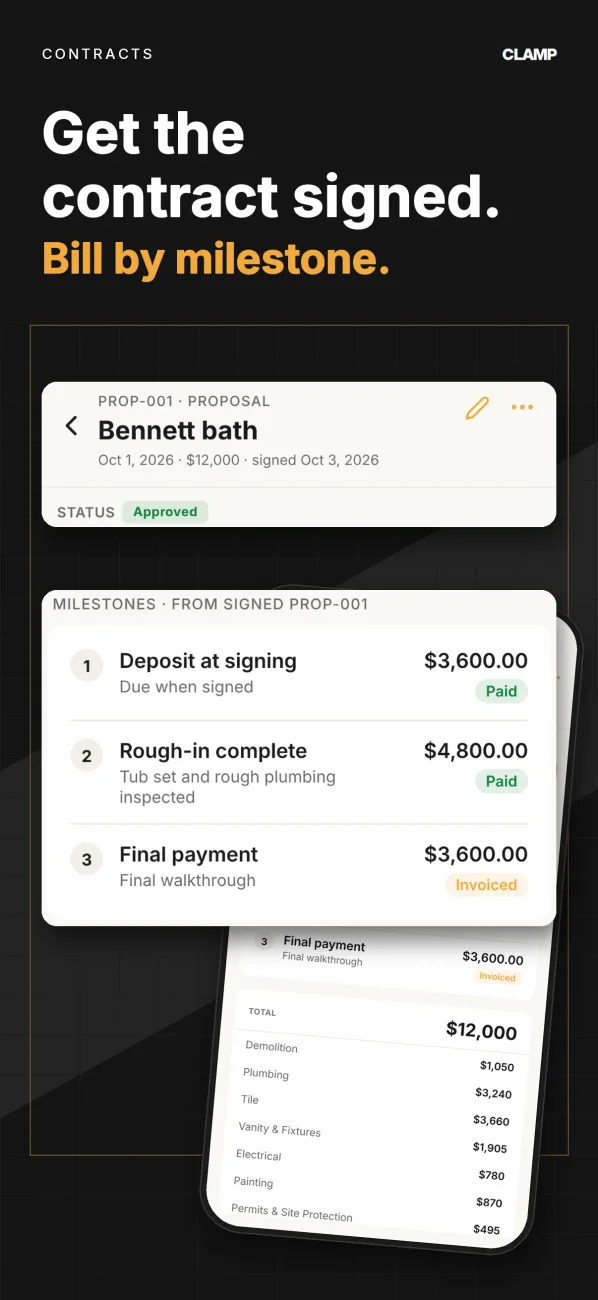
- Payment schedules: a deposit, milestones and a final payment, each invoiced from the contract
- Sales tax at the rate you enter, plus customer credits and refunds
- Every status in one place: sent, signed, invoiced, outstanding, paid
- Punch lists that close the job out, shared by text or PDF
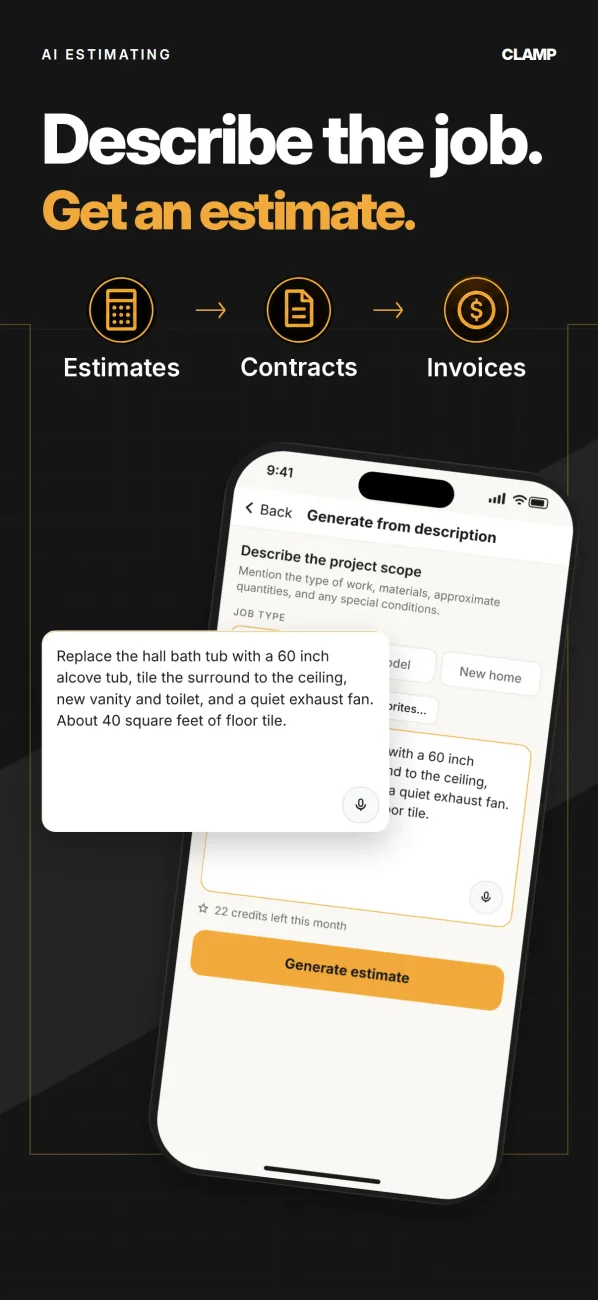
DESCRIBE THE JOB. GET AN ESTIMATE.
- Type the job the way you would say it out loud and get an itemized, priced draft back
- Remodels and new homes: one estimator detects which you described
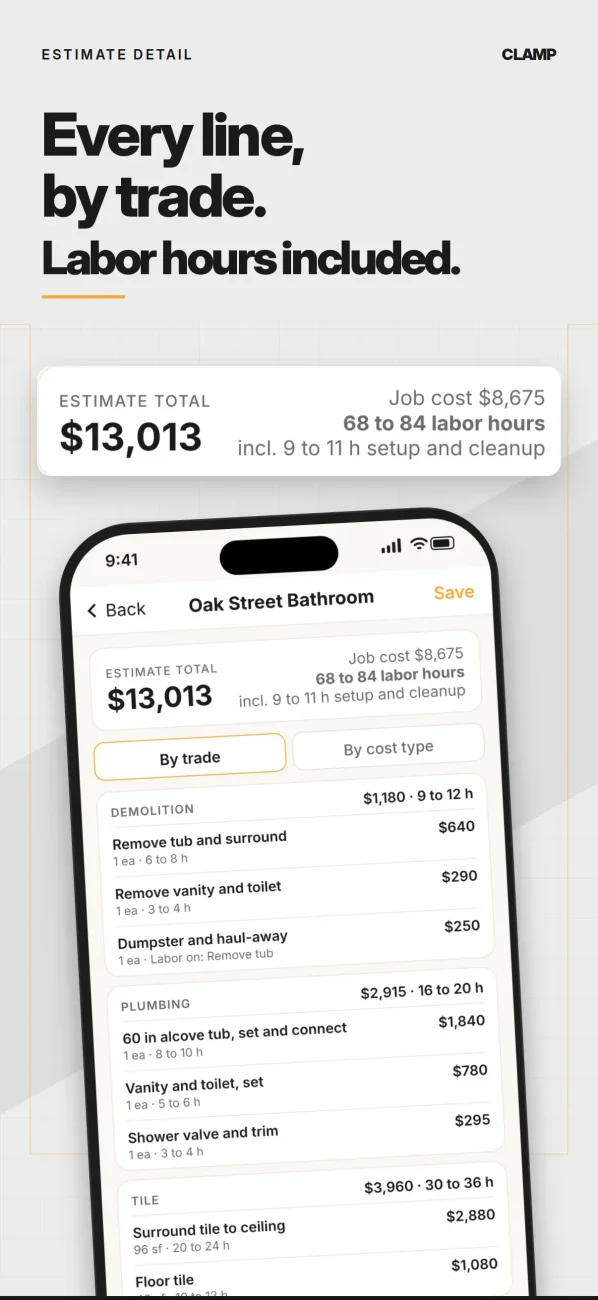
- Every line broken out by trade, with assemblies, quantities, rates and labor hours you can inspect
- Revise the draft with a follow-up prompt, then save your own rates and templates
QUICK CLAMP: FAST ESTIMATES AND FREE TOOLS
- Ballpark a job: a price range, labor hours and every line by trade, at three markup levels
- Free tools, no plan needed: a sketch pad, a level with plumb and slope, checklists with templates, and a scanner for cards, notes and receipts
- 3 free AI credits; buy credit packs in the app
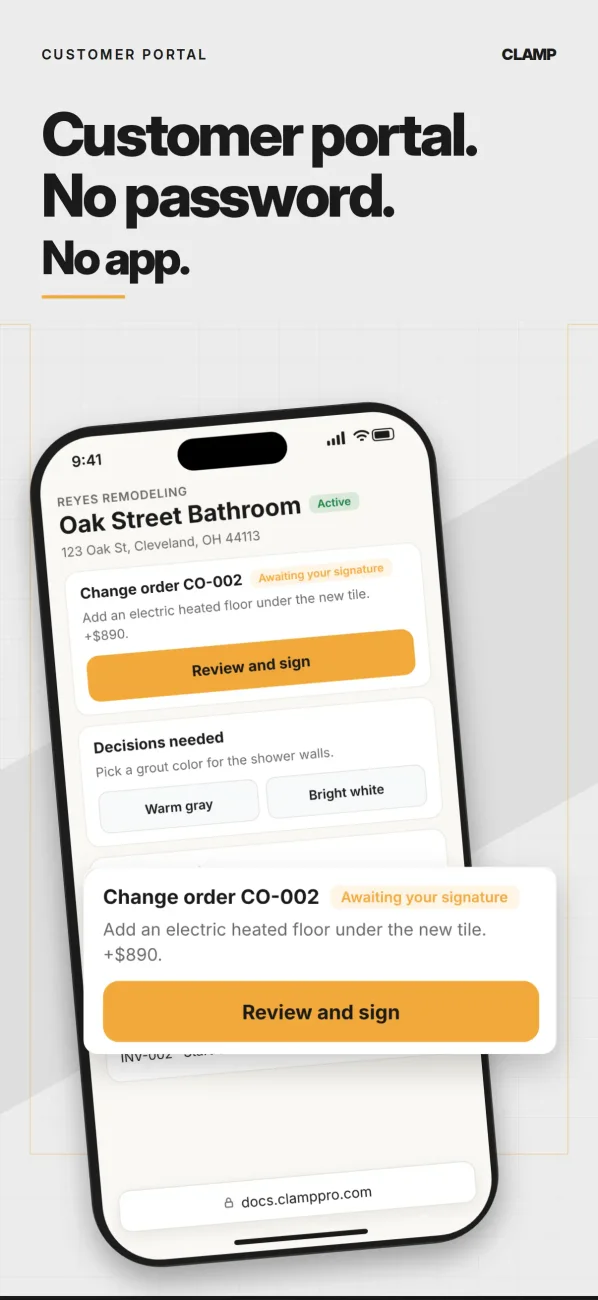
CUSTOMER PORTAL AND E-SIGNING (ASSISTANT AND TEAMS)
- The homeowner opens a link and sees their job. No password, no app
- E-signing on their phone, with up to five signers per document
- Project updates, photos and decisions they answer from their phone
- Appointment reminders by email that customers can confirm
MILEAGE AND TIME ON SITE, TRACKED FOR YOU
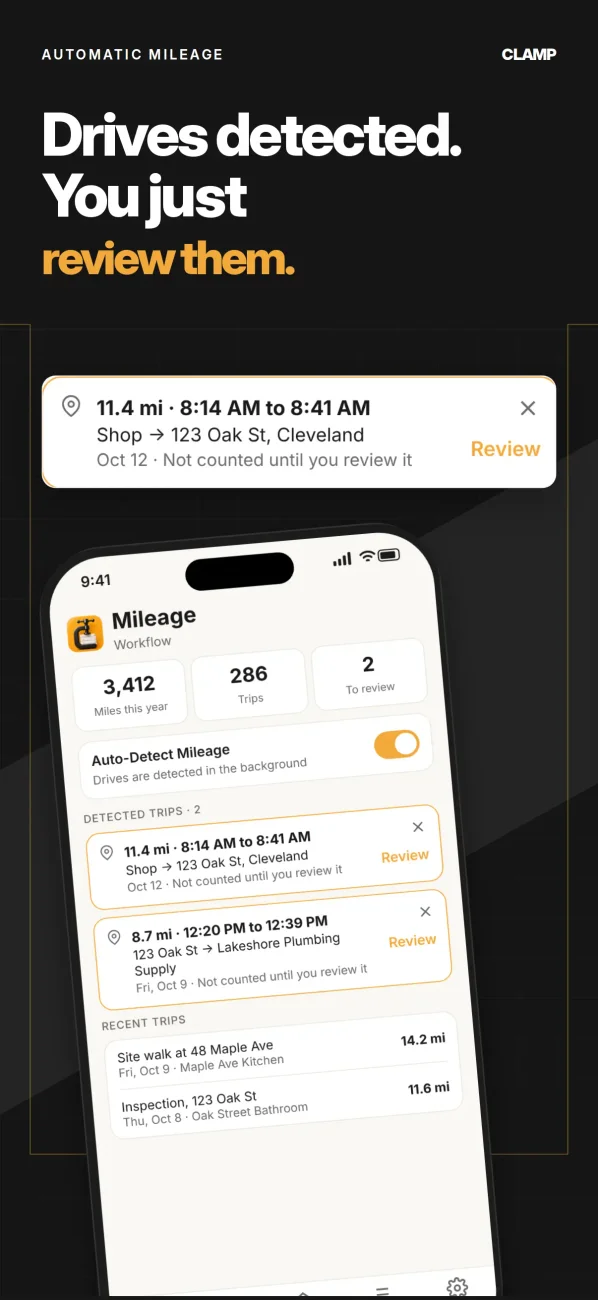
- Drives detected by GPS in the background; you review each trip before it counts
- Time on site logged automatically when you arrive at and leave a saved job site
- IRS mileage rates applied, ready for tax time
KNOW WHAT THE JOB COST
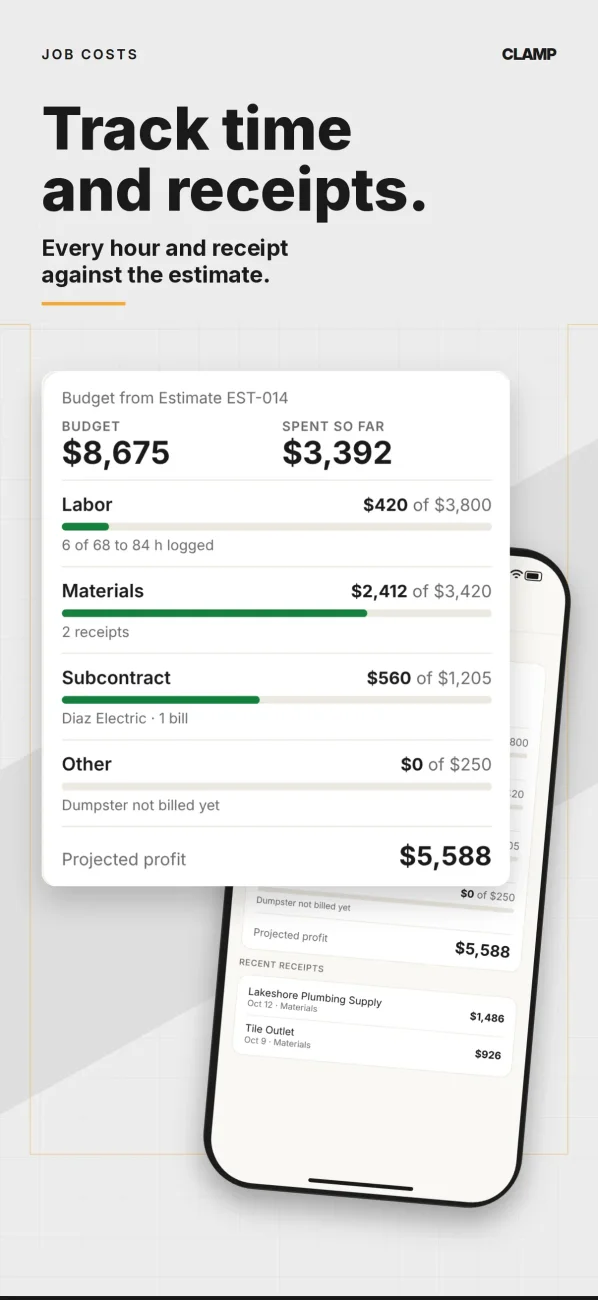
- Receipts, purchase orders and vendor bills tied to the job that caused them
- Budget from the estimate against what you have spent, by labor, materials and subs
- An accountant export package at tax time
THE SCHEDULE (ASSISTANT AND TEAMS)
- Installs, deliveries, inspections and work days on each job in the Jobsites tab
- Custom schedule types and email reminders
- With Teams, crew and subs on the shared schedule: they confirm or propose dates and share photos
KNOW WHERE EVERYTHING STANDS
- A daily briefing of overdue invoices, follow-ups, appointments and open proposals
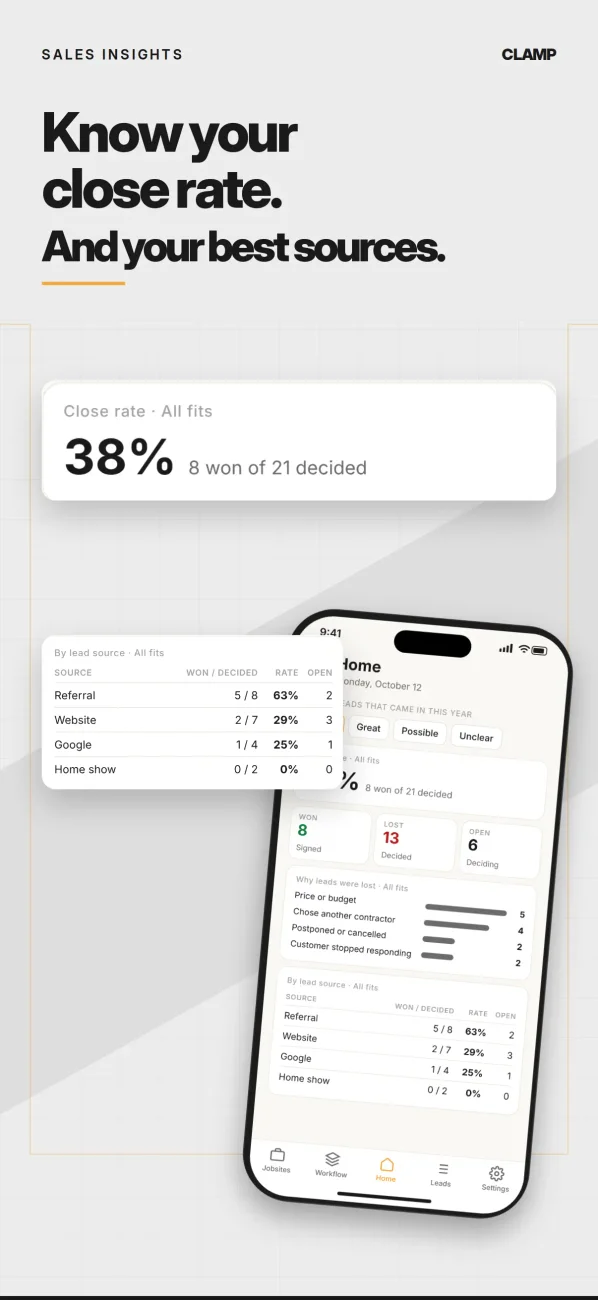
- Sales on Home: close rate, revenue won, open pipeline and why leads were lost
- Close rate by lead source, so you know which sources turn into work
- Five-factor lead scoring before you drive: a clear yes, no or maybe
WORK AS A TEAM (TEAMS)
- Up to 10 accounts on one business, each with their own sign-in and one of five roles
- Unlimited subs, free for them and never a seat
YOUR DATA
- Leads, documents, photos, mileage, time, receipts and job costing work offline
- AI estimates, the portal, e-signing, email, Teams, cloud backup and the web view need a connection
- No account needed to start
- Backup, restore, CSV export and bulk import
PLANS
Every account gets 3 free AI credits. Solo: the full job workflow, offline, with device backup. Assistant adds the customer portal, e-signatures, the job schedule, cloud backup, email reminders, a read-only web view and 25 AI credits a month. Teams adds up to 10 accounts, the shared schedule, unlimited sub invites and 50 AI credits a month shared by the team. An estimate is 1 credit; a revision is half.
Try Solo monthly free for one month.
Terms of Use: https://clamppro.com/terms/
Privacy Policy: https://clamppro.com/privacy/
This app is also governed by Apple's standard End User License Agreement:
https://www.apple.com/legal/internet-services/itunes/dev/stdeula/
Yang baru
Versi 2.1.6 · 17/11/2026
New: Quick Clamp, a home screen for fast estimates and free everyday tools:
• Ballpark estimates: a price range, labor hours and every line by trade. Edit lines or change it with a prompt.
• Sketch rooms with shapes and fixtures. Saves as you go.
• Level, plumb and slope on your phone.
• Checklists, with or without a lead, plus templates.
• Scan business cards, notes and receipts.
• Start free with 3 AI credits; buy credit packs in the app.
• Light, dark or automatic appearance.
Plus fixes.
Privasi aplikasi
Yang dinyatakan Contractor School di App Store tentang cara aplikasi ini menangani data.
-
Data yang ditautkan dengan Anda
Dapat dikumpulkan dan ditautkan dengan identitas Anda.
- Pembelian
- Info keuangan
- Lokasi
- Info kontak
- Konten pengguna
- Pengenal
- Data penggunaan
-
Data yang tidak ditautkan dengan Anda
Dapat dikumpulkan, tetapi tidak ditautkan dengan identitas Anda.
- Pengenal
- Data penggunaan
- Diagnostik
Praktik privasi dapat bervariasi, misalnya berdasarkan fitur yang Anda gunakan atau usia Anda.
Informasi
- Penjual
- Proud Mary Management Company LLC
- Kategori
- Bisnis
- Versi
- 2.1.6
- Diperbarui
- 17/11/2026
- Dirilis
- 8/4/2026
- Ukuran
- 121,1 MB
- Memerlukan
- iOS 15.5 atau yang lebih baru
- Batasan usia
- 4+
- Pembelian dalam aplikasi
- Ya
- Bahasa
- Inggris
- Hak cipta
- © 2026 Contractor School
Mungkin Anda juga suka
-
 Handoff Construction EstimatorBisnis
-
 Contractor ForemanBisnis
-
 SimplyWise: Cost EstimatorBisnis
-
 Jobber Field Service SoftwareBisnis
-
 Sherwin-Williams PRO+Bisnis
-
 ERGO NEXT InsuranceKeuangan
-
 Angi for ProsBisnis
-
 MaxRewards Credit Card RewardsKeuangan
-
 SherMatch+Produktivitas
-
 Zillow Rental ManagerProduktivitas