
- Batasan usia4+
- KategoriFoto & Video
- PengembangShinji Nishijima
- BahasaInggris+ 10 lainnya
- Ukuran11,9 MB
Tertaut ke halaman resmi App Store
Download.org tidak menyimpan file CropCamera apa pun. Tombol ini membuka halaman aplikasi di App Store, tempat Shinji Nishijima menerbitkannya. Halaman terakhir diperiksa pada 17/11/2026.
Tangkapan layar
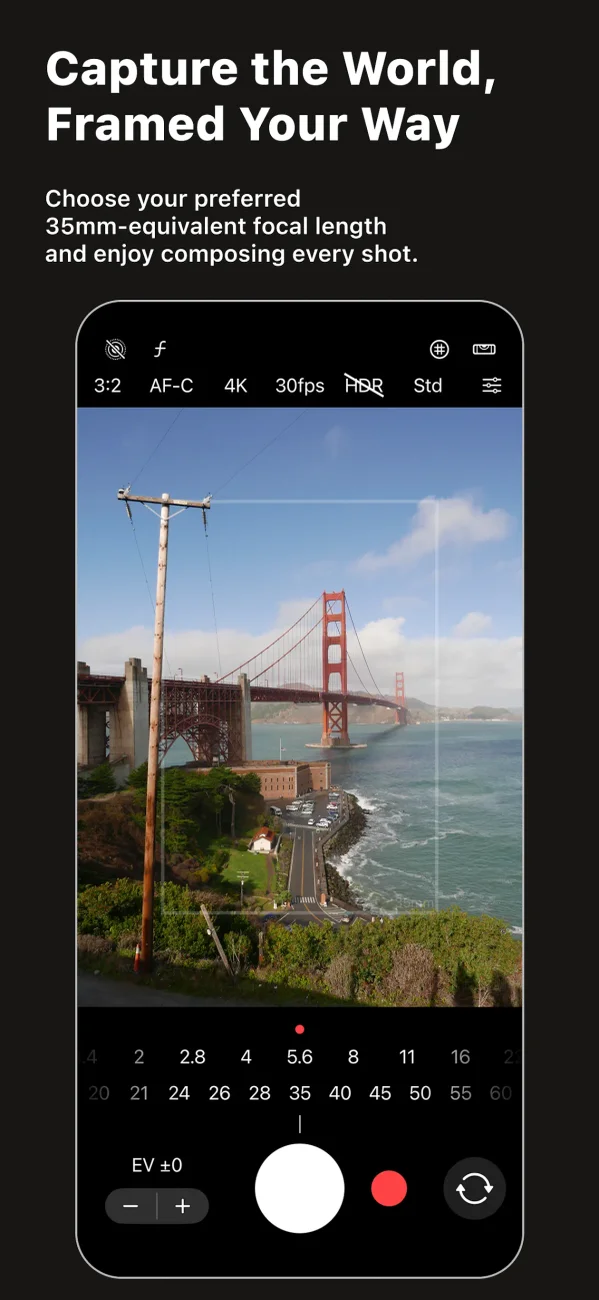


Tentang
Pengembang belum menyediakan teks ini dalam bahasa Anda.
Turn Everyday Moments into Timeless Memories
Frame everyday scenes and travel memories with your favorite composition and color, and transform each moment into something unforgettable.
This camera app lets you shoot exactly as you see through a camera viewfinder. Crop your composition in real time and capture it with your own custom look—so your photos are ready the moment you press the shutter. No editing required.
Features
* Choose from multiple focal lengths (35mm equivalent*) as if you’re switching between prime lenses on a camera.
* Select from four beautifully crafted filters: Std, B&W, Warm, and Cool.
* Fine-tune the contrast, saturation, highlights, and shadows of each filter to create your own signature look.
* Record video instantly by simply pressing the red REC button—no need to switch camera modes.
* Capture Live Photos.
* Adjust the aperture (f-stop) to create beautiful background blur.
* Record videos in 4K or Full HD at 30 fps or 24 fps.
* Turn HDR (High Dynamic Range) capture on or off.
* Take photos with a silent shutter.
* Save both your customized photo and the original unedited image at the same time (optional in Settings).
How to Use
1. Select a focal length (35mm equivalent*).
2. Check the semi-transparent framing guide.
* Double-tap the screen to zoom into the selected frame for a closer preview.
3. Compose your shot.
4. Tap the subject to lock focus.
5. Adjust the exposure (EV).
6. Press the shutter button.
Notes
* Photos are saved to Apple’s built-in Photos app.
* This app does not include an image preview gallery. Please use the Photos app to view your captured photos.
* Videos are always recorded in a 16:9 aspect ratio, regardless of the selected photo aspect ratio.
* Photos are saved after being cropped to the selected frame. As a result, image resolution may be reduced at certain focal lengths. Please keep this in mind if you plan to print your photos.
* Focal lengths are approximate 35mm-equivalent values and are provided for reference only.
Yang baru
Versi 3.0.1 · 3/10/2026
- Support iPhone 18 Pro series.
Privasi aplikasi
Yang dinyatakan Shinji Nishijima di App Store tentang cara aplikasi ini menangani data.
-
Data tidak dikumpulkan
Pengembang tidak mengumpulkan data apa pun dari aplikasi ini.
Praktik privasi dapat bervariasi, misalnya berdasarkan fitur yang Anda gunakan atau usia Anda.
Informasi
- Penjual
- Shinji Nishijima
- Kategori
- Foto & Video
- Versi
- 3.0.1
- Diperbarui
- 3/10/2026
- Dirilis
- 14/3/2022
- Ukuran
- 11,9 MB
- Memerlukan
- iOS 26.0 atau yang lebih baru
- Batasan usia
- 4+
- Harga
- Rp 59ribu
- Bahasa
- Inggris, Prancis, Jerman, Italia, Jepang, Korea, Portugis, Tionghoa Sederhana, Spanyol, Thai, Tionghoa Tradisional
- Hak cipta
- © 2026 Shinji Nishijima
Mungkin Anda juga suka
-
 LensAgent ProFoto & Video
-
 Magic Film ViewFinderFoto & Video
-
 FinderKit: ViewfinderFoto & Video
-
 Viewfinder PreviewFoto & Video
-
 Magic Canonic ViewFinderFoto & Video
-
 Magic Sonic ViewFinderFoto & Video
-
 Magic Cinema ViewFinderFoto & Video
-
 Magic ARRI ViewFinderFoto & Video
-
 ProCam: Manual Camera LensFoto & Video
-
 Super 16 | 16mm Film CameraFoto & Video