
- Batasan usia4+
- KategoriProduktivitas
- Pengembang明刚 王
- BahasaInggris+ 1 lainnya
- Ukuran6,7 MB
Tertaut ke halaman resmi App Store
Download.org tidak menyimpan file Fish Memory! apa pun. Tombol ini membuka halaman aplikasi di App Store, tempat 明刚 王 menerbitkannya. Halaman terakhir diperiksa pada 18/11/2026.
Tangkapan layar
Tentang
Pengembang belum menyediakan teks ini dalam bahasa Anda.
Make remembering easier.
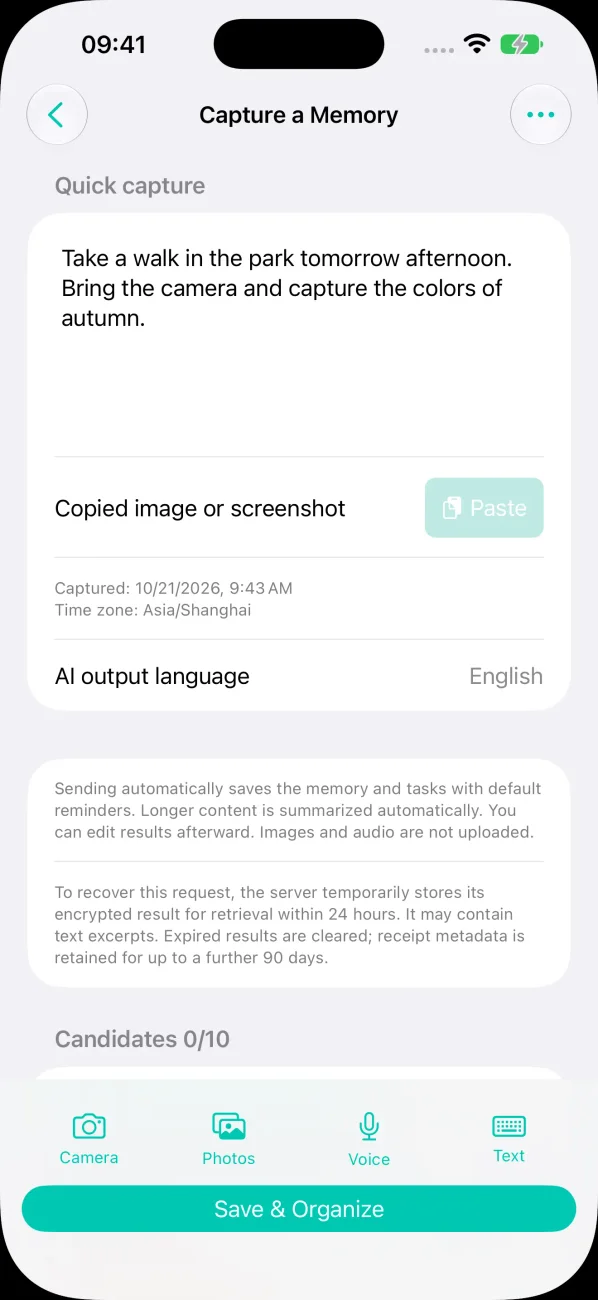
Capture text, take a photo, or choose a screenshot. Text recognition happens on your iPhone. Dictate in English or Mandarin with on-device transcription and review the text before using it.
Tap Save & Organize to save the original as a memory and add identified tasks and events to Plans automatically. Clear event times receive a reminder time according to your defaults; notifications require system permission. No need to choose a category or confirm again. Edit, complete or delete saved results at any time. Uncertain dates stay flagged for your review.
Favorite important memories and find them again with search. Long notes can also be organized separately into a title, a short overview and grouped points, with the original text available for checking.
Keep parcel and food pickup codes in separate cards, including multiple packages from one image. Copy a code or mark it collected. Pickup information stays as a memory unless you explicitly arrange a reminder. On supported devices, Live Activities show the current pickup on the Lock Screen and Dynamic Island. A Home Screen widget opens your pinned memory.
Browse memories by calendar month. Opening a month for the first time generates and saves a monthly summary; subsequent visits reuse the saved result. Enable Weekly Review in Settings for a local reminder at 8 AM on Mondays. Last week’s plans, completions and memories are summarized when background execution is available, with the latest report completed when you reopen the app. iOS does not guarantee exact background execution times. Weekly and monthly summaries use the disclosed text and one AI allowance per generation.
Actively run the automatic screenshot shortcut to recognize text locally, send it for organization and save the result. On supported iPhones, assign a shortcut to the Action button.
The interface supports Simplified Chinese and English. AI output follows the app language; original text and quotations are preserved. Voice transcription requires on-device support for the selected language.
Memories, original images and plans are stored locally. The capture page shows what will be sent. Tapping Save & Organize sends the source text, capture time, time zone and output language through the Fish Memory service to DeepSeek. Images and audio are not uploaded. No API key setup is needed. AI usage limits apply. Choose More > Save on Device Without AI for offline capture.
Backup & Restore in Settings lets you export an archive including original images, import a backup or restore the previous local version. Exported files are unencrypted; keep them safe. There is no cloud sync or system backup. Uninstalling deletes local data and the internal backup.
New in 2.0: share-sheet intake, everyday-language search, recurring tasks and snooze, 30-day Recently Deleted, separate Markdown notes, and calendar and daily recollection widgets. Resume drafts and image processing, or check existing results for submitted AI requests.
To recover submitted requests, the server may retain that request's encrypted output for 24 hours, then keep only duplicate-prevention receipt metadata for up to 90 more days. Checking existing results uses no AI credits. Interrupted or expired requests do not automatically start a new paid request. This is not full-library cloud sync.
Yang baru
Versi 2.0 · 27/10/2026
Fish Memory 2.0 makes it easier to capture, find and act on what matters.
• Save from the share sheet: Receive text, links and images from apps such as Photos and Safari, then organize them when needed.
• Find memories with everyday wording: Search using common date and synonym expressions, filter by date, type or favorites, and see matching source text. On-device search uses no AI credits.
• Recurring tasks and snooze: Create daily, weekly or monthly schedules, complete or skip an occurrence, view its history, and postpone reminders.
• Recently Deleted: Recover individual memories and tasks for up to 30 days after deletion.
• Resume your input: Keep drafts and image-processing progress, continue interrupted work, and check existing results for submitted AI requests.
• Markdown notes: Add separate notes with headings, bold text, lists, quotes, links and checklists. Preview, copy or share them while keeping the original input intact.
• More widgets: Add calendar and daily recollection widgets. A pinned memory's Live Activity can also show the next upcoming task.
Also includes improvements to Chinese and English layouts, long-content reading and data recovery.
Privasi aplikasi
Yang dinyatakan 明刚 王 di App Store tentang cara aplikasi ini menangani data.
-
Data yang ditautkan dengan Anda
Dapat dikumpulkan dan ditautkan dengan identitas Anda.
- Info kontak
- Konten pengguna
- Pengenal
- Data penggunaan
- Diagnostik
-
Data yang tidak ditautkan dengan Anda
Dapat dikumpulkan, tetapi tidak ditautkan dengan identitas Anda.
- Diagnostik
Praktik privasi dapat bervariasi, misalnya berdasarkan fitur yang Anda gunakan atau usia Anda.
Informasi
- Penjual
- 明刚 王
- Kategori
- Produktivitas
- Versi
- 2.0
- Diperbarui
- 27/10/2026
- Dirilis
- 2/10/2026
- Ukuran
- 6,7 MB
- Memerlukan
- iOS 17.0 atau yang lebih baru
- Batasan usia
- 4+
- Harga
- Gratis
- Bahasa
- Inggris, Tionghoa Sederhana
- Hak cipta
- © 2026 王明刚
Mungkin Anda juga suka
-
 Dunit: Tugas & RutinitasAplikasi tugas terakhirmu
-
 Tricket - App Blocker & HabitsProduktivitas
-
 Lunbi: Habit TrackerProduktivitas
-
 66 Days: Pelacak KebiasaanBentuk kebiasaan yang bertahan
-
 QingCalProduktivitas
-
 TapHabit - Daily Habit TrackerProduktivitas
-
 超慢跑节拍器-运动节拍器,计时器,健康减肥Produktivitas
-
 Bear Habit Tracker - Todo AppProduktivitas
-
 个税-工资五险一金计算Produktivitas
-
 作家助手Produktivitas