
Flowmodoro - Focus·Flow·Timer
Flowtime deep work for ADHD
Dirancang untuk iPhone, iPad
Gratis · Pembelian dalam aplikasi
- Batasan usia12+
- KategoriProduktivitas
- PengembangRaynearSoft LLC
- BahasaInggris+ 7 lainnya
- Ukuran124,0 MB
Tertaut ke halaman resmi App Store
Download.org tidak menyimpan file Flowmodoro - Focus·Flow·Timer apa pun. Tombol ini membuka halaman aplikasi di App Store, tempat RaynearSoft LLC menerbitkannya. Halaman terakhir diperiksa pada 13/11/2026.
Tangkapan layar
Tentang
Pengembang belum menyediakan teks ini dalam bahasa Anda.
Stop letting a 25-minute timer break your flow.
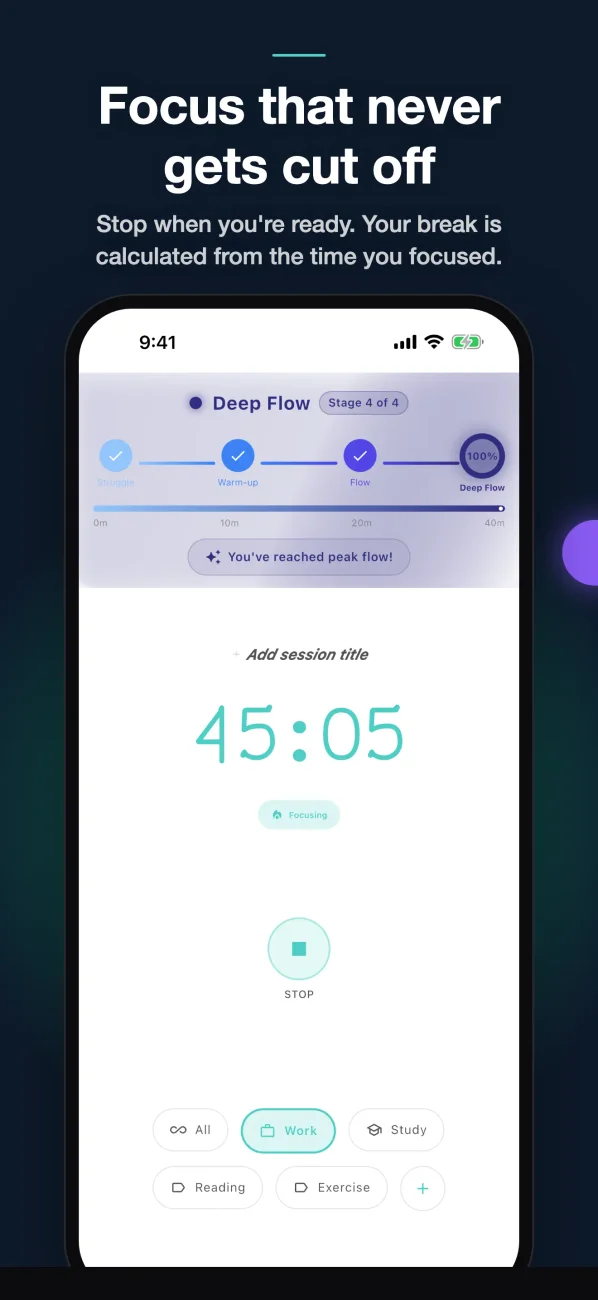
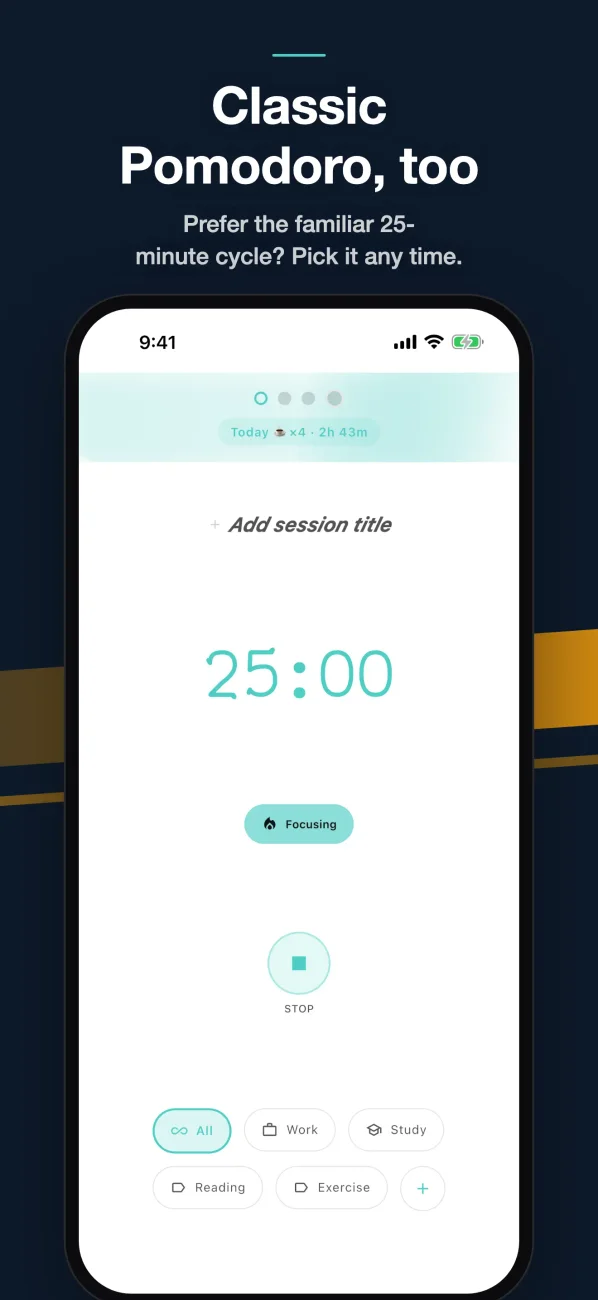
Flowmodoro is built on the Flowtime Technique: focus for as long as you're in the zone, then take a break earned from the time you actually put in. Prefer the classic method? A full Pomodoro timer is built in — pick either one and switch anytime.
WHY FLOWMODORO
The Pomodoro problem: you finally reach deep focus, and the timer forces a break. Your flow is destroyed.
The Flowmodoro answer: work until you decide to stop. Your break is calculated from your focus time.
TWO WAYS TO FOCUS
- Flowmodoro (Flowtime): the timer counts up. Stop when you're done and your break is earned from your focus time. Set your own break ratio.
- Classic Pomodoro: focus, short break, long break — your own durations and long-break interval, with presets to start from.
FLOW ZONES
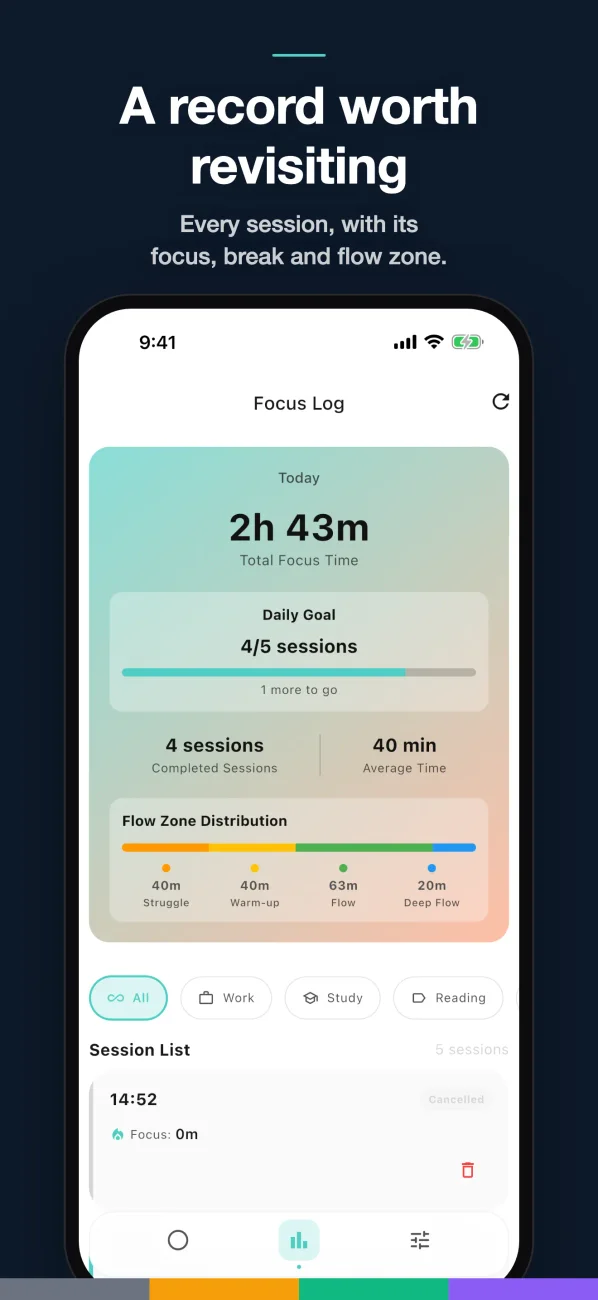
Watch a session move from Struggle to Warm-up to Flow to Deep Flow as the minutes add up. You can see the moment you actually arrive — and you'll think twice before stopping.
DEEP FOCUS: BLOCK DISTRACTING APPS
Choose the apps that pull you away and they won't open while the timer is running. Strict Mode removes the escape hatch, and a daily override limit keeps you honest when it doesn't.
WHITE NOISE
Nine ambient sounds — brown, pink, white, rain, ocean, underwater, wind, stream and fire — with volume control. It also keeps focus and break switching automatically while your phone is locked.
LOCK SCREEN AND HOME SCREEN
- Live Activity on iPhone: your timer on the Lock Screen and Dynamic Island
- Home Screen widget: start, pause and stop without opening the app
- Today's focus time and session count at a glance
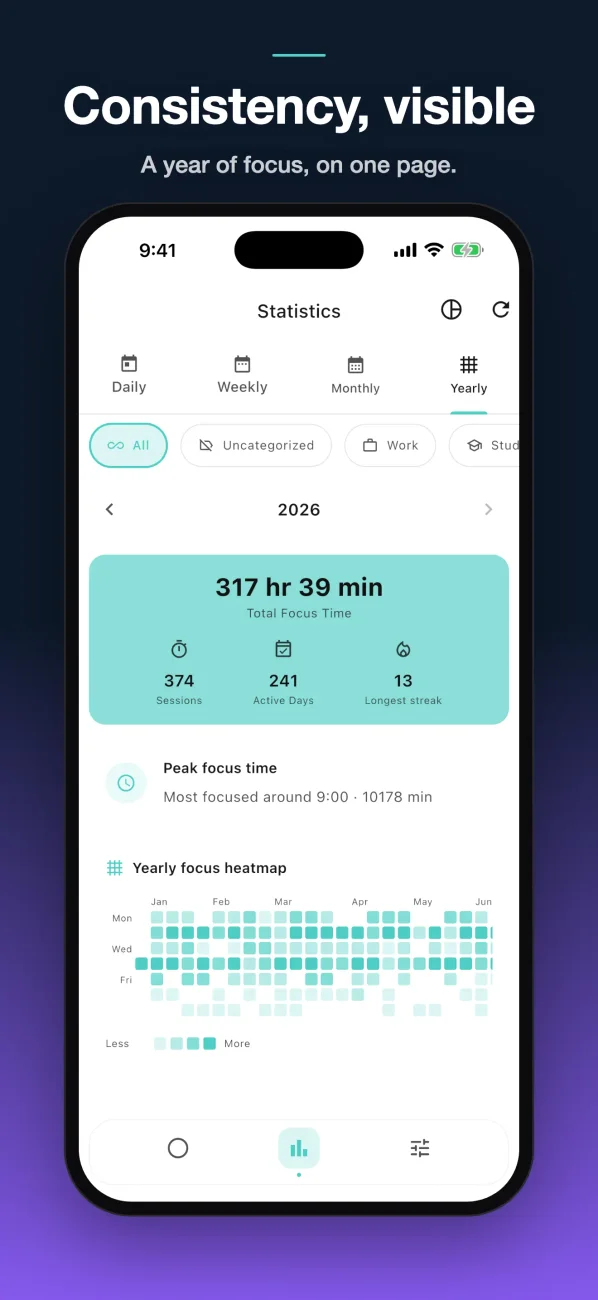
STATISTICS THAT SHOW PROGRESS
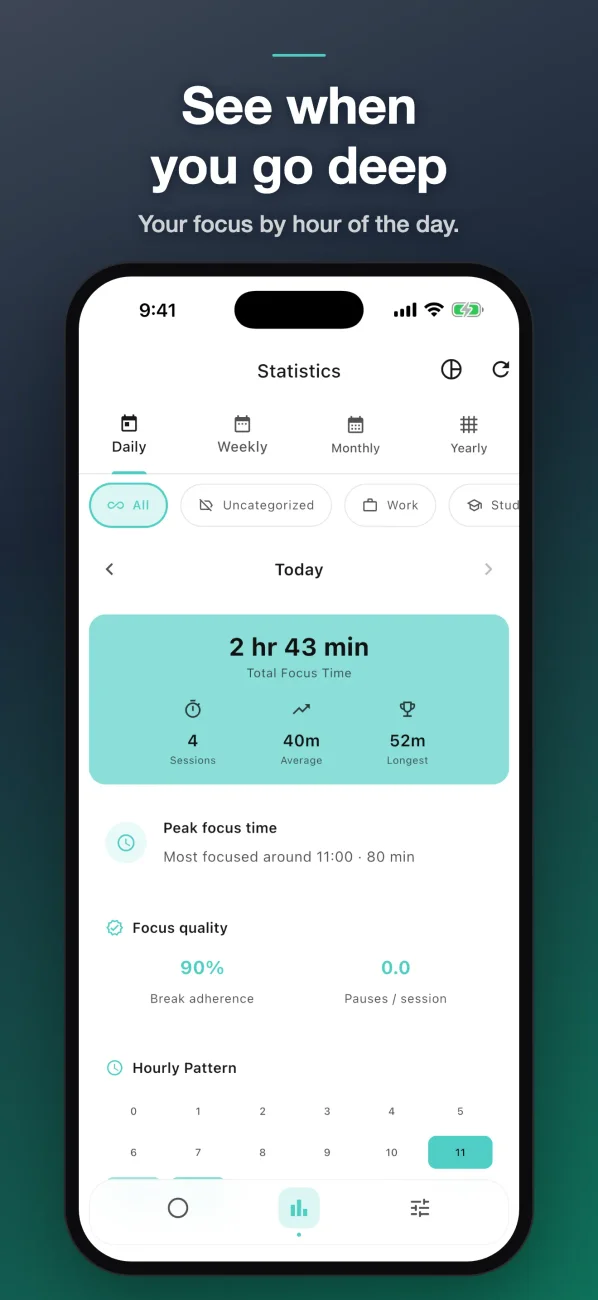
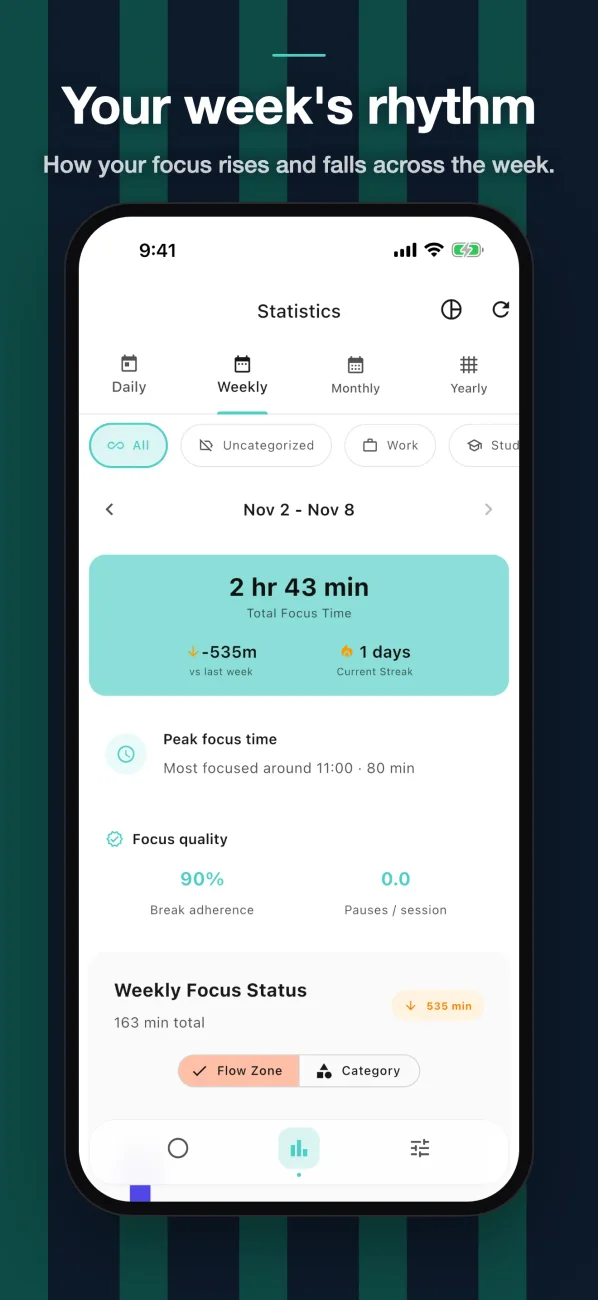
- Daily and weekly trends
- Monthly and yearly trends, activity heatmap and best streak
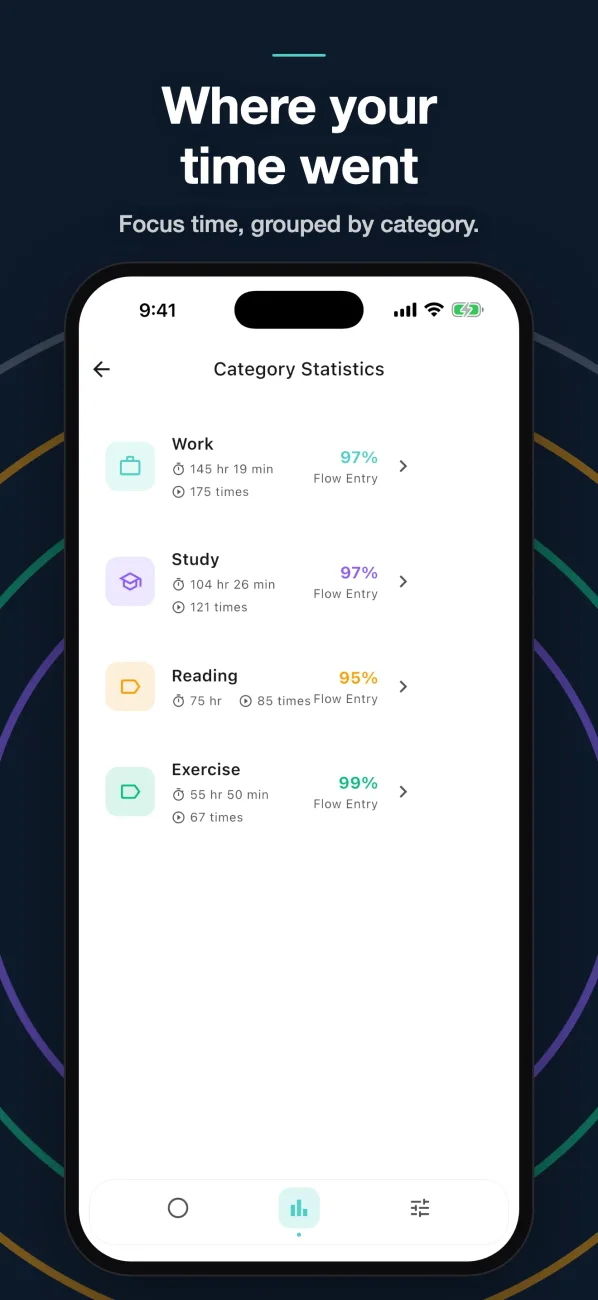
- Category breakdown: see where your hours actually go
- Session history you can edit
- Export a full JSON backup or a CSV for analysis, and import to restore
CATEGORIES
Tag every session — Work, Study, Exercise, Reading, or your own — and filter any statistic by category.
EIGHT LANGUAGES
English, 한국어, 日本語, 中文, Deutsch, Français, Português, Русский.
WHO IS THIS FOR
- Students preparing for exams
- Professionals who need deep work
- Freelancers and creators
- People with ADHD or focus challenges
- Pomodoro users frustrated by interruptions
FLOWMODORO PRO
- Monthly and yearly statistics with category breakdown
- Theme colors and Flow Zone palettes
- Auto-start the next focus session after a break
- Export and import your data
- No ads
Available monthly, yearly, or as a one-time lifetime purchase.
THE FLOWTIME TECHNIQUE
1. Start your focus session
2. Work until you naturally need a break
3. Get a break length calculated from your focus time
4. Come back refreshed and start again
No more fighting the timer.
Flow with your focus.
Questions or feedback: raynearsoft@gmail.com
This app is subject to Apple's standard terms and conditions (EULA). For more information, see Apple's Standard Terms and Conditions(https://www.apple.com/legal/internet-services/itunes/dev/stdeula/).
Yang baru
Versi 1.3.2 · 11/11/2026
Fixed
- Stability improvements
Privasi aplikasi
Yang dinyatakan RaynearSoft LLC di App Store tentang cara aplikasi ini menangani data.
-
Data yang digunakan untuk melacak Anda
Dapat digunakan untuk melacak Anda di aplikasi dan situs web milik perusahaan lain.
- Pengenal
- Data penggunaan
- Diagnostik
-
Data yang tidak ditautkan dengan Anda
Dapat dikumpulkan, tetapi tidak ditautkan dengan identitas Anda.
- Pengenal
- Data penggunaan
- Diagnostik
Praktik privasi dapat bervariasi, misalnya berdasarkan fitur yang Anda gunakan atau usia Anda.
Informasi
- Penjual
- RaynearSoft LLC
- Kategori
- Produktivitas
- Versi
- 1.3.2
- Diperbarui
- 11/11/2026
- Dirilis
- 1/2/2026
- Ukuran
- 124,0 MB
- Memerlukan
- iOS 17.0 atau yang lebih baru
- Batasan usia
- 12+
- Harga
- Gratis
- Pembelian dalam aplikasi
- Ya
- Bahasa
- Inggris, Prancis, Jerman, Jepang, Korea, Portugis, Rusia, Tionghoa Sederhana
- Hak cipta
- © 2026 RaynearSoft
Mungkin Anda juga suka
-
 Flowmodoro Flow TimerProduktivitas
-
 Flowmodoro: Focus Study TimerProduktivitas
-
 Flowmo: Flowmodoro TimerProduktivitas
-
 Flowtime° Focus & Time TrackerProduktivitas
-
 Focused Work - Pomodoro TimerProduktivitas
-
 Flow: Focus & Pomodoro TimerProduktivitas
-
 Focus Traveller - Flow TimerProduktivitas
-
 Brain.fm: Focus & Sleep MusicProduktivitas
-
 FocusFlight - Deepfocus TimerProduktivitas
-
 Onrise: Habit Tracker & FocusProduktivitas