
JetMemo
Open, type, saved as files
Dirancang untuk iPhone, iPad
Gratis · Pembelian dalam aplikasi
- Batasan usia4+
- KategoriProduktivitas
- PengembangHatsuhito Shimizu
- BahasaInggris+ 1 lainnya
- Ukuran25,1 MB
Tertaut ke halaman resmi App Store
Download.org tidak menyimpan file JetMemo apa pun. Tombol ini membuka halaman aplikasi di App Store, tempat Hatsuhito Shimizu menerbitkannya. Halaman terakhir diperiksa pada 23/11/2026.
Tangkapan layar
Tentang
Pengembang belum menyediakan teks ini dalam bahasa Anda.
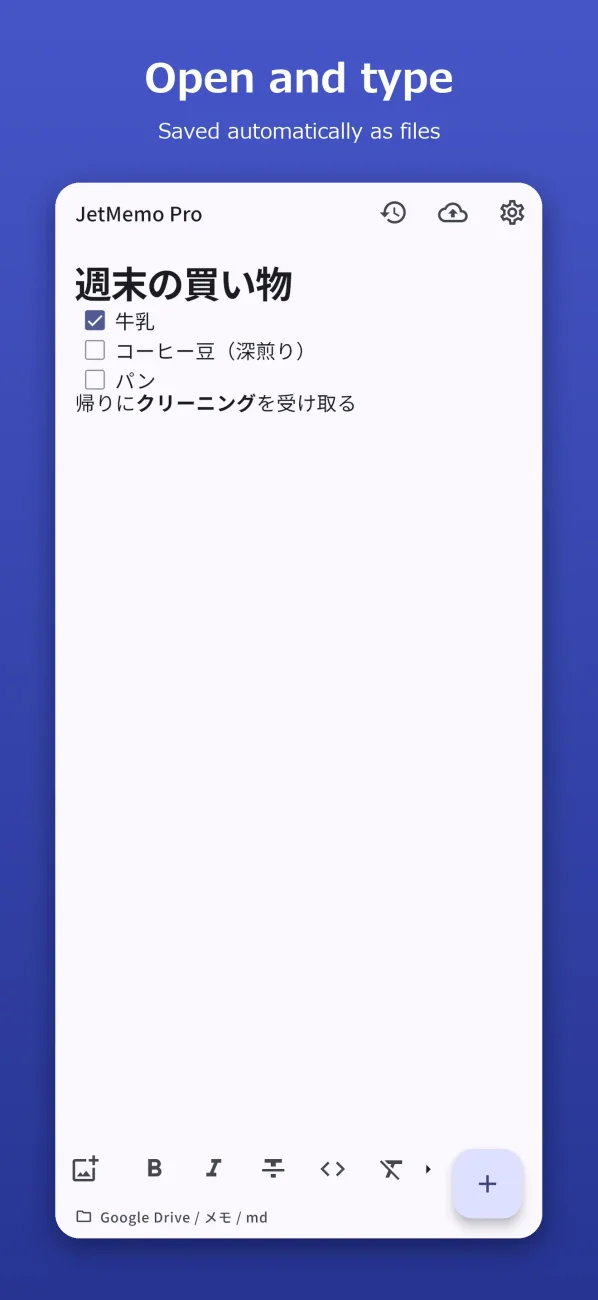
JetMemo is a note app for capturing a thought the moment it comes. It opens straight to your note, and a few seconds after you stop typing, the note is saved as a real file. No save button, no file names to think about.
Your notes stay as plain Markdown (.md) or text (.txt) files in the Files app or iCloud Drive. That means you can later hand them to a generative AI tool to summarize them, pull out to-dos or organize your ideas. When you write, just write; leave the reviewing and tidying to AI afterwards. A write-and-forget notepad makes a handy inbox for the notes you hand to AI.
(JetMemo itself has no AI features. You give the saved files to the AI service or app you already use.)
WHO IT'S FOR
- People who want to jot something down in seconds
- People who want notes as plain files in the Files app or iCloud Drive, not locked inside an app
- Markdown (.md) and plain text writers who also read their notes on a Mac
- People who want AI to summarize and organize their notes later
- People who want one place to drop notes meant for AI
- Anyone looking for a note app without ads or sign-up
AN INBOX FOR NOTES YOU HAND TO AI
- Just drop your thoughts in. Notes pile up as .md and .txt files in the JetMemo folder in Files or iCloud Drive
- Ways to let AI read them, for example:
- Add the .md or .txt files as sources in Gemini Notebook (formerly NotebookLM) and ask for a summary or questions
- Give the iCloud Drive folder on your Mac to an AI agent that can read a folder, such as Claude Code, and ask it to list to-dos or write a recap
- Turn on "Add date and time at the top (for AI)" to start each .md file with the created and updated time, title and tag (a #tag on the first line), so AI can tell when and what each note is
- Collect a day in one file (Pro) and hand the whole day to AI
(This is not a partnership or built-in integration with any AI service. Check each service's help for how to add files and which formats it accepts.)
FREE
- Notes auto-save to On My iPhone > JetMemo in the Files app
- Turn on Save to iCloud Drive to keep them in the JetMemo folder of iCloud Drive and open them on your Mac or iPad
- Markdown (.md), plain text (.txt), HTML or RTF
- The first line becomes the file name (e.g. 2026-10-11_093015_Shopping list.md)
- Tap + to start the next note (the one you wrote is already saved)
- History: look back at finished notes, copy them or continue writing
- Share text or links from other apps straight into a note
- Start a new note from a Lock Screen widget, Control Center, Shortcuts or a long press on the app icon
- Works offline
JETMEMO PRO (one-time in-app purchase)
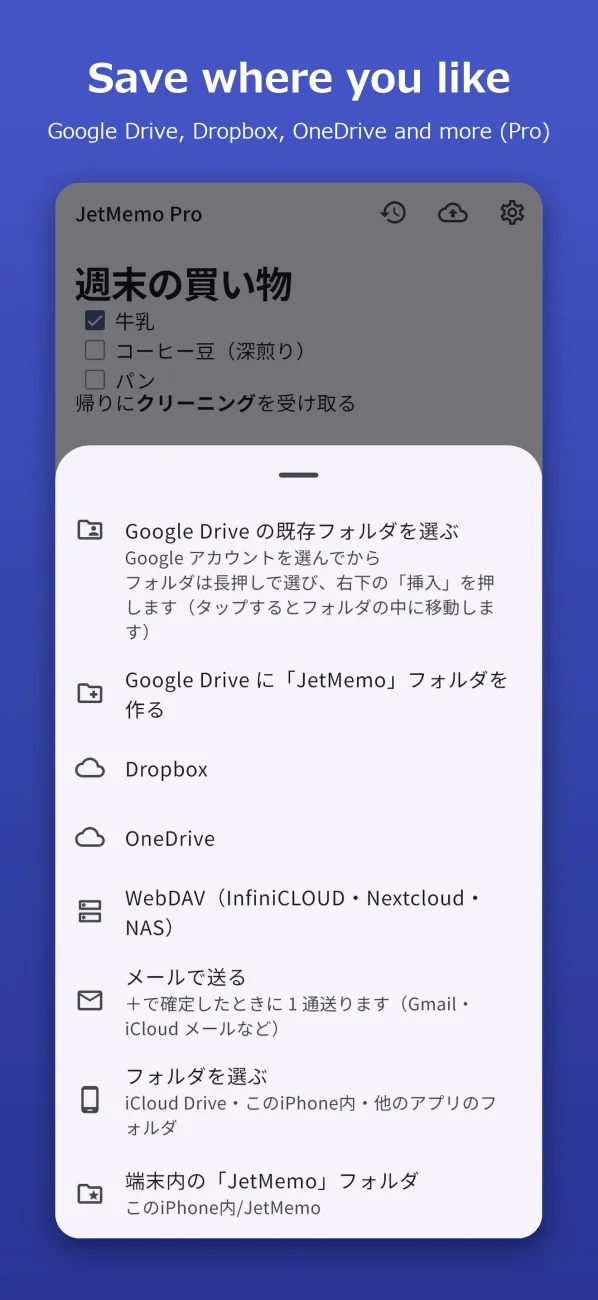
- Save to Google Drive, Dropbox, OneDrive, WebDAV (Nextcloud, NAS and more), send by email, or any folder you pick in Files (anywhere in iCloud Drive or other apps' folders)
- Also save as Word (.docx) or Google Docs
- Formatting (headings, bold, lists, checklists, links) and photos
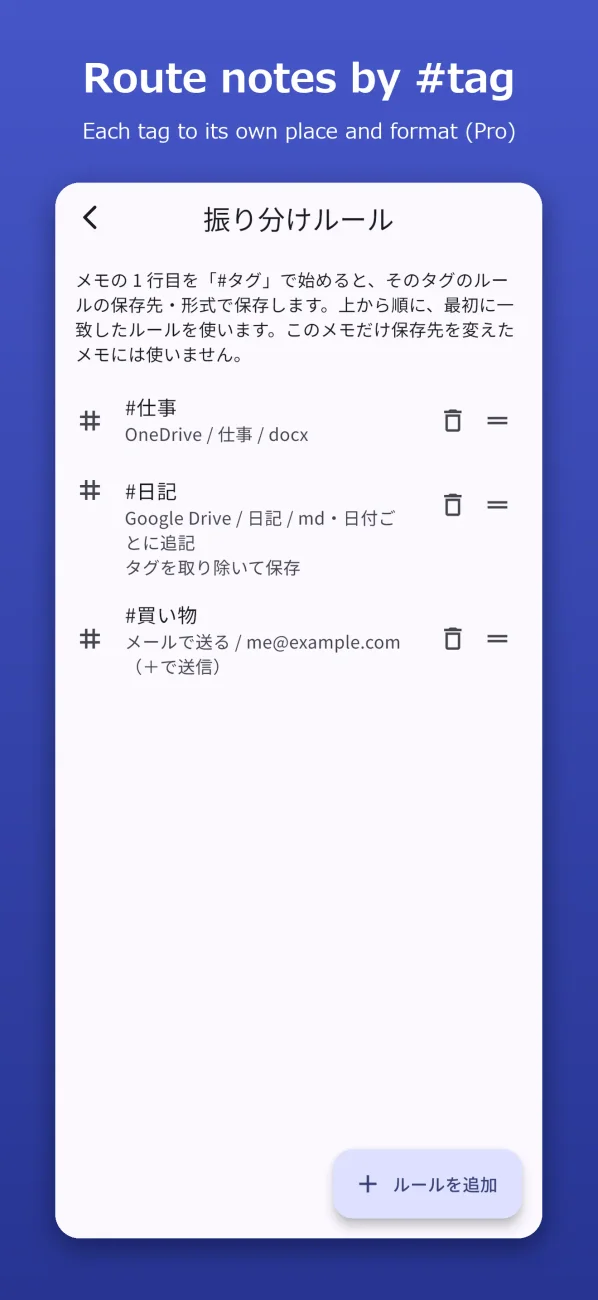
- Routing rules: start the first line with a tag like #work to send the note to a chosen place and format
- One file per day (great for journals and work logs; md, txt, docx, HTML)
- Home Screen widget (first line of the current note and New note)
- Buy once and use it on your iPhone and iPad with the same Apple ID (Restore Purchases)
PRIVACY
- No servers of ours in between: notes go directly from your device to the place you choose
- No ads, no analytics, no account
- Google Drive access is limited to files JetMemo creates and folders you pick (drive.file)
Yang baru
Versi 1.0.6 · 19/11/2026
- Text shared from other apps now opens as a new memo
- Print a memo (or save it as a PDF from the print dialog)
- A cleaner screen that lets you start writing right away
- Bug fixes
Privasi aplikasi
Yang dinyatakan Hatsuhito Shimizu di App Store tentang cara aplikasi ini menangani data.
-
Data tidak dikumpulkan
Pengembang tidak mengumpulkan data apa pun dari aplikasi ini.
Praktik privasi dapat bervariasi, misalnya berdasarkan fitur yang Anda gunakan atau usia Anda.
Informasi
- Penjual
- Hatsuhito Shimizu
- Kategori
- Produktivitas
- Versi
- 1.0.6
- Diperbarui
- 19/11/2026
- Dirilis
- 19/10/2026
- Ukuran
- 25,1 MB
- Memerlukan
- iOS 16.0 atau yang lebih baru
- Batasan usia
- 4+
- Harga
- Gratis
- Pembelian dalam aplikasi
- Ya
- Bahasa
- Inggris, Jepang
- Hak cipta
- © 2026 Hatsuhito Shimizu
Mungkin Anda juga suka
-
 60d MemoProduktivitas
-
 RED 消防アプリProduktivitas
-
 GenMail: AI Email AssistantProduktivitas
-
 Speakly - Keyboard Suara AIBicara saja, jangan mengetik
-
 TampermonkeyUserscript manager
-
 Jam Pasir Hitung Mundur VisualTimer Belajar & Fokus
-
 MyTurn - One turn a dayProduktivitas
-
 QuickPaste - Clipboard ManagerProduktivitas
-
 Locally AI by LM StudioProduktivitas
-
 Plaud: AI Work CompanionProduktivitas