MyHanKey
AI-Powered Keyboard
Dirancang untuk iPhone
Gratis · Pembelian dalam aplikasi
- Batasan usia12+
- KategoriProduktivitas
- PengembangHAN MIN PUI
- BahasaInggris
- Ukuran1,2 MB
Tertaut ke halaman resmi App Store
Download.org tidak menyimpan file MyHanKey apa pun. Tombol ini membuka halaman aplikasi di App Store, tempat HAN MIN PUI menerbitkannya. Halaman terakhir diperiksa pada 22/11/2026.
Tangkapan layar

Tentang
Pengembang belum menyediakan teks ini dalam bahasa Anda.
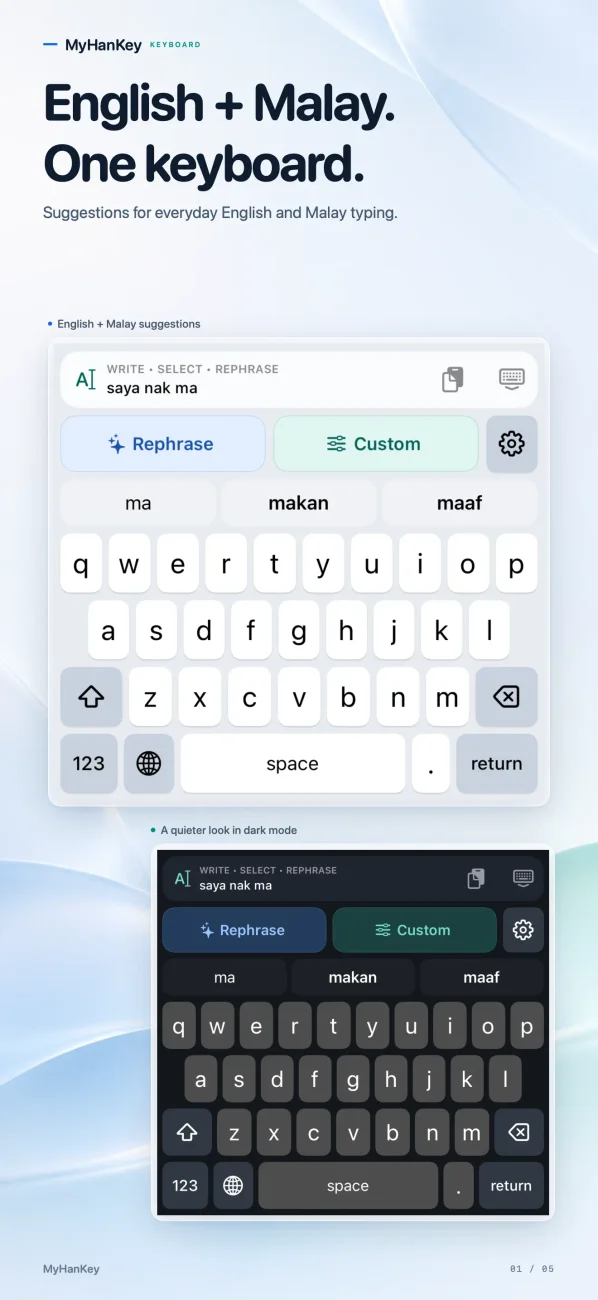
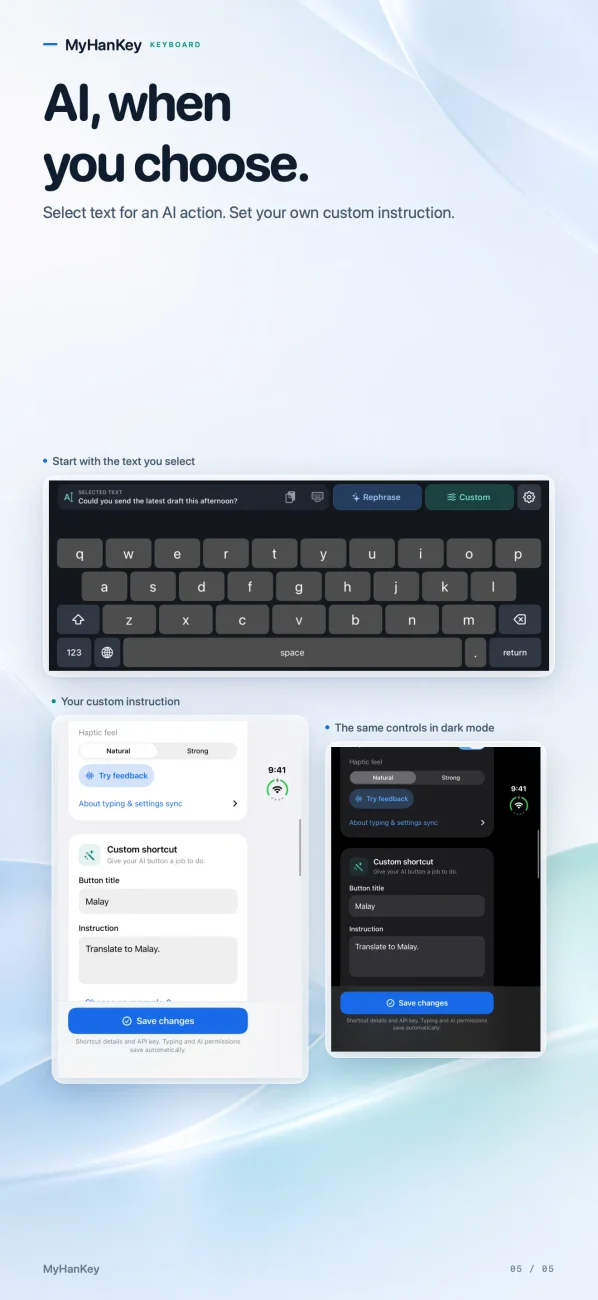
Type in English and Malay, with optional AI actions from your iPhone keyboard.
MyHanKey brings Rephrase and a custom AI action to supported text fields, so you can work on a sentence while staying in the app where you are writing.
ENGLISH + MALAY
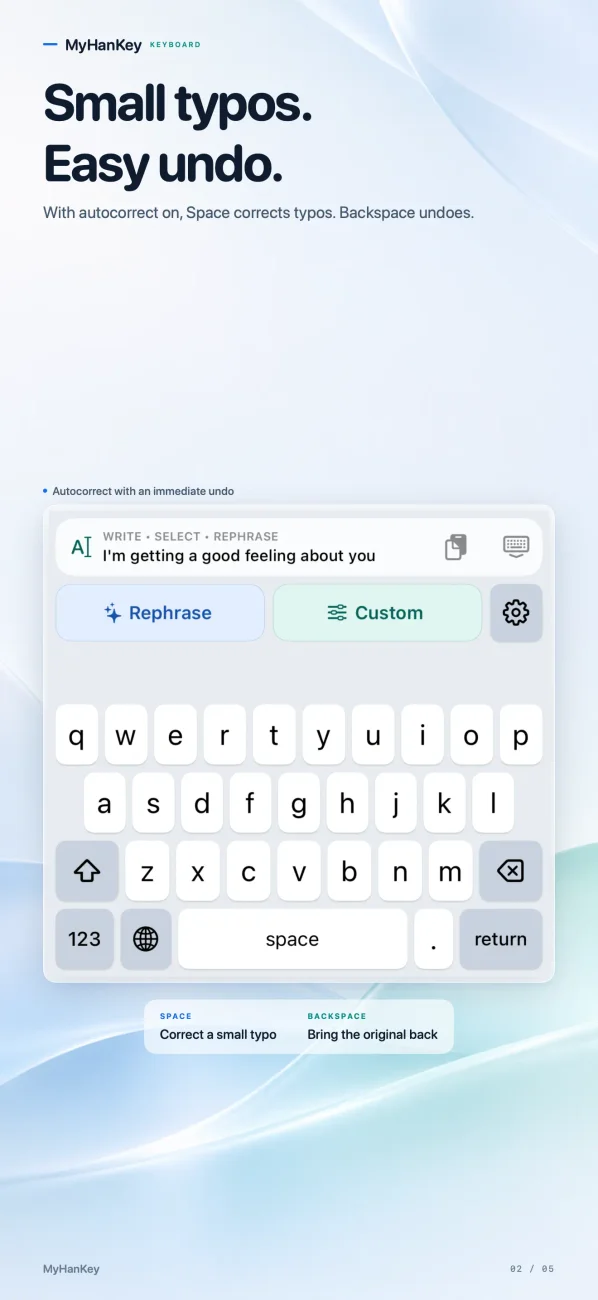
See local word suggestions as you type. Optional autocorrect fixes eligible, high-confidence typos when you tap Space; press Backspace immediately to restore your original spelling. Autocorrect is off by default. Keep your typed word or choose a suggestion yourself. Ordinary typing and local suggestions work without Allow Full Access or an internet connection.
COMFORTABLE TYPING
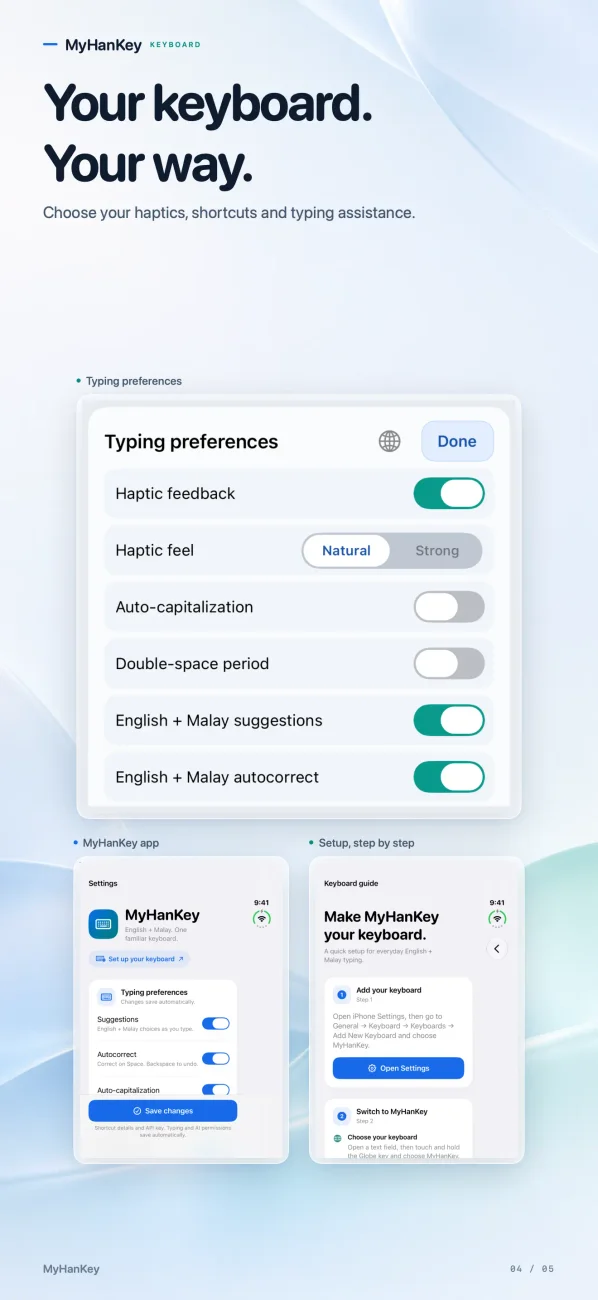
Use the refreshed keyboard with clearer AI controls, Shift and Caps Lock, symbol pages, held Delete and spacebar cursor movement. Press a letter, slide to a neighbouring key and lift to enter the highlighted character. Open the gear panel to turn haptic feedback or auto-capitalization on or off, and optionally enable double-space punctuation. Typing preferences save immediately. Haptic strength depends on your device and iOS settings.
LAYOUTS FOR IPHONE DUO
Controls adapt to the available screen width and margins. Wide layouts provide a compact AI toolbar, larger keys and more room for Space. Find a keyboard-switching Globe in Typing Preferences when needed.
REPHRASE YOUR TEXT
Make a sentence clearer and more concise with Rephrase. Work with selected text or the sentence at your caret, then review the returned text as you write.
CREATE YOUR OWN AI ACTION
Choose a button title and instruction in MyHanKey. Set up an action for a task such as translating text, changing its tone or making a checklist. Save your favorite prompt examples and apply the action from the keyboard.
CHOOSE HOW TO USE AI
- Premium: use AI through MyHanKey's service with an active monthly subscription.
- My API Key: enter your own OpenAI API key to send requests directly to OpenAI.
YOU CHOOSE WHAT TO SUBMIT
Ordinary typing does not send text to AI. The app explains where requests go and asks for permission before enabling AI processing. Text and any custom instruction are submitted when you tap an AI action. Premium also sends Apple purchase proof to MyHanKey's service to verify the subscription. Verified signed purchase evidence is saved securely on your device for later checks; Premium still verifies current subscription status for every AI request.
GET STARTED
Add HAN Key (shown as “keyboard”) in iOS Settings to start typing. For optional AI actions, open the app, choose a service and allow its AI-sharing permission. Use Save changes for a personal API key or custom shortcut. Enable Allow Full Access for AI networking. AI needs internet access. Existing Premium subscribers can use Restore Purchases, then Check AI access.
Premium is offered as a monthly auto-renewing subscription. The price is shown in the app before purchase. Manage or cancel your subscription through your Apple account.
PREMIUM USAGE LIMITS
Premium has a limit of 10 requests per minute and 100 requests per UTC day, plus
a daily budget of 100,000 reserved tokens. A request reserves its input allowance
and full output allowance before processing. This budget provides roughly 21
short requests per day; longer text uses more budget. It can stop usage before
the 100-request limit. Failed attempts count once their budget has been reserved.
Daily limits reset at midnight UTC. Shared IP and service-wide caps can also
temporarily limit access. These are Premium service limits; My API Key uses your
own OpenAI account.
Privacy Policy: https://paintmytee.my/iOSK/privacy.html
Terms of Use: https://www.apple.com/legal/internet-services/itunes/dev/stdeula/
Yang baru
Versi 2.2 · 14/11/2026
MyHanKey 2.2 brings a refreshed interface and local bilingual typing.
- English and Malay word suggestions as you type.
- Optional autocorrect on Space, with immediate Backspace undo.
- Refreshed Settings and a clearer keyboard setup guide.
- Adaptive layouts for compact and expanded iPhone Duo screens.
- Improved larger-text layouts and custom shortcut controls.
Ordinary typing stays local. AI actions remain optional and require your permission.
Privasi aplikasi
Yang dinyatakan HAN MIN PUI di App Store tentang cara aplikasi ini menangani data.
-
Data yang ditautkan dengan Anda
Dapat dikumpulkan dan ditautkan dengan identitas Anda.
- Pembelian
- Konten pengguna
- Pengenal
- Data penggunaan
- Data lainnya
Praktik privasi dapat bervariasi, misalnya berdasarkan fitur yang Anda gunakan atau usia Anda.
Informasi
- Penjual
- HAN MIN PUI
- Kategori
- Produktivitas
- Versi
- 2.2
- Diperbarui
- 14/11/2026
- Dirilis
- 6/1/2024
- Ukuran
- 1,2 MB
- Memerlukan
- iOS 16.0 atau yang lebih baru
- Batasan usia
- 12+
- Harga
- Gratis
- Pembelian dalam aplikasi
- Ya
- Bahasa
- Inggris
- Hak cipta
- © HAN MIN
Mungkin Anda juga suka
-
 Synergy BeaconProduktivitas
-
 Task AIProduktivitas
-
 Less Meeting: Agenda & NotesProduktivitas
-
 SiteNote: Project NotesProduktivitas
-
 Lightning Project TrackerProduktivitas
-
 KYRO: Storm, Linemen & VMProduktivitas
-
 Penerjemah Korea PercakapanSuara, Kamera & Teks AI
-
 Tables - Mengelola PekerjaanRencana, Melacak,Berkolaborasi
-
 Calculator Box:All-in-one clacProduktivitas
-
 Photo Inventory RetinelleProduktivitas