
- Batasan usia4+
- KategoriProduktivitas
- PengembangJunda Chu
- BahasaTionghoa Tradisional+ 3 lainnya
- Ukuran7,9 MB
Tertaut ke halaman resmi App Store
Download.org tidak menyimpan file NanNanCat Notes apa pun. Tombol ini membuka halaman aplikasi di App Store, tempat Junda Chu menerbitkannya. Halaman terakhir diperiksa pada 12/11/2026.
Tangkapan layar
Tentang
Pengembang belum menyediakan teks ini dalam bahasa Anda.
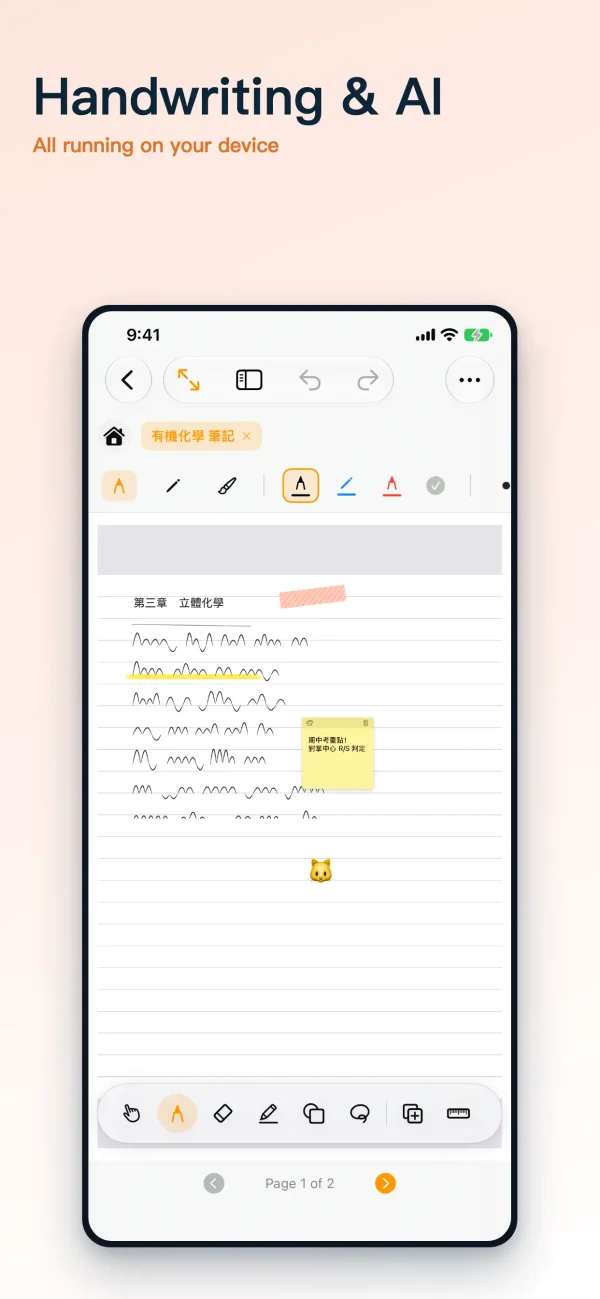
NanNanCat Notes is a handwriting notes app, made by a university student in Taiwan and named after their cat, NanNan.
No subscription, no in-app purchases, no locked features, no ads — just a plain tool.
HANDWRITING AND DRAWING
Fountain pen, ballpoint, brush and highlighter with freely adjustable width and colour — save your favourites. Shape recognition, a ruler, sticky notes, washi tape, stickers and text boxes are included. Inserted photos can be cropped, resized and rotated.
RECORDING WITH INK REPLAY
Record a lecture or meeting, and optionally capture the timing of your writing — during playback the ink reappears stroke by stroke in time with the audio. Choose the built-in mic or a connected headset.
THREE KINDS OF DOCUMENT
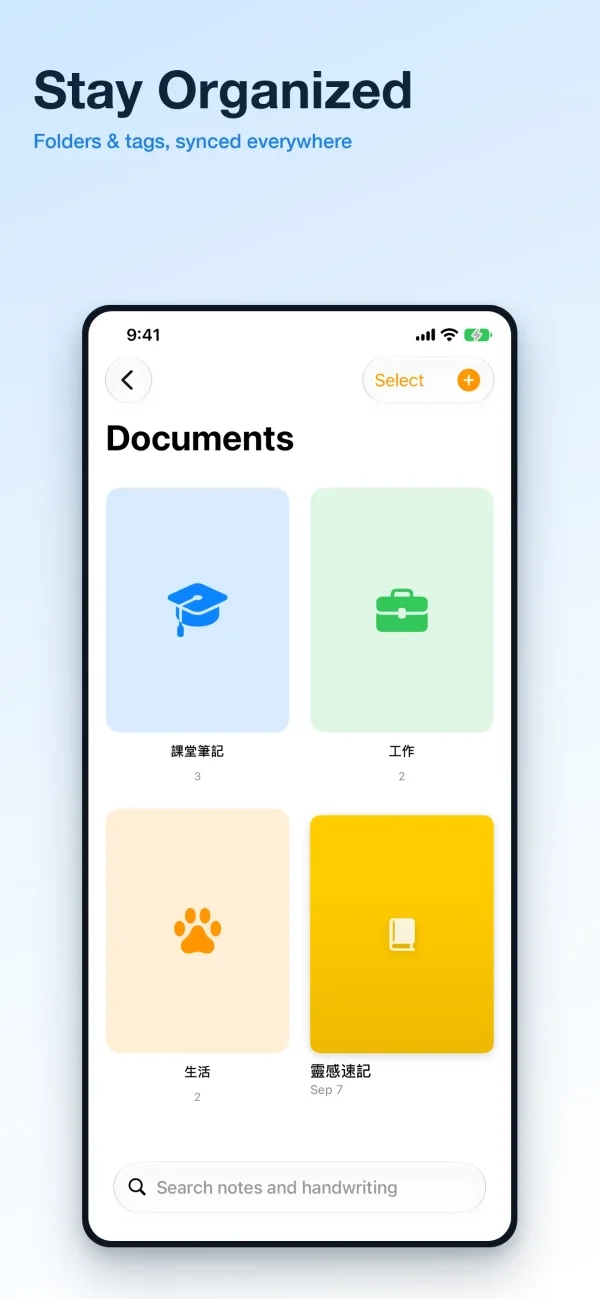
Besides paged notebooks, there's a whiteboard for thinking out loud and a text document that exports as Markdown. All three share the same folders and search.
SYNCS ACROSS YOUR DEVICES
Sign in to the same Apple Account and notes written on iPad appear on iPhone by themselves — no account to create, no sync button to press. Or keep everything local with iCloud turned off entirely.
HANDWRITING SEARCH AND ON-DEVICE AI
Search your own handwriting. Summarising, proofreading and translating all run on the device — your notes are never sent to any server.
PRIVATE AND SECURE
Set a passcode for the app and unlock it with Face ID or Touch ID. No ads, no tracking, no third-party analytics.
TAKE IT ANYWHERE
Export notebooks as PDF or as a re-editable file format, and text documents as Markdown. The Files app always has an up-to-date PDF of every notebook.
Available in Traditional Chinese, English, Japanese and Korean.
Questions or suggestions? Reach us on Discord or by email.
Yang baru
Versi 1.2 · 18/9/2026
What's new:
• Undo and redo now cover every action: lasso moves, text boxes, stickers, sticky notes, tape, photos, adding/deleting/duplicating pages — not just handwriting.
• Page turning feels new: see the next page as you drag, flick to turn, swipe from the grey margin too; the bottom page bar is now a small corner label, giving you more room to write.
• New "Add Page" menu: insert before/after the current page or at the end, pick a different paper template per page, or add pages from an image, a document scan, the camera, or an imported PDF/image.
• New Pencil pen style.
• On iPad, the navigation bar and tool row are merged into two compact rows, with the tabs on their own row.
Fixes:
• Fixed thin handwriting turning thicker the moment you lift the pen.
• Fixed the Undo/Redo buttons staying greyed out on iPad.
• Fixed photos jumping around while resizing from a corner or rotating.
• Fixed the Add Page, Export, Recording and AI buttons disappearing into an overflow menu on iPhone.
• Fixed the editor jumping to a different page after deleting an earlier page from the page list.
• Fixed highlighter colours appearing inverted in exported PDFs and thumbnails in Dark Mode.
• Many other stability, memory and performance improvements.
Privasi aplikasi
Yang dinyatakan Junda Chu di App Store tentang cara aplikasi ini menangani data.
-
Data tidak dikumpulkan
Pengembang tidak mengumpulkan data apa pun dari aplikasi ini.
Praktik privasi dapat bervariasi, misalnya berdasarkan fitur yang Anda gunakan atau usia Anda.
Informasi
- Penjual
- Junda Chu
- Kategori
- Produktivitas
- Versi
- 1.2
- Diperbarui
- 18/9/2026
- Dirilis
- 16/9/2026
- Ukuran
- 7,9 MB
- Memerlukan
- iOS 18.0 atau yang lebih baru
- Batasan usia
- 4+
- Harga
- Gratis
- Bahasa
- Tionghoa Tradisional, Jepang, Inggris, Korea
- Hak cipta
- © 2026 Junda Zhu
Mungkin Anda juga suka
-
 揪筆記 Join NoteProduktivitas
-
 Jeejee: Markdown, LaTeX, PenaMencatat sesuai cara Anda
-
 Asympta Paperie: JournalProduktivitas
-
 Stash - Post & Link SaverProduktivitas
-
 Stash: Save Posts & Read LaterProduktivitas
-
 JustNotes - Notetaking/MarkupProduktivitas
-
 Brenda's NoteProduktivitas
-
 StudiaryProduktivitas
-
 Nib - Handwritten DiaryProduktivitas