Note-Due: Tasks & Notes
Tasks & Notes together at last
Dirancang untuk iPhone, iPad
Gratis · Pembelian dalam aplikasi
- Batasan usia4+
- KategoriProduktivitas
- PengembangJames Roche
- BahasaInggris
- Ukuran11,9 MB
Tertaut ke halaman resmi App Store
Download.org tidak menyimpan file Note-Due: Tasks & Notes apa pun. Tombol ini membuka halaman aplikasi di App Store, tempat James Roche menerbitkannya. Halaman terakhir diperiksa pada 17/11/2026.
Tangkapan layar


Tentang
Pengembang belum menyediakan teks ini dalam bahasa Anda.
Note-Due brings your notes and tasks together. Write a note, add tasks inside it, set due dates, and get reminded — all without switching apps.
NOTES THAT DO MORE
Rich text with bold, italic, highlights, checklists, and code blocks. Attach photos, scan documents, record voice memos, and embed video. Draw with Apple Pencil or your finger — handwriting can be recognised and converted to typed text. While you write or scroll, toolbars slide away so your words get the whole screen.
TASKS BUILT INTO YOUR NOTES
Create tasks inside any note, or add standalone tasks. Set due dates, priorities, and reminders. Quick Add understands natural language — type "call James tomorrow at 9am high priority" and Note-Due does the rest. Block tasks behind other tasks to map real dependencies.
POWERFUL ORGANISATION
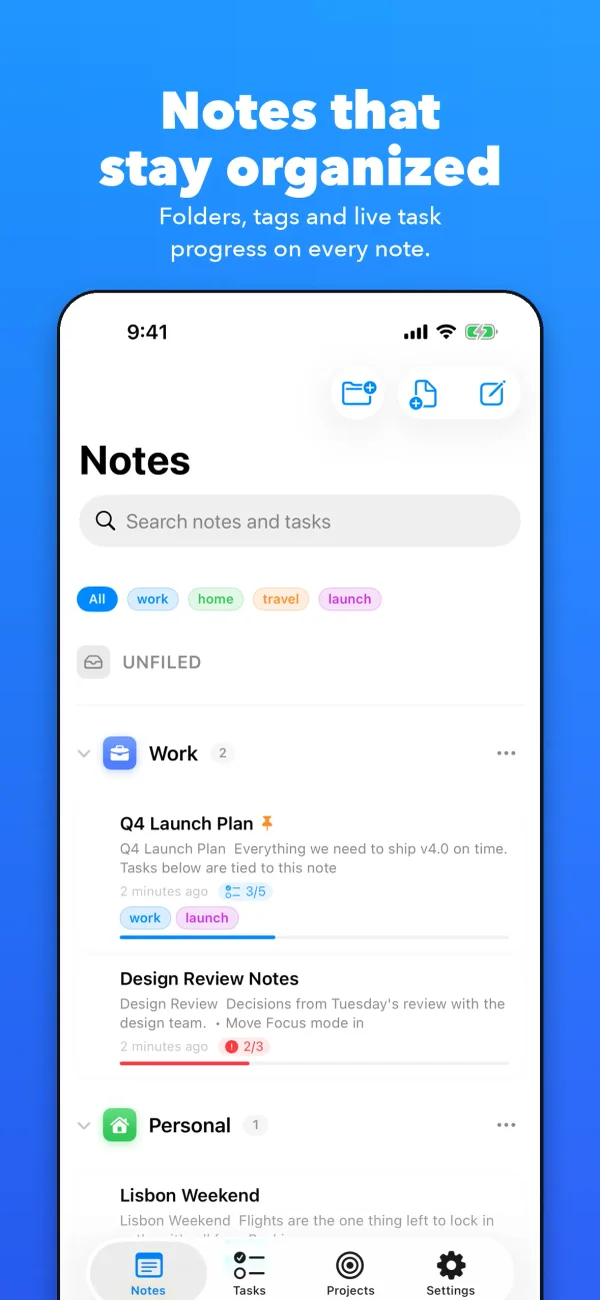
Folders, subfolders, tags, and smart filters keep everything findable. Switch between Today, Upcoming, Overdue, All, and Inbox, and between list, agenda, calendar, and kanban layouts. Snooze tasks, pin notes, and search everything instantly. The Trash keeps deleted items until you're sure.
INBOX AND FOCUS MODE
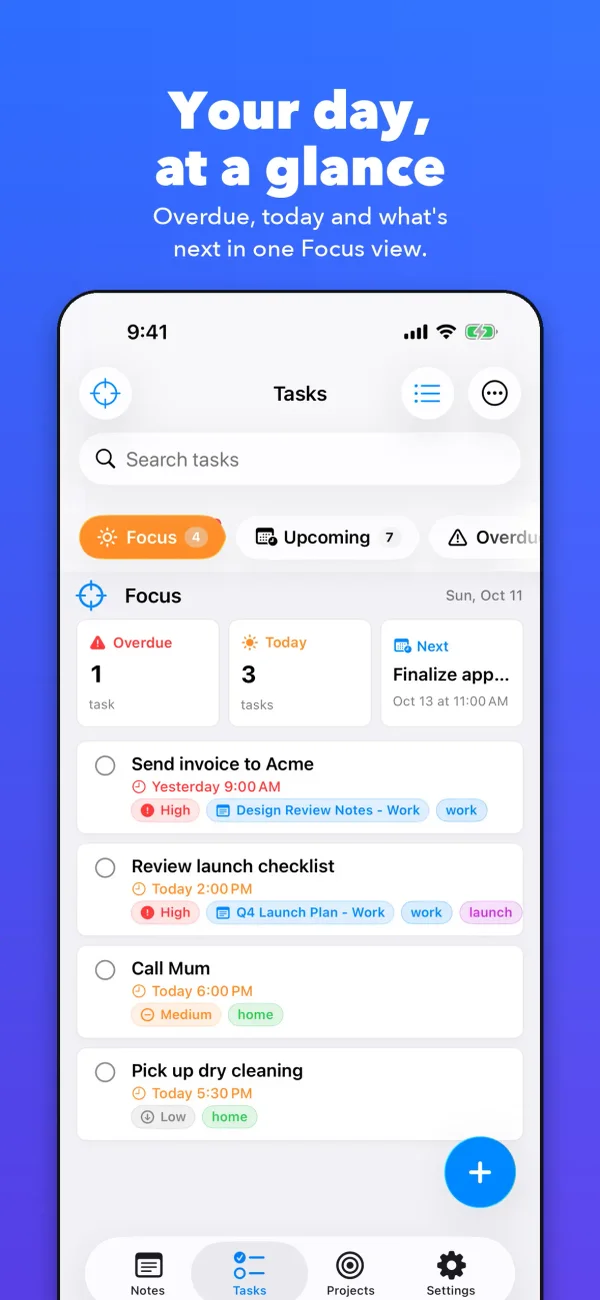
Capture first, schedule later: tasks without a date land in your Inbox. When it's time to work, Focus Mode shows only today's tasks in a distraction-free view.
SIRI, SHORTCUTS & SPOTLIGHT
Add tasks, check what's overdue, or complete something with your voice or the Shortcuts app. Find notes and tasks from Spotlight search.
BUILT FOR EVERY SCREEN
Designed for iPhone, iPad, and iPhone Duo. On iPad, see your notes list beside the open note, or open any note in its own window with Stage Manager.
PRIVATE BY DEFAULT
Your data lives on your device. No accounts, no servers, no tracking. Optional iCloud sync keeps your Apple devices up to date using your personal iCloud — we never see it.
———
UNLOCK NOTE-DUE PRO — $9.99 ONCE, NO SUBSCRIPTION
Apple Intelligence
Extract tasks from a note, summarise long notes, and rewrite selected text in any style — all on-device. Your previous version is saved before every AI rewrite.
Privacy Vault & Note Locking
Hide folders behind Face ID in the Vault, lock individual notes, or require Face ID every time you open the app.
Version History
Every note is versioned automatically. Browse and restore any earlier draft.
Power Tasks
Recurring tasks (daily, weekdays, weekly, monthly, yearly), subtasks, dependencies, and Apple Calendar sync.
Advanced Notifications
Morning daily digest, second reminders, quiet hours, custom lead times, lock-screen snooze, and custom sounds.
Export & Import
Export notes as PDF or HTML, or your whole library as a Markdown ZIP. Import Markdown and text notes from Bear, Obsidian, or Apple Notes, and tasks from Apple Reminders.
Projects & Time Tracking
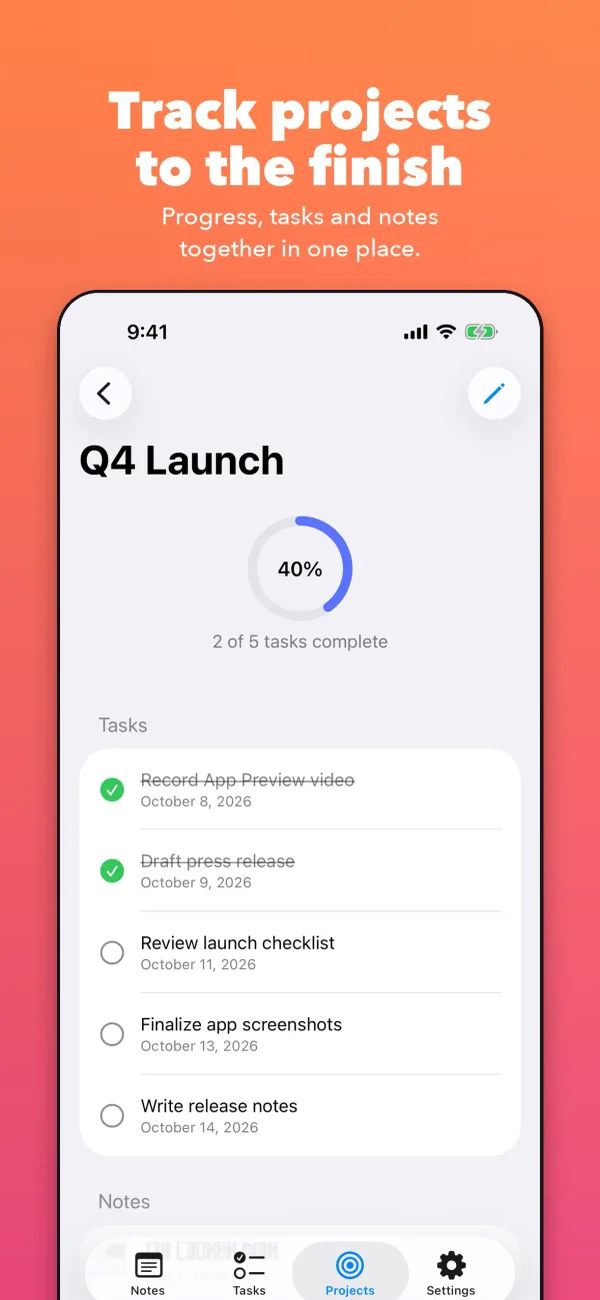
Group notes and tasks into projects with live progress and due dates. Add time estimates to tasks and track real time with a built-in timer.
PDF Annotation & Tables
Draw on PDF attachments with Apple Pencil, saved per page. Insert editable grid tables into any note.
Smart Scheduling
Smart Schedule checks your task load and suggests the least-busy day and time.
Kanban Board
Manage tasks across To Do, In Progress, and Done, and drag cards between columns.
Yang baru
Versi 3.8 · 11/10/2026
What’s New
New & Improved
Your writing gets the whole screen. When you type or scroll, the toolbars and note details now slide out of the way.
“Include Sample Library” during setup now works for iCloud users too.
Better layout on iPad, iPhone Duo and smaller screens. Onboarding scrolls when needed and is centred on iPad.
A cleaner note editor: the folder button, attachments row and keyboard “Done” button all display properly.
The “New Task” button now shows its plus icon, and Delete swipe actions are red.
Agenda times such as “11:00 AM” no longer wrap onto two lines.
Project tasks and notes now respect locked notes and hidden folders.
Fixes
New notes no longer jump back to the note list when you start typing a title.
Snoozed reminders now fire, even with an advance-warning time set.
Auto-archive no longer removes tasks you’ve only just completed.
Version History now saves your note before an edit, so you can restore earlier text. AI rewrites save the previous version first.
Recurring tasks keep their project and time estimate.
The daily digest no longer says “all caught up” when tasks are due.
Second reminders now respect your quiet hours.
Deleted tasks are removed from Spotlight search.
The calendar no longer jumps to the wrong month when switching months.
Windows-format Markdown files import correctly, with more text encodings supported.
Fixed the app sometimes sitting on “Loading your library…” when iCloud is slow.
Fixed PDF annotations moving or disappearing after you finish drawing.
Handwriting recognition no longer gets stuck on an error.
Creating a tag that already exists reuses it instead of making a duplicate.
You can no longer set two tasks to block each other.
Tasks are no longer dimmed after the task blocking them is deleted.
Fixed a possible crash when deleting a project.
Refunded Pro purchases now lock again right away.
Privasi aplikasi
Yang dinyatakan James Roche di App Store tentang cara aplikasi ini menangani data.
-
Data tidak dikumpulkan
Pengembang tidak mengumpulkan data apa pun dari aplikasi ini.
Praktik privasi dapat bervariasi, misalnya berdasarkan fitur yang Anda gunakan atau usia Anda.
Informasi
- Penjual
- James Roche
- Kategori
- Produktivitas
- Versi
- 3.8
- Diperbarui
- 11/10/2026
- Dirilis
- 19/5/2026
- Ukuran
- 11,9 MB
- Memerlukan
- iOS 26.0 atau yang lebih baru
- Batasan usia
- 4+
- Harga
- Gratis
- Pembelian dalam aplikasi
- Ya
- Bahasa
- Inggris
- Hak cipta
- © James Roche