My OpenKit
Extract, Preview & Edit
Dirancang untuk iPhone, iPad
Rp 19ribu · Pembelian dalam aplikasi
- Batasan usia4+
- KategoriKegunaan
- Pengembang一凡 彭
- BahasaInggris+ 1 lainnya
- Ukuran9,0 MB
Tertaut ke halaman resmi App Store
Download.org tidak menyimpan file My OpenKit apa pun. Tombol ini membuka halaman aplikasi di App Store, tempat 一凡 彭 menerbitkannya. Halaman terakhir diperiksa pada 18/11/2026.
Tangkapan layar


Tentang
Pengembang belum menyediakan teks ini dalam bahasa Anda.
OpenKit. A simpler way to work with files.
From chat attachments and downloaded archives to project configuration files, OpenKit helps you view, organize, and share your files. No sign-up, no ads. Files are processed on your device.
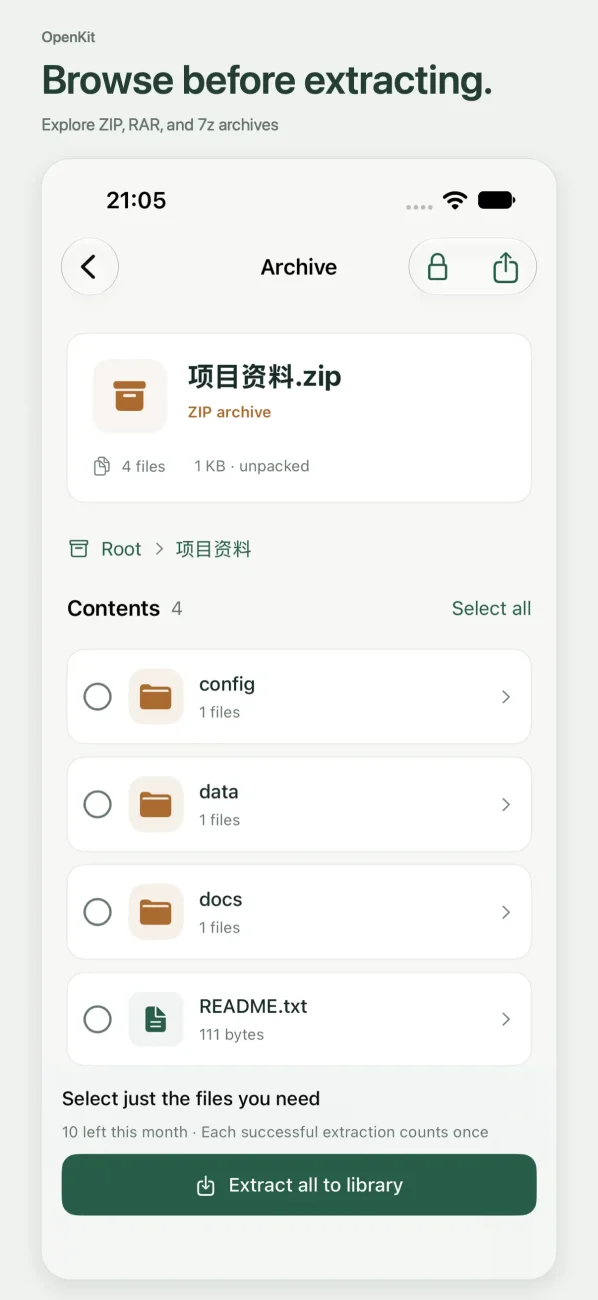
• Explore archives before extracting
Browse ZIP archives and common unencrypted RAR, RAR5, and 7z archives. Preview files with a tap and extract only what you need. You can also bundle multiple files into a ZIP for easy sharing.
• View and edit JSON and configuration files
Explore JSON in a structured view, search its contents, format or minify it, and check its syntax. Edit YAML, TOML, INI, ENV, and other configuration files as plain text while preserving comments and indentation. Changes are saved as a new copy, keeping the original intact.
• Read documents and use text tools in one place
Read Markdown, view CSV and TSV tables, inspect HTML source text, and open text files such as Dockerfile and Makefile. Preview PDFs, images, and documents supported by your device. Encode or decode Base64 and URLs, or generate SHA-256 hashes, then copy, save, or export the results.
• Simple, with room for your preferences
Keep frequently used files in Favorites, find files quickly with search, and recover deleted files within 30 days. Choose from six theme colors, light and dark appearances, and English or Chinese interfaces. Designed for iPhone and iPad.
Start free. Upgrade when you need more.
File viewing, editing, text tools, and all theme colors are free. The Free plan includes 10 operations per device per calendar month, shared between extracting files to your library and creating ZIP archives. Each batch extraction counts as one operation. Failed or canceled operations do not count.
OpenKit Pro offers monthly and yearly subscriptions that remove this usage limit. Subscriptions renew automatically. Prices are shown in the App Store, and you can manage or cancel your subscription in your Apple Account settings.
File format and size limits are the same for Free and Pro. Syntax validation and formatting are available for JSON only. Encrypted RAR and 7z archives, as well as multipart archives, are not currently supported. See the app for more details on supported formats.
Apple EULA:https://www.apple.com/legal/internet-services/itunes/dev/stdeula/
Yang baru
Versi 1.0.2 · 8/11/2026
fix some UI.
Privasi aplikasi
Yang dinyatakan 一凡 彭 di App Store tentang cara aplikasi ini menangani data.
-
Data tidak dikumpulkan
Pengembang tidak mengumpulkan data apa pun dari aplikasi ini.
Praktik privasi dapat bervariasi, misalnya berdasarkan fitur yang Anda gunakan atau usia Anda.
Informasi
- Penjual
- 一凡 彭
- Kategori
- Kegunaan
- Versi
- 1.0.2
- Diperbarui
- 8/11/2026
- Dirilis
- 20/10/2026
- Ukuran
- 9,0 MB
- Memerlukan
- iOS 17.0 atau yang lebih baru
- Batasan usia
- 4+
- Harga
- Rp 19ribu
- Pembelian dalam aplikasi
- Ya
- Bahasa
- Inggris, Tionghoa Sederhana
- Hak cipta
- © 2026 彭一凡