
Pikkaru
Sort by Size, Filter by Format
Dirancang untuk iPhone
Gratis · Pembelian dalam aplikasi
- Batasan usia4+
- KategoriFoto & Video
- PengembangTatsuyoshi Sasaki
- BahasaJepang+ 1 lainnya
- Ukuran2,5 MB
Tertaut ke halaman resmi App Store
Download.org tidak menyimpan file Pikkaru apa pun. Tombol ini membuka halaman aplikasi di App Store, tempat Tatsuyoshi Sasaki menerbitkannya. Halaman terakhir diperiksa pada 12/11/2026.
Tangkapan layar




Tentang
Pengembang belum menyediakan teks ini dalam bahasa Anda.
Pikkaru shows you your largest photos and videos by file size, lets you check each one, and deletes what you no longer need — all without leaving the app.
The Photos app can't sort by file size. Pikkaru can, and it filters by file format or media type, including HEIC, JPG and PNG.
FIND
• Sort your photos and videos by file size, largest first or smallest first
• Filter by file format or media type: HEIC, JPG, PNG, GIF, RAW, videos, screenshots, screen recordings, Live Photos, bursts
• Sort by capture date, oldest or newest first
• Storage dashboard: total file size by format and media type, and how much you have sent to Recently Deleted
CHECK
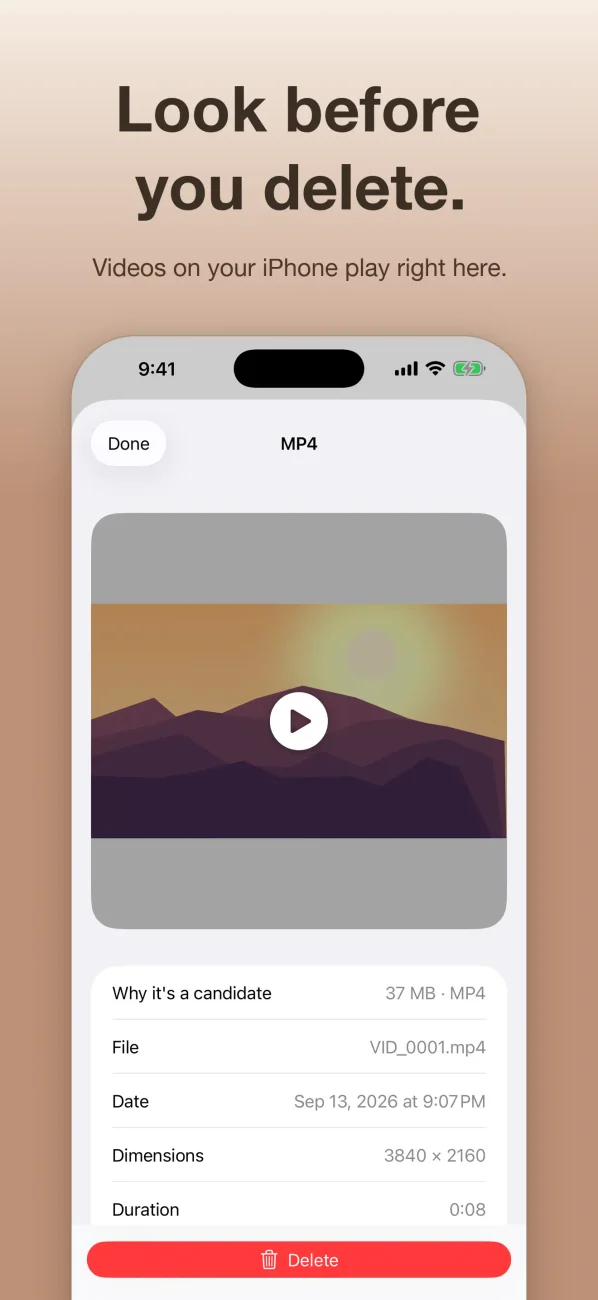
• Open a photo to review it and its details before you decide
• Play videos stored on this iPhone right inside Pikkaru
• See file size, format, dimensions, duration and capture date at a glance
TIDY UP
• Select items and delete them without switching to Photos
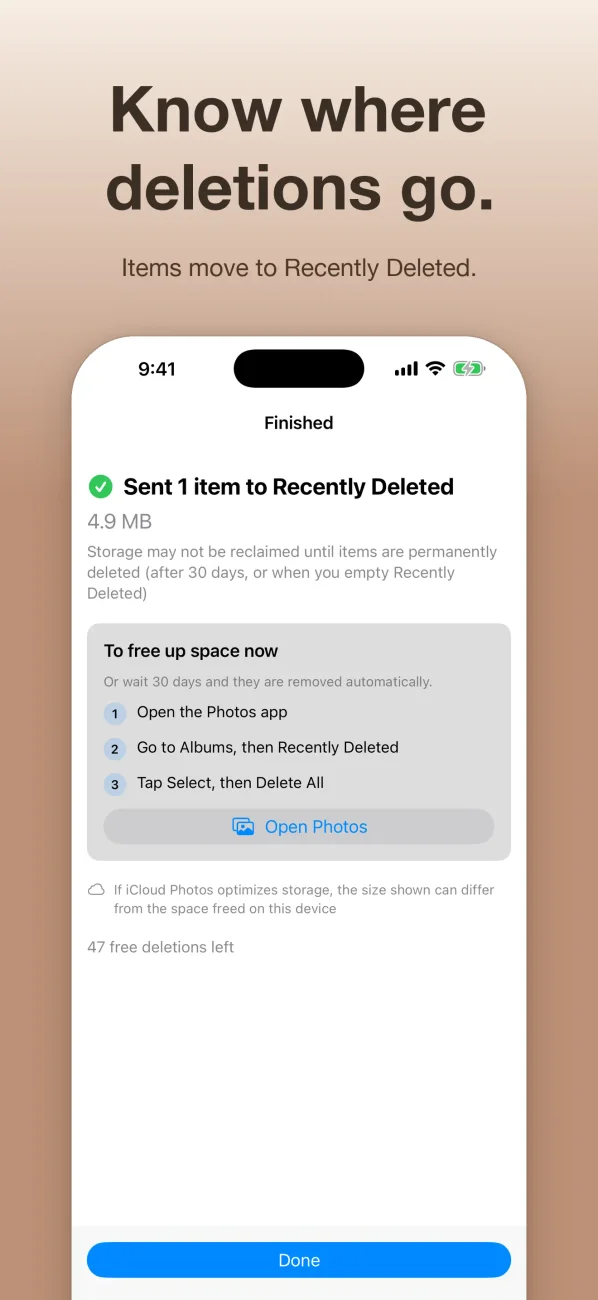
• iOS moves deleted items to Recently Deleted, where you can restore them for up to 30 days unless you permanently delete them sooner
• Pikkaru is honest about storage: deleting sends items to Recently Deleted, and storage is reclaimed only after it is emptied (or after 30 days). Pikkaru shows you the steps.
FREE AND PRO
• Free, with no limits: sorting, filtering, the dashboard, photo viewing and previews of videos stored on this iPhone
• Free: delete up to 50 photos or videos in total, enough to try the whole flow from sorting to deleting
• Pro (one-time purchase): unlimited deletions, plus bulk selection — the top 100 items shown, or everything in the current filter (up to 5,000 items at a time)
• Pro is a single purchase. No subscription, no ads. Restore it on your other iPhones signed in with the same Apple Account.
• Our promise: we will never remove a feature you paid for.
PRIVACY
• Pikkaru never uploads your photos or videos. No account, no usage analytics, no advertising SDK.
• From your library it reads only the thumbnails and previews it shows you, and the information needed to sort and filter: format, dimensions, duration, capture date and file size.
GOOD TO KNOW
• With full access, Pikkaru sorts your whole photo library; with limited access, it sorts only the items you select.
• With iCloud Photos and Optimize iPhone Storage, sizes shown are the original file sizes, which can differ from the space used on this iPhone.
• Video previews play videos stored on this iPhone. Videos kept only in iCloud are listed but not downloaded.
Privasi aplikasi
Yang dinyatakan Tatsuyoshi Sasaki di App Store tentang cara aplikasi ini menangani data.
-
Data tidak dikumpulkan
Pengembang tidak mengumpulkan data apa pun dari aplikasi ini.
Praktik privasi dapat bervariasi, misalnya berdasarkan fitur yang Anda gunakan atau usia Anda.
Informasi
- Penjual
- Tatsuyoshi Sasaki
- Kategori
- Foto & Video
- Versi
- 1.0.0
- Diperbarui
- 22/9/2026
- Dirilis
- 22/9/2026
- Ukuran
- 2,5 MB
- Memerlukan
- iOS 17.0 atau yang lebih baru
- Batasan usia
- 4+
- Harga
- Gratis
- Pembelian dalam aplikasi
- Ya
- Bahasa
- Jepang, Inggris
- Hak cipta
- © 2026 Tatsuyoshi Sasaki
Mungkin Anda juga suka
-
 Kyodo - Auto Edit Daily VideosFoto & Video
-
 GearLog - Camera & Lens StatsFoto & Video
-
 Large Video CleanerFoto & Video
-
 Photo Cleaner: Sort by SizeFoto & Video
-
 AI Image to Pixel ArtFoto & Video
-
 Quick Photo CleanerFoto & Video
-
 Simple Video SplitterFoto & Video
-
 Video Cleaner: Sort by SizeFoto & Video
-
 Manual ExposureFoto & Video
-
 Campera - Point & Shoot CameraFoto & Video