PractiCal AR
FRC Practice Field Calibration
Dirancang untuk iPhone, iPad
Gratis
- Batasan usia4+
- KategoriKegunaan
- PengembangA2IDEA, LLC
- BahasaInggris
- Ukuran18,7 MB
Tertaut ke halaman resmi App Store
Download.org tidak menyimpan file PractiCal AR apa pun. Tombol ini membuka halaman aplikasi di App Store, tempat A2IDEA, LLC menerbitkannya. Halaman terakhir diperiksa pada 13/11/2026.
Tangkapan layar


Tentang
Pengembang belum menyediakan teks ini dalam bahasa Anda.
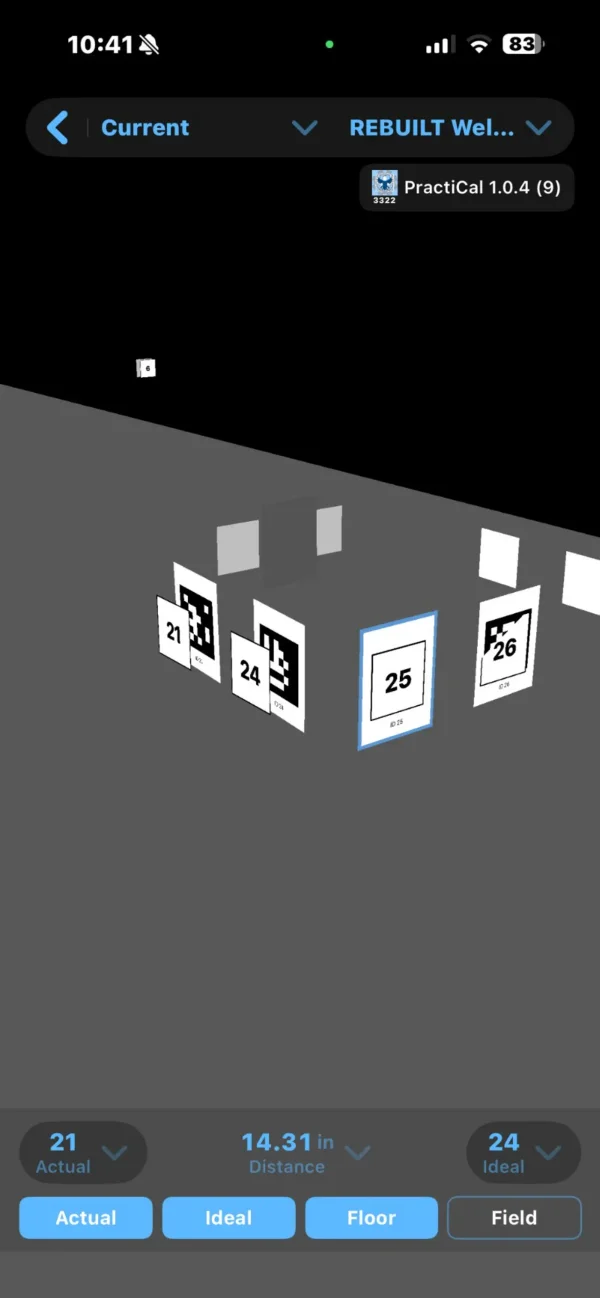
PractiCal AR helps FIRST® Robotics Competition teams calibrate and check practice field AprilTag placement using augmented reality and AprilTag detection.
Use your device to detect AprilTags, build a field map, compare detected tag positions against an ideal field layout, and export the results for use in other tools.
APRILTAG DETECTION
Detect AprilTags in real time using your device’s camera and ARKit. Each detected tag is shown in the AR view with its 3D pose so you can see position and orientation while scanning
.
FIELD CALIBRATION
Scan your practice field AprilTags and compare their detected positions against the official field layout.
CALIBRATION REPORT
View a table showing Ideal vs. Actual tag placement, then export the report as CSV, JSON, or Markdown.
3D FIELD MODEL
View this season’s simplified field CAD model in a 3D viewer, or place it in your environment using AR.
REVIEW MODE
Review saved calibration data in the app without needing to be in front of the field.
EXPORT YOUR DATA
Export your field calibration data in WPILib JSON format and Limelight JSON format.
AR GAME
Use your a practice or competition field to play four AR mini-games — launch fuel balls at the hub targets on the field and track your scores.
Play the games from the stands, no need to do any calibration of the field, other than using PractiCal to detect and pin a single tag, all from the stands.
The included games are:
- Quick Shot — Score as many as you can in 20 seconds
- Hot Shot — Build the longest streak without missing
- Long Shot — Go for distance — how far can you score from?
- Top Shot — How good is your accuracy rate?
The game features:
- Real-time ball physics with adjustable launch speed and angle
- Aim with your camera.
NOTE:
The game and scores are specific to REBUILT and will be removed at the beginning of the 2027 FRC season.
Leaderboard participation is optional and only displays user provided 3 letters and FRC team #.
Useful settings for calibrating tags from a distance is in Settings -> Calibration
* Tap to recenter all tags
* Snap tags to vertical
The higher the resolutions and lower the decimation, the farther you can be.
You can also detect closer and walk away, ARKit will know how fr you've gone.
PractiCal AR is free, with no in-app purchases or ads. Built by an FRC mentor for the FRC community.
Requires a device with ARKit support and a camera. Works best in a well-lit environment with clearly visible AprilTags.
LEGAL & TRADEMARKS
This app is an independent educational project developed by Eagle Evolution, FRC Team #3322.
The 3D field models included are simplified derivative works created for reference purposes, based on the official 2026 FIRST® Robotics Competition season, REBUILT™ presented by Haas.
FIRST®, the FIRST® logo, FIRST® Robotics Competition, and REBUILT™ are trademarks of For Inspiration and Recognition of Science and Technology (FIRST®), which is not overseeing, involved with, or responsible for this activity, product, or service. All original CAD data and field technical information are the sole property of FIRST®. Any reproduction of the original CAD, in part or as a whole, without written permission from FIRST® is prohibited.
AprilTag detection is powered by the AprilTag 3 library, licensed under the BSD 2-Clause License.
Yang baru
Versi 1.0.7 · 6/11/2026
Tag size setting. PractiCal now works with smaller AprilTags. Go to Settings → Tag Size and pick 3.25 in for the FTC BioBuzz tags, or keep 6.5 in for FRC. If the axes look too big or too small, or slide off the tags as you move, check this setting first.
Print the tags you need. Print AprilTags now prints the set that matches your tag size: IDs 30–45 at 3.25 in, or IDs 1–32 at 6.5 in. Print at 100% / Actual Size and measure the black square.
Smoother Review. Fixed stuttering when orbiting the 3D Review view.
Privasi aplikasi
Yang dinyatakan A2IDEA, LLC di App Store tentang cara aplikasi ini menangani data.
-
Data tidak dikumpulkan
Pengembang tidak mengumpulkan data apa pun dari aplikasi ini.
Praktik privasi dapat bervariasi, misalnya berdasarkan fitur yang Anda gunakan atau usia Anda.
Informasi
- Penjual
- A2IDEA, LLC
- Kategori
- Kegunaan
- Versi
- 1.0.7
- Diperbarui
- 6/11/2026
- Dirilis
- 3/3/2026
- Ukuran
- 18,7 MB
- Memerlukan
- iOS 26.0 atau yang lebih baru
- Batasan usia
- 4+
- Harga
- Gratis
- Bahasa
- Inggris
- Hak cipta
- © 2026 Todd Yocum