
Quirepad
Collect text as you browse
Dirancang untuk iPhone, iPad, Mac, iPod touch
Gratis
- Batasan usia4+
- KategoriProduktivitas
- PengembangSaurabh Mishra
- BahasaInggris
- Ukuran2,5 MB
Tertaut ke halaman resmi App Store
Download.org tidak menyimpan file Quirepad apa pun. Tombol ini membuka halaman aplikasi di App Store, tempat Saurabh Mishra menerbitkannya. Halaman terakhir diperiksa pada 17/11/2026.
Tangkapan layar


Tentang
Pengembang belum menyediakan teks ini dalam bahasa Anda.
Quirepad is a small, focused tool for anyone who copies text from the web more than once at a time, built specifically for how you actually read on iPhone and iPad.
The problem it solves: you are reading a long article, a research paper, or documentation, and you need three or four separate pieces of text, not the whole page. Selecting with your finger cannot skip the lines in between. And copying one piece, pasting it, then scrolling back for the next one breaks your reading flow every single time, especially on a smaller screen.
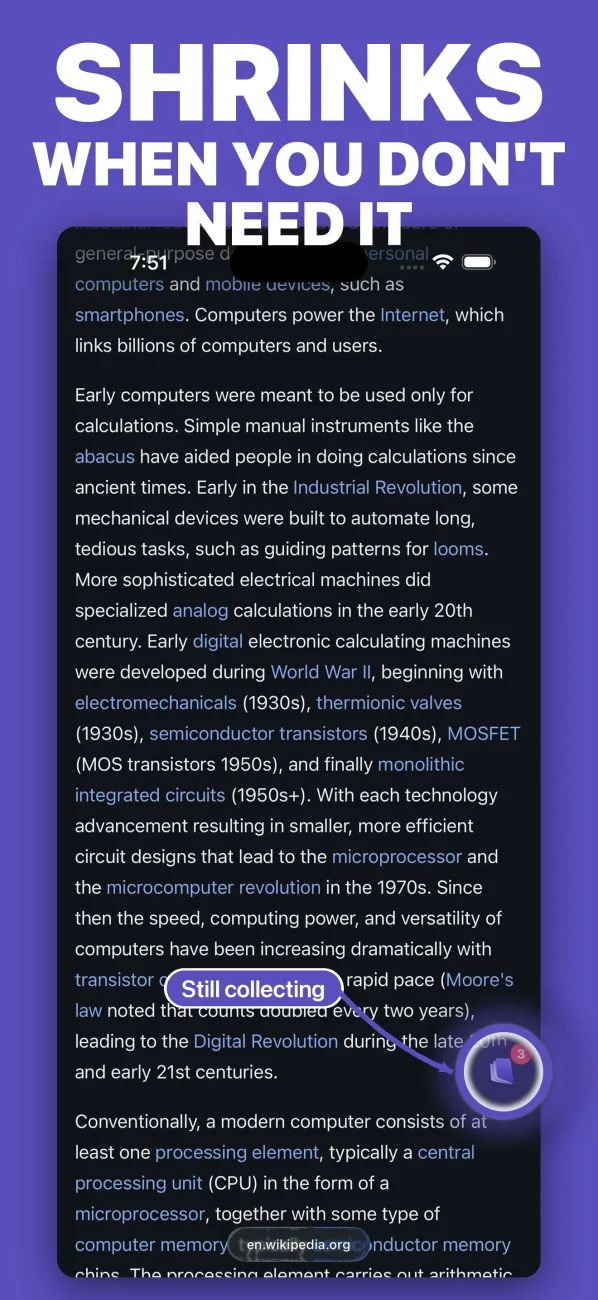
Quirepad fixes this. Turn it on, and every piece of text you select gets added to a small floating box right on the page. Keep reading. Switch tabs. Select more. When you are done, tap Copy All and everything you gathered is merged into your clipboard, ready to paste anywhere, grouped by the page it came from.
HOW IT WORKS
-Tap the Quirepad icon in Safari to arm it. A small badge confirms it is active.
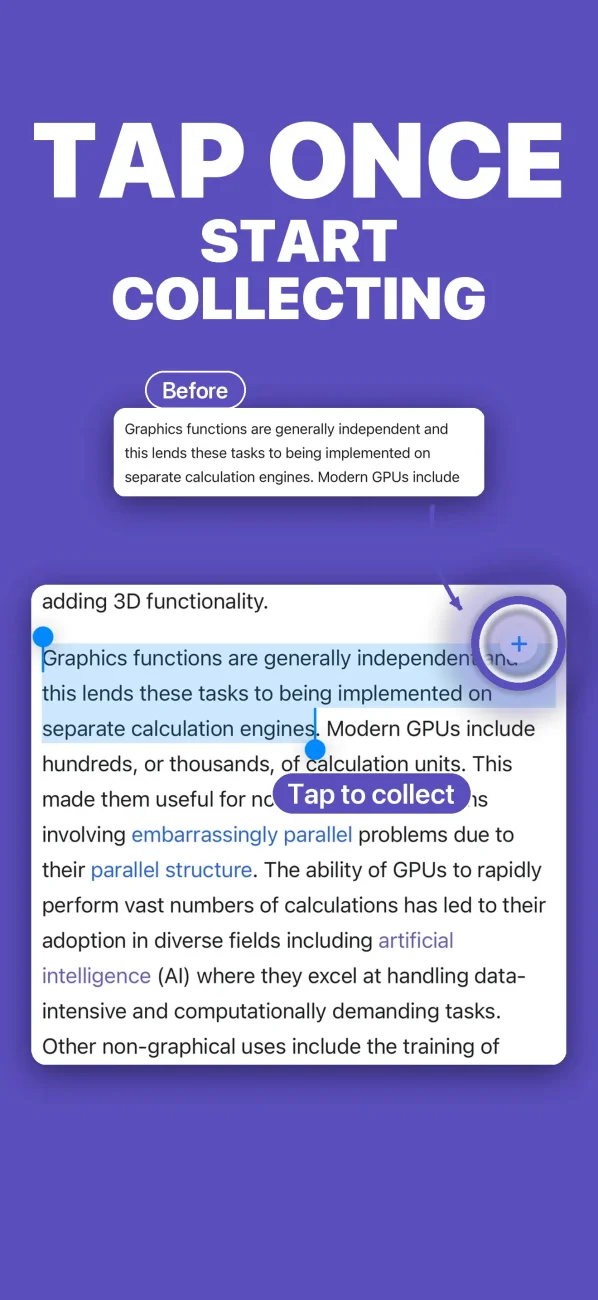
-Select any text on any page. A small + button appears, tap it, and the text is added to the box.
-Switch tabs or pages freely. Quirepad keeps collecting across all of them, and groups snippets by source with a clear divider.
-Made a mistake? Delete any single snippet, or copy just one, right from the box. Nothing is final until you say so.
-Tap Copy All to merge everything into your clipboard as one clean block of text, ready to paste into your notes, your document, or an email.
BUILT FOR HOW YOU ACTUALLY READ
Quirepad works the same way on your iPhone, iPad, and Mac, so the habit carries over wherever you are reading. Most tools like this only exist on Chrome and only on desktop. Quirepad was built Safari first, with real support for how much harder it is to copy multiple pieces of text on a phone.
Turn on Keep Formatting to preserve bold, italics, and links when you paste into a rich text document.
Turn on Include Sources to automatically add the page title and link above each group of snippets, useful for citations and research notes.
PRIVACY
Everything Quirepad collects stays on your device. There is no account, no analytics, no tracking, and nothing is ever sent anywhere. Your reading and your notes are yours.
Quirepad is a quiet, purpose-built tool. It does one thing, and it tries to do it well.
Yang baru
Versi 1.2 · 21/8/2026
Snippets now paste with the spacing they had on the page instead of
inheriting the site's own margins on top of your document's. Pages
that used to paste with two or three blank lines between every line
now land tight.
• Exactly one blank line between two snippets, nothing extra
• Paragraph breaks, line breaks, lists, headings and code blocks keep
their shape
• Links, bold, italic and underline still come through with Keep
formatting on
• Text copied from a dark-themed page no longer pastes light-on-white
Privasi aplikasi
Yang dinyatakan Saurabh Mishra di App Store tentang cara aplikasi ini menangani data.
-
Data tidak dikumpulkan
Pengembang tidak mengumpulkan data apa pun dari aplikasi ini.
Praktik privasi dapat bervariasi, misalnya berdasarkan fitur yang Anda gunakan atau usia Anda.
Informasi
- Penjual
- Saurabh Mishra
- Kategori
- Produktivitas
- Versi
- 1.2
- Diperbarui
- 21/8/2026
- Dirilis
- 28/7/2026
- Ukuran
- 2,5 MB
- Memerlukan
- iOS 15.0 atau yang lebih baru
- Batasan usia
- 4+
- Harga
- Gratis
- Bahasa
- Inggris
- Hak cipta
- © 2026 Saurabh Mishra
Mungkin Anda juga suka
-
 MinDrop: Notes & RemindersProduktivitas
-
 Thought Meadow - Private NotesProduktivitas
-
 Noter: Sticky NotesProduktivitas
-
 PageCacheProduktivitas
-
 HomemProduktivitas
-
 Tuck: Private FeedProduktivitas
-
 Winter CalendarProduktivitas
-
 Lucid: Second BrainProduktivitas
-
 ShiftClickProduktivitas
-
 NexReader: Markdown ReaderProduktivitas