- Batasan usia4+
- KategoriFoto & Video
- PengembangNEXRAVEN INNOVATIONS
- BahasaInggris+ 19 lainnya
- Ukuran19,9 MB
Tertaut ke halaman resmi App Store
Download.org tidak menyimpan file Resize Ease apa pun. Tombol ini membuka halaman aplikasi di App Store, tempat NEXRAVEN INNOVATIONS menerbitkannya. Halaman terakhir diperiksa pada 17/11/2026.
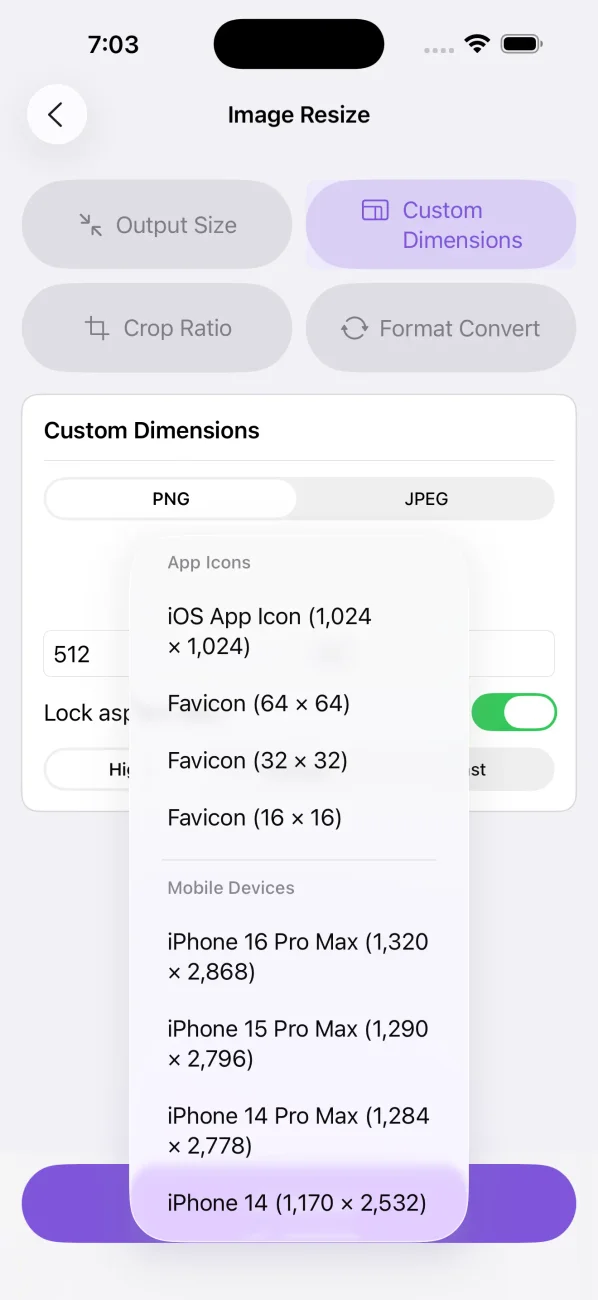
Tangkapan layar


Tentang
Pengembang belum menyediakan teks ini dalam bahasa Anda.
Resize, crop, and convert your photos in seconds—entirely offline on your device. Resize Ease keeps your images 100% private with no cloud uploads, no accounts, and no subscriptions.
Compress images to target file sizes (KB/MB), scale exact pixel dimensions, crop for social media or ID photos, convert HEIC files, and export batch scans to PDF.
KEY FEATURES
• COMPRESS TO TARGET SIZE: Reduce image files down to 10 KB–20 MB for official forms, visas, and email attachments.
• EXACT PIXEL RESIZING: Scale by dimensions or percentage. Use built-in presets for ID photos, printing, and social media, or save custom presets.
• ADVANCED CROP & ROTATE: Crop to 1:1, 16:9, 4:5, or 9:16. Rotate, flip, and straighten photos individually or apply across an entire batch.
• FORMAT CONVERT & HEIC SUPPORT: Convert between HEIC, PNG, JPEG, and WEBP. Remove metadata and fix sideways photos automatically.
• BATCH EXPORT TO PDF: Combine multiple photos into a single PDF document or save directly to your Photos library.
• 100% ON-DEVICE PRIVACY: All processing runs locally on your phone CPU. Images are never uploaded, stored, or shared.
DAILY ACCESS
• 20 free image edits every day
• Optional short ads for bonus processing slots
• Full offline functionality for core editing tools
SUPPORTED LANGUAGES
English, Japanese, Traditional Chinese, Simplified Chinese, Hindi, Spanish, French, Indonesian, Portuguese, Russian, German, Persian, Arabic, Urdu, and more.
Yang baru
Versi 1.1.0 · 14/11/2026
# Resize Ease 1.1.0 — Release Notes
## Editing made easier
- Clearer modes: Compress to size, Exact size, Crop, and Change format
- Resize by exact size or by percentage
- New crop tool with rotate, flip, and straighten
- Adjust each photo separately, or apply one crop to all
- Set exact output sizes, from 10 KB up to 20 MB
- Ready-made sizes for ID photos, printing, forms, and documents
- Save your own presets for one-tap reuse
- Your last settings are remembered automatically
## Faster importing and exporting
- Add HEIC photos without converting them first
- Select several files at once
- Save directly to Photos
- Export a batch as a single PDF
- Cancel long exports and see how much time is left
- Preview before and after in full screen
- Reopen your last export folder automatically
- No more sideways photos
## Free daily use
- 20 free images every day
- Watch up to 3 short ads per day for 5 extra images each
- Clear message when you reach the daily limit
## Smaller improvements
- Simple tabs on the Home screen
- 20 languages, including Arabic and Urdu
- Prompt to rate the app only when you're happy
- Fresh new app icon and updated App Store page
Privasi aplikasi
Yang dinyatakan NEXRAVEN INNOVATIONS di App Store tentang cara aplikasi ini menangani data.
-
Data yang digunakan untuk melacak Anda
Dapat digunakan untuk melacak Anda di aplikasi dan situs web milik perusahaan lain.
- Pengenal
- Data penggunaan
-
Data yang tidak ditautkan dengan Anda
Dapat dikumpulkan, tetapi tidak ditautkan dengan identitas Anda.
- Konten pengguna
- Pengenal
- Data penggunaan
- Diagnostik
Praktik privasi dapat bervariasi, misalnya berdasarkan fitur yang Anda gunakan atau usia Anda.
Informasi
- Penjual
- NEXRAVEN INNOVATIONS
- Kategori
- Foto & Video
- Versi
- 1.1.0
- Diperbarui
- 14/11/2026
- Dirilis
- 15/9/2026
- Ukuran
- 19,9 MB
- Memerlukan
- iOS 18.6 atau yang lebih baru
- Batasan usia
- 4+
- Harga
- Gratis
- Bahasa
- Inggris, Arab, Bengali, Filipino, Prancis, Jerman, Hindi, Bahasa Indonesia, Jepang, Persian, Portugis, Rusia + 8 lainnya
- Hak cipta
- © 2026 NEXRAVEN INNOVATIONS
Mungkin Anda juga suka
-
 Instaresize - Resize PhotosFoto & Video
-
 ぴったり写真 - 画像圧縮・リサイズ・KB指定Foto & Video
-
 Ubah Ukuran & Kompres FotoHapus Background, Scan Dokumen
-
 GifLoopFoto & Video
-
 PhotoFit – Resize & CompressFoto & Video
-
 Ubah Ukuran Foto: SekaligusUkuran gambar sesuai kebutuhan
-
 Image Resizer: Resize PhotoFoto & Video
-
 Mortal AI : AI Image GeneratorFoto & Video
-
 Dorr: Edit Foto & SlideshowPembuat Video Musik & Filter
-
 ++SlideShowFoto & Video