- Batasan usia4+
- KategoriHiburan
- PengembangYuji Mizutani
- BahasaInggris+ 1 lainnya
- Ukuran9,5 MB
Tertaut ke halaman resmi App Store
Download.org tidak menyimpan file ScriptCueMark apa pun. Tombol ini membuka halaman aplikasi di App Store, tempat Yuji Mizutani menerbitkannya. Halaman terakhir diperiksa pada 20/11/2026.
Tangkapan layar


Tentang
Pengembang belum menyediakan teks ini dalam bahasa Anda.
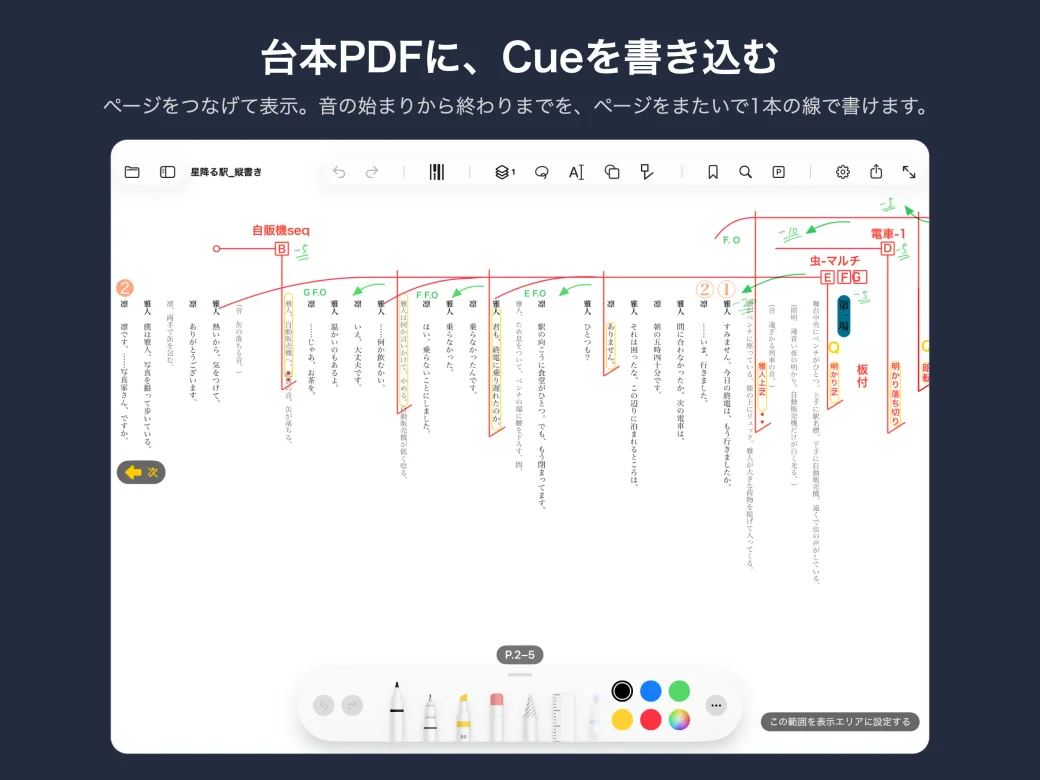
ScriptCueMark lets you open a script PDF on iPad and mark cues with Apple Pencil for use during a performance.
■ Read the script the way it is printed
Show one page at a time or a two-page spread. Choose the page-turn direction and page order so right-bound, vertically written Japanese scripts read naturally. Set the gap between pages to one of five widths and draw seamlessly across the spread.
Roll View removes page breaks and displays the script as one roll. Draw one line from the start of a cue to its end across pages.
Add a blank margin for notes when the script has little room. It is included in the exported PDF.
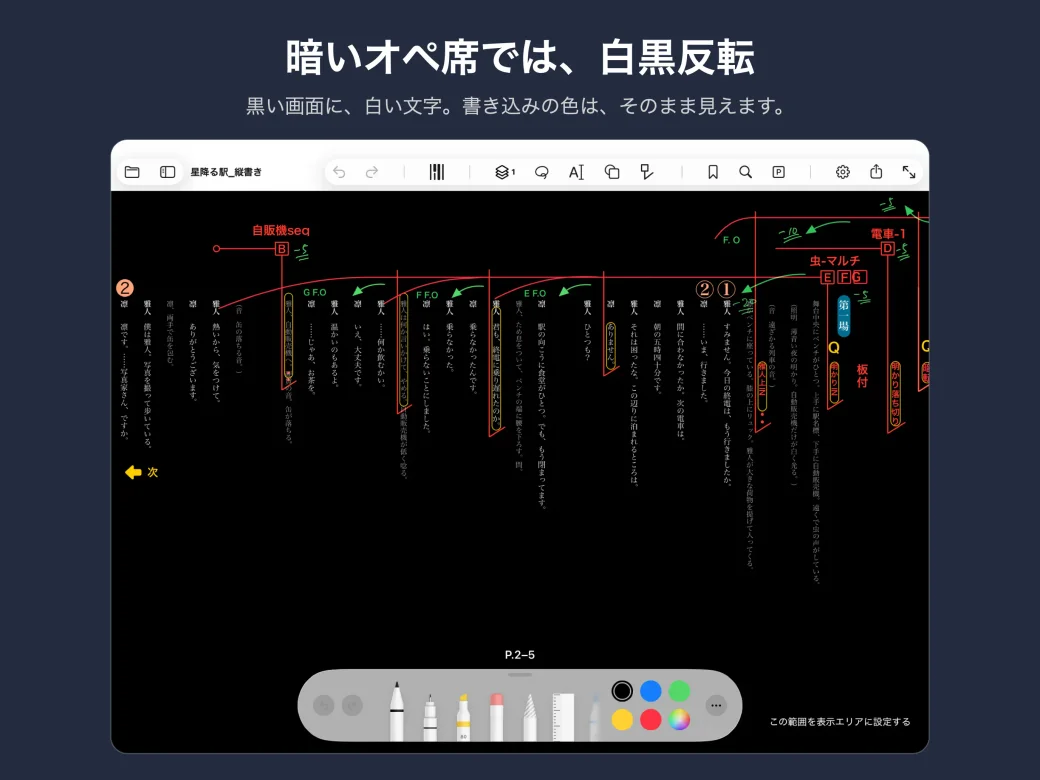
Invert black and white in dark spaces; markup colors stay as they are.
■ Mark it up with Apple Pencil
Hold Apple Pencil still after drawing to convert the stroke into a straight line, circle, or another shape.
Use preset shapes and editable text as stamps.
Add horizontal or vertical text, and choose its font, size, and color. Previously used text is available from history.
Draw around marks to select, move, scale, or rotate them.
Tap lines or text after writing to duplicate them or change their color, line width, or text size. Select multiple marks at once.
Draw toward the edge of the screen and the script scrolls, letting the line continue onto later pages.
Create and save custom colors.
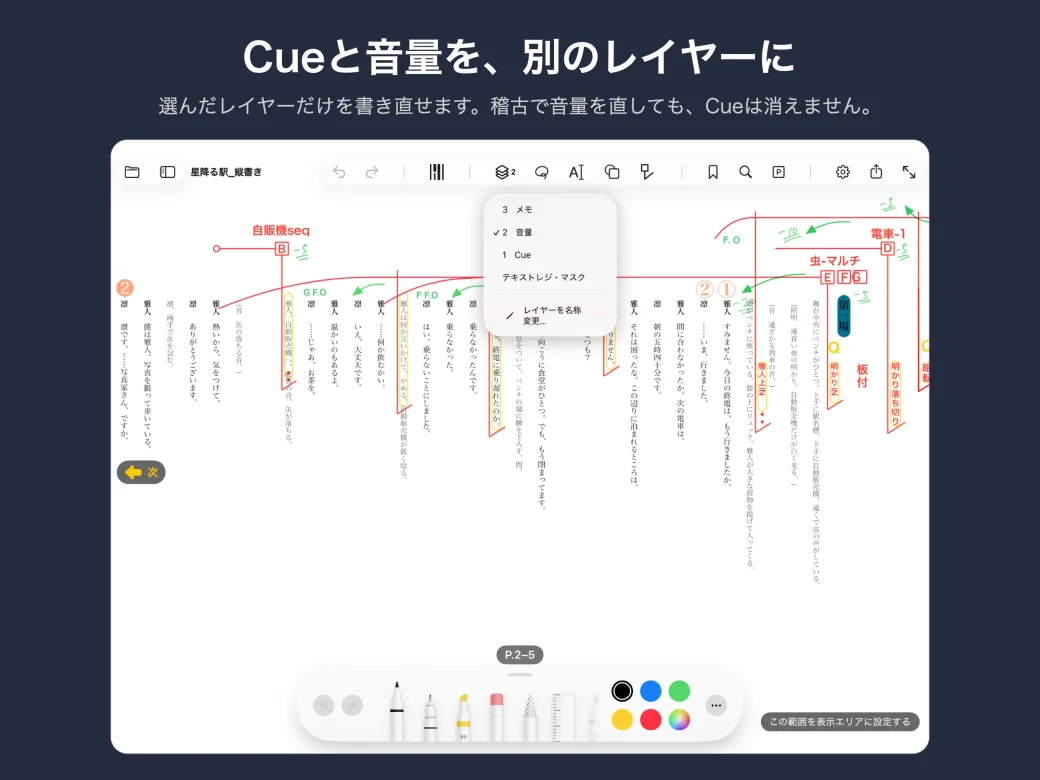
■ Keep cues and levels on separate layers
Split your marks across layers, like transparent sheets stacked over the page. Only the selected layer can be edited, so changing levels in rehearsal does not erase your cues.
Add, merge, reorder, or hide layers, and link a color to each. Import marks from other apps, such as Preview, into a new layer.
■ See the page with the next mark
Touch and hold the yellow indicator at the edge of the screen to view the page with the next mark. Release it to return to where you were.
■ Go by the script's own page numbers
ScriptCueMark reads the page numbers printed on the script and uses them to jump to a page. Whether or not the cover counts as page 1, "p. 12" in rehearsal opens page 12.
■ Jump to a scene with bookmarks
Add named bookmarks such as "Scene 1" to any page, and jump to them from a list. It can also find scene headings in the script and add them for you.
■ Search the script
Search for a word and jump to the page. Hiragana and katakana are treated as equivalent, and the search can also find kanji with the same reading.
■ Keep line changes in one place
Paste a list of line changes received during rehearsal. Select an item to jump to its page, cover the text being changed with a mask, and replace it with the revised text. Mark each item when it is complete.
■ Two ways to export
• Not Editable: your marks are drawn into the PDF and look the same elsewhere.
• Editable: opens in ScriptCueMark with your marks still editable, to continue on another iPad.
Only visible layers are exported.
■ Share with your team
Members write on the same script, each on a named layer, synced through iCloud. Send messages in Notes. Invite people with an iPad nearby; the app verifies their Apple ID through iCloud.
■ Sync with rehearsal video
The line being spoken is highlighted on the script, and pages turn with the video. Play from any page or line.
■ Your script stays with you and your team
No developer servers. Scripts and markups stay on the iPad and, with team sharing, in the participants' iCloud. Video dialogue is transcribed on the iPad. No data collection, no ads.
■ Good to know
• Works with PDF files, including password-protected ones.
• Text selection, search, and automatic location of line changes require a PDF with text data and do not work with scanned paper scripts.
• You can use your finger if you do not have an Apple Pencil.
• The manual opens from the file menu (folder button, top left).
• This app is published free of charge by an individual. Please check it with your own script before using it in rehearsal or performance.
Yang baru
Versi 1.8 · 18/11/2026
• Team sharing now works by project. When you share a project, every script in it reaches the members, including scripts added later. Everyone on the team needs version 1.8 or later.
• Notes is now shared across the whole project. Messages about another script show its name on the attachment, and tapping it opens that script at the spot.
• Added administrator rights. The host can grant them to other members by touching and holding a name in the team member list. Administrators can approve scripts added by members, remove and restore scripts, and approve export requests.
• Scripts a member adds to the project reach everyone after an administrator approves them.
• Shared scripts can be removed from the project. Removed scripts can be restored with their markups within 30 days.
• Members can export shared scripts after an administrator approves the request.
• Per-script sharing started in 1.7 can be moved to project sharing. Markups carry over.
• The agreement before joining now covers how Notes content is handled.
• After sharing ends, Notes messages stay readable for each script.
• Fixed how sharing is handled when you change your iCloud account.
• Other minor fixes.
Privasi aplikasi
Yang dinyatakan Yuji Mizutani di App Store tentang cara aplikasi ini menangani data.
-
Data tidak dikumpulkan
Pengembang tidak mengumpulkan data apa pun dari aplikasi ini.
Praktik privasi dapat bervariasi, misalnya berdasarkan fitur yang Anda gunakan atau usia Anda.
Informasi
- Penjual
- Yuji Mizutani
- Kategori
- Hiburan
- Versi
- 1.8
- Diperbarui
- 18/11/2026
- Dirilis
- 11/10/2026
- Ukuran
- 9,5 MB
- Memerlukan
- iOS 17.0 atau yang lebih baru
- Batasan usia
- 4+
- Harga
- Gratis
- Bahasa
- Inggris, Jepang
- Hak cipta
- © 2026 Yuji Mizutani