
- Batasan usia4+
- KategoriProduktivitas
- PengembangNeville Forsythe
- BahasaInggris
- Ukuran3,0 MB
Sleuthbox mungkin sedang tidak tersedia di App Store
Halaman di toko tidak dapat dijangkau saat terakhir kami periksa. Tautan tetap mengarah ke halaman resmi App Store.
Tangkapan layar



Tentang
Pengembang belum menyediakan teks ini dalam bahasa Anda.
Most email cleaners want access to your mailbox and process it on their own servers. Sleuthbox doesn't have a server. Your iPhone talks directly to your email provider, your password stays in the iPhone's Keychain, and your mail never passes through anyone else. We collect no data at all.
KEEP WHAT MATTERS. CLEAR THE REST.
Instead of hunting for what to delete, Sleuthbox shows your email one day at a time. Tap the circle next to the few emails worth keeping, then clear everything else in one tap. Or flip it around and select only what should go. Not sure about an email? Tap it to read it right in the app.
INVESTIGATE YOUR INBOX
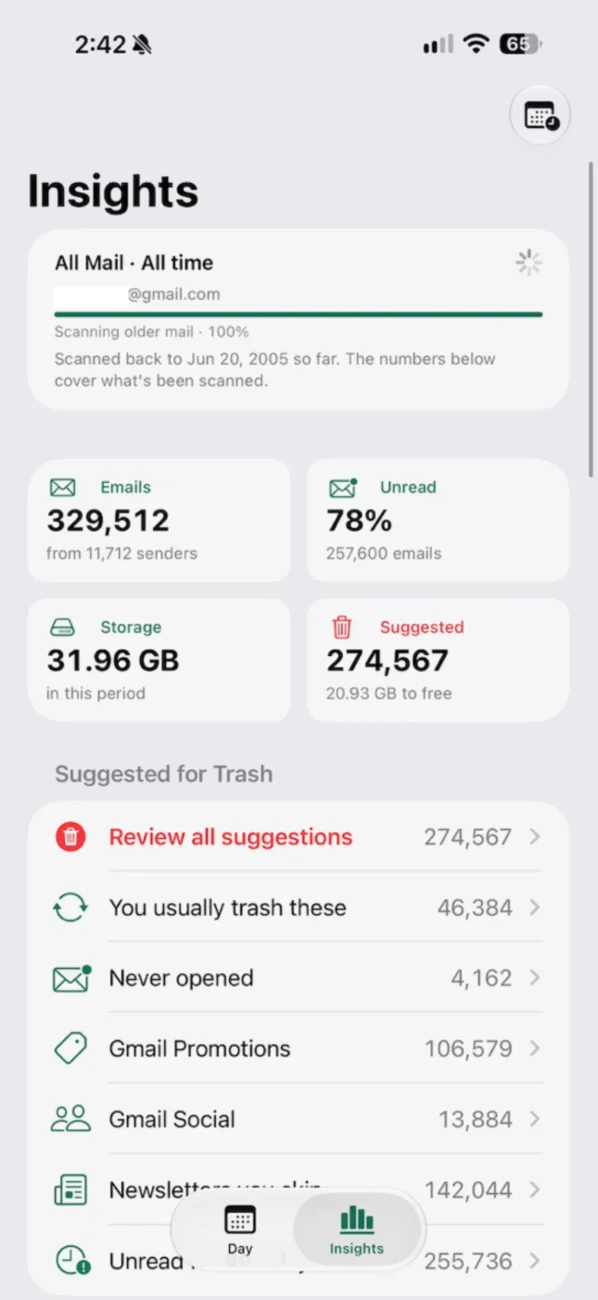
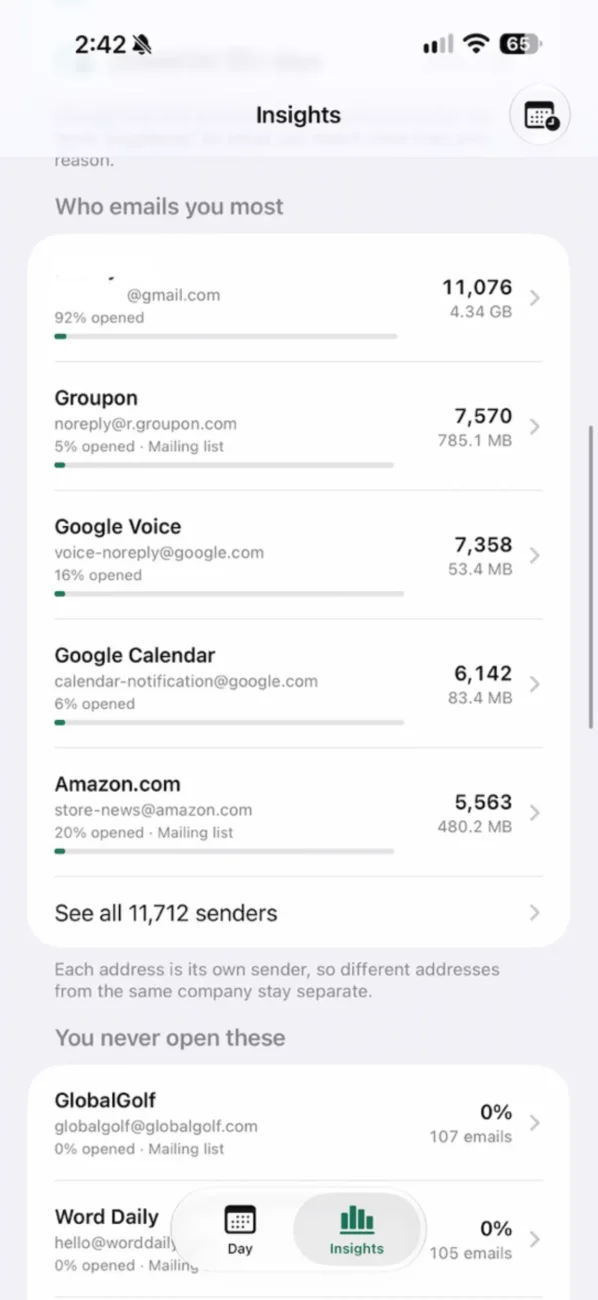
Insights scans anywhere from 30 days to your entire mailbox, even decades of mail, and shows you:
- Who emails you most, ranked by exact address, so a store's receipts and its promotions stay separate
- Senders you never open
- Who's using the most storage, plus your largest emails
- Newsletters you skip, old unread mail, and Gmail Promotions and Social
- How much mail you get each day and your busiest times
Every suggestion opens as a list grouped by sender, already selected. Untick what you want to keep and clear the rest. Long scans show results as they go and pick up where they left off.
IT LEARNS WHAT YOU CLEAR
Sleuthbox remembers which senders you usually clear and flags their next emails for you. The learning happens entirely on your iPhone, and you can export it as a backup.
READ PRIVATELY
Opened emails never run scripts, and images from the internet stay blocked until you choose to load them, so senders can't tell you opened their email. Opening an email doesn't mark it as read. Attachments show their name and size and download only when you tap them.
SAFE BY DESIGN
- Undo every sweep with one tap
- Choose Trash or Archive. Archived mail is never deleted
- Starred emails and senders you always keep are never touched
- Optional Face ID lock
AUTOMATIC RULES
Clear predictable mail for you, such as deals after a week or a newsletter you never read. Preview exactly what a rule will catch before you save it. Rules are off until you turn them on.
MORE
- One-tap unsubscribe from mailing lists
- Multiple accounts, each with its own settings and history
- Optional Reply & Forward that hands replies to the mail app you already use
- A built-in guide and troubleshooting help
WORKS WITH
Gmail, iCloud Mail, Yahoo Mail, AOL Mail, Fastmail and most other IMAP email providers. Sign-in uses an app password, a separate password just for Sleuthbox that you can revoke at any time; the app walks you through creating one. Outlook.com and Hotmail accounts are not supported. Some work and school accounts don't allow app passwords.
Sleuthbox isn't affiliated with Google, Apple, Yahoo or any email provider.
Yang baru
Versi 1.2 · 4/11/2026
Sleuthbox 1.2: the biggest update yet
Stop unwanted mail
Block a sender: clear everything they’ve sent, and Sleuthbox keeps clearing new mail from them
Keep only the latest: keep a sender’s newest 1–10 emails and clear the rest automatically. Perfect for statements, shipping updates and sign-in codes
New Subscriptions view: see every mailing list, then unsubscribe, clear and block several at once
Free up space
New Storage view shows how much of your storage you’re using
See what Trash and Spam are holding, and empty them to get space back right away
Track how much mail you’ve cleared with Sleuthbox
Is this email genuine?
Every email you open shows whether your provider confirmed who really sent it
Warnings for lookalike addresses (like paypa1.com) and names pretending to be a company
Checked privately on your iPhone. Nothing is sent anywhere
Smarter Insights
New Protected section: see every starred email, sender and domain you’ve locked, and how much mail each keeps. Unlock any with a swipe
Grouped lists now collapse to one row per sender, with search and Expand/Collapse All
Faster, clearer cleanups
Live progress when clearing or restoring mail, so you always know it’s working
On iOS 26, big cleanups keep going in the background, with progress on your Lock Screen
Your Trash, Archive and Undo now go ahead of Insights updates, so no more waiting
More reliable
Fixed connection errors when returning to the app or switching between Wi-Fi and cellular
Sleuthbox now reconnects automatically and retries when the network comes back
Privasi aplikasi
Yang dinyatakan Neville Forsythe di App Store tentang cara aplikasi ini menangani data.
-
Data tidak dikumpulkan
Pengembang tidak mengumpulkan data apa pun dari aplikasi ini.
Praktik privasi dapat bervariasi, misalnya berdasarkan fitur yang Anda gunakan atau usia Anda.
Informasi
- Penjual
- Neville Forsythe
- Kategori
- Produktivitas
- Versi
- 1.2
- Diperbarui
- 4/11/2026
- Dirilis
- 1/11/2026
- Ukuran
- 3,0 MB
- Memerlukan
- iOS 17.0 atau yang lebih baru
- Batasan usia
- 4+
- Bahasa
- Inggris
- Hak cipta
- © 2026 Neville Forsythe
Mungkin Anda juga suka
-
 ClenzaProduktivitas
-
 Hermod Mail: Private EmailProduktivitas
-
 OculockProduktivitas
-
 Vmail - AI Email AssistantProduktivitas
-
 Go Postal - AI Email AssistantProduktivitas
-
 EncLock Password ManagerProduktivitas
-
 TabMailProduktivitas
-
 AirLock - Offline & Secure AIProduktivitas
-
 Stamp MailProduktivitas
-
 OnePass - Password ManagerProduktivitas