- Batasan usia17+
- KategoriBisnis
- PengembangDavid Olsen
- BahasaInggris
- Ukuran44,2 MB
stationOS Respond mungkin sedang tidak tersedia di App Store
Halaman di toko tidak dapat dijangkau saat terakhir kami periksa. Tautan tetap mengarah ke halaman resmi App Store.
Tangkapan layar


Tentang
Pengembang belum menyediakan teks ini dalam bahasa Anda.
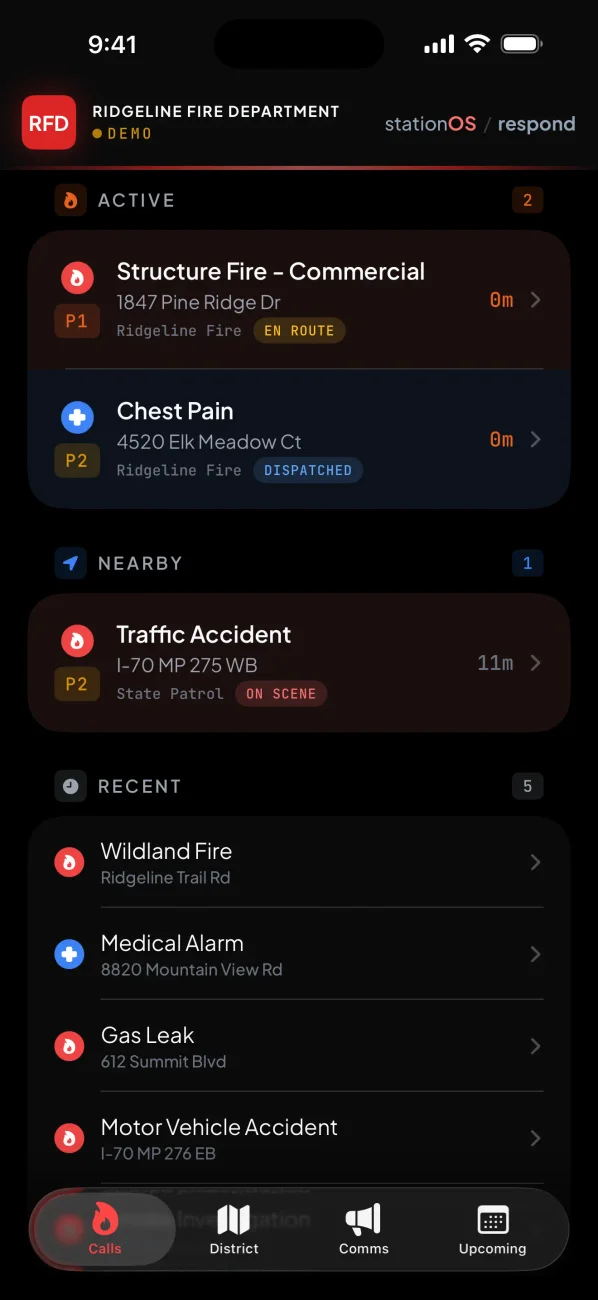
Respond is the dispatch app for fire and EMS departments. When your department is toned out, Respond pages every member at once — on the phone in their pocket, the watch on their wrist, and the screen in their truck — and shows the officer in charge who is coming.
It is not a wrapped website. Each surface is a real native app sharing one live incident feed, so the wrist, the dash and the station board never disagree about what is happening.
WHEN THE TONE DROPS
Your phone speaks the call out loud — the problem and the address — so you know what you are going to before you have found your glasses. The alert can break through silent mode and Focus, and exactly one alert stage is allowed to, chosen by you. Everything else respects your phone.
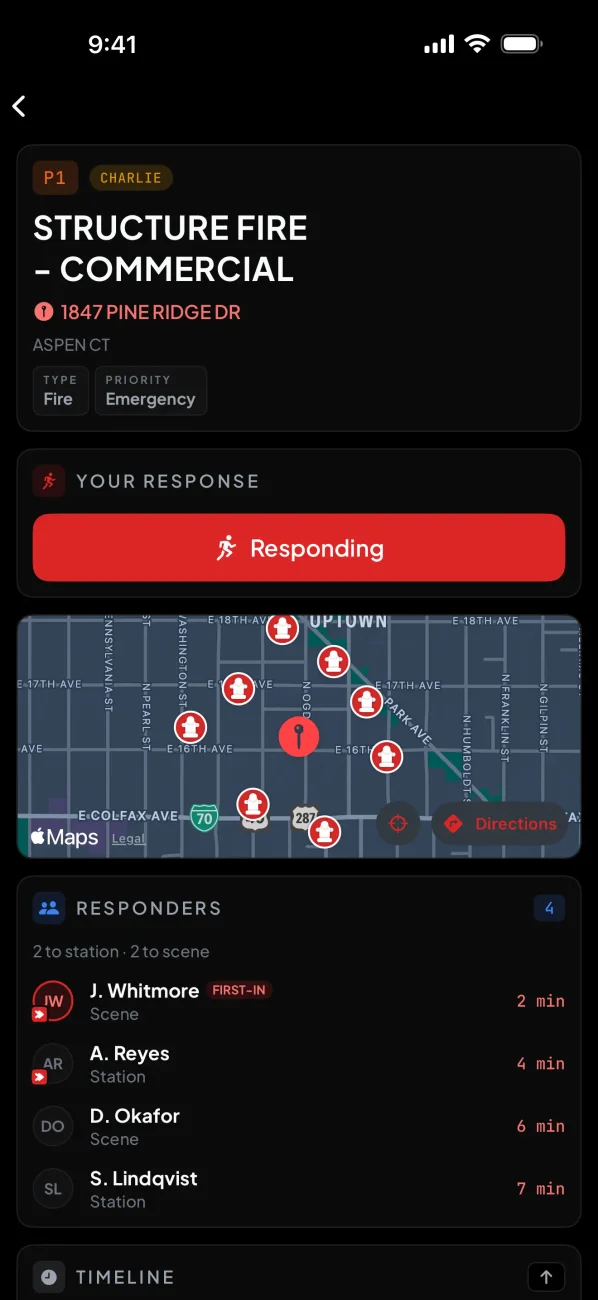
Open the call and you get what dispatch knows: call type and priority, the address on a map, CAD narrative as it updates, which units are assigned, and the nearest hydrants.
ONE TAP TO ANSWER
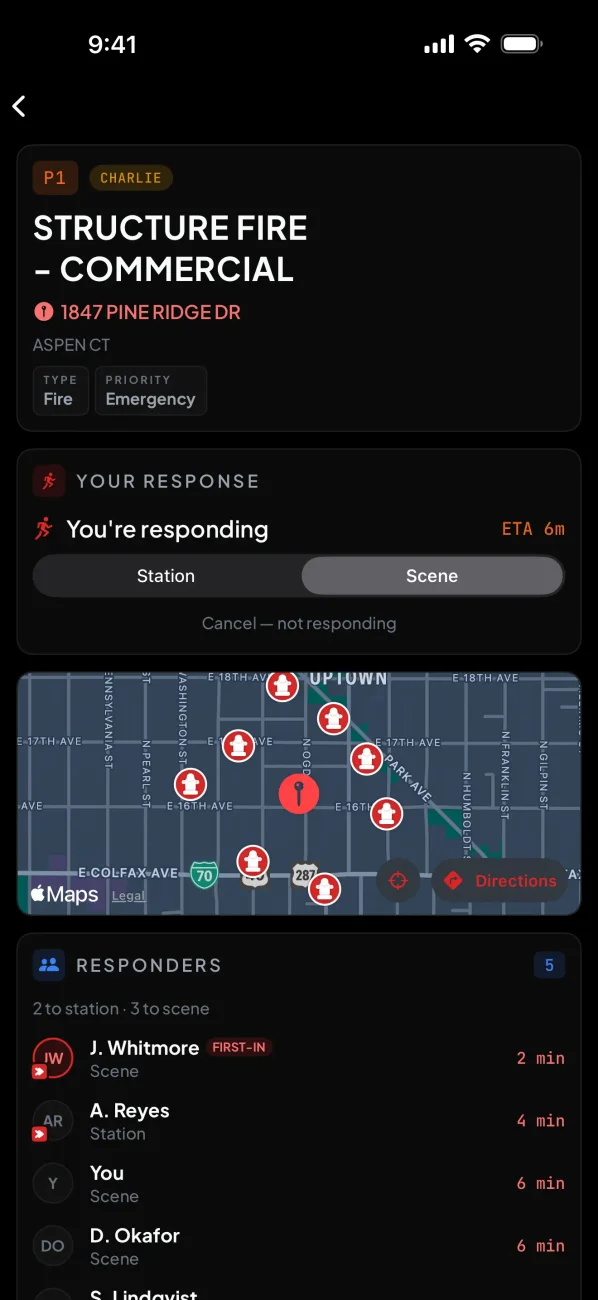
Tap "I'm Responding", pick the station or the scene, and you are on the board with an ETA. Your crew sees who is rolling and how far out, ranked by arrival. Answer from the lock screen, the watch, CarPlay, or a paired Garmin — it counts the same from anywhere.
Change your mind, or dispatch clears the call, and standing down is one tap.
BUILT FOR WHERE CALLS ACTUALLY HAPPEN
Coverage in a fire district is not a straight line. Respond assumes that. A response given with no bars is queued on the phone and sent when signal returns, stamped with the moment you tapped rather than the moment it arrived. Your drive is recorded through the dead zone and lands afterwards. Arrival registers on a geofence that works with no signal at all.
ON THE ROAD
In CarPlay the call is on the car's own screen. Tap it and you are responding with turn-by-turn already running, and new CAD notes are read aloud over the navigation — a changed address, a patient update — so you hear them instead of reading them at speed.
ON THE WRIST
A haptic the instant the page lands. Read the call, see who else is coming, and mark yourself responding without digging the phone out of a coat pocket. On a working fire the watch shows your own heart rate; it stays on your wrist and is never sent anywhere.
ON THE LOCK SCREEN
The active call sits on the lock screen for the whole run — priority, type, address, a running clock and the number of members responding. No unlocking, no app switching.
FOR THE DEPARTMENT
Officers can page the whole department or a subset, and ask for staffing on a specific call with responses tallied live. Duty and roster come from the department's own schedule.
ALERTING THAT MEMBERS TRUST
Alerting is per member, not per department: which stages you get, which one may break through, how long you snooze, and which tone you hear. A volunteer's phone is also their family's phone, and an app that always breaks through stops being believed.
GETTING AN ACCOUNT
There is no sign-up here. Accounts are issued by your own department. If you are a member, ask your chief or department administrator. If you are a department, start at stationos.io.
Want to see it first? Tap "See a demo — no sign-in needed" on the first screen. It runs a fictional department with scripted calls, and nothing in it is real.
Yang baru
Versi 1.4.0 · 19/11/2026
Preplans & hydrants: a new map at the bottom of the District tab, for walkthrough nights. Search finds a building by name or address and a hydrant by number, and it works with no signal. Officers can confirm a preplan after walking the building, add notes and place features. Any member can add a missing hydrant, flag one that's out of service or blocked, fix its details, or confirm it while standing at it. Moving or removing a hydrant needs an officer's approval.
Area labels: when your department labels an area, like Direct to scene or a station pickup, a call inside it shows the label, and Responding goes where it says, from the call screen or the lock screen. A label with its own alert gets its own tone in Settings, Alerting. When your department has a label members draw for themselves, you can draw your own area in Settings, as a circle or a shape.
Department messages: links open, and a long press copies the text. Tapping a message notification opens Comms.
CarPlay leads nearby calls with the department, reads a call's notes as a voice prompt so your radio stays put, and shows Station and Scene full size again.
Also fixed: a cause of unexpected sign-outs. Rig iPads stay on the District map while they sleep, and a rig whose position is rough is drawn hollow, with how far off it may be. The duty pill follows a change made on another device.
Privasi aplikasi
Yang dinyatakan David Olsen di App Store tentang cara aplikasi ini menangani data.
-
Data yang ditautkan dengan Anda
Dapat dikumpulkan dan ditautkan dengan identitas Anda.
- Lokasi
- Info kontak
- Konten pengguna
- Pengenal
- Data penggunaan
- Diagnostik
Praktik privasi dapat bervariasi, misalnya berdasarkan fitur yang Anda gunakan atau usia Anda.
Informasi
- Penjual
- David Olsen
- Kategori
- Bisnis
- Versi
- 1.4.0
- Diperbarui
- 19/11/2026
- Dirilis
- 28/8/2026
- Ukuran
- 44,2 MB
- Memerlukan
- iOS 16.0 atau yang lebih baru
- Batasan usia
- 17+
- Bahasa
- Inggris
- Hak cipta
- © 2026 Fireline Colorado LLC