- Batasan usia4+
- KategoriReferensi
- PengembangAndrew Bales
- BahasaInggris
- Ukuran149,7 MB
Tertaut ke halaman resmi App Store
Download.org tidak menyimpan file WrittenWord apa pun. Tombol ini membuka halaman aplikasi di App Store, tempat Andrew Bales menerbitkannya. Halaman terakhir diperiksa pada 25/11/2026.
Tangkapan layar




Tentang
Pengembang belum menyediakan teks ini dalam bahasa Anda.
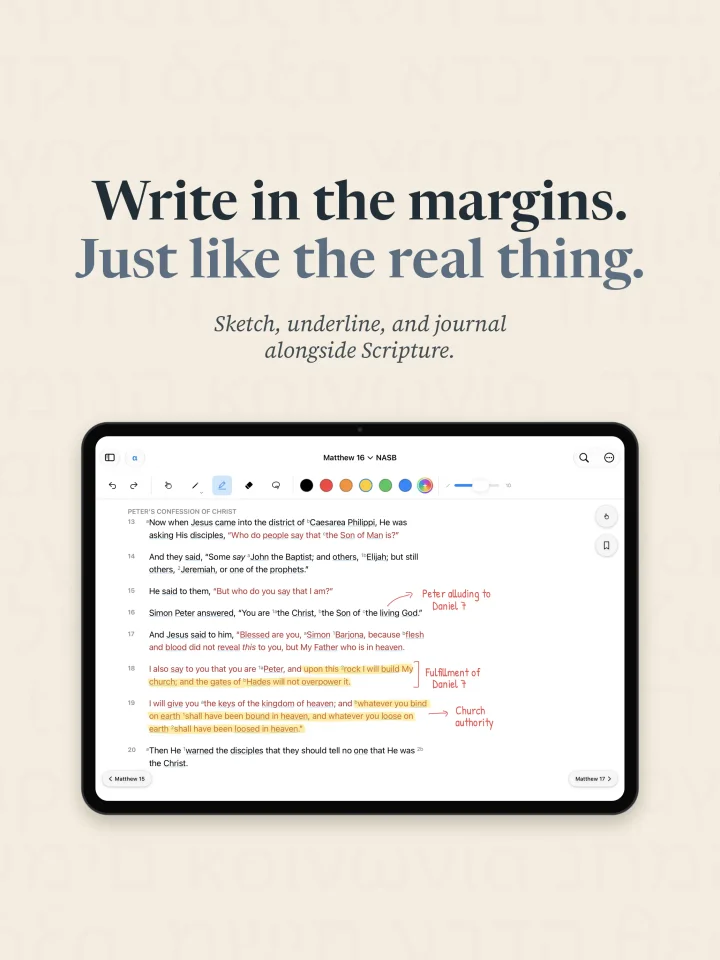
WrittenWord is a free Bible study app built for iPad, featuring the complete NASB 1995 text with original-language and annotation study tools — no subscriptions, no ads, no account required. It works completely offline, and your study notes sync across your devices with iCloud.
Annotate directly on the page with Apple Pencil — underline phrases, circle words, draw connections, and write notes in the margin beside the text. Open a full-page drawing view, with an optional journaling template, for detailed study notes on any chapter, and add ruled lines to give your notes structure.
Type anywhere with text boxes, on the chapter page or in your notes. Move, resize and color each box, and set any font size. With Apple Pencil, write inside a box and Scribble turns your handwriting into typed text (Scribble must be turned on in iPad Settings).
Tap any word in Original Language mode to see its Greek, Hebrew or Aramaic source, transliteration, definitions, and where it occurs across Scripture.
Tag verses by theme, and add your own cross-references and footnotes alongside the NASB's built-in cross-references to build a personal study system.
Put a verse on your Home Screen or Lock Screen. The WrittenWord widget shows a verse you've pinned, or a new verse each day from one of your tags, in your reading theme and font. Tap it to open the passage.
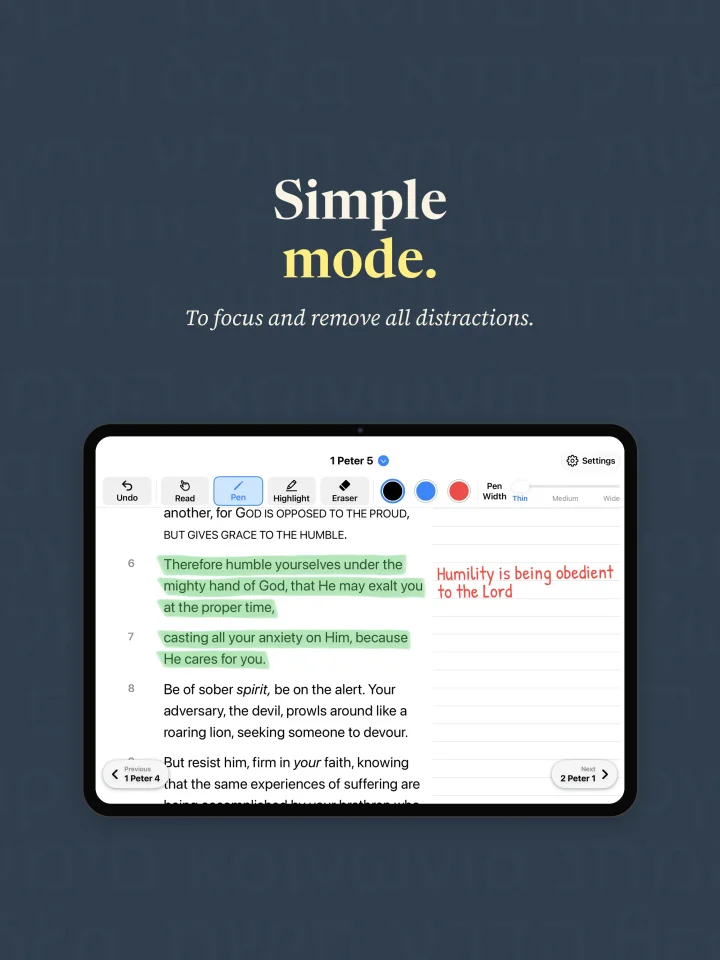
Simple Mode strips WrittenWord back to the essentials — large, clear text, a simple pen and highlighter, and easy navigation — for anyone who wants a straightforward Bible on their iPad.
Study & Annotation
- Freeform handwritten annotations with Apple Pencil or a compatible stylus
- Typed text boxes on the page and in notes, with Scribble support
- Full-page chapter drawing view with a journaling template and ruled lines
- Pinch to zoom in for detailed writing, and drag in any direction to move around the page
- Text highlighting in multiple colors
- Verse tags in 20 colors that match every reading theme
- Custom cross-references and footnotes
- Verse notes with margin indicators
- Up to 8 bookmarks to keep your place in different readings
- Interlinear and lexicons for Greek, Hebrew and Aramaic
- Home Screen and Lock Screen widget: a pinned verse, or a daily verse from a tag
Reading & Navigation
- Home Screen widget: a pinned verse, or a daily verse from a tag
- Simple Mode: large text, a simple toolbar and easy navigation
- Place marker that holds your exact spot while you look elsewhere
- Pick up where you left off, at the same spot on the page
- Global search across all verses
- NASB cross-references and footnotes from The Lockman Foundation
- Red-letter text for the words of Jesus
- Reading themes (System, Light, Dark, Sepia, Sand) and font choices
- Export and back up your study data
- Works completely offline — no internet connection needed
Scripture quotations, cross-references and footnotes taken from the (NASB®) New American Standard Bible®, Copyright © 1960, 1971, 1977, 1995 by The Lockman Foundation. Used by permission. All rights reserved. [www.lockman.org](https://www.lockman.org)
Yang baru
Versi 1.3.4 · 24/11/2026
This update makes writing with Apple Pencil smoother.
• A finger resting on the screen while you write no longer stops Apple Pencil from drawing, and the page no longer scrolls or zooms under your pen
• When you're zoomed in, you can now drag the page diagonally to get around it. Prefer scrolling only up and down or sideways? Turn on Lock Scroll Direction in Settings → Reading & Navigation
• Text boxes on the chapter page can now be opened, edited and moved in Read mode
• The scroll bar on the reading page now starts below the annotation toolbar and stays put when you swipe to the next chapter
• In Simple Mode, the bottom bars now match the Sepia page color
Privasi aplikasi
Yang dinyatakan Andrew Bales di App Store tentang cara aplikasi ini menangani data.
-
Data yang ditautkan dengan Anda
Dapat dikumpulkan dan ditautkan dengan identitas Anda.
- Diagnostik
-
Data yang tidak ditautkan dengan Anda
Dapat dikumpulkan, tetapi tidak ditautkan dengan identitas Anda.
- Konten pengguna
Praktik privasi dapat bervariasi, misalnya berdasarkan fitur yang Anda gunakan atau usia Anda.
Informasi
- Penjual
- Andrew Bales
- Kategori
- Referensi
- Versi
- 1.3.4
- Diperbarui
- 24/11/2026
- Dirilis
- 28/5/2026
- Ukuran
- 149,7 MB
- Memerlukan
- iOS 18.6 atau yang lebih baru
- Batasan usia
- 4+
- Harga
- Gratis
- Bahasa
- Inggris
- Hak cipta
- © 2026 Andrew Bales
Mungkin Anda juga suka
-
 Christ Covenant ColoradoPendidikan
-
 The Scripture ScribeReferensi
-
 BibleScribeReferensi
-
 ScriptInk: Scripture JournalReferensi
-
 Meadowlands Baptist ChurchPendidikan
-
 The PreacherReferensi
-
 Inscribe Bible JournalingReferensi
-
 Anthems - National AnthemsReferensi
-
 Amogh PipingReferensi
-
 Hours: Roman BreviaryReferensi