
AI Coloring Maker
Photo to Line Art Converter
Designed for iPhone, iPad
In-app purchases
- Age rating4+
- CategoryEntertainment
- DeveloperIkuya Terasaka
- LanguagesEnglish+ 3 more
- Size91.3 MB
Links to the official App Store page
Download.org hosts no file of AI Coloring Maker. The button opens its official App Store page, published by Ikuya Terasaka. Listing last checked on Nov 8, 2026.
Screenshots


About
Transform Your Photos into Unique Coloring Pages with AI Magic!
"AI Coloring Maker" uses advanced AI technology to instantly transform your favorite photos into beautiful line art for coloring. Family photos, beloved pets, memorable landscapes - create your own special coloring pages with ease.
Full support for A4 printing. Convert on your phone, print at home, and enjoy coloring with real crayons and pencils!
-------------------------
FEATURES OF AI COLORING MAKER
-------------------------
[AI POWERED CONVERSION]
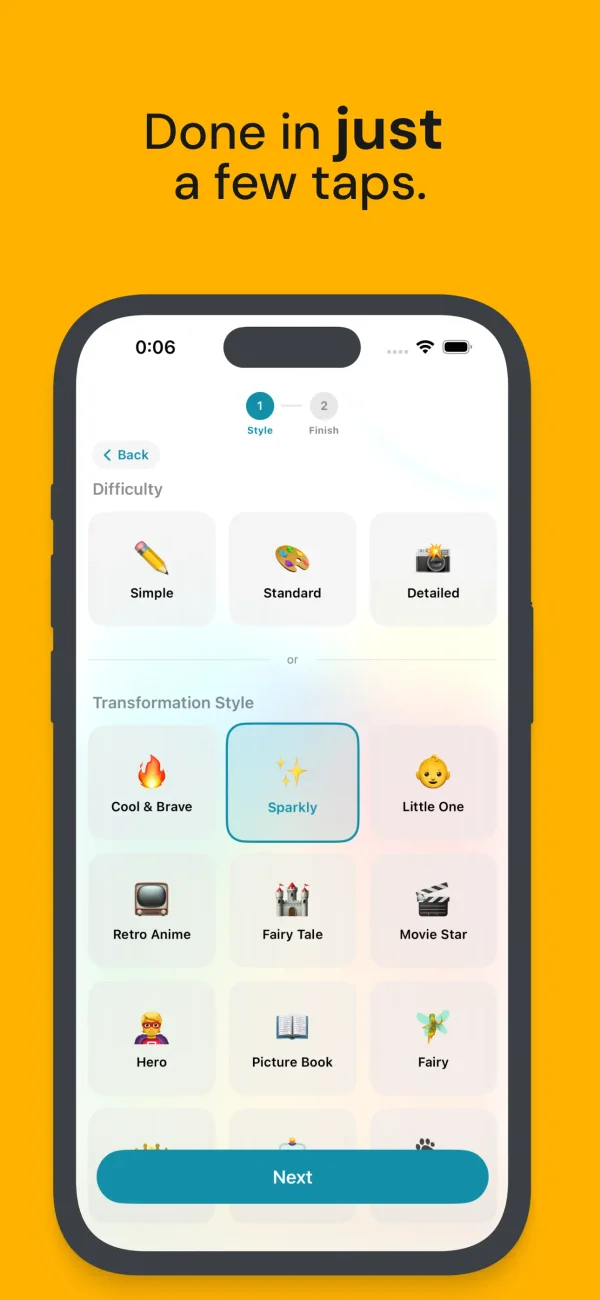
Google Gemini AI analyzes your photos and creates clean outlines in seconds. No complex skills needed - just pick a photo!
[15+ STYLES TO MATCH ANY AGE]
* Difficulty Levels:
- Simple: For ages 2-5. Bold, easy-to-color lines
- Standard: For ages 6-10. Perfectly balanced complexity
- Detailed: For adults. Intricate lines for relaxation
* 12 Art Styles: Shonen Manga, Chibi, Retro Anime, Fairy Tale, Movie Style, and more!
[14 THEME KEYWORDS]
Add extra magic like Fantasy, Dinosaurs, Space, Robots, or Sweets to customize your coloring page.
[7 EFFECT OPTIONS]
Add digital flair to your creations: Sparkle, Soft, Sketch, Snow, Space, Forest, and Neon.
[SAVE, PRINT & SHARE]
- Export as PNG/PDF
- Print directly via AirPrint
- iCloud sync across your devices
-------------------------
PERFECT FOR
-------------------------
- Rainy days or long car rides
- Educational tools to develop creativity and focus
- Adult relaxation and mindfulness
- Creating personalized gifts for family
[PRIVACY FIRST]
Your photos are processed temporarily for conversion and are never stored on our servers. Your privacy is our priority.
-------------------------
SUBSCRIPTION INFORMATION
-------------------------
Premium subscription unlocks all styles, themes, and effects with unlimited conversions.
Terms of Use: https://colorea-5b4d3.web.app/terms_en.html
EULA: https://www.apple.com/legal/internet-services/itunes/dev/stdeula/
Privacy Policy: https://colorea-5b4d3.web.app/privacy_en.html
What’s new
Version 1.5 · Aug 6, 2026
Thank you for using our app as always!
We've made some internal updates.
App privacy
What Ikuya Terasaka declares on the App Store about how this app handles data.
-
Data linked to you
May be collected and linked to your identity.
- Purchases
- Contact info
- User content
- Identifiers
-
Data not linked to you
May be collected but is not linked to your identity.
- User content
- Usage data
- Diagnostics
Privacy practices may vary, for example with the features you use or your age.
Information
- Seller
- Ikuya Terasaka
- Category
- Entertainment
- Version
- 1.5
- Updated
- Aug 6, 2026
- Released
- Feb 12, 2026
- Size
- 91.3 MB
- Requires
- iOS 18.4 or later
- Age rating
- 4+
- In-app purchases
- Yes
- Languages
- English, Japanese, Korean, Simplified Chinese
- Copyright
- © 2026 kichiemon. All rights reserved.
You might also like
-
 DrawChat AI Coloring PagesPhotos into coloring pages
-
 AI Coloring Book: Create ShareTurn Photos into Coloring Page
-
 Pintora: Print & Color & AIPrintable AI Coloring Pages
-
 Coloring: Photo into ArtConvert and paint your photo
-
 PhotoColor AI Coloring BookTurn Photo to Coloring Page
-
 Penna: Photo to Coloring PageCustom Coloring Book Maker
-
 ColorKids: AI Coloring BookCustom Pages & Drawing Fun
-
 Coloring Book Maker ColorMochiMake Coloring Pages from Photo
-
 AI Coloring Book: Color Pop GoArt,Painting & Drawing games