
AiRC Transcriber: Voice Notes
Private audio to text
Designed for iPhone, Mac
Free · In-app purchases
- Age rating12+
- CategoryProductivity
- DeveloperRyan Cox
- LanguagesEnglish+ 43 more
- Size67.2 MB
Links to the official App Store page
Download.org hosts no file of AiRC Transcriber: Voice Notes. The button opens its official App Store page, published by Ryan Cox. Listing last checked on Nov 23, 2026.
Screenshots
About
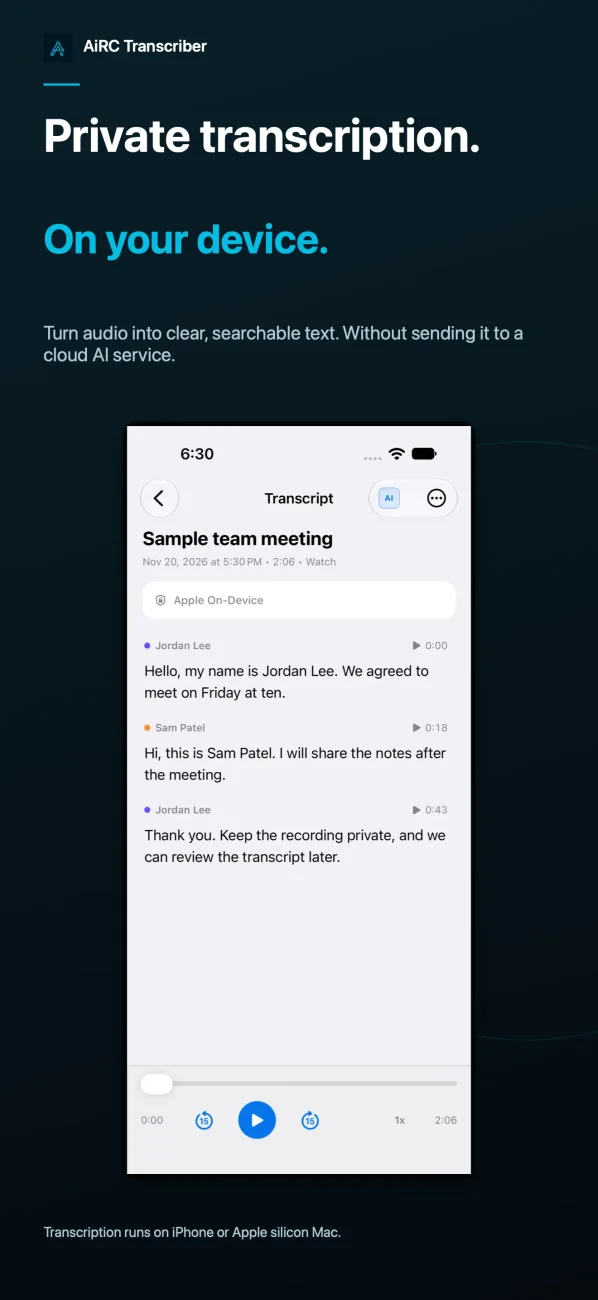
Turn recordings into private, searchable text on your iPhone and Apple silicon Mac. Record on Apple Watch, then transcribe on your paired iPhone or Mac. Try 15 successful transcriptions with every feature included, then unlock unlimited transcription with one lifetime purchase. No subscription.
RECORD AND IMPORT
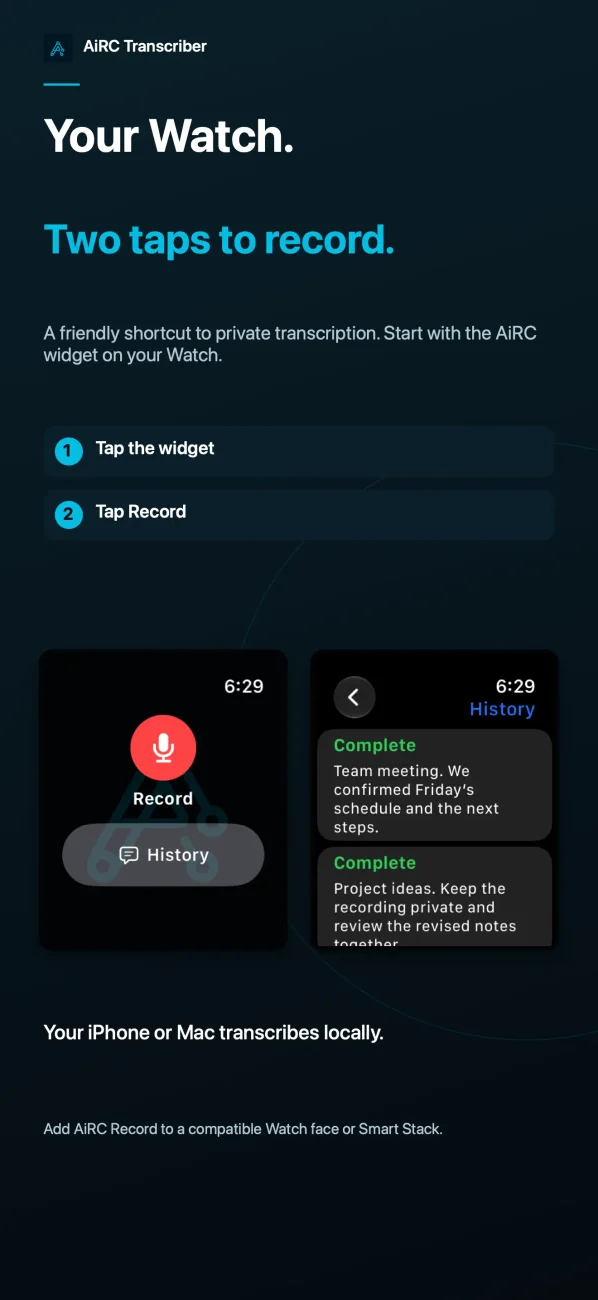
Record on iPhone, Apple Watch or Mac with pause and resume. Add AiRC Record to a compatible Watch face or Smart Stack, then start recording in two taps: tap the widget, then tap Record. Watch History shows recent transcript previews from your iPhone. Import audio and video from Photos or Files. On Mac, record or import while earlier work waits in a saved processing queue.
YOUR INTERFACE. YOUR SPOKEN LANGUAGE.
Use the app in 43 interface languages, with 50 language and region variants. Choose the language spoken in each recording separately. Enhanced Transcription is available in up to 100 spoken languages. Availability varies by device and the selected transcription option. Transcription preserves the spoken language; it does not automatically translate recordings into English. Apple speech availability varies by device, language and OS. See Language Support in Settings for details.
CHOOSE YOUR LOCAL TRANSCRIPTION
Start with Apple On-Device transcription where supported. Enhanced Transcription provides a local fallback and a more detailed pass for difficult audio. It takes longer and runs on your device. Choose Enhanced by default in Settings, or enhance an existing transcript, compare both versions and decide which to keep.
ENHANCE LATER ON YOUR MAC
Prefer a quick iPhone transcript first? Optionally enable Enhance Later on Mac. Private iCloud sync carries the recording to an open, online Mac app for local enhancement, then returns the updated transcript. Both apps need version 3.5 or later. This option is off by default. Original text and media are retained; edited transcripts wait for comparison.
READ, EDIT AND EXPORT
Search recordings, follow up to eight speaker labels, add notes and play from a transcript moment. Compare wording, speaker names and timestamps, with changes highlighted and uncertain voice moments available for listening. Export text, PDF, audio, SRT captions or a separate captioned video copy while preserving the original. Enhancing or exporting an existing transcript does not use another free transcription.
ASK ABOUT YOUR RECORDING
On compatible devices, Secure Local AI uses on-device Apple Intelligence to summarize recordings and answer transcript questions with source moments. Audio and transcript text are not sent to a cloud AI provider. Apple Intelligence must be enabled and ready in a supported language.
OPTIONAL SYNC, SEPARATE FROM AI
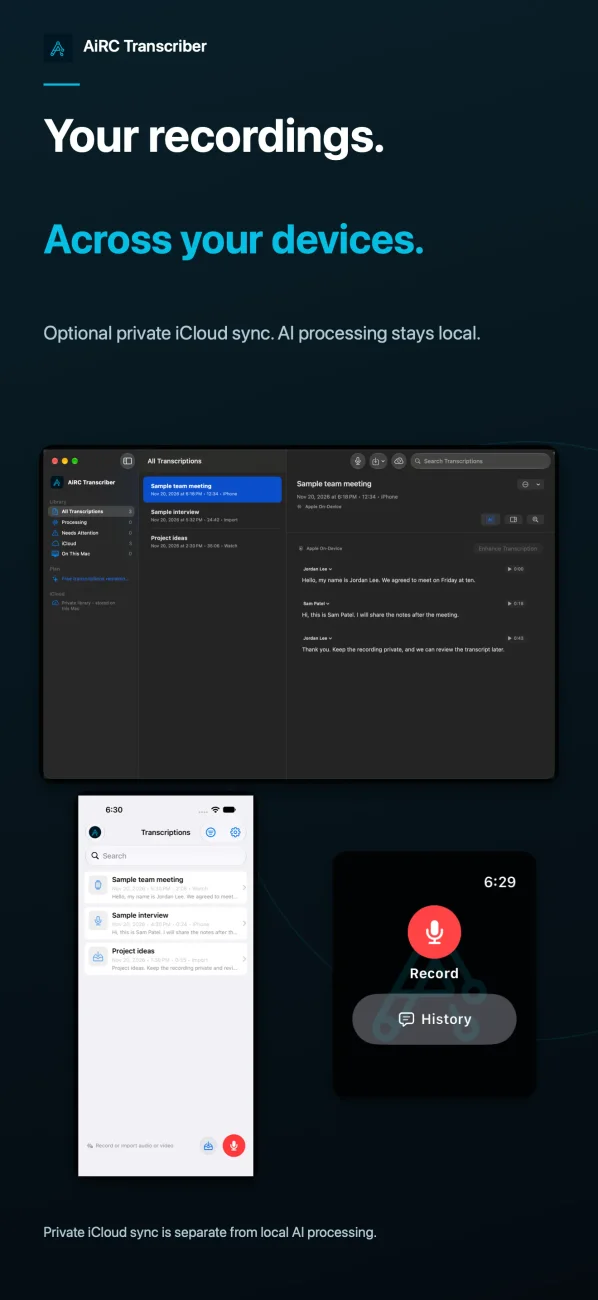
Private iCloud sync can keep recordings, transcripts, notes and processing jobs available across your devices. Watch recordings transfer through the paired iPhone. Transcription, enhancement and AI run on your Apple devices. iCloud synchronization is a separate choice.
START FREE, UNLOCK ONCE
The first 15 successfully completed transcriptions include the full feature set. Unlimited is a one-time lifetime purchase, with no subscription: US$4.99 in the U.S. App Store. Regional prices appear in the purchase panel. Existing content remains accessible after the free allowance. Family Sharing and Restore Purchases are supported.
Speech features may need initial download or preparation. Availability and accuracy depend on device, language, transcription option and recording. Features depend on storage, Apple Intelligence and iCloud settings. The Mac app requires Apple silicon.
What’s new
Version 3.5 · Nov 22, 2026
More voices. More possibilities.
• Use AiRC Transcriber in 43 languages, with 50 language and region options. Choose the spoken language separately, with Enhanced Transcription available in up to 100 languages.
• Follow conversations with up to eight speakers, improved name labels and easier review of uncertain moments.
• Compare wording, speaker names and timestamps. Listen to the original audio and choose the version to keep.
• Get an iPhone transcript first, then optionally let your Mac enhance it later through private iCloud sync. Enhance Later on Mac is off by default; both apps need version 3.5 or later and the Mac app must be open.
• See a friendly guide to new features after updating.
• Improved translated layouts, Watch History and processing reliability.
Transcription and AI stay on your Apple devices. Try 15 full-featured successful transcriptions, then unlock unlimited use once. U.S. price is $4.99, with no subscription; regional prices appear in the App Store.
App privacy
What Ryan Cox declares on the App Store about how this app handles data.
-
Data linked to you
May be collected and linked to your identity.
- Location
- Usage data
- Diagnostics
Privacy practices may vary, for example with the features you use or your age.
Information
- Seller
- Ryan Cox
- Category
- Productivity
- Version
- 3.5
- Updated
- Nov 22, 2026
- Released
- Jun 17, 2026
- Size
- 67.2 MB
- Requires
- iOS 18.4 or later
- Age rating
- 12+
- Price
- Free
- In-app purchases
- Yes
- Languages
- English, Arabic, Bengali, Catalan, Croatian, Czech, Danish, Dutch, Finnish, French, German, Greek + 32 more
- Copyright
- © 2026 AiRC.ai
You might also like
-
 MemoNoteNotes, PDF markup, canvas
-
 Oria: Calendar & WorkspaceTasks, Routines & Workflow
-
 UtilityPDF: Convert & CompressPDF to Word, JPG, Merge, Split
-
 Text Scan - OCR Photo to TextScan, copy & export PDF
-
 DeveloProductivity
-
 Super Reminder AppDon't be late again
-
 Recapio - Audio Video to TextTranscribe meetings on-device
-
 SU BrowserPrivate & Ad-Free Browsing
-
 Let's Tolk - Offline TranslateKeyboard, camera & voice
-
 ScanviteEvent check-in & QR scanning